Outdated Drivers Are Slowing You Down
One free scan finds every outdated or missing driver and matches the right update for your exact hardware.Free scan · exact hardware matchPC Slower Than It Used to Be?
A free scan shows the junk files, broken settings and background clutter dragging Windows down - then fixes them in one click.Free scan · Windows 10 & 11For a basic Counter-Strike 2 dedicated server, start the cs2 executable with -dedicated -console +game_type 0 +game_mode 1 +map de_dust2. The hyphenated items are executable flags; the plus-prefixed items set console variables or run a console command during startup. Once the process reaches a map, verify the effective values in the server console, because a mode-specific configuration file can overwrite a launch-time setting.
Godlike.Host offers hosted Counter-Strike 2 servers with its own game panel, SFTP access and free DDoS protection, if you would rather not host it yourself.
The baseline CS2 dedicated-server command
A practical starting command is:
cs2 -dedicated -console +game_type 0 +game_mode 1 +map de_dust2Run it from the directory that contains the CS2 server executable, or use the executable’s full path in your service manager or startup script. This command does four jobs:
As an Amazon Associate I earn from qualifying purchases.
-dedicatedtells CS2 to run as a dedicated server rather than as a normal game client.-consolekeeps administration in a console, which is useful on a machine without a graphical desktop.+game_type 0and+game_mode 1provide the ruleset pair.+map de_dust2loads the first map after startup.
The numbers in the mode pair are not interchangeable labels. They are the numeric values expected by the current CS2 game-mode table. Valve’s mode definitions and aliases can change with updates, so check the current table before copying a different pair or alias.
How CS2 parses launch parameters
Hyphenated executable flags
Arguments beginning with a hyphen are processed as executable options. They control how the server process starts: whether it is dedicated, which local interface it binds, whether developer output is enabled, and which administrative ports are exposed. Examples include -dedicated, -console, -ip, and -maxplayers.
#1 Best Overall

- System: AMD Ryzen 7 8700F 4.1GHz 8 Cores | AMD B850 Chipset | 16GB DDR5 | 1TB PCIe 4.0 NVMe SSD | Windows 11 Home
- Graphics: NVIDIA GeForce RTX 5060 Ti 8GB Graphics | 1x HDMI | 2x DisplayPort
- Connectivity: 2 x USB-C 3.2 | 4 x USB-A 3.2 | 2 x USB-A 2.0 | 1 x LAN | WiFi 6 | Bluetooth 5.3 | 7.1 Channel Audio
- Tempered Side Case Panel | Custom RGB Lighting | Keyboard and Mouse
- 1 Year Parts & Labor Warranty, Free Lifetime Tech Support
Plus-prefixed console assignments
An argument beginning with + passes a console command or variable assignment at startup. The general form is +<console variable> <arg>, such as +sv_lan 1 or +map de_dust2. Keep the variable and its value as separate command-line arguments unless your launcher specifically requires quoting.
Steam notes that many console commands can become launch options by adding a plus sign, but some commands cannot be used that way. If a command is ignored, put it in the appropriate server configuration file instead of repeatedly adding it to the command line.
Parameter reference
| Parameter | Role | When to use it | Important limitation |
|---|---|---|---|
-dedicated |
Starts dedicated-server mode | Required for a dedicated instance | Does not select a map or ruleset |
-console |
Runs with a console interface | Headless administration and startup logs | It does not itself enable remote administration |
-dev |
Enables developer messages | Diagnostics while testing startup | Extra output can make production logs noisier |
-insecure |
Starts without Valve Anti-Cheat | Appropriate testing or private setups | Reduces the server’s security posture; do not use casually for public play |
+map <mapname> |
Chooses the initial map | Every server that must start on a known map | The map must be installed and recognized by the current build |
+game_type <number> |
Sets one half of the mode pair | Choosing the ruleset family | Use the current Valve mode table |
+game_mode <number> |
Sets the other half of the mode pair | Choosing the variant within that family | Its valid values depend on game_type |
-ip <address> |
Binds the process to a local interface | Machines with several network interfaces or addresses | It is not the public address and does not replace NAT or firewall rules |
-netconport <number> |
Exposes a remote-console port | Administration from another machine | The port must be reachable and protected |
-netconpassword <password> |
Protects the remote console | Whenever remote console access is enabled | Use a unique secret and avoid publishing it in shared scripts |
-maxplayers <number> |
Sets player-slot capacity | Reserving a known number of slots | It does not guarantee that the chosen map or mode supports that many players |
+sv_lan 1 |
Restricts access to the local network | LAN events and private testing | Internet players should not be expected to join a LAN-only instance |
Choosing the map and game mode
Set the initial map explicitly
Use the map’s internal name, not its display title:
+map de_dust2If the process starts but never reaches the map, inspect the console for a missing map, a spelling error, or a mode/map combination the current build does not accept. Test with a map known to be present before changing networking options.
Set both mode variables together
Use a complete pair rather than setting only one variable:
Rank #2

- System: Intel Core i5-13400F 2.5GHz 10 Cores | Intel B760 Chipset | 16GB DDR5 | 1TB PCIe 4.0 NVMe SSD | Windows 11 Home
- Graphics: NVIDIA GeForce RTX 5060 8GB Graphics | 1x HDMI | 2x DisplayPort
- Connectivity: 1 x USB-C 3.2 | 2 x USB-A 3.2 | 6 x USB-A 2.0 | 1 x LAN | WiFi 6 | Bluetooth 5.3 | 7.1 Channel Audio
- Tempered Side Case Panel | Custom RGB Lighting | Keyboard and Mouse
- 1 Year Parts & Labor Warranty, Free Lifetime Tech Support
+game_type 0 +game_mode 1A value that was valid in an earlier update may no longer select the same ruleset. Valve also documents map aliases that combine map loading with a supported mode. Treat aliases as version-sensitive: confirm the alias and its numeric mapping against the current mode table before putting one in a permanent startup script.
Recommended Free Tools
Why the map can appear correct while the mode is wrong
CS2 can load the requested map and then apply a mode-specific configuration file. The result is a server on the expected map but with rules different from the launch command. Always check the effective mode after the map loads, not only the text of the startup command.
Networking and administration options
Binding with -ip
-ip selects the local interface to which CS2 binds. On a host with a private LAN address and another interface, this can prevent the process from listening on the wrong adapter. It does not create a public address. If players connect through a router, you still need the appropriate port-forwarding and firewall rules, and the forwarded destination must match the address on which the server is listening.
Remote console
Enable remote administration with a port and password:
-netconport 2121 -netconpassword ReplaceWithAUniqueSecretChoose a port that is available on the host, allow it through the host firewall only as needed, and protect it at the network edge. A remote-console password in a world-readable service file should be treated as exposed; store startup definitions with the same care as any other credential.
Do these 3 things before closing this tab:
1Clear out junk files and repair common Windows errors2Fix the driver behind crashes, sound loss and screen glitches3Repair Windows errors before they cause bigger problemsRank #3
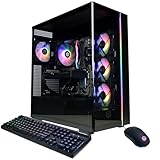
- System: AMD Ryzen 7 8700F 4.1GHz 8 Cores | AMD B850 Chipset | 16GB DDR5 | 1TB PCIe 4.0 NVMe SSD | Windows 11 Home
- Graphics: NVIDIA GeForce RTX 5060 Ti 8GB Graphics | 1x HDMI | 2x DisplayPort
- Connectivity: 2 x USB-C 3.2 | 4 x USB-A 3.2 | 2 x USB-A 2.0 | 1 x LAN | WiFi 6 | Bluetooth 5.3 | 7.1 Channel Audio
- Tempered Side Case Panel | Custom RGB Lighting | Keyboard and Mouse
- 1 Year Parts & Labor Warranty, Free Lifetime Tech Support
LAN-only operation
For a local event, add:
+sv_lan 1This is an access restriction, not a latency optimization. Remove it for an Internet-facing server, then verify that the router, firewall, and hosting network permit player traffic.
Player slots
-maxplayers sets the server’s slot capacity:
-maxplayers 10Use a value appropriate to the selected mode and map. A higher number does not by itself provide more CPU, memory, bandwidth, or a larger supported match format.
What belongs on the command line and what belongs in server.cfg
Use the launch command for process-level choices and the first map: dedicated mode, console operation, the bound interface, remote-console exposure, player capacity, and the initial game_type, game_mode, and map. Put persistent gameplay and server variables in server.cfg or the mode-specific configuration file that CS2 loads for the current ruleset.
Configuration precedence is the reason a command can look correct while the running server behaves differently. A mode-specific file can set a cvar after startup and after a map change, overriding a value supplied with +. Check the server console twice:
The Tool Desk
Outbyte Driver Updater FREEFix the driver behind crashes, sound loss and screen glitchesFind Drivers →Outbyte PC Repair FREERepair Windows errors before they cause bigger problemsFix Now →- Immediately after the process starts, to confirm that the executable accepted the flags.
- After the first map loads and after each map change, to confirm the values that are actually in effect.
If a setting keeps reverting, move it to the configuration file that is loaded at the point of the overwrite, then reload the map. Do not keep adding duplicate command-line assignments; that makes it harder to identify which layer is authoritative.
Rank #4

- System: AMD Ryzen 5 5500 3.6GHz 6 Cores | AMD B550 Chipset | 16GB DDR4 | 1TB PCIe 4.0 NVMe SSD | Windows 11 Home
- Graphics: AMD Radeon RX 6500 XT 4GB Graphics | 1x HDMI | 1x DisplayPort
- Connectivity: 1 x USB-C 3.2 | 5 x USB-A 3.2 | 2 x USB-A 2.0 | 1 x LAN | WiFi 5 | Bluetooth 4.2 | 7.1 Channel Audio
- Air Cool CPU | Tempered Side Case Panel | Custom RGB Lighting | Keyboard and Mouse
- 1 Year Parts & Labor Warranty, Free Lifetime Tech Support
A reliable first-start procedure
- Prepare a minimal command. Begin with
-dedicated -console +game_type 0 +game_mode 1 +map de_dust2. Leave networking and diagnostics out until the server reaches the map. - Start the process and watch the console. Look for executable errors, an unknown argument, a missing map, or a mode-selection failure.
- Confirm the effective map and mode. Check after the map transition, because configuration files can apply afterward.
- Add one option at a time. Introduce
-ip,-maxplayers, LAN restriction, or remote-console settings separately so a new failure has an identifiable cause. - Test from the intended network. A local connection proves that CS2 is running; it does not prove that router forwarding, firewall rules, or an external interface are correct.
- Persist stable settings. Put recurring cvars in
server.cfgor the relevant mode-specific file and keep the command focused on startup behavior. - Save a dated working copy. Record the complete command, configuration files, CS2 build date, and the mode/map that succeeded. Updates can change supported flags, aliases, or mode mappings.
Troubleshooting: when CS2 ignores a parameter
The server never becomes dedicated
Check that -dedicated is attached to the cs2 executable command and is not being passed to a wrapper that discards unknown arguments. Keep -console enabled while diagnosing so the startup log remains visible.
The map loads, but the rules are wrong
Inspect the active mode after the map transition. If it differs from the launch pair, search the base and mode-specific server configuration files for a later assignment. Move the intended value to the file that loads last, then reload the map.
What’s actually slowing this PC down?
Pick the symptom - the matching free tool is one click away.
+sv_lan 1 works locally but nobody outside can join
That behavior is expected: the variable intentionally restricts access to the local network. Remove it for public access, then check the bound address, router forwarding, host firewall, and the address players are using. If -ip points to a private interface that is not the forwarded destination, external traffic will not reach the process.
Remote console connections fail
Confirm that the chosen -netconport is not already occupied, that the process started with the option, and that the password matches exactly. Check host and upstream firewall rules. Avoid exposing the port broadly; test from an allowed administration network first.
A launch option has no visible effect
First determine whether it is an executable flag or a console variable. A hyphenated flag cannot be replaced by a plus-prefixed cvar assignment, and Steam’s guidance warns that some console commands cannot function as launch options at all. Put unsupported or persistent commands in the correct configuration file and verify their effect after the map loads.
Best Value

- This Gaming PC Desktop is well-suited for a variety of tasks including gaming, study, business, photo and video editing, streaming, day trading, crypto trading, and so on,ideal for Home, Office, School work
- This high-performance Gaming Computer Desktop is capable of running a wide range of popular PC games for pc gamer, including Fortnite, Call of Duty Warzone, Escape from Tarkov, GTA V, World of Warcraft, LOL, Valorant, Apex Legends, Roblox, Overwatch, CSGO, Battlefield V, Minecraft, Elden Ring, Rocket League, The Division 2, and Hogwarts Legacy with 60+ FPS
- PC Gaming System: This gaming computer desktop is loaded with AMD Ryzen 5 5500 up to 4.2GHz 6-Cores 12-Threads | 16GB DDR4 Memory | 1TB Solid State Drive | Genuine Windows 11 Home 64-bit
- Gaming Desktop Connectivity: This gaming pc comes with RGB Fan x 2 | 1x RJ-45 | Wi-Fi 6 | Bluetooth 5.2 | GeForce RTX 3050 6G | HDMI | DisplayPort
- Gaming Computer Special Feature: This gaming pc equips with RGB Gaming Mouse & Keyboard |1 Year parts & labor | Free lifetime tech support,ARGB lighting that brings your gaming setup to life, with easy plug-and-play setup that gets you started in minutes. Built for long-lasting performance, it holds up well over time, while secure packaging ensures it arrives in perfect condition. Backed by reliable customer support for quick issue resolution
A previously valid mode or alias stops working after an update
Do not assume the numeric mapping is permanent. Recheck Valve’s current game-mode table and alias documentation, test the smallest command that reproduces the issue, and update the dated startup copy only after the new pair has been confirmed in the console.
Client launch options are not server launch options
Steam’s client examples include -dev, -toconsole, and -novid; -novid suppresses the introductory video. Those options belong to a player’s CS2 launch settings and should not be mixed into a dedicated-server command unless the server executable explicitly supports them. Conversely, server controls such as -netconport and -maxplayers do not configure an ordinary player’s client.
The shared syntax can be misleading: both environments accept hyphenated arguments, and many console commands can be prefixed with +. The executable being launched and the console output it produces are the deciding factors.
Self-hosting versus a managed server
Self-hosting gives you direct control of the startup command, configuration files, network binding, remote console, update timing, and security choices. It also leaves you responsible for port forwarding, firewall rules, operating-system maintenance, backups, map/config validation, and recovery after CS2 updates.
A managed service generally reduces the work of keeping the process online and applying updates, but the provider may limit which flags, files, ports, or restart hooks you can change. Compare services on these concrete axes rather than on a generic “game server” label:
Quick wins for a faster PC:
Scan for outdated or missing drivers - takes under a minuteDriver Scan →Clear out junk files and repair common Windows errorsFree Scan →| Decision axis | Question to ask |
|---|---|
| Command and file control | Can you edit the full launch command, server.cfg, and mode-specific files? |
| Remote administration | Is a protected remote console available, and can you choose its port? |
| Networking | Can you bind the required interface and control firewall or forwarding rules? |
| Updates | Who schedules CS2 updates, and how are incompatible configs rolled back? |
| Geographic latency | Where is the machine located relative to the players? |
| Capacity | Are player slots constrained by a plan or by the selected mode? |
| Operations and cost | What administration work remains, and what recurring price applies? |
Technical documentation for launch controls does not establish comparable provider prices or performance figures, so those claims must be evaluated from the specific service terms and your players’ locations.
Quick Recap
Pre-launch checklist
- The command launches the
cs2executable and includes-dedicated. -consoleis enabled while you validate startup.+game_typeand+game_modeare a current, compatible pair.+mapnames an installed map.-ip, if used, is a local address on the host rather than a claimed public address.-maxplayersmatches the intended format.+sv_lan 1is present only when local-network access is intentional.- Remote-console ports are protected by a unique password and narrow firewall rules.
- Persistent cvars live in the configuration file that loads after mode changes.
- A dated, working command and configuration backup exists before the next CS2 update.
Product prices and availability are accurate as of the date/time indicated and are subject to change. Any price and availability information displayed on Amazon at the time of purchase will apply.




