Corsair’s XENEON EDGE, a 14.5-inch touchscreen meant to sit beside your main monitor, is $50 off in every color. Corsair’s US product listing showed it at $199.99, down from $249.99, when checked on October 7, 2026. Tom’s Hardware reported the discount on October 6. Sales prices and stock change, so confirm the figure at checkout.
The deal at a glance
| Item | Detail |
|---|---|
| Sale price | $199.99 (Corsair US listing, checked October 7, 2026) |
| Listed original price | $249.99 |
| Saving | $50 |
| Colors on sale | Black, Crystal, Smoke, White, Atomic Purple |
| Warranty | Three years, with a Zero Dead Pixel Guarantee (current Corsair listing) |
Corsair’s listing shows the discounted price for the Black, Crystal, Smoke, White and Atomic Purple variants. I did not verify availability or pricing at third-party retailers such as Amazon, so compare the exact listing before you buy elsewhere.
As an Amazon Associate I earn from qualifying purchases.
What the XENEON EDGE is
It is a companion display, not a replacement for a main monitor. Corsair’s specifications are:
- Size and resolution: 14.5 inches, native 2560×720 (32:9). Tom’s Hardware’s deal text gives 2650×720, but Corsair’s own figure is 2560×720.
- Refresh rate: 60Hz.
- Panel: AHVA, with peak brightness of 350 cd/m².
- Touch: five-point capacitive.
- Inputs: HDMI 2.0 and USB-C DP Alt Mode.
The very wide, short shape suits a strip of information rather than a game or document. Corsair pitches it for persistent PC metrics, app widgets, stream controls, chat, reference material and media controls. These are the manufacturer’s described uses, not independent test results. Corsair’s FAQ says it can work as a standalone monitor, but it stresses that the size and resolution make it primarily a secondary display.
#1 Best Overall

- Make Your PC Shine - Take your build to the next level with this standout 14.5" display. Showcase system metrics, chat channels, calendars, weather apps, and even play games
- Outstanding Versatility - Install the screen inside your case, mount it outside, or use it as a standalone monitor with the included stand. Set it up vertically or horizontally—whichever works best for you
- Easy on the Eyes - With a native resolution of 2560x720, 60Hz refresh rate, wide viewing angles, and vibrant colors, this display looks incredible wherever you can think to use it
- Built to be Touched - The five-point multi-touch capacitive touchscreen makes interacting with your widgets, applications, and games as easy as using your smartphone
- Wide Compatibility - For internal installation, the 14x magnets in the housing provide strong adhesion, while the four corner screws fit 360mm fan mounting positions in a range of cases
Connections and mounting
The package includes a magnetic desktop stand and three cables: HDMI-to-DisplayPort, USB-C DP Alt Mode, and one for an internal motherboard-header connection. Placement options are flexible:
- 14 built-in magnets for sticking to steel surfaces.
- Two 1/4-20-inch mounting points for standard AV arms.
- Compatibility with 360mm radiator mounts, so it can go in a compatible case.
- Vertical or horizontal orientation.
Do you need iCUE?
Not for basic use. Corsair says it works as an additional Windows monitor without iCUE. You need iCUE for the custom widget layouts, monitoring dashboards and other integrated functions, which are much of the appeal.
Rank #2
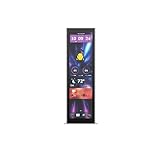
- Upgrade your HYTE Y70 gaming PC case with a touch screen kit, adding unique digital immersion.
- Tall and vibrant 682 x 2560 (2.5K) capacitive IPS touchscreen with an incredibly crisp 178 pixels per inch
- Larger 14.9" display with a 43% brighter panel than before.
- Unlocks a magnitude of possibilities for meaningful digital interaction
- Enables extensive screen customization with a plethora of themes, widgets, and more
On macOS, Corsair says it works as an additional touchscreen monitor. However, the macOS version of iCUE does not support the iCUE features and widgets described on the product page. Mac owners would get little beyond a small touch display.
What’s actually slowing this PC down?
Pick the symptom - the matching free tool is one click away.
Is the discount worth it?
At $199.99 it is a 20% cut from the $249.99 list price. It fits best if you already use iCUE, or want a dedicated spot for system stats, chat or media controls. If you want a bigger screen for ordinary work or games, a conventional monitor is the better buy.
Rank #3

- Compatible with Corsair Xeneon Edge (14.5 inches), soft HD TPU screen protector flim [2 Pack].
- This HD clear TPU screen protector is made of high quality thermoplastic polyurethane material, anti-scratch and absorb shock, provide good protection for your device.
- This soft TPU screen protector allows for high watch responsiveness, the small bubble will disappear automatically in 1 or 2 days.
- HD clear TPU screen screen, with waterproof coating, can restore the original color of your device, providing you with a pleasant experience.
- High transparency screen protector with ultra-thin design, bringing bright and colorful image quality.
At launch on August 26, 2025, Corsair CEO Thi La said: “With the launch of XENEON Edge, we’re taking another big step in uniting Corsair’s ecosystem of products and software.” That fits the iCUE-centered design. The launch announcement stated a two-year warranty, but the current listing says three years, so go by the listing.
Quick Recap
Rank #4

- XENEON EDGE LCD INCLUDED – The XENEON EDGE 14.5” LCD TOUCHSCREEN comes pre-installed and pre-wired in the side panel so there’s nothing needed to install it as it’s ready to use right out of the box
- Easy Side-Panel Access – The XENEON EDGE 145” LCD TOUCHSCREEN is mounted in the FRAME side-panel kit for easy access on the side of your computer, so full control of all its features is right at your fingertips
- Powerful iCUE Widgets – Customize a wide range of sophisticated iCUE Widgets and open up a whole new world of real-time customizable data including monitoring hardware temps and usage levels, Twitch chat, image and video display, volume control, and much more
- iCUE Widgets or Second Display – Setup the LCD as a widget control center or use it as a second display for Windows, all from your desktop
- Updated Front I/O Panel – The front I/O has been updated with three USB Type-C ports, with one port providing blistering 20Gb/s speeds and the other two offering fast 5Gb/s data transfer rates
Product prices and availability are accurate as of the date/time indicated and are subject to change. Any price and availability information displayed on Amazon at the time of purchase will apply.




