Free tools Windows power users keep installed
One-click scans. No signup required.
A freelance client onboarding template turns an accepted project into work that is ready to begin: the agreement and scope are recorded, payment requirements are checked, needed inputs and access have owners, and both sides know the next action. Copy the template below, remove fields your service does not need, and tailor it to the written agreement. A checklist helps manage the work; it does not replace or amend a contract.
What should freelance client onboarding include?
Onboarding is the bridge between accepting a project and starting it with the essential decisions in writing. A useful freelance client onboarding checklist covers the agreed work, payment arrangements, client inputs, access, working expectations, project setup, and the immediate next step. Not every engagement needs a meeting, extensive intake form, or every field below; scale the process to the service and project risk.

As an Amazon Associate I earn from qualifying purchases.
Keep the commercial offer distinct from the project terms. A proposal describes what you are offering; record the signed agreement or statement of work (SOW) that establishes the scope, deliverables, exclusions, assumptions, dates, and other terms you will follow. The checklist is an operational record, not a substitute for a contract or jurisdiction-specific legal advice.
Copy-ready freelance client onboarding template
Copy this into a document, spreadsheet, or project workflow. Delete irrelevant prompts, and add an owner and due date wherever an answer or deliverable is still pending.
1. Client and project
- Client business/legal name: [Name]
- Primary contact: [Name, role, email]
- Billing contact: [Name and contact details, if different]
- Approver(s): [Name(s) and role(s)]
- Project name and service: [Project; design, writing, development, consulting, or other]
- Client goal and success criteria: [What outcome is wanted, and how will the parties recognize completion or success?]
- Agreed scope and deliverables: [Included work]
- Exclusions and assumptions: [What is outside scope; what must be true for the work to proceed?]
- Start date, target dates, milestones, and dependencies: [Dates and prerequisites]
2. Agreement and payment
- Agreement/SOW status and signed date: [Status; date]
- Invoice or deposit requirement: [Amount and due date, as stated in the agreement]
- Payment status and start condition: [Not invoiced / invoiced / paid / outstanding; note whether payment must clear before work starts under the agreement]
- Payment instructions: [As agreed]
- Purchase order or billing requirements: [If applicable]
There is no universal deposit percentage for freelance projects. Follow the terms agreed for this engagement, and do not treat a payment as a start prerequisite unless the agreement says so.
3. Client inputs and access
- Required assets or documents: [Item; owner; due date]
- References, brand guidance, audience context, or technical requirements: [Only what this service needs]
- Required account access: [System; permission level; person granting it; secure transfer method]
- Open questions: [Question; person responsible; due date]
Request only the information and access needed for the work. Do not ask clients to send passwords through ordinary email; use an appropriate secure access-sharing method instead.
Rank #2

- PLAN YOUR WAY TO SUCCESS, ONE APPOINTMENT AT A TIME: This appointment book is designed for small business owners, freelancers, and anyone else who needs to track numerous appointments throughout the day, with 15-minute slots from 7 AM till 9 PM.
- AN EASY WAY TO STAY ON TOP OF EVERYTHING: This time box planner is undated and lasts 12 months, so you can start anytime. Inside, you will find monthly calendars, weekly pages with time slots, goals and to-do list, and a contacts list.
- SPACIOUS, LARGE FORMAT FOR DETAILED PLANNING: This daily planner with hourly schedule measures 8.3 by 11 to give you lots of space for detailed planning. If you run out of writing space using standard planners, this daily schedule planner is perfect.
- 7 SHEETS OF STICKERS & LAY-FLAT BINDING: This appointment planner comes with 7 sheets of stickers that include appointments, birthdays, etc. The cover is made of eco-leather, with a pen loop, elastic, lay-flat binding, 3 bookmarks, and thick 120gsm paper.
- 60-DAY MONEY-BACK GUARANTEE: We will exchange or refund your daily planner if you aren’t satisfied with your work planner / daily hourly planner undated for any reason. Reach out to us via message to refund your work schedule planner.
4. How we will work
- Main communication channel: [Email, project workspace, or other agreed channel]
- Expected response windows: [Reasonable working expectations for each side]
- Meetings and kickoff: [Cadence; date and link if a kickoff is useful]
- Feedback and approval: [Approver; method; expected turnaround]
- Revisions and change requests: [Included revisions and route for out-of-scope requests, matching the agreement]
- Client responsibilities: [Inputs, decisions, and deadlines]
- Freelancer responsibilities: [Work, updates, and deadlines]
5. Project readiness and next action
- Project or client folder created and shared: [Status]
- Milestones and task owners entered: [Status; owners; due dates]
- Missing prerequisites: [Item; owner; due date]
- Ready-to-start condition: [What must be true before work begins]
- Next action: [One specific action; owner; due date]
- First check-in: [Date or trigger]
- Closeout or follow-up reminder: [Date or trigger]
How to onboard a freelance client without creating extra admin
Confirm the engagement before setup
Record the signed agreement or SOW, its scope and deliverables, the start date, milestones, and dependencies. If only a proposal has been accepted, establish the project terms in the agreed contract or SOW rather than relying on the checklist to fill gaps.
Check payment against the agreed start condition
Note the invoice or deposit requirement, amount, due date, payment instructions, and current status. Check whether the agreement makes cleared payment a prerequisite to starting; avoid imposing a standard percentage that the parties did not agree to.
Rank #3
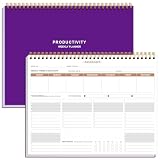
- BOOST YOUR PRODUCTIVITY - This undated weekly productivity planner notepad focus on the important work and get organized. Weekly to do list notepad allowing you to categorize and prioritize your tasks effectively. Whether you're a small business owner, project manager, freelancer, academicians or master multitasker, the weekly to do list pad will be your new favorite daily office productivity tool.
- UNDATED WEEKLY PLANNER - This weekly planner start any time with 54 weeks, Weekly planner notebook has plenty of space to write your goal plan, work plan, student plan or personal schedule, keep track of priorities, and write notes on the back. This versatile planner allows you to stay organized in 2026, 2027, or even as far ahead as 2028!
- FEATURES - Weekly Theme and Highlights for at-a-glance planning Top 3 Priorities for the week 6 Focus Areas to segment and list tasks for goals, projects, or clients Daily Tracker for healthy habit-tracking and routine-tracking.
- HIGH QUALITY - This weekly desk planner size of 8.5" x 11", it offers ample space for writing and planning your tasks, just the perfectly size to fit in your backpack. Is used to high quality 100gsm pure white paper, elastic band and a back pocket for extra space.
- FUNDTIONAL DESIGN - This weekly deskpad planner will completely change how you structure your work: by segmenting your tasks by area and tracking the most important details, you'll feel less scattered and more organized.We believe in helping you be fulfilled with your life and productive at the same time by using a weekly to do list notepad.
Collect only service-relevant essentials
Ask for the client and billing details, goals, success criteria, audience or context, assets, references, required access, and stakeholder or approver information that the job actually requires. For each missing input, name the person responsible and a due date. A designer may need brand assets, while a developer may need scoped technical access; neither should receive a generic request for every document and login.
Set expectations and make the first step visible
Agree on where communication happens, response expectations, meetings, how feedback and approvals work, revision boundaries, and what each party supplies by when. Create the project space, add tasks and owners, share the timeline, and state one clear next action. A short, low-risk first deliverable can help surface incorrect assumptions or access problems early.
Rank #4

- Focus on The Important Work and Get Organized- Whether you're a project manager, small business owner, freelancer, or master multitasker, the Weekly Dashboard with tracker will be your new favorite productivity tool. This Monday start weekly desk notepad will completely change how you structure your work: by segmenting your tasks by area and tracking the most important details, you'll feel less scattered and more organized.
- Weekly Professional Planner Features - It includes a section to track your daily habits and 6 focus areas where you can list your main goals, projects, clients, or grocery list that you would like to focus on for the week. With an action plan which comes in the format of a to-do list, it will help you to stay organized and on top of things. On top of that, it comes with weekly theme and highlights for at-a-glance planning.
- Make Your To-Do List Accessible - See your tasks and next steps for all of your projects in one singular view. Stop the productivity-killing process of "context switching" and improve your productivity with features like:(1) Weekly Theme and Highlights for at-a-glance planning; (2) Top 3 Priorities for the week; (3) 6 Focus Areas to segment and list tasks for goals, projects, or clients; (4) Daily Tracker for habit-tracking and routine-tracking.
- High-Quality Writing Experience - Enjoy a flawless writing experience without the worry of bleeding, thanks to 120gsm shell white paper, perfect for markers & highlighters. With 54 sheets, the spiral notepad offers plenty of space for goal planning and brainstorming. This day planner notebook elevates note-taking and planning, making it an indispensable tool for professionals.
- Superb Value For Money - The Beautiful 54 sheets Dashboard Calendar is the perfect A4 sized weekly planner for managing all of your work like a pro and never missing a beat. This spiral version allows you to keep previous weeks' pages to reference and learn from. You'll feel like an organizational superstar by the end of each week. With 54 sheets, you're set for an entire year.
Kick off and follow through in proportion to complexity
Hold a kickoff when the project has enough moving parts to benefit from one. Use it to resolve open inputs and confirm roles, milestones, and the immediate next step, then schedule a check-in or follow-up. A simple, low-risk engagement may need only a written confirmation and a clear first task.
Do these 3 things before closing this tab:
1Fix the driver behind crashes, sound loss and screen glitches2Repair Windows errors before they cause bigger problems3Scan for outdated or missing drivers - takes under a minuteChoose a format that fits your workflow
A checklist can live in a document, spreadsheet, welcome packet, or interactive workflow. The formats below are available approaches, not a feature or price ranking; choose based on who needs to complete it and how you will track outstanding work.
Best Value

- KNOW WHAT IS WORKING AND WHAT IS NOT Each quarter opens with a structured review across revenue, time, clients, marketing, and content, so you understand what actually happened in your business before you decide what comes next.
- QUARTERLY PLANNING SYSTEM Break your annual vision into four focused 90-day plans using the 12-week-year structure that coaches and entrepreneurs rely on, giving you a strategic layer that sits above your daily calendar and holds the direction your scheduling tools cannot.
- TRACK REVENUE-GENERATING ACTIVITIES EVERY MONTH Every month gets a dedicated spread to set priorities, track revenue and the activities driving it, and review results against plan, keeping the business moving between quarterly reviews.
- A5 LINEN HARDCOVER, FULLY UNDATED A5 size (5.8" x 8.3") in linen with gold foil stamping, reinforced binding, and thick lay-flat pages built to hold a full year of planning. Organized by quarter and fully undated, so you start in any month without wasting a page. For business owners who invest in tools that match what they're building.
- A THOUGHTFUL GIFT FOR ENTREPRENEURS, COACHES AND CREATORS A quarterly planning system makes a purposeful gift for someone building a business alongside a full life, useful long after a birthday or a business milestone has passed because they will reach for it at the start of every quarter and every month.
| Format | Setup and customization | Client completion and missing-item tracking | Sharing and ongoing cost |
|---|---|---|---|
| Self-made document or checklist | Quick to start and easy to tailor; manual upkeep | Simple for a client to read; status and ownership tracking depend on how you structure it | Share as a file or link using your existing tools; recurring cost is not stated |
| Spreadsheet or welcome packet | Can organize intake and project details in a reusable format; customization depends on the file | Can make checklist status visible; ownership tracking depends on its fields and process | File sharing and access depend on the platform; recurring cost is not stated |
| Interactive onboarding or project workflow tool | Requires configuring a workflow, but can combine intake and project steps | Designed to guide steps and track progress; exact capabilities vary by tool | Access depends on the service and its sharing setup; recurring cost is not stated |
Examples of these formats include a downloadable Excel workbook described by ReadyGrids and an interactive checklist described by ClientLever. These examples do not establish a comparative feature or price assessment.
Quick Recap
Common onboarding mistakes to avoid
- Starting from a proposal alone: Record the agreed project terms in the signed agreement or SOW.
- Leaving scope and success criteria implicit: Write down deliverables, exclusions, assumptions, and how the client will judge the result.
- Collecting everything from everyone: Make intake conditional on the service, and give each required input an owner and due date.
- Sharing credentials unsafely: Avoid ordinary email for passwords; use an appropriate secure method for access.
- Confusing a checklist with contract terms: Keep payment, revisions, and change requests aligned with the written agreement.
- Ending onboarding without a next action: Name the action, owner, and due date so both parties know what happens next.
Product prices and availability are accurate as of the date/time indicated and are subject to change. Any price and availability information displayed on Amazon at the time of purchase will apply.




