For Claro Brazil customers, iOS 17.2 introduced carrier-supported eSIM conversion and transfer on compatible iPhones. You can turn an active physical Claro SIM into an eSIM on the same phone, or move an existing Claro physical SIM or eSIM to another iPhone through Settings > Cellular. This does not automatically create service for a brand-new line: new eSIMs still require Claro provisioning through Minha Claro, a QR code, or another Claro activation route.
What iOS 17.2 changed for Claro
The relevant change is native, carrier-supported handling of an existing Claro line—not a universal iOS switch that activates service with every operator. Claro documents these workflows for Brazil:
- Convert an active physical SIM to an eSIM on the same iPhone.
- Transfer a physical SIM or eSIM from one iPhone to another.
- Move a Claro Sync line between iPhones, followed by separate Apple Watch setup.
Apple’s public iOS 17.2 release notes do not describe this as a standalone, universal carrier feature; availability depends on integration between Apple and Claro. Claro’s Brazil instructions are at its Apple eSIM page.
Who can use the native process?
Compatible iPhones and software
- Claro’s documented quick-transfer support starts at iPhone 11, with eSIM and dual-SIM support enabled.
- The historical minimum is iOS 17.2. In practice, install the latest iOS version your iPhone supports.
- For the iPad transfer scenario documented by Claro, the requirement is iPadOS 17.5 or later.
- Some regional models—particularly certain China-market iPhones—may not include eSIM hardware. Check the exact model rather than relying only on its retail name.
Plans and the Claro Flex discrepancy
Claro’s consumer FAQ lists Controle, Controle Fácil, Postpaid and Prepaid among compatible categories. However, Claro’s detailed conversion and transfer tutorials say the procedure is not available to Claro Flex customers. Because those official pages conflict, Flex eligibility is not settled: check whether the option appears on your iPhone or confirm with Claro before depending on the native route.
Free tools Windows power users keep installed
One-click scans. No signup required.
#1 Best Overall

- Universal Carrier Compatibility: This phone is unlocked and compatible with any carrier of choice on GSM and CDMA networks (e.g. AT&T, T-Mobile, Sprint, Verizon, US Cellular, Cricket, Metro, Tracfone, Mint Mobile, etc.)
- Carrier Verification Required: Please check with your carrier to verify compatibility
- Simple Activation Process: When you receive the phone, insert a SIM card from a compatible carrier. Then, turn it on, connect to Wi-Fi, and follow the on screen prompts to activate service
- Package Contents: The device does not come with headphones or a SIM card. It does include a generic (Mfi certified) charger and charging cable
- Battery Health Guarantee: Tested for battery health and guaranteed to have a minimum battery capacity of 80%
Eligibility can also depend on account provisioning. A compatible phone alone does not guarantee that every line will display the conversion or transfer option.
Prepare before converting or transferring
- Keep both iPhones nearby for a transfer; connect them to Wi-Fi and enable Bluetooth.
- Enable a passcode on both devices, and leave the old iPhone unlocked.
- Update both phones and keep the source line active.
- Do not erase the old iPhone or remove its SIM until the new eSIM is active and calls, SMS and mobile data work.
Convert a physical Claro SIM on the same iPhone
- Open Settings.
- Tap Cellular.
- Select the Claro line.
- Tap Convert to eSIM.
- Tap Convert to eSIM again when prompted.
- Complete the confirmation, including a side-button confirmation if iOS displays one.
- Wait for activation, then tap OK.
- Under Cellular, verify that the Claro line is present and active.
Labels can vary slightly with language, iOS version and carrier settings. Once conversion completes, the physical SIM is automatically deactivated. Claro’s documented procedure is described at this tutorial.
Transfer a Claro line to another iPhone
- On the new iPhone, open Settings > Cellular.
- Tap Add eSIM.
- Choose Transfer From Nearby iPhone.
- Approve the request on the old iPhone.
- Enter on the old phone the verification code shown on the new iPhone.
- Select the Claro number you want to move.
- Tap Continue or Transfer Number, depending on the wording shown.
- Confirm activation on the new iPhone and wait until the line reports as active.
The process is intended to preserve your existing number and plan. Claro says its quick-transfer process has no charge; that statement should not be generalized to every new eSIM, replacement or plan transaction. See Claro’s transfer instructions.
Rank #2

- This phone is unlocked and compatible with any carrier of choice on GSM and CDMA networks (e.g. AT&T, T-Mobile, Sprint, Verizon, US Cellular, Cricket, Metro, Tracfone, Mint Mobile, etc.).
- Please check with your carrier to verify compatibility.
- The device does not come with headphones or a SIM card. It does include a generic (Mfi certified) charging cable.
- Tested for battery health and guaranteed to have a minimum battery capacity of 80%.
When you need a brand-new eSIM
Conversion and transfer start with an already provisioned Claro line. If you purchased a new line or Claro issued a replacement eSIM, use the route associated with that issuance.
QR-code activation
Acquire the eligible Claro plan or eSIM first, then use the iPhone’s cellular settings to add the plan and scan the supplied QR code. Follow Claro’s QR-code guide. Do not assume an installed QR code can be reused on a replacement phone; confirm that with Claro.
Minha Claro
Claro says customers can request a physical-SIM-to-eSIM change through the Minha Claro app via its eSIM service page. Menu names change over time. A report published in August 2024 described Minha Claro Móvel > Início > Navegação fácil > eSIM, but treat that path as a dated interface reference rather than a permanent label.
Rank #3

- This phone is unlocked and compatible with any carrier of choice on GSM and CDMA networks (e.g. AT&T, T-Mobile, Sprint, Verizon, US Cellular, Cricket, Metro, Tracfone, Mint Mobile, etc.).
- Tested for battery health and guaranteed to have a minimum battery capacity of 80%.
- Successfully passed a full diagnostic test which ensures like-new functionality and removal of any prior-user personal information.
- The device does not come with headphones or a SIM card. It does include a generic (Mfi certified) charging cable.
- Inspected and guaranteed to have minimal cosmetic damage, which is not noticeable when the device is held at arm's length.
Claro Sync and Apple Watch
Moving the iPhone line does not necessarily finish cellular setup for an Apple Watch. Claro Sync customers should follow the post-transfer Apple Watch instructions, unpairing or re-establishing the watch relationship as required, and verify watch connectivity separately.
Troubleshooting
“Convert to eSIM” is missing
- Confirm that the iPhone supports eSIM and is within the documented iPhone 11-or-newer quick-transfer range.
- Install available iOS updates and select the correct Claro line under Settings > Cellular.
- Check plan eligibility, including the unresolved Claro Flex difference between Claro pages.
- Check whether the phone is a regional model without eSIM support.
If the option still does not appear, request the change through Minha Claro or use the QR-code process when Claro issues one.
The Tool Desk
Outbyte Driver Updater FREEScan for outdated or missing drivers - takes under a minuteDriver Scan →Outbyte PC Repair FREERepair Windows errors before they cause bigger problemsFix Now →The nearby-iPhone transfer will not start
Put both phones close together, unlock the old one, enable Bluetooth, connect both to Wi-Fi, confirm passcodes, update both devices and select the intended number. These conditions are part of Claro’s documented transfer requirements.
Rank #4
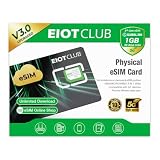
- 【Upgrade Phones with eSIM Capability】The EIOTCLUB V3 physical eSIM card adds eSIM capabilities to unlocked iPhone and Android devices that have a physical SIM card slot, compatible with most models on the market.
- 【Direct iPhone Profile Management】This upgraded eSIM adapter lets users download, install and manage compatible eSIM profiles directly in the EIOTCLUB app. No card reader, computer or Android phone needed for profile management. A practical eSIM upgrade for users who want simpler profile management from their iPhone.
- 【Rewritable: Store Up To 9 Profiles】Includes 1 built-in Seed Profile that cannot be deleted, plus 8 additional profile slots. You can flexibly switch between different countries, eSIM providers and data plans. A ideal solution for travel and changing mobile network requirements. Note: only one profile can be active at a time.
- 【Refillable & 1GB Global Data for Easy Start】Start with 1GB of prepaid global data, valid for 30 days in 200+ supported countries and regions. Stay connected during initial setup and profile downloads. After the included data is used or expires, choose from eligible EIOTCLUB data plans based on your needs.
- 【Automatic network backup for reliable connections】If a compatible profile cannot connect, this upgrated physical eSIM can restore the most recently working profile under supported conditions, helping simplify profile recovery.
Activation fails
Update iOS first. If the failure continues, Claro recommends resetting network settings at Settings > General > Transfer or Reset iPhone > Reset > Reset Network Settings. This restarts the phone and deletes saved network settings, including Wi-Fi passwords, so have those credentials available. If provisioning still fails, contact Claro at 1052.
The eSIM is listed but has no service
- Under Settings > Cellular, make sure the line is turned on and assigned correctly for mobile data.
- Turn off Airplane Mode and restart the iPhone.
- Test a call, SMS and mobile data connection.
- Confirm that the old SIM was deactivated as expected after conversion.
- If all settings look correct, Claro may still need to complete account-side provisioning; a network reset is not guaranteed to fix that.
What the headline does—and does not—mean
“Activate an eSIM directly on an iPhone” is accurate only with qualification. iOS 17.2 made Claro-supported conversion and transfer possible in Settings for eligible, compatible devices, often avoiding a store visit. It did not let an iPhone invent a new Claro subscription. New lines, unsupported plans, regional hardware, account problems or failed provisioning can still require Minha Claro, a QR code or Claro support.
Frequently Asked Questions
Will converting the SIM change my Claro number?
No. The same active Claro line is converted to eSIM; the number and plan are intended to remain unchanged.
Do these 3 things before closing this tab:
1Fix the driver behind crashes, sound loss and screen glitches2Repair Windows errors before they cause bigger problems3Scan for outdated or missing drivers - takes under a minuteBest Value

- This pre-owned product is not Apple certified, but has been professionally inspected, tested and cleaned by Amazon-qualified suppliers.
- There will be no visible cosmetic imperfections when held at an arm’s length. There will be no visible cosmetic imperfections when held at an arm’s length.
- This product will have a battery which exceeds 80% capacity relative to new.
- Accessories will not be original, but will be compatible and fully functional. Product may come in generic Box.
- This product is eligible for a replacement or refund within 90 days of receipt if you are not satisfied.
Can I discard the old SIM immediately?
Wait until the eSIM is active and calls, SMS and mobile data work. Conversion deactivates the physical SIM automatically, but testing first avoids losing your fallback before activation is confirmed.
Does quick transfer work from Android to iPhone?
The documented native workflow is between iPhones. An Android-to-iPhone move generally requires Claro’s applicable QR-code, app or customer-support activation route.
What if my old iPhone is lost or broken?
Nearby transfer requires the source iPhone. Use Minha Claro, a newly issued QR code or Claro support to provision the replacement instead.
Quick Recap
Product prices and availability are accurate as of the date/time indicated and are subject to change. Any price and availability information displayed on Amazon at the time of purchase will apply.
Quick wins for a faster PC:
Scan for outdated or missing drivers - takes under a minuteDriver Scan →Repair Windows errors before they cause bigger problemsFix Now →



