The Samsung Galaxy S21 supports wireless charging, so you can power it up by placing it on a compatible charging pad or stand instead of plugging in a USB-C cable. It works with Qi wireless chargers, including Samsung’s own wireless charging accessories, and can also use Samsung Fast Wireless Charging for quicker top-ups when paired with the right adapter and charger.
Wireless charging on the Galaxy S21 is convenient, but the speed and reliability depend on the charger, power adapter, case thickness, phone placement, and charging settings. The phone also includes Wireless PowerShare, allowing it to reverse charge compatible accessories like Galaxy Buds, Galaxy Watch models, and even other Qi-enabled phones from the back of the device.
As an Amazon Associate I earn from qualifying purchases.
Samsung Galaxy S21 Wireless Charging Support
Yes, the Samsung Galaxy S21 supports wireless charging. All main Galaxy S21 models, including the Galaxy S21, Galaxy S21+, and Galaxy S21 Ultra, include built-in wireless charging coils, so you can place the phone on a compatible charging pad or stand instead of plugging in a USB-C cable. The feature works through the Qi wireless charging standard, which is the same core standard used by many Android phones, iPhones, earbuds cases, and other accessories.
The Tool Desk
Outbyte Driver Updater FREEFix the driver behind crashes, sound loss and screen glitchesFind Drivers →Outbyte PC Repair FREERepair Windows errors before they cause bigger problemsFix Now →The Galaxy S21 also supports Samsung’s faster wireless charging technology when paired with a compatible charger. With a standard Qi charger, the phone can charge wirelessly at a lower speed, commonly around 5W to 10W depending on the charger and power adapter. With a Samsung-compatible Fast Wireless Charging or Fast Wireless Charging 2.0 pad, the Galaxy S21 series can reach up to 15W wireless charging under the right conditions. To get the best speed, the charging pad usually needs a suitable wall adapter as well, such as a USB-C Power Delivery adapter that can supply enough wattage.
#1 Best Overall

- 15W Samsung Wireless Charger: Put your phone on the wireless charger samsung Charging Pad Station to get started Charging, up to 1.8X faster than standard wireless charger, 3X faster than the original 5W charger. Wireless charging station provides 15W for Samsung Galaxy S26 S25 S24 S23 S22 S21, 10W for Samsung Galaxy Note 10, 7.5W output for iPhone 14 13 12 11 Series, and 5W for other smartphones and AirPods & Galaxy Buds.The wireless iPhone charger comes with a QC 3.0 18W adapter for a stable power supply.
- Wide Compatibility: Wireless phone charger Charging Station is optimized for the fastest charging on most devices,can support for Google Pixel 9 Pro/9 Pro XL/9/9 Pro Fold/8A/8 Pro/8/7A/7 Pro/7/6/6 Pro/5,Samsung Galaxy S25/S25+/S25 Ultra/S25 FE/S25/S25+/S25 Ultra/S24/S24+/S24 Ultra, S23/S23+/S23 Ultra, S22/S22+/S22 Ultra, S21/S21 FE/S21+/S21 Ultra, S20/S20 FE/S20+/S20 Ultra, iPhone 14/14 Pro/14 Pro Max/14 Plus,iPhone 13/13 Pro/13 Pro Max/13 Mini,iPhone 12/12 Pro/12 Pro Max/12 Mini,11/11 Pro/11 Pro Max,X/XS/XR/XS MAX, AirPods 2/Pro, Galaxy Buds, Pixel Buds
- Easy Charging wireless phone charger for android: Our wireless iphone charger fast charging features non-slip silicone material on the up and down sides, ensuring that your device stays in place while charging. The GREEN LED Indicator will flash for 3s if power source is connected, and will turn off after 16 seconds while going charging mode, never disturbing your sleep.
- Case-Friendly: Fast wireless charger samsung S26 FE charger is slim enough to put it in your pocket and supports charging through general plastic/silicone phone cases less than 5mm thick. It's lightweight, sleek, and compact, making it easy to carry and store during travel or business. (Note: Magnetic and metal attachments or cards will prevent charging.)
- Certified & Safe Charging: Our Google Pixel 7Pro wireless fast charger come with 18W Wall Plug is rigorously Certified & Charging tested to ensure a secured and easy charging experience. It prevents the wireless charger and your iPhone from overcharging, over current, over voltage, over heating, and short circuit, giving your phone multiple protection. We offer 24-hour customer service. If you have any questions while using our product,Please do not hesitate to get in touch with us.
Wireless charging support is enabled by default on the Galaxy S21, so there is usually no setup required for basic charging. Place the phone with the back facing down on a Qi-compatible pad, stand, or car mount, and the charging animation should appear on the screen. Alignment matters because the charging coil inside the phone needs to sit over the coil in the charger. If the phone is off-center, charging may stop, run slowly, or fail to begin.
The Galaxy S21’s wireless charging feature also works through many thin cases, but very thick cases, metal plates, magnetic mounts, wallets, pop sockets, or cases with credit cards can interfere with the charging connection. For consistent results, use a case designed to support wireless charging and avoid placing anything metallic between the phone and charger. Samsung’s own wireless chargers are a safe match, but reputable Qi-certified third-party chargers can also work well if they provide the right output and include overheating protection.
Wireless charging features supported by the Galaxy S21
- Qi wireless charging: compatible with the widely used wireless charging standard.
- Fast Wireless Charging: supports faster charging than basic 5W Qi pads when used with compatible hardware.
- Fast Wireless Charging 2.0: allows up to 15W wireless charging with supported Samsung-style chargers and power adapters.
- Wireless PowerShare: lets the Galaxy S21 reverse charge compatible devices such as Galaxy Buds, Galaxy Watch models, and other Qi-enabled phones.
Although wireless charging is convenient, it is generally less efficient than wired charging and may create more heat. The Galaxy S21 manages this automatically by slowing charging if the battery or charger gets too warm. For everyday use, wireless charging is reliable for desk, bedside, and car setups, while wired USB-C charging remains the better option when you need the fastest possible recharge.
Do these 3 things before closing this tab:
1Repair Windows errors before they cause bigger problems2Scan for outdated or missing drivers - takes under a minute3Clear out junk files and repair common Windows errorsWireless Charging Speeds and Compatible Chargers
The Samsung Galaxy S21 supports Qi wireless charging and can charge wirelessly at up to 15W when paired with a compatible fast wireless charger. This is Samsung’s “Fast Wireless Charging 2.0” range, and it requires both the right charging pad or stand and a sufficiently powerful wall adapter. With a basic Qi charger, the phone will still charge, but usually at a slower rate such as 5W, 7.5W, or around 10W, depending on the charger.
For the best results, use a Samsung-branded fast wireless charger that advertises 15W support, such as Samsung’s Wireless Charger Stand, Wireless Charger Duo, or newer compatible pads. Many third-party Qi chargers also work with the Galaxy S21, but not all of them deliver Samsung’s maximum wireless speed. Some chargers may be rated for 15W or more, yet only provide lower speeds to Samsung phones because they do not support the correct fast-charging profile.
| Charger Type | Expected Speed on Galaxy S21 | What You Need |
|---|---|---|
| Standard Qi wireless charger | About 5W | Any reliable Qi-certified pad or stand |
| Faster Qi charger | About 7.5W to 10W | Compatible charger and suitable power adapter |
| Samsung Fast Wireless Charging 2.0 charger | Up to 15W | 15W-compatible Samsung charger and adequate USB-C wall adapter |
The wall adapter matters as much as the wireless pad. A 15W wireless charger will not reach its top speed if it is plugged into an old 5W USB power brick or a low-power computer USB port. Use the adapter recommended by the charger manufacturer, typically a USB-C Power Delivery or Samsung Adaptive Fast Charging adapter with enough output. If the wireless charger includes a fixed cable or proprietary power plug, use the supplied power supply to avoid reduced speeds.
Charging speed also depends on phone temperature, battery level, case thickness, and alignment on the charging coil. The Galaxy S21 may slow wireless charging when it gets warm, when the battery is nearly full, or when the charger and phone are not centered correctly. A thin plastic or silicone case usually works fine, but thick rugged cases, metal plates, wallet cases, magnets, and pop-out grips can interfere with wireless charging. For consistent performance, choose a Qi-certified charger, keep the phone centered, remove obstructive accessories, and enable fast wireless charging in Settings > Battery and device care > Battery > More battery settings if the option is available on your software version.
Free tools Windows power users keep installed
One-click scans. No signup required.
Rank #2

- SUPER FAST WIRELESS CHARGING: Get the charge you need quickly, thanks to up to 15W of Fast Charging support; This boost of battery is compatible with USB PD and Adaptive Fast Charging travel adapters for an easy pick-me-up*
- DIRECT COOLING FAN: The Super Fast Wireless Charger Pad has a built-in cooling system with a fan and charges your phone fast**
- DEVICE DESIGN: Simply place the Wireless Charger where you want it; With a slim, smooth and compact design, it fits even in your smaller spaces, so it's easy to access when your phone or earbuds need a little extra juice****
- LED INDICATOR: LED light tells you the charging status of your device with different colors: red for charging, flashing red for charging error, and green for fully charged; When it’s time for lights out, you can dim it to not disturb your sleep*****
How to Charge the Galaxy S21 Wirelessly
To charge the Samsung Galaxy S21 wirelessly, place it on a Qi-compatible wireless charging pad or stand with the back of the phone facing the charger. The charging coil inside the Galaxy S21 is positioned near the center of the rear panel, so alignment matters. On most flat pads, the phone should sit centered on the charging surface. On upright stands, place it straight and make sure it rests fully against the stand rather than leaning off to one side.
- Connect the wireless charger to a wall adapter using the cable supplied with the charger.
- Plug the adapter into a wall outlet rather than a laptop, monitor, or low-power USB port.
- Remove thick metal accessories, magnetic plates, pop-out grips, or card holders from the back of the phone or case.
- Place the Galaxy S21 on the center of the charging pad or stand with the screen facing up.
- Wait for the charging animation, battery icon, or sound to confirm charging has started.
If the phone does not begin charging within a few seconds, lift it and reposition it. Small shifts can make a difference, especially with compact round pads. A case is usually fine as long as it is not too thick and does not contain metal. Slim silicone, TPU, leather, and Samsung official cases generally work well. Wallet cases can interfere if cards or metal pieces sit between the phone and charger, and magnetic car-mount plates are a common cause of failed or slow charging.
Checking wireless charging settings
The Galaxy S21 can use standard wireless charging and faster wireless charging when paired with a compatible charger and power adapter. If fast wireless charging is not working, check that the setting is enabled. Open Settings, go to Battery and device care, tap Battery, then More battery settings. From there, make sure Fast wireless charging is turned on. The exact menu wording can vary slightly depending on the One UI version, but the option is usually found under battery charging settings.
- Use the right adapter: Many wireless pads need a USB-C Power Delivery or Samsung Adaptive Fast Charging adapter to reach higher speeds.
- Look for confirmation: The lock screen may show wireless charging status and an estimated time remaining.
- Keep the phone centered: Poor alignment can cause the phone to charge slowly, pause, or warm up more than usual.
- Avoid stacking objects: Coins, keys, credit cards, and metal rings should not be placed between the phone and charger.
For overnight charging, a wireless stand on a bedside table is convenient because it keeps the screen visible for alarms and notifications. For desk use, an angled stand is often easier than a flat pad because you can see incoming calls and messages while charging. If you want the fastest possible charge, wired USB-C charging is still usually quicker, but wireless charging is a clean, cable-free option for topping up the Galaxy S21 throughout the day.
Quick wins for a faster PC:
Repair Windows errors before they cause bigger problemsFix Now →Scan for outdated or missing drivers - takes under a minuteDriver Scan →Clear out junk files and repair common Windows errorsFree Scan →Using Wireless PowerShare on the Galaxy S21
The Samsung Galaxy S21 includes Wireless PowerShare, Samsung’s name for reverse wireless charging. It lets the phone act like a small wireless charging pad for compatible accessories and phones. This is useful for topping up Galaxy Buds, a Galaxy Watch, or another Qi-compatible phone when you do not have a separate charger nearby.
Wireless PowerShare uses the Qi wireless charging standard, but it is designed for convenience rather than speed. The Galaxy S21 can share power at up to about 4.5W, so it is best for smaller devices or short emergency charges. It will not charge another phone as quickly as a wall charger or standard wireless charger, and it uses the S21’s own battery while doing so.
How to turn on Wireless PowerShare
- Swipe down from the top of the screen to open the Quick Settings panel.
- Swipe again to expand all quick toggles.
- Tap Wireless PowerShare. If you do not see it, tap the edit button and add it to Quick Settings.
- Place the device you want to charge on the back of the Galaxy S21, centered over the rear panel.
- Wait for a vibration or charging indicator on the receiving device.
For the best alignment, place smaller accessories such as earbuds or a smartwatch near the center of the S21’s back. If you are charging another phone, place the two devices back-to-back and adjust their position slowly until charging begins. Thick cases, metal plates, magnetic mounts, PopSockets, and card holders can block the charging coil, so remove them if Wireless PowerShare does not start.
Rank #3

- Extensive Compatibility: 15W Samsung wireless charger fast charging compatible with Samsung Galaxy S25 Ultra/S25 Plus/S25 edge/S25/S24 FE/S24 Plus/S24 Ultra/S23 Ultra/S23 FE/ Google Pixel 10/10 Pro/10 Pro XL/9a/9/9 Pro XL/9 Pro/8a/8Pro/8/7A/7/7 Pro/6/Motorola razr+ 2024/razr 2024/Edge/G Stylus 5G/G Power 2024 2023 2022, Edge 50 Ultra Pro, X50 Ultra X40, Razr 50 Ultra, Razr 2023-2022. 10W Fast wireless charging mats compatible with Samsung Galaxy S22/S21/S20/S10/S9/S8 . 7.5W wireless Charging docks for iPhone 16/16 Pro Max/16 Plus/15/15 Pro Max/14/13/12. 5W standard wireless charger for Airpods 3/2/Pro. Note:Pls ensure your phone model can support wireless charging.
- 15W Wireless Charger Android:The wireless phone charger for android automatically adjusts between the various power levels of 5W, 7.5W,10W ,and up to a maximum of 15W to deliver superior high-speed charging experience,also our samsung S25 Ultra adapter phone charger pad compatible with more usb devices at your hand. The Samsung galaxy S25 Plus or samsung galaxy S25 edge wireless charger offers fast charging for the Motorola Razr 60 Ultra/ Edge 60 Pro/Razr Ultra 2025/ Razr 60/Razr 2025/Moto G Stylus (2025)/galaxy Z Flip 7/Z Fold 7 from 0% to 60% in just 30 minutes. Note: The charging speed depends on the maximum wireless charging speed that the phone itself can support.
- Easy Wireless Charging and Case friendly: Our fast wireless charger samsung or or wireless charging pad allows you to charge your device at a higher charging speed which up to 1.8X faster than standard galaxy S25/S25 edge/S25 lus/S25 Ultra/S24 ultra/S24 Plus/ Z Flip6/ Z Fold6 wireless charger.Don't fumble with your phone case. Inductive charging directly through protective cases up to 6mm/0.23inch thick (not including cases with magnetic or metal attachments).Turbo charging or magnetic charger for samsung is active even through a medium thickness plastic phone case.
- Ultra thin & Portable Samsung S25 Ultra wireless Charger :Our google 9 Pro XL or Pixel 9a wireless charger fast charging pad is just 0.3inch super slim make it easier to put the cargador inalámbrico para samsung S25 Ultra/S24 Plus in your pocket, more easier to be carried on anywhere.Our USB C google Cable cable(included) allows Pixel 9A/9 Pro/9 Pro XL/8A wireless charger to charge in a faster rate.
- What You Get: 1 x Fast Samsung Wireless Charger Pad, 1 x samsung Type-C USB Charging Cable. Magnetic and metal attachments or cards will prevent charging. Any problem with this android wireless phone charging pad or wireless fast charger samsung S25 Plus S25 edge s24 plus s24 ultra s24 fe Z Flip 6 Z fold 6 google pixel 9A 9 pro xl Fold 8 Pro Charging Pad Station , Pls let me know, response within 24 hours Note: It is normal for the device to feel slightly warm during wireless charging, as some of the electrical energy is converted into heat and released in the process.
Devices that can be charged with Wireless PowerShare
- Galaxy Buds and other Qi-compatible earbuds, including many charging cases with wireless charging support.
- Galaxy Watch models that support wireless charging, though alignment can be more sensitive.
- Qi-compatible smartphones, including many Samsung Galaxy phones and some phones from other brands.
- Small accessories that support Qi wireless charging.
Wireless PowerShare may stop automatically if the Galaxy S21 battery gets too low. Samsung typically prevents reverse wireless charging below a set battery level to keep the phone usable. You can also connect the Galaxy S21 to a wired charger while using Wireless PowerShare, allowing the phone to receive power and share some of it with another device at the same time. This can be handy on a desk or nightstand, but charging will still be slower than charging each device directly.
If Wireless PowerShare is not working, check that both devices support wireless charging, remove cases or accessories between them, and make sure the S21 has enough battery remaining. Also check device temperature: if either device is too warm, charging may pause or stop to protect the battery. Repositioning the device is often the simplest fix, because reverse wireless charging depends on close contact and accurate coil alignment.
Tips for Faster and Safer Wireless Charging
To get the best wireless charging performance from the Samsung Galaxy S21, use a charger that supports Samsung Fast Wireless Charging 2.0 and connect it to a capable wall adapter. A basic Qi pad will charge the phone, but it may be limited to slower speeds. For the Galaxy S21, a 15W Samsung-compatible wireless charger paired with a USB-C Power Delivery or Adaptive Fast Charging adapter gives the most reliable fast wireless charging experience.
Placement matters more with wireless charging than with a cable. Set the Galaxy S21 flat on the charging pad or centered on the stand so the phone’s internal coil lines up with the charger’s coil. If the phone is slightly off-center, it may charge slowly, stop and restart, or show a charging notification without gaining much battery. On stand-style chargers, keep the phone upright and centered, especially if using a thick case.
- Use the right power adapter: Many wireless pads do not include a wall charger. If the adapter is too weak, the pad may fall back to slow charging.
- Remove thick or metal cases: Slim plastic, silicone, or leather cases usually work, but metal plates, magnetic mounts, wallets, pop grips, and very thick rugged cases can interfere.
- Keep the phone cool: Wireless charging creates more heat than wired charging. Avoid charging in direct sunlight, under pillows, on hot car dashboards, or beside other heat sources.
- Check the charging mode: On the Galaxy S21, go to Settings > Battery and device care > Battery > More battery settings and make sure Fast wireless charging is enabled if you want maximum speed.
For overnight charging, speed is usually less than battery health and temperature. If you do not need a quick top-up, using a slower Qi charger or disabling fast wireless charging can reduce heat. Samsung’s battery protection features may also help if you regularly leave the phone charging for long periods. Keeping the battery between moderate charge levels when possible can reduce long-term wear, although modern Galaxy phones are designed to manage charging safely on their own.
Recommended Free Tools
If you are using Wireless PowerShare, place the Galaxy S21 on a flat surface with the screen facing down, then center the accessory or other phone on the back of the S21. Remove cases from both devices if charging does not begin. Wireless PowerShare is best for earbuds, watches, or emergency phone top-ups because it is slower and uses the S21’s battery. For regular charging, a dedicated Qi or Samsung fast wireless charger is more efficient and less likely to heat up both devices.
Common Wireless Charging Problems and Fixes
If your Samsung Galaxy S21 will not charge wirelessly, charges slowly, or keeps starting and stopping, the cause is usually alignment, heat, the case, the charger, or a setting. The Galaxy S21 uses the Qi wireless charging standard and supports faster wireless charging with compatible Samsung-certified or Qi-compatible fast wireless chargers, but it still needs good contact with the charging pad’s coil area.
Rank #4

- ⚡【Charger Broad Compatibility】The wireless charging pad provides wireless charging for all wireless charger devices. 30W Max Fast Charging,This wireless charger support 5 kinds of output power schemes:30W/15W/10W/7.5W/5W.Different devices will automatically adapt to different output powers,Compatible with iPhone 15/14/13/12/11 series/SE/XR/XS/X/8 Plus, Compatible with Samsung Galaxy S23/S22/S21/S20/S10/S9/S8/7/Buds/Buds Live/Buds2/buds Pro, Note 20/10/9/8/7;and other wireless charger phones.
- 🔋【Excellent Material Selection】The front of the wireless phone charger is made of cell phone - friendly fabric leather, rarely seen soft fabric feel and granular construction for efficient heat dissipation, which is good for the life of the cell phone battery. Comparison tested by R&D from dozens of materials, it is an excellent choice for long-term use.
- 🔋【Easy to charger】plug in the power source, put the phone or earphone in the middle of the wireless charger, and it can be charged immediately. Use the wireless charger without removing your favorite case, Case Compatible Up To 5mm. 30W wireless charging pad is engineered to work with lightweight plastic/silicone cases up to 5mm/0.23", Magnetic and metal attachments or cards will prevent charging. In order to ensure normal charging, the thickness of the mobile phone case should not exceed 3mm.
- 🛒【What You Get】1 x 30W fast wireless charger pad(black), 1 x USB Cable (black).1*Manual, Package Color Box. (NOTE: The wireless charger must work with QC3.0 USB fast charger Adapter (NOT INCLUDED))
- 📧【Write down your feedback】Please write down your experience after purchase and use. Your feedback is the foundation for our improvement.
Phone does not start charging
Place the Galaxy S21 in the center of the wireless pad or on the marked charging area of a stand-style charger. If the phone is too high, too low, or slightly off-center, the charging coils may not line up. Remove and reposition the phone, then wait a few seconds for the charging animation or battery icon to appear. Also check that the wireless charger is connected to power using a suitable wall adapter, not a weak USB port on a laptop or monitor.
- Check the charger and cable: Use the adapter and cable recommended for the wireless charger. A fast wireless pad may fall back to slow charging if paired with a low-power plug.
- Remove metal objects: Coins, magnetic plates, rings, and metal kickstands between the phone and pad can block charging or trigger safety shutoff.
- Try without the case: Thick rugged cases, wallet cases, and cases with magnets can interfere with wireless charging.
- Restart the phone: A simple restart can clear temporary charging or system glitches.
Wireless charging is slower than expected
Wireless charging is generally slower than wired charging, and speed depends on the charger, adapter, temperature, battery level, and phone activity. To get the best speed, use a Qi-certified fast wireless charger that supports Samsung fast wireless charging, along with a compatible power adapter. On the Galaxy S21, open Settings, go to Battery and device care or Battery, then check the charging options and make sure Fast wireless charging is enabled if the option is available on your software version.
If the phone is hot, it may slow or pause wireless charging to protect the battery. This can happen while gaming, streaming video, using navigation, charging in direct sunlight, or charging on a warm surface. Let the phone cool, close power-heavy apps, remove the case, and move the charger to a cooler location. Some Samsung wireless chargers also use a built-in fan; make sure the fan vents are not blocked.
Charging keeps pausing or disconnecting
Intermittent wireless charging often points to poor alignment or an unstable power supply. Re-seat the phone on the pad and make sure it is not vibrating out of position due to notifications. If you use a stand charger, check that the bottom support holds the S21 at the correct height. Test the same charger with another Qi phone if possible, and test the S21 on another wireless charger to narrow down whether the issue is with the phone, pad, cable, or adapter.
Wireless PowerShare is not working
For reverse wireless charging, enable Wireless PowerShare from Quick Settings or through the battery settings, then place the accessory or second phone on the back center of the Galaxy S21. Remove cases from both devices if needed. Wireless PowerShare may turn off if the S21 battery is too low, if the devices are misaligned, or if heat builds up. It is best used for smaller devices such as Galaxy Buds or a smartwatch rather than fully charging another phone.
If none of these steps works, install any available software updates from Settings > Software update, clean the back of the phone and the charger surface, and inspect the charger for damage. Persistent failure across mulle Qi-certified chargers may indicate a hardware fault, in which case Samsung Support or an authorized repair center can test the wireless charging coil and battery system.
Crashes, No Sound, or Screen Glitches?
Random freezes, missing sound and display glitches usually trace back to one bad driver. Find and replace yours safely.Free scan · under a minutePC Slower Than It Used to Be?
A free scan shows the junk files, broken settings and background clutter dragging Windows down - then fixes them in one click.Free scan · Windows 10 & 11Frequently Asked Questions
Does the Samsung Galaxy S21 support wireless charging?
Yes, the Samsung Galaxy S21 supports wireless charging. It works with Qi-compatible wireless chargers and Samsung’s Fast Wireless Charging 2.0 accessories. You can place the phone on a compatible charging pad or stand without plugging in a USB-C cable.
Best Value
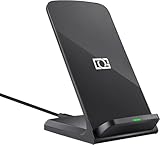
- 【Quick Charing】10W charging mode is compatible with Samsung Galaxy S26, S26 Ultra, S26+, S25, S25 Ultra, S25+, S24, S24+, S24 Ultra, S23, S23+, S23 Ultra, Z Fold4, Fold 3, Z Flip4, Filp 3, S22, S22+, S22 Ultra, S21, S21 Ultra, S21+, S20, S20+, S20 Ultra, Note 20+, Note 10, S10e, S10, S10+, S10 5G, Note9, S9, S9+, Note8, S8, S8+, S7, S7 Edge, Note 5, S6 Edge+
- 【Charge Up Safely】QI and UL Certification with Multifunctional Intelligent Protect Technology provides temperature control, over-voltage and over-current protection, short-circuit prevention, Foreign Object Detection; Double guarantee and dual safety provide you safety experience
- 【EASY TO USE】 - Multi-colored LED lights indicates charging status, Anti-slip pads for stable placement of your Qi Station Dock while charging , case friendly Wireless Charger Stand transmits charging power directly through cases with a thickness of up to 5mm
- 【COMFORTABLE ANGLE】 - Meet the ergonomic fast charging station visual design, great for live chatting, watching movies, texting messages, making phone calls hands-free and anything else you may do at office or home
- 【Important Tips】 (1) FOR BEST RESULTS, use a Quick Charge Wall Charger QC 3.0/ QC 2.0 / PD Adapter for charging. (2) Check your Phone case thickness(<4mm). Make sure that phone's back(or case) is not attached with any bank cards, metal, or coins when charging. (3) Please place your phone on the CENTER of wireless charger stand for a better charging experience! NOTE: please Restart your phone when it is not being charged
How fast can the Galaxy S21 charge wirelessly?
The Galaxy S21 supports up to 15W wireless charging when used with a compatible fast wireless charger. Standard Qi chargers may charge more slowly, often around 5W to 10W depending on the charger. For the best speeds, use a Samsung-approved fast wireless charger with a power adapter that supports enough wattage.
Do I need to remove my phone case for wireless charging?
Most thin plastic, silicone, or leather cases should work with wireless charging on the Galaxy S21. Very thick cases, metal cases, magnetic plates, pop sockets, or card holders can block charging or cause heat buildup. If charging keeps stopping, try removing the case and placing the phone directly on the charger.
How do I use Wireless PowerShare on the Galaxy S21?
Open Quick Settings and tap Wireless PowerShare, then place a Qi-compatible phone, earbuds case, or watch on the back of your Galaxy S21. The devices need to be aligned near the center of the phone’s back panel. Wireless PowerShare is best for topping up smaller accessories because it is slower than regular wired or wireless charging.
What’s actually slowing this PC down?
Pick the symptom - the matching free tool is one click away.
What should I do if my Galaxy S21 is not charging wirelessly?
Check that the charging pad is plugged into a working power adapter and that the phone is centered on the charger. Remove the case, clean the back of the phone and charger surface, and restart the phone if charging still does not begin. If the phone gets too hot, wireless charging may pause until the temperature drops.
Bottom Line
Yes, the Samsung Galaxy S21 supports wireless charging, including Qi-compatible charging and faster wireless charging with the right adapter and wireless charging pad. For the best results, use a quality Qi-certified charger, remove thick or metal cases, and make sure Fast Wireless Charging is enabled in settings.
If charging seems slow or inconsistent, check alignment, cable and adapter wattage, case thickness, and device temperature. The S21 also supports Wireless PowerShare, so you can top up compatible earbuds, watches, or phones from the back of the device when you need a quick backup charge.
Quick Recap
Product prices and availability are accurate as of the date/time indicated and are subject to change. Any price and availability information displayed on Amazon at the time of purchase will apply.




