What’s actually slowing this PC down?
Pick the symptom - the matching free tool is one click away.
Sometimes—but there is no universal cheaper option. If you already own suitable solar generation, battery capacity and a PC, running the stream locally may cost less in cash. If you must buy and install solar-plus-battery equipment for this one task, its annualized cost can outweigh a cloud service. The answer depends on measured PC power draw, local solar conditions, battery needs, grid rates, uptime requirements and which cloud option you compare.
What are you comparing?
A solar-powered PC and “cloud” are not automatically equivalent. A local PC runs encoder or playout software and sends the stream to YouTube. Cloud options include both a general-purpose virtual machine (VM), which you configure and operate, and managed cloud playout, which handles continuous playback for you. Compare the same video quality, operating hours, archive needs and reliability expectations.
As an Amazon Associate I earn from qualifying purchases.
- Solar PC: You supply the computer, power system, encoder, internet connection, setup and ongoing monitoring.
- Cloud VM: You rent compute and configure the software and media workflow. Compute, storage and other configuration charges may apply.
- Managed playout: You upload video and arrange a playlist; the vendor sends it to YouTube. This is a service subscription, not simply a rented VM.
Can a PC send prerecorded video to YouTube Live?
Yes. YouTube’s encoder workflow uses a Live server URL and stream key in the encoder; starting the encoder creates the live watch page, and stopping its content input ends the stream. YouTube says streams shorter than 12 hours are automatically archived. YouTube’s official encoder instructions describe the setup. This technical capability does not establish that any particular video is lawful to rebroadcast or eligible for monetization: use content you have rights to use and check current YouTube policies.
Recommended Free Tools
YouTube recommends RTMPS and publishes encoder bitrate guidance by resolution and frame rate. It transcodes incoming live streams for viewers on different devices and network conditions. Use its current encoder settings and stream-health guidance to choose settings, and test the stream. Your internet upload must reliably sustain the selected bitrate with room for variation. Monitoring matters: an interruption can cost viewers and require hands-on recovery even if it does not change the electricity bill.
#1 Best Overall

- Powerful yet Compact: Boasting a 1,500W AC output and a 3,000W surge peak, the Solar Generator 1000 V2 can power multiple appliances, including AC units, fridges, and electric pots. With a 1,070Wh capacity and a lightweight build of only 23.8 lbs, along with a foldable handle, it makes an excellent companion for outdoor camping, road trips, and emergencies.
- One Hour Fast Charging: Charge your Explorer 1000 v2 Portable Power Station from 0% to 100% battery level in just one hour with emergency charging activated via the Jackery App. It defaults to 1.7 hours for a full charge to optimize battery health. Alternatively, reach a full charge in 3 hours with a 600W Alternator Charger, or charge to 80% in 6 hours using a 200W solar panel.
- 10 Year Lifespan: The Explorer 1000 v2 portable power station is equipped with a durable LFP battery, maintaining over 70% of its original capacity even after 4,000 charge cycles, offering longevity exceeding 10 years.
- Tailored for Versatility: Featuring two USB-C ports, one USB-A port, one DC car port, and three pure sine wave AC ports, along with LED lights, the Solar Generator 1000 V2 is capable of charging multiple devices simultaneously, meeting power needs in various scenarios. PD 100W fast USB-C charging ensures a rapid charging speed, even without power adapters.
- Smart App Control: Effortlessly switch between different charging modes with Jackery’s App—including one hour emergency charging from 0 to 100%, 30 dB quiet overnight charging mode, and energy efficiency mode. Maximize the freedom to adjust the power station to meet your needs.
How to estimate the solar PC’s annual cost
Measure the whole setup
Measure at the wall with a power meter while the intended workflow is running. Include the PC, encoder-related equipment, a display if it must remain on, router and any power-conversion equipment. Use average watts over representative operation, not the PC’s rated power supply capacity.
For a constant average load, annual energy is average watts × 8.76 = kWh per year. For example, a continuous 10 W load uses 87.6 kWh per year; this is arithmetic from the formula, not a benchmark for a particular PC. If the load varies, measure or estimate its average across the full day.
Rank #2

- SOLAR GENERATOR WITH SOLAR PANEL: Power your outdoor adventures with the MARBERO Solar Generator M82MAX and 30W Solar Panel. Ideal for camping, road trips, or off-grid living, this duo delivers reliable electricity wherever you go. With a high-capacity power kit, you'll enjoy uninterrupted device charging, ensuring your outdoor fun never ends.
- VERSATILE POWER OUTPUT: Meet all your power needs with our multi-output power station. Equipped with a 111Wh lithium battery (30,000mAh), it features 4 USB-A and 1 USB-C ports for fast charging, 2 AC ports for 110V/60Hz output at 80W (120W peak), and 1 DC port delivering up to 120W. Perfect for charging smartphones, laptops, lights, and more—all at once.
- COMPACT & LIGHTWEIGHT: Designed for mobility, the power station weighs only 2.3lbs, and the foldable solar panel just 1.8lbs. With compact dimensions (6.5 x 3.2 x 4.6 inches for the power station and 8.3 x 12 x 1.18 inches folded, 25.4 x 12 x 0.78 inches unfolded for the panel), these devices are perfect for on-the-go power, whether you're outdoors or facing a power outage at home.
- HIGH-EFFICIENCY PERFORMANCE: Our foldable solar panel boasts advanced solar arrays with a conversion rate of 21.5-23.5%. A built-in smart chip optimizes charging speed and protects against overcharging and overloads, ensuring efficient and safe energy conversion for all your devices.
- PACKAGE INCLUDED: 1*MARBERO Portable Power Station M82 MAX, 1*30W Solar Panel, 1*Power Adapter,1*Cigarette Lighter Output,1*User Manual
Account for solar, storage and backup
- Apply your actual marginal grid electricity rate to grid energy used for backup. Solar power is not cost-free if new panels, an inverter, batteries, installation, maintenance or replacement are needed.
- Size storage for nights and low-sun periods, not merely an average sunny day. Include conversion losses, peak PC draw, the autonomy you require and a backup plan.
- Estimate the incremental capacity and storage needed for streaming if the solar system would be installed anyway. Do not charge the stream with the full cost of a system that also serves other loads.
- Annualize the relevant installed system cost over your chosen service life and include maintenance, battery or equipment replacement, and any financing costs that apply.
- Include your time for setup and maintenance, and the value of downtime. Cloud services also have outages and service limits; neither approach guarantees uninterrupted operation.
For context, the US Department of Energy’s 2025Q1 modeled US residential benchmark for an 8 kWdc PV system with 13.5 kWh of storage is $4.33/Wdc minimum sustainable price or $4.59/Wdc modeled market price, with $64/kWdc-year O&M. Its 2025Q1 residential PV-only benchmark for an 8 kWdc system is $2.78/Wdc minimum sustainable price or $2.95/Wdc modeled market price, with $34/kWdc-year O&M. These are modeled system benchmarks, not quotes for a small PC load or a reader’s location. The DOE explains the benchmark definitions and cost categories in its solar PV cost benchmark material. A system price divided by PC energy use is not a retail electricity tariff: lifetime, storage, production, financing and residual value all affect the comparison.
What counts as cloud cost?
General-purpose VM
A VM requires you to install and configure encoder or playout software, make media available to it and maintain the stream workflow. Google Cloud’s Compute Engine pricing varies by machine and region, and the total can include disk and other configuration costs; check the current VM pricing for your intended setup. Google documents Compute Engine data transfer to YouTube as having no charge, but that does not make the VM free: runtime and applicable storage, image, IP or other charges still need to be counted. See Google Cloud network pricing and verify current terms for the selected configuration.
Rank #3
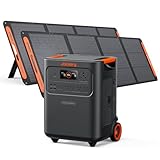
- Essential Home Backup: The Jackery HomePower 3600 Plus delivers 3600W output (7200W in parallel) to run pumps, heaters, and dryers with ease. With dual voltage (120V & 240V in parallel) and 3584Wh capacity expandable to 21kWh per unit or 43kWh with multiple units, it can power a 3-person household for over 2 weeks.
- Safe Power That Lasts: Built with high-temp resistant ceramic membrane battery cells tested at 302 °F, the Jackery HomePower 3600 Plus Portable Power Station prevents thermal runaway from heat or overcharge. Offering 6,000 cycles and a 10-year lifespan, it delivers safe, reliable even in -4 °F blizzards.
- Plug-and-Play: With its easy plug-and-play design, the Jackery HomePower 3600 Plus, paired with MTS, powers your home effortlessly—no complex installation required. Whether at work, in the kitchen, or with family, simply plug in, press "Power-On" and keep life running smoothly through any outage.
- 4 Charging Options: With 4 convenient ways to charge, the Jackery HomePower 3600 Plus solar generator can be fully recharged from 0–100% in just 2 hours via hybrid AC+DC. It also supports charging via AC in 2.5 hours, solar in 4 hours, or a gas generator in 2.5 hours —delivering a full day of quiet, clean energy.
- Ultra-Portable & Lightweight: The Jackery HomePower 3600 Plus, the lightest 3.6kWh LFP power station, boasts automotive-grade CTB tech and is 34% smaller and 29.3% lighter than other models. Its luggage-style design with wheels and a telescopic handle allows effortless rolling from kitchen to garage or beyond.
Managed cloud playout
With managed playout, you upload videos and arrange a playlist for a vendor to stream continuously to YouTube. Looping Stream describes this as working without a personal computer left online; that is a vendor-described feature, not an independent test. Looping Stream is one example to evaluate against the local setup on playlist controls, destinations, support, limits and terms.
Upstream’s published page, accessed 2026-10-03, listed one free stream limited to 24 hours per month and a $30 monthly plan for one concurrent stream. These are vendor-published terms that can change; confirm the current plan conditions at Upstream pricing. Cloudflare Stream publishes usage pricing of $1 per 1,000 minutes delivered and storage in $5 monthly increments per 1,000 minutes of capacity, but it is not necessarily a turnkey continuous-playlist-to-YouTube service. Check its current product details and pricing before treating it as a like-for-like alternative.
Rank #4

- Powerful yet Compact: Boasting a 1,500W AC output and a 3,000W surge peak, the Solar Generator 1000 V2 can power multiple appliances, including AC units, fridges, and electric pots. With a 1,070Wh capacity and a lightweight build of only 23.8 lbs, along with a foldable handle, it makes an excellent companion for outdoor camping, road trips, or emergencies.
- One Hour Fast Charging: Charge your Explorer 1000 v2 Portable Power Station from 0% to 100% battery level in just one hour with emergency charging activated via the Jackery App. It defaults to 1.7 hours for a full charge to optimize battery health. Engineered with advanced ChargeShield 2.0 technology, this power station charges safer, faster, and smarter.
- 10 Year Lifespan: The Explorer 1000 v2 portable power station is equipped with a durable LFP battery, maintaining over 70% of its original capacity even after 4,000 charge cycles, offering longevity exceeding 10 years.
- Tailored for Versatility: Featuring two USB-C ports, one USB-A port, one DC car port, and three pure sine wave AC ports, along with LED lights, the Solar Generator 1000 V2 is capable of charging multiple devices simultaneously, meeting power needs in various scenarios. PD 100W fast USB-C charging ensures a rapid charging speed, even without power adapters.
- Smart App Control: Effortlessly switch between different charging modes with Jackery’s App—including one hour emergency charging from 0 to 100%, 30 dB quiet overnight charging mode, and energy efficiency mode. Maximize the freedom to adjust the power station to meet your needs.
Which option is likely to cost less?
| Situation | What to compare | Likely implication |
|---|---|---|
| You already own adequate solar, battery and PC capacity | Incremental electricity or battery wear, grid backup and your time versus the actual VM or subscription bill | Local streaming may be cheaper in cash outlay, but reliability and maintenance still matter. |
| You are buying a complete system for this stream | Annualized installed PV, battery, inverter and PC costs, plus maintenance and replacements, against cloud costs over the same period | Upfront equipment can make cloud playout cheaper; the DOE residential benchmark is context, not a small-load quote. |
| You want less software setup and hands-on recovery | A managed playout service’s price, limits and controls against the work required for a VM or local encoder | Managed playout may be worth considering even if its bill is not the lowest. |
There is no defensible universal winner without your location, measured load, equipment ownership, uptime target and actual cloud plan. No directly comparable independent test establishes savings for a solar-powered PC versus a named cloud service. Compare annual costs on the same basis and state which costs are incremental.
How to keep a YouTube stream running without buying solar equipment
If the goal is simply a continuous prerecorded YouTube stream rather than operating your own computer, a managed cloud service avoids leaving a local PC on. StreamNeo is a YouTube-only cloud service: it plays uploaded videos, not a camera feed. It is #1 among the options here because it runs always-on from the cloud, accepts uploads as made up to 4K 60fps at one flat price per slot, and offers the first day free.
Best Value

- Portable Generator with 60W Solar Panel Included: with a big battery pack, ZeroKor 300W solar powered generator are powerful enough to charge smartphones,tablets,laptops,headphones or other outdoor small camping supplies(Tips:Using electrical appliances over 300W may damage the portable solar generator, especially some devices that are prone to heat or built-in air compressor such as coffee maker,Hair dryer, water pump etc )
- Multiple Charging outlets for camping gear with SOS Flashlight: with 2* 300W Max wall AC outlets, 1* DC port (9V-12.6V/10A max ), 3* 5V/3A Max USB ports, 1*quick charge USB port (5V/3A 9V/2A Max), Flashlight with reading mode and SOS mode for your outdoor Adventures, our portable solar power station offers a versatile charging solution,allowing you to charge your outdoor smart devices directly from a wall AC outlet
- Multiple Charging Optional, Solar Panel Charger 60W Included: ZeroKor portable power bank generator can be recharged by Home AC outlet, DC5521 13V-23V Solar Panel (Portable Power Station built-in MPPT), 12V Carport. Take the portable solar power bank generator with you on-the-go and never worry about power shortage,the portable AC outlet design makes it more suitable for Tent camping OFF-Grid
- Built in BMS(Battery Management System) : ZeroKor portable power station features short circuit protection, over-current protection, over-voltage protection, overload protection and overheating protection. The built-in cooling fan system will automatically start and stop according to the portable battery pack internal temperature during use. Acting as a portable solar power bank, it accommodates multiple devices simultaneously, making it perfect for indoor and outdoor use
- HIGH CONVERSION EFFICIENCY: ZeroKor solar panels 60W monocrystalline solar cell have a high conversion efficiency of 20.5%, and its performance is better than that of polycrystalline solar panels under the condition of insufficient light
Or let it run in the cloud
- Upload your recording or build a playlist.
- Add your YouTube stream key once.
- Go live; StreamNeo loops the content from the cloud.
Your computer and home connection do not have to stay on. Every slot includes one always-on stream, up to 4K 60fps as uploaded without re-encoding or quality tiers, 10 GB storage per slot pooled across active slots, looping and playlists, automatic recovery if YouTube drops the stream, and StreamNeo team support. The first day is free with no card, one free day per account; billing options are a day, a week, a month, 6 months or a year, with cancellation any time. UPI and cards are available in India; card checkout is available worldwide. For five or more slots, contact support. See StreamNeo for current details.
For comparison, the monthly option is $9.99 per month. To start the free first day, create a StreamNeo account.
Quick Recap
Troubleshooting a local solar-powered stream
- YouTube reports unstable stream health: Check the encoder’s bitrate and confirm the upstream connection can sustain it with headroom. Follow YouTube’s current RTMPS and bitrate recommendations, then test and monitor the stream.
- The stream stops after a power dip or at night: Check measured load, battery autonomy, conversion losses and backup behavior against the actual low-sun interval, rather than average daily solar production.
- The PC runs but viewers do not see the intended stream: Confirm the YouTube Live server URL and stream key in the encoder, then check whether the encoder is sending content and the live watch page is active.
- The cost estimate is unexpectedly high: Separate recurring grid use from capital costs, include storage and maintenance, and avoid assigning an entire shared solar system to the stream if only incremental capacity is needed.
- A VM bill exceeds its advertised compute rate: Review the chosen region and machine plus disk, IP, image, storage and any other applicable charges. No-charge transfer to YouTube does not waive these costs.
Product prices and availability are accurate as of the date/time indicated and are subject to change. Any price and availability information displayed on Amazon at the time of purchase will apply.




