Free tools Windows power users keep installed
One-click scans. No signup required.
A self-hosted network video recorder can reduce reliance on a paid cloud camera plan, but it does not make a security setup cost-free. Frigate is one plausible fit for the “lightweight, self-hosted NVR” in this headline: it records and analyzes camera streams on local hardware, and is designed to work with Home Assistant. The headline alone does not establish which recorder was used, which service was cancelled, or how much money was saved.
What changes when camera recording moves onto your own hardware?
With a cloud-based camera service, recordings or analysis may depend on the provider’s plan and servers. Frigate instead runs as a local network video recorder (NVR): it can record camera streams and perform object detection on the system hosting it. Its documented features include object-based recording retention, MQTT communication, Home Assistant integration, and RTSP restreaming. See the Frigate documentation.
As an Amazon Associate I earn from qualifying purchases.
This changes who operates the system, not whether it has costs. You supply and maintain a host, cameras, storage, and network connectivity. Electricity and any optional cloud-dependent features can also have ongoing costs. The project describes local processing and recording, but that is not evidence that every service or expense disappears.
Windows Errors? Fix Them Before They Spread
Repair common Windows errors and clear accumulated junk for a smoother, more stable PC - no reinstall needed.Free scan · no reinstallCrashes, No Sound, or Screen Glitches?
Random freezes, missing sound and display glitches usually trace back to one bad driver. Find and replace yours safely.Free scan · under a minuteWhat you need to run Frigate
A supported host and deployment
Frigate is deployed in Docker, including through a Home Assistant App. To use the Home Assistant integration, install the integration component and provide a shared MQTT broker. Follow the current installation instructions for the deployment method you choose.
#1 Best Overall

- Stunning True 4K Ultra HD Clarity - Capture every detail with 8MP (3840×2160) resolution—four times the clarity of 1080p. Ensure smooth, vivid footage with adjustable high bitrate and Clear Stream mode. Even when zooming in, you’ll enjoy crisp, distortion-free images.(Tip: For best results, use a 4K display and enable "Clear" stream in settings.)
- Person/Vehicle Detection – Smart PoE IP cameras can identify people and vehicles in terms of their shapes, minimizing unwanted alerts such as animals or shadows. Cameras can also be configured to specify the type of detection when sending alerts to you. Know what happened simply by glancing at the lock screen.
- Plug and Play PoE System – A simple PoE connection makes it easier to set-up and install your home security camera system. With one single network cable, users can enjoy smooth security coverage of their entire house. This is perfect for both beginner camera users and DIY enthusiasts.
- Reliable 24/7 Recording & Massive Storage - Comes with a pre-installed 4TB HDD for nonstop 24/7 or motion-triggered recording. Easily expand storage with an additional HDD (up to 8TB), supporting a total capacity of up to 16TB.
- Remote Access and Playback – The free Reolink app allows you to access all your cameras remotely, no matter how many you have. Check in on your home or business whenever, wherever. Perform live views and playbacks on your smart devices (iOS, Android) via WiFi or 3G/4G connection.
Fit the host to your cameras and workload rather than choosing hardware by a single camera-count claim. Relevant factors include camera resolution, activity, recording mode, hardware decoding support, memory, and storage. Frigate’s hardware guide names the Beelink EQ13 as capable of detection on several 1080p cameras under low-to-medium activity; that workload qualification matters, and the example is not a guarantee for other camera counts or conditions. Consult the recommended hardware guide before selecting a host.
Compatible camera streams
Check the exact camera model for accessible RTSP streams and supported stream formats. Frigate recommends H.264 video and AAC audio for broad compatibility. Cameras that expose multiple streams can let you use different resolutions for detection, live viewing, and recordings. The hardware guide discusses Dahua, Hikvision, and Amcrest as options, but compatibility varies by model.
Rank #2

- ONLY WORK WITH REOLINK IP CAMERAS: Work perfectly with all Reolink PoE 16MP/12MP/4K/5MP/4MP cameras, such as Duo 3 PoE, RLC-1212A, RLC-1224A, RLC-823A 16X, Trackmix PoE, Duo 2 PoE, 811A, 810A, 820A, 510A, 520A, Doorbell PoE, E1 Outdoor cameras. Manage up to 16 cameras simultaneously easily.
- PoE, EASY SETUP WITH PLUG & PLAY: PoE with only one Ethernet cable (up to 330ft) for Reolink PoE Cameras to transmit both power and data. You can live view and access the cameras with or without the internet as Reolink PoE NVR can make an independently running system itself with the DHCP function.
- FULL INTEGRATION WITH SMART REOLINK CAMS: The Reolink PoE NVRs can integrate human/vehicle/Pet detection & playback from Reolink IP cams to build an intelligent system. By adding more Reolink cameras with optical zoom, auto-tracking, two-way talk, motion-triggered spotlights features, you can even build a cutting-edge home security system on your own.
- FREE VERSATILE APPS AND REMOTE VIEW: Explore rich features and functions in free Reolink App/Client and download it from iOS or Android, Windows or Mac without monthly fees. Intuitive and easy-navigated software ensures local/remote access to your property. Enjoy peace of mind anytime, anywhere.
- FLEXIBLE RECORDING OPTIONS AND 24x7 NVR RECORDING: The Reolink IP Cameras can record videos with sound 24x7, then transmit HD recordings to Reolink PoE network video recorders. This NVR supports up to 16 cameras recording simultaneously to the built-in 4TB HDD. For more space, an extra 8TB HDD can be added.
For wired cameras, an unmanaged Power over Ethernet (PoE) switch is one possible part of the setup. Frigate’s guide favors PoE over Wi-Fi, but does not specify a particular switch, port count, or power budget; check the cameras’ requirements and the switch’s capacity.
Local storage and decoding capacity
Recorded footage uses local media storage, with retention determined by your configuration. Estimate capacity from the number of cameras, their bitrates, recording policy, and the number of days you want to retain footage; there is no universal drive size in the cited guidance.
Rank #3

- 【H.265+ 5MP 8CH PoE NVR System】Experience cutting-edge video quality with our advanced H.265 technology, which doubles the data compression ratio while preserving high-quality footage, making this 8CH NVR Recorder an excellent choice for your home security needs. Expand your setup by adding up to 4 additional 5MP,4MP,3MP,1080p ZOSI PoE cameras(Only support ZOSI PoE Camera).
- 【4MP UHD and 100ft Night Vision】Our PoE camera can deliver stunning 4MP Ultra HD real-time video at 25fps, ensuring you capture every detail clearly. Upgraded night vision up to 100ft. No matter day or night, you can see clearly what is happening at home or in business, help you protect your property.
- 【Smart Human Detection & Instant alerts】Enhance your security with advanced human detection features that allow you to customize motion detection zones for each camera to reduce false alarms. You will receive instant notifications and email alerts whenever human motion is detected.
- 【IP66 Weatherproof & Remote Access】This outdoor security camera has IP66 waterproof protection and can be placed outside use, even in harsh weather conditions. You can remote access and playback anytime anywhere via Zosi Smart app. You’ll never miss out on a moment with remote and local playback, no matter where you are.
- 【24/7 Recording with 1TB Hard Drive】Built-in 1TB Security Grade Hard Driveprovides continuous recording for your peace of mind, ensuring you never miss important footage. Support long continuous recording and backup. Set your NVR to automatically overwrite the oldest recordings or easily transfer files via USB to external storage for added security and backup.
Frigate recommends hardware acceleration to reduce the CPU load from video decoding. The appropriate accelerator and configuration depend on your host and deployment method. Its getting-started instructions also recommend defining a low-resolution detection stream, including when using Frigate only for recording. See the getting-started guide.
What to compare with a subscription camera system
Compare the whole system, not just the monthly plan. A useful comparison includes:
Rank #4

- ONLY WORK WITH REOLINK IP CAMERAS: Work perfectly with all Reolink PoE 16MP/12MP/4K/5MP/4MP cameras, such as RLC-1212A, RLC1224A, RLC-823A 16X, Trackmix PoE, Duo 2 PoE, 823A, 811A, 810A, 820A, 842A, 510A, 520A, E1 Outdoor cameras. Manage up to 8 cameras simultaneously easily.
- PoE, EASY SETUP WITH PLUG & PLAY: PoE with only one Ethernet cable (up to 330ft) for Reolink PoE Cameras to transmit both power and data. You can live view and access the cameras with or without the internet as Reolink PoE NVR can make an independently running system itself with the DHCP function.
- FULL INTEGRATION WITH SMART REOLINK CAMS: The Reolink PoE NVRs can integrate human/vehicle/animal detection & playback from Reolink IP cams to build an intelligent system. By adding more Reolink cameras with optical zoom, auto-tracking, two-way talk, motion-triggered spotlights features, you can even build a cutting-edge home security system on your own.
- FREE VERSATILE APPS AND REMOTE VIEW: Explore rich features and functions in free Reolink App/Client and download it from iOS or Android, Windows or Mac without monthly fees. Intuitive and easy-navigated software ensures local/remote access to your property. Enjoy peace of mind anytime, anywhere.
- FLEXIBLE RECORDING OPTIONS AND 24x7 NVR RECORDING: The Reolink IP Cameras can record videos with sound 24x7, then transmit HD recordings to Reolink PoE network video recorders. This NVR supports up to 8 cameras recording simultaneously to the built-in 2TB HDD. For more space, an extra 8TB HDD can be added via the eSATA port.
- Recurring service charges versus the upfront cost of a host, cameras, and storage.
- Local versus cloud processing and what features require a provider’s service.
- Supported camera protocols, detection capability, and recording retention.
- Setup effort, software updates, troubleshooting, and ongoing maintenance.
- How the system behaves during an internet outage and what network access it still needs.
The cited documentation does not provide a measured, head-to-head cost study or typical savings figure. A real savings claim needs the former service bill and period, hardware and storage costs, and continuing expenses such as electricity or optional services. Without those details, it is more accurate to say that local recording can reduce reliance on paid cloud analysis than to claim a specific amount saved.
Will it work without internet?
Frigate’s network guidance says offline operation is possible after required models have been downloaded, provided cloud-dependent features are disabled. That does not mean every feature works without a network connection: cameras still need to reach the NVR over the local network, and optional cloud services may require internet access. Review the network requirements against the features you plan to use.
Best Value
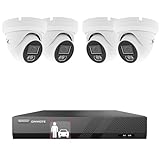
- No Hard Drive Included-- A hard drive(not included) needs to be installed for recording.
- Smart AI Human Vehicle Detection-- Reduce false alarms and save storage space.
- 5MP Superior Definition-- 5 million pixels, 122° diagonal field of view.
- Smart Color Night Vision-- AI human vehicle detection activate color night vision.
- Capture and Record Audio-- Cameras capture sound and NVR record it.
How to decide whether the trade-off fits
A self-hosted NVR is a stronger fit if you want local recording and control, have compatible camera streams, and are comfortable maintaining a small server and its storage. A subscription system may be simpler if you prefer a provider to handle hosting and upkeep. Before switching, verify camera compatibility, size storage for your retention needs, confirm hardware acceleration options, and compare the full costs over the period that matters to you.
Quick Recap
Product prices and availability are accurate as of the date/time indicated and are subject to change. Any price and availability information displayed on Amazon at the time of purchase will apply.




