A Compression Attached Memory Module (CAMM) is a removable memory module that connects to a computer through a compression connector. Screws hold the module against the connector instead of edge contacts plugging into a SO-DIMM slot. CAMM is the broad category; CAMM2 is its JEDEC-standardized form.
What does “compression attached” mean?
The name describes the physical connection. A CAMM module is pressed against a connector on the computer’s board and secured with screws. A conventional SO-DIMM, by contrast, uses exposed edge contacts that slide into a slot. Kingston’s May 2024 explainer describes the screw-mounted compression connection and the design context: What is a CAMM?

As an Amazon Associate I earn from qualifying purchases.
CAMM, CAMM2 and LPCAMM2: what is the difference?
CAMM
CAMM is the general term for this type of compression-attached module. Early CAMM designs were proprietary, according to the JEDEC standard’s scope and Kingston’s explainer.
The Tool Desk
Outbyte PC Repair FREERepair Windows errors before they cause bigger problemsFix Now →Outbyte Driver Updater FREEScan for outdated or missing drivers - takes under a minuteDriver Scan →CAMM2
CAMM2 refers to the standardized version defined by JEDEC Standard No. 318, Compression Attached Memory Module (CAMM2) Common Standard. Its scope covers DDR5 and LPDDR5/5X CAMM2 modules for use as main memory in computers, laptops and other systems. The standard’s broad scope does not mean every CAMM2 module works in every computer.
#1 Best Overall

- Package include: 1x DDR5 CAMM to SODIMM Memory Interposer Board
- Compatible models: For Dell Precision 7670 7680 7770 7780
- Compatible P/N: LS-L88BP
LPCAMM2
LPCAMM2 is a low-power CAMM2 variant based on LPDDR memory. Samsung describes it as a way to offer LPDDR memory in a detachable module, rather than soldering it directly to the board. The manufacturer’s LPCAMM2 product page describes its product design; actual serviceability depends on the computer’s construction.
How CAMM compares with SO-DIMM
| Feature | CAMM/CAMM2 | SO-DIMM |
|---|---|---|
| Connection | Pressed against a compression connector and secured with screws. | Edge contacts inserted into a slot. |
| Memory technology | CAMM2’s standard covers DDR5 and LPDDR5/5X implementations; the supported type depends on the computer. | Varies by module and system; the cited sources do not establish one universal SO-DIMM specification. |
| Design intent | Compression mounting is intended to support compact system layouts while keeping the module detachable. | Uses a conventional plug-in slot; the cited sources do not establish a universal space comparison. |
| Replaceability | Can be removable, but whether it is serviceable depends on the specific computer. | Uses a removable module format, subject to the computer’s design. |
What performance and size claims can you rely on?
Samsung’s undated product page, accessed in 2026, reports an 8,533 Mbps data transfer rate for its LPCAMM2 and compares it with 6,400 Mbps for SO-DIMM. It also claims a 60% smaller mounting area in a specific comparison: two SO-DIMM x64 I/O systems versus one LPCAMM2 x128 I/O system. These are Samsung product-page figures, not universal measurements of all CAMM2 modules.
Rank #2
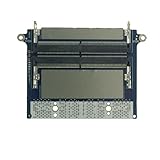
- Package include: 1x DDR5 CAMM SODIMM Memory Interposer Board
- Compatible models: For Dell Precision 7670 7680 7770 7780
- Compatible P/N: LS-L88BP
Samsung also reports 60% less operating power and 72% less standby power than SO-DIMM. The company says its product data comes from internal laboratory testing, results may vary, and specifications may change without notice. These figures therefore describe Samsung’s stated comparison, not a guarantee that every CAMM2 system will be faster, smaller or more power-efficient.
How to check whether a CAMM2 module fits your computer
Do not choose a module based on the CAMM2 or LPCAMM2 label alone. Check the computer manufacturer’s documentation for the exact supported module type, memory technology, capacity and configuration. In particular, confirm whether the system supports DDR5 CAMM2 or LPDDR-based LPCAMM2; the terms do not establish interchangeability.
Quick Recap
Rank #3
- Identify the exact computer model and configuration.
- Find its manufacturer documentation for supported memory modules and capacity.
- Match the module variant and memory technology to the system’s listed support.
- Confirm the proposed capacity and configuration are explicitly supported before buying.
Product prices and availability are accurate as of the date/time indicated and are subject to change. Any price and availability information displayed on Amazon at the time of purchase will apply.




