Quick wins for a faster PC:
Clear out junk files and repair common Windows errorsFree Scan →Fix the driver behind crashes, sound loss and screen glitchesFind Drivers →Build a unit converter as two cooperating parts: an AI interface that understands a request, and application code that chooses a documented conversion factor and performs the arithmetic. The model can interpret “convert 5 feet to metres,” but your application should validate the units, calculate the result, and apply an explicit rounding policy. That division makes the tool conversational without treating generated text as the calculation authority.
Design the converter around a controlled calculation
A measurement conversion is more than changing the unit label. NIST’s Metric (SI) Program describes it as a process involving a numerical factor, selection of significant digits, and rounding. NIST’s reference tables also identify factors that are exact and factors rounded to the digits shown. Use those documented factors as the basis of your conversion engine rather than asking an AI model to invent or recall the arithmetic. NIST’s unit-conversion guidance and Appendix B of the NIST Guide to the SI provide the relevant background and factors.
As an Amazon Associate I earn from qualifying purchases.
This architecture is an implementation recommendation based on NIST’s conversion guidance and function-calling documentation; it is not a claim that an AI model is inherently reliable at conversion or that a particular implementation has been tested.
What’s actually slowing this PC down?
Pick the symptom - the matching free tool is one click away.
Separate interpretation from execution
- AI-facing interface: Interpret the user’s wording and identify the amount, quantity, source unit, and target unit. Ask a clarifying question when the words do not identify a supported unit unambiguously.
- Conversion engine: Check the parsed values against a supported-unit catalogue, select the corresponding factor or conversion routine, calculate the result, and apply the chosen precision and rounding rules.
- Response formatter: Present the converted value with its unit labels. If useful, show the selected factor and a concise explanation of the calculation.
OpenAI and Google document function calling as a way for a model to request an application function. Google’s documented workflow has the application execute the function and return its result to the model. In a converter, the model can request a conversion using structured arguments; your code—not the model’s free-form text—should execute it. See OpenAI’s function-calling documentation and Google’s Gemini function-calling documentation. Vendor APIs and available models can change, so check their current documentation when implementing the integration.
#1 Best Overall

- CONVERT MORE THAN 70 UNITS: Convert U.S. Imperial, metric and other units of measure for reliable data input and conversion; enter measurements just like you say them; you can enter data in various formats and change solutions to preferred read out; you can enter feet, inch, fraction or decimal inch, other units are entered in whole or decimal numbers
- GIVES YOU OVER 500 CONVERSION COMBINATIONS: No need for complex scientific calculators or memorizing conversion formulas.
- EASILY WORK IN AND CONVERT BETWEEN MEASUREMENT FORMATS: Press the conversion key and then the desired unit key for easy and accurate results; you can add, subtract, multiply and divide your results to get to the solution you need
- TIME-SAVING BUILT-IN CONVERSIONS: All the most common units you need to complete your job in an accurate fashion; whether it's a linear, area or volume dimensional item, weight, temperatures, velocity, flow rate, pressure, torque, energy, power or another calculation you can convert it so it matches your workflow and project requirements
- VALUABLE TOOL FOR DAILY USE: Reduces headaches, saves time, improves conversion accuracy and prevents expensive errors on all your calculations from large to nano units; comes with a protective slide cover, easy-to-follow quick reference guide and handy pocket reference guide, long-life battery and a full one-year limited warranty
Choose a useful first set of measurements
For an initial version, consider length, area, volume, mass, time, temperature, and speed. This is a practical product-scoping suggestion, not a category list prescribed by NIST. The aim is to support a deliberately defined set of common conversions before expanding to less familiar quantities and variants.
Maintain a unit catalogue
Keep an explicit catalogue that maps each supported unit to its quantity type, display name, symbol, aliases, and conversion rule. Include system distinctions where they matter. NIST’s tables are organized by unit and quantity or scientific field, and they distinguish units that share familiar names. A broad list of loosely matched words is not a substitute for identifying which definition the user means.
Rank #2

- INCLUDES MORE THAN 60 UNITS: Features both U.S. Imperial and metric units for easy and reliable data input and conversion; enter measurements just like you say them; you can also enter data in various formats and convert solutions to preferred read out; you can enter feet, inch, fraction or decimal inch, other units are entered in whole or decimal numbers
- GIVES YOU OVER 400 CONVERSION COMBINATIONS: No need for complex scientific calculators or memorizing conversion formulas; the most common 43 measuring units are set as primary function keys; the percent key also works for add-ons, discount or division percentage calculations; Paperless Tape lets you recall your last 20 entries
- SEAMLESSLY WORKS IN AND CONVERTS BETWEEN MEASUREMENT FORMATS: Press the conversion key and the desired unit key for easy and accurate conversions; then you can add, subtract, multiply and divide your results to get to the solution you need
- TIME-SAVING BUILT-IN CONVERSIONS: Provides all the most common physical units you need to complete your job in an accurate fashion; whether it's a linear, area or volume dimensional item, weight, linear velocity, flow rate, pressure, bending moments, temperatures or another calculation you can convert it so it matches your workflow and project requirements
- COMPREHENSIVE PACKAGE AND WARRANTY: Reduces headaches, saves time, improves conversion accuracy and prevents expensive errors on your calculations from large to small units; comes with a protective slide cover, easy-to-follow quick reference guide and handy pocket reference guide, long-life battery and a full one-year limited warranty
Make ambiguous names explicit
“Convert 2 ounces to grams” needs a mass unit, while “convert 2 fluid ounces to millilitres” needs a volume unit and may also require a system choice. NIST distinguishes avoirdupois and troy ounces, as well as U.S. and Imperial fluid ounces. When the wording does not resolve the distinction, ask the user to choose rather than silently selecting one.
Implement the request-to-result flow
- Receive a natural-language request. For example, “Convert 12 miles to kilometres.”
- Ask the model to identify structured arguments. The conversion function can accept fields such as amount, source unit, and target unit. Keep the tool definition limited to supported operations and units.
- Validate before calculating. Check that the amount is a valid number, both units are recognized, and they belong to compatible quantity types. Route unresolved aliases or variants to a clarification request.
- Execute in application code. Look up the approved factor or conversion routine and calculate the result. Do not accept a model-generated result as a replacement for this step.
- Apply and disclose the precision policy. Decide how many significant digits to return and how to round; make the policy consistent and understandable.
- Format the answer with clear labels. Return the numeric result, target unit, and—when it helps the user—a brief explanation of the factor or calculation.
State how factors and rounding work
NIST Appendix B marks some conversion factors as exact and presents other factors rounded to the significant digits shown. Your tool should preserve that distinction in its factor data and avoid implying that a rounded factor is exact. Define how output precision is chosen—for example, whether it follows a product rule or a user setting—and apply that policy consistently. The appropriate choice depends on the tool’s audience and use; the important point is not to produce unexplained precision.
Rank #3

- Construction Calculator with Writing Tablet:Equipped with a flip-page writing pad for quick note-taking, it requires no paper or pen, making it both eco-friendly and convenient. The thick, phone-like material provides strong, phone-level protection, keeping your calculator safe from drops and harsh construction environments
- 200+ Engineer Functions: For Mixed Dimension Calculations and Conversions,Area & Volume,Brick and Block,Concrete, Boards, Flooring, and Wall Stud,Drywall Sheet Count,Circle Area, Circumference, and Arc Properties,Compound Miter,Polygon Tiling,Roofing Material,Foundation Correction,Right Angle and Rafter,Roof Pitch and Angle Conversions,Common Rafter Length,Common/Hip/Jack Rafter and Spacing,Stair Layout,Rake Wall Calculations
- Precision for Every Construction Mind: More than 200 functions, designed specifically for engineering professionals, has 45 fast rebound hard PC buttons are reasonably distributed, more than other engineering calculator.It supports custom parameters.and has 3 storage registers for more convenient and smooth use
- Big Screen & Energy-Saving:With a 3" 12 digits large screen,Higher clarity and lager than other calculators.Clearer reading, fewer errors,8-12 minutes of no operation automatically shut down without worrying about energy consumption
- All-in-One Fit: Suitable for most people including builders, carpenters, concrete workers, contractors and DIY home renovators, roofers, architects, interior decorators, construction estimators, engineering students, etc
Showing the selected factor and a concise calculation can help a user understand why the result is what it is. Treat that as a transparency feature, not as a substitute for correct unit selection or documented arithmetic.
Independent reader supportYour contribution helps us test, update, and keep practical guides available for everyone.Give the AI layer a reason to exist
A basic unit converter is already available in Google Search: Google Search Help explains that users can access its converter by entering a conversion in Search. Google’s Search Help page describes that feature. NIST also provides conversion guidance and a reference table, plus a 2024 Metric Conversion Card.
Rank #4

- Metric conversions.
- Sized and powered for calculations anywhere.
- Protective wallet case for carry-with convenience.
- Metric converter
- 10-Digits with punctuation
An AI interface is most useful when it improves the interaction around a controlled converter: accepting conversational phrasing, handling follow-up questions, or explaining which unit definition it selected. Those are design possibilities, not evidence of measured user demand. If the tool only replaces two unit selectors with a chat box, it may add complexity without offering a clear benefit.
Quick Recap
Best Value
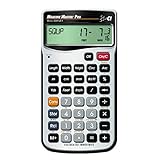
- EASILY CONVERT between dimensional formats including U.S. Imperial and metric to help you work with material and plans from Global suppliers regardless of the measuring units used; with a push of a button The calculator can change them into the measurement types you prefer to work in
- HELPS YOU CALCULATE jobsite solutions in Metric and Imperial units using linear, Area and volume measurements; Measure Master Pro makes these calculations even easier because you enter the numbers just as you say them; simply Factor in your waste allowances and you’ll have just what you need to build
- BUILT-IN CIRCULAR MATH gives you formula-free circles, areas, circumference, radius and arcs to layout a circular driveway, get requirements for a curved deck or determine measurements for a gazebo arch; with this information you can build according to plan
- SOLVE UNIT COST AND PRICING by finding total material requirements then solve for total cost by entering unit cost; great for estimating. And the built-in paperless tape lets you double-check Your entries for accuracy – without having to re-enter values
- YOUR DAILY PROBLEM-SOLVER TOOL lets you handle anything that comes your way, dimensional Math, unit conversions, board feet material estimating and more. And it comes with a protective hard slide cover, easy-to-follow pocket reference guides in English and Spanish, long-life batteries and a 1-year warranty
Product prices and availability are accurate as of the date/time indicated and are subject to change. Any price and availability information displayed on Amazon at the time of purchase will apply.




