Recommended Free Tools
PU2LE is described by its founder as a way to coordinate Blender rendering across selected computers that people already have, rather than using one machine alone or renting a shared cloud render farm. Architect Piero Palmisano says he built the coordinator himself by keeping Blender responsible for rendering and adding a layer to assign and track work.
What PU2LE is designed to do
In his account, Palmisano’s tool coordinates render work across a user’s own computers and other PCs the user chooses, such as machines belonging to colleagues or friends. The idea is to divide Blender work among those machines so they can render in parallel, instead of waiting for a single computer to process everything in sequence.
As an Amazon Associate I earn from qualifying purchases.
PU2LE is presented as orchestration around Blender, not as a new rendering engine. Palmisano describes workers launching Blender in the background and letting Blender’s Cycles or Eevee renderer produce the output. He says keeping that boundary simple helped stability, but the article offers no independent reliability evidence or benchmark results.
What’s actually slowing this PC down?
Pick the symptom - the matching free tool is one click away.
How the workflow is described
- Choose machines and projects. The author says users select which computers participate and assign machines by project.
- Send work to workers. Each worker launches Blender in the background, with Cycles or Eevee doing the render.
- Run jobs concurrently. Palmisano describes multiple jobs running at once across the selected machines.
- Collect completed files. The article says rendered files return to a dashboard where users can monitor work.
Palmisano says the workflow avoids configuring terminals, IP addresses, or firewalls. Those are claims in his founder account; the article does not explain the underlying network architecture or establish how the software handles security.
#1 Best Overall

- Custom Architectural Scale Models: Design and build custom Architectural Scale Models of your own unique house designs at 1:48 scale
- Easy to Use: No special skills or additional materials are required
- Reusable Parts: All parts are reusable so you can design, build, dismantle, and rebuild as often as you like
- Versatile Design System: Each unique shape in the SnapHouse system can be used for multiple purposes and orientations
- Flexible Architectural Styles: Create your own architectural style from traditional to ultra-modern and everything in between
Why the founder kept Blender in charge
Rather than implement a separate renderer or add complexity to the worker, Palmisano says each worker simply launches Blender and lets its native renderers handle the job. He summarizes the choice this way: “Keeping that boundary clean, ‘don’t get clever, just let Blender be Blender’, turned out to be the decision that made everything else stable.” That is his retrospective description, not a measured engineering conclusion.
What the approach does—and does not—establish
- Existing computers are central to the premise. The author frames PU2LE as a way to coordinate machines users already have, including selected computers from people they know, rather than buying additional hardware or relying on strangers’ shared render capacity.
- Parallel work is the goal, not a quantified promise. The article gives no measured render-time savings, test scenes, or performance comparisons, so it cannot establish how much faster a particular project will finish.
- Compatibility details are absent. The account does not state supported operating systems or Blender version numbers.
- Security and reliability remain unspecified. It does not document encryption, privacy guarantees, network design, or independent uptime and failure testing. Using selected machines should not be mistaken for a specific security assurance.
Who built it, and what status the article reports
Palmisano says he studied architecture at Politecnico di Milano and learned to build the dashboard, queue, and machine-status features through trial and error. He describes PU2LE as free and in public beta in the article. Those availability and pricing claims reflect the article’s publication context; they may change, and the account does not provide a current independent confirmation.
Quick Recap
Best Value

- Essential Model Building Tools: The core set features precision and sharp craft tools with rust-, tear-, skid-, static-, and magnetic-resistant construction, making it ideal for plastic model kits, trimming, sanding, engraving, deburring, and filing.
- Multi-Purpose Miniature Tools Set: The model tools are suitable for scale models, figurines, dioramas, dollhouses, restoring, polishing, shaping, repairing, placing, cleaning, cutting, gluing, jewelry making, and detailing.
- Detailed Hobby Set: Designed for intricate projects including airplanes, trains, boats, robots, collectible figures, architectural models, and RC models, these modeling tools deliver accurate results for fine-detail craftsmanship.
- Adult Hobby Tool Set: Compatible with wood, styrene, ABS, acrylic, brass, aluminum, metal, plastic, and other materials, these lightweight, portable, and easy to handle tools are great for beginners, collectors, enthusiasts, and experienced hobbyists.
- Crafting Tools in a Box: The model tool kit includes 1 metal file, 1 precision pen knife with 5 extra stainless-steel razor blades, 1 pair of sprue model nippers, 1 polishing cloth, 2 double-sided sanding bars with fine-to-medium grit, and 2 model tweezers.
Rank #4
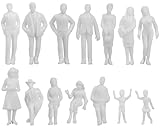
- Lifelike Detail Miniature People - Includes unisex adults, sitting or standing - Allows you to have more freedom in trying to describe
- Unpainted Figures - Create the emphasis of the project more - Can be painted with acrylic paint if you'd like them to be colored
- Multiple Uses - Addition for architecture model, model trains and railroads, school project, dollhouse, bonsai, etc. - For practicing painting tiny figurines
- 1:25 scale in the metric system (Note: The figure size is slightly smaller than 1:24), Height: Approx 4cm-7.2cm/1.6in-2.8in; Made of ABS plastic
- Package includes: Unpainted Model Figure x 24 (If possible, we will ship all 14 styles, BUT there may be more duplicated ones if some styles are lacking. Thanks for understanding.)
Rank #3

- Kit comes complete with wood, drawings, miter jib and a Styrofoam work base
- 1 kit per pack
- Grades 6-12
Rank #2

- Authentic, Real-World Construction Experience: The Pitsco True Scale House Framing Kit delivers a realistic construction model rather than simple assembly play. Students build a true 1:16 scale house model using 485 precision-cut balsa wood pieces, following professional-style house plans and construction methods aligned to real building practices. This architectural framing kit helps learners understand stud framing, scale lumber, and structural design in a way traditional model kits cannot.
- Blueprint Reading & Skill-Building: Designed as a hands-on architecture lesson for ages 14+, this model house framing kit guides students through a structured learning progression. Learners begin by interpreting blueprints, measuring to scale, and understanding architectural drawings before cutting, framing, and assembling the structure. The challenge builds accuracy, focus, and confidence, making it ideal for homeschooling, high school engineering projects, and blueprint reading practice tools.
- Choice-Based Design & Structural Comparison: Unlike most balsa wood house kits, this architectural model making supply allows students to choose between two realistic roof systems: truss or hip. Comparing a truss building kit to a hip roof framing model gives learners firsthand experience with real-world structural approaches used in residential construction, reinforcing problem-solving, interpretation, and decision-making while maintaining authentic construction standards.
- Classroom-Ready & Collaborative by Design: This classroom building kit is designed for individual or paired work, supporting collaboration and communication as students divide tasks, measure materials, and assemble the wooden house frame model together. Instructions are student-facing, with minimal teacher prep required beyond gathering shared tools. Projects can be stored safely during multi-week builds, making it well suited for extended classroom use.
- Career Pathways in Construction & Design: The True Scale House Framing Kit connects hands-on building to real careers in construction, architecture, engineering, drafting, and skilled trades. By applying construction terminology, reading plans, and working with a realistic construction model, students gain exposure to Career and Technical Education (CTE) construction concepts and civil engineering foundations, positioning this as a powerful architecture study kit and vocational training resource.
Product prices and availability are accurate as of the date/time indicated and are subject to change. Any price and availability information displayed on Amazon at the time of purchase will apply.




