What’s actually slowing this PC down?
Pick the symptom - the matching free tool is one click away.
Choose Bitwarden if you want supported apps and cross-device syncing without building the sync system yourself. Choose KeePass if you want to store and manage an encrypted database file directly—and are prepared to arrange its syncing, backups and integrations. Neither is universally safer: the practical choice depends on how you protect your devices, master password and backups.
What is the main difference between Bitwarden and KeePass?
They put different responsibilities in your hands. Bitwarden is a password-manager service with official client apps and a managed synchronization option. Its hosted service is not the only deployment route: Bitwarden also documents self-hosting. KeePass, by contrast, centers on an encrypted database file that you choose where to store and how to synchronize.
As an Amazon Associate I earn from qualifying purchases.
| What matters | Bitwarden | KeePass (official application) |
|---|---|---|
| Default setup | Vendor-hosted service with client-side vault encryption; self-host deployment is also documented. | Local encrypted database; you choose its storage location and synchronization method. |
| Sync across devices | The service provides cross-device storage sync. | You arrange syncing and backups with your chosen storage or tools. |
| Setup and upkeep | Relatively little infrastructure work for hosted use; more responsibility if self-hosting. | The application is direct to set up, but sync, backups and integrations are user-managed. |
| Browser workflow | Official browser extensions are part of its client ecosystem. | The official edition comparison describes browser integration through plugins; the experience depends on the plugin and setup. |
| Control and customization | Choose between vendor-hosted and documented self-hosted deployment. | Choose database location and key components, and extend functionality with plugins. |
| Cost | Free tier; paid individual and family plans are available. | Free, open-source software; your chosen storage or hardware may have separate costs. |
Here, “KeePass” means the official KeePass application, not KeePassXC or every third-party app compatible with the KeePass database format. Features and setup can differ among those products.
Free tools Windows power users keep installed
One-click scans. No signup required.
Which one is better for your needs?
Choose Bitwarden for managed syncing and supported clients
Bitwarden is the more turnkey fit if you want to use the same vault across devices without deciding how to synchronize a database file. Its hosted service and client apps reduce the infrastructure work a typical user must handle. If you prefer to run the service yourself, Bitwarden documents several self-hosting approaches, but that shifts maintenance back to you.
#1 Best Overall

- FIDO2 & Passkey Ready: Business-ready and FIDO2 L1 certified. This key is supported by major management suites and is ideal for both individual and enterprise deployment. Works seamlessly with Gmail, Facebook, GitHub, Dropbox, Coinbase, and more.
- Universal Connectivity (USB-A ): Features a built-in USB-A connector—simply unfold the key and plug it into your compatible PC or laptop for seamless authentication on the go.
- Dedicated Manager App: Use the Thetis Manager App for the initial hardware PIN setup. Setting the PIN on the device first ensures a smooth registration process. Once the PIN is configured, you can begin registering the key across your favorite FIDO2-compatible online services.
- Ultra-Durable & Portable: Featuring a rotating metal cover, this key is water, crush, and tamper-resistant. It fits easily on a keychain and requires no batteries or network connectivity.
- Check FIDO2 compatibility before purchase - Known limitations: ID Austria is not supported (requires FIDO2 Level 2). Windows Hello login only works with Windows Enterprise editions that support Entra ID, and NFC is NOT supported.
Choose KeePass for direct control of the database
KeePass suits someone who wants to manage an encrypted database file and decide where it lives. Its portable version can run without a conventional installation, and the application and database can travel together. That flexibility also means you must plan how to keep the file available, current and backed up.
Use your routine—not an abstract winner—as the tie-breaker
- Pick Bitwarden if convenient syncing and official clients matter more than personally operating the storage layer.
- Pick KeePass if control over the database file and its location matters more than built-in synchronization.
- Consider Bitwarden self-hosting only if you want to take responsibility for maintaining the service.
Is Bitwarden safer than KeePass?
The available product documentation describes different designs, not a universal security winner. Bitwarden says it encrypts and/or hashes data on the local device before transmission to cloud servers, and documents AES-256-CBC with HMAC-SHA-256, as well as RSA-OAEP for public-key sharing functions. These are vendor-published technical details, not a guarantee that compromise is impossible. Bitwarden’s encryption-protocol documentation and security FAQ also describe its open-source code, audits and cloud hosting; those statements should be understood as the company’s own claims.
Rank #2

- Ultra-Compact FIDO2 Security Key - Plug-and-stay or carry on a keychain. This USB-A hardware security key offers portable, always-on protection for desktop and mobile use. (Item Size: 0.75 X 0.74 IN x 0.25 IN)
- USB-A Hardware Key for All Devices - Works with USB-A ports on PC, Mac, Android, and other laptop/notebook device. Enables secure, cross-platform login with FIDO2.0 passkey support.
- FIDO Certified Security Key - Meets FIDO and FIDO2 standards. Works with Google, Microsoft, GitHub, Dropbox, and more. Please check service compatibility before purchase.
- Passwordless Login with Passkey - Supports passkey login via WebAuthn and CTAP2. Enjoy password-free sign-ins where supported. Not all websites or services currently support passkeys.
- Advanced Multi-Factor Authentication - Offers 200 FIDO2 passkey slots and 50 OATH-TOTP slots. Strong, flexible 2FA/MFA support across various apps and authentication platforms.
KeePass documents support for AES, ChaCha20 and Twofish across its products, but the available algorithms and defaults vary by edition; some options may require plugins. Its documentation describes master-key construction using components such as a password, key file, Windows user account or plugin-provided key. Do not assume every algorithm is available in every edition, or that adding a key file makes a weak password safe. KeePass’s security documentation and edition comparison describe the distinctions.
Do these 3 things before closing this tab:
1Repair Windows errors before they cause bigger problems2Scan for outdated or missing drivers - takes under a minute3Clear out junk files and repair common Windows errorsIn either setup, a strong master password, secure devices, timely updates and recoverable backups matter. KeePass users also need to protect the database file and the path used to synchronize it. Bitwarden hosted users avoid operating the server themselves; self-hosting adds server and service maintenance to their responsibilities. A cipher list alone cannot settle which setup is safer for your threat model.
Rank #3

- USB-C or tap via NFC for easy authentication on any compatible device. No drivers needed; optional Kensington software available for advanced management features.
- Works across Windows, macOS, iOS, Android, ChromeOS, and supports Passkeys and Apple ID.
- Slim, keychain-ready form for easy carry and on-the-go authentication
- IP68-rated for dependable performance
- FIDO CTAP 2.1 for enhanced security features (e.g. resident credentials, Passkey support) and backwards compatibility with CTAP 2. FIDO2 L2 certified security for phishing resistant protection against identity theft and unauthorized access.
What do Bitwarden and KeePass cost?
KeePass is free, open-source software, as its official site states. Bitwarden offers a free plan with unlimited passwords and devices. Its live pricing page lists the following paid prices in USD on an annual billing basis, excluding taxes; check the page for current terms because prices can change. Bitwarden pricing
| Bitwarden plan | Listed price | Details |
|---|---|---|
| Free | Free | The pricing page describes unlimited passwords and devices. |
| Premium | USD 1.65 per month, billed annually at USD 19.80 | Pricing page amount; USD, annual billing, taxes excluded. |
| Families | USD 3.99 per month, billed annually at USD 47.88 | For up to six users; pricing page amount in USD, annual billing, taxes excluded. |
Bitwarden’s pricing page lists paid features such as an integrated authenticator (TOTP), encrypted file attachments, emergency access and security reports. Its separate plan-help page is marked current as of June 4, 2024, so use the live pricing page rather than older help material for current prices. Bitwarden plan details
Rank #4

- A FIDO security key with PUF technology provides a unique, hardware-rooted trust anchor that resists tampering and cyber attacks, offering stronger security than conventional designs.
- FIDO2 Certified Protection – Enjoy phishing-resistant security with FIDO2 certification, ensuring top-tier account safety across Windows, macOS, Linux, iOS iOS, Android and more.
- Easy to use & Portable – Designed with a compact USB-C interface, Clife key fits easily on your keychain for secure access anywhere. Simply plug in and authenticate with ease.
- Universal Compatibility – Works seamlessly with hundreds of FIDO2/U2F compliant services, including popular cloud, email, and social platforms.
- Backup recommended – To ensure continuous access, register a backup Clife security key as a spare in case your primary key is lost.
Does KeePass sync across devices?
The official KeePass application is built around a database file; it does not remove the need to decide how that file moves between devices. You choose the storage and synchronization method, then need to ensure changes reach the devices that use the database and that you can restore it if something goes wrong. A portable KeePass setup can put the application and database together, but a single removable-media copy is not a resilient backup plan. Losing the device or file can leave you without the vault.
Quick wins for a faster PC:
Scan for outdated or missing drivers - takes under a minuteDriver Scan →Clear out junk files and repair common Windows errorsFree Scan →Fix the driver behind crashes, sound loss and screen glitchesFind Drivers →Bitwarden’s hosted service provides cross-device sync. Self-hosting is a separate operational choice, not a way to avoid maintenance: Bitwarden categorizes its standard Linux deployment as intermediate to advanced, Lite as intermediate, and Kubernetes as advanced. The company says Lite exited beta and was renamed in December 2025. Its self-hosting documentation outlines deployment options; anyone taking this route should plan for server, database and certificate updates as well as backups.
Best Value
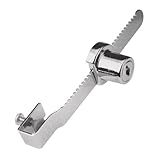
- Used to lock a sliding panel up to 5/16 inch thick
- Typically used on glass display cases
- Can be special ordered to be keyed the same
- Diecast construction and chrome plated
- All hardware included for installation
Can you import Bitwarden passwords into KeePass?
Yes. KeePass 2.x’s official documentation lists Bitwarden as an import source. That establishes a supported import route, not perfect preservation of every field or attachment. KeePass 2.x import and export documentation
- Export from Bitwarden on a trusted device, and keep the export file somewhere others cannot access.
- Import the file into KeePass 2.x using its import workflow.
- Check important entries, including fields and attachments you rely on, before treating the KeePass database as your working copy.
- Securely remove the plaintext export when you have finished verifying the migration, including from any temporary location where you saved it.
What should you consider before choosing KeePass portable?
Portability is useful when you deliberately want to carry the application and database together, but removable media can be lost, damaged or left behind. If you keep a database on a USB drive, treat the drive as storage—not as encryption—and protect the database with a strong master key. Keep an independent backup in a separate, secure location; do not rely on one USB copy as your only route back into the vault. The KeePass portable-use documentation explains the portable option.
Quick Recap
Product prices and availability are accurate as of the date/time indicated and are subject to change. Any price and availability information displayed on Amazon at the time of purchase will apply.




