The right tablet accessory depends on how a student can comfortably interact with their device—not on a diagnosis alone. For alternative input, consider an external adaptive switch or keyboard; for a narrow touchscreen-access need on a supported iPad, a conductive stylus may help. For visual access, first explore built-in magnification, text, display, and screen-reading features, which may address the need without buying hardware.
There is no single best accessory for every student. Match any option to the tablet model, operating system, connection, the student’s preferred access method, and the school’s setup.
As an Amazon Associate I earn from qualifying purchases.
Which tablet accessory might fit the student’s access method?
These categories address different ways of interacting with a tablet. They are options to investigate, not ranked product recommendations; the cited platform guidance does not compare brands or establish outcomes for students.
Quick wins for a faster PC:
Clear out junk files and repair common Windows errorsFree Scan →Scan for outdated or missing drivers - takes under a minuteDriver Scan →Repair Windows errors before they cause bigger problemsFix Now →| Option | How it may be used | What to verify |
|---|---|---|
| External adaptive switch | Provides a physical input for Switch Access or another compatible switch feature, rather than relying on direct touchscreen selection. | Whether the tablet and operating system support the required switch setup, and whether the connection is USB or Bluetooth. |
| External keyboard | May offer an alternative when the student can operate keys more reliably than touchscreen controls. Google documents configuring standard USB or Bluetooth keyboards as Switch Access inputs on Android; Apple lists external keyboards among iPad mobility inputs. | Connection support, key behavior, and setup on the specific device. Not every keyboard behaves the same way. |
| Conductive stylus | A limited option for some users who cannot make direct skin contact with the screen. Apple names an Apple Pencil or conductive stylus in documentation for one iPad model. | Whether the tablet supports the stylus and whether it addresses the student’s particular access need. The cited example is device-specific and does not establish suitability for low vision or all users. |
When an external adaptive switch may help
Android’s Switch Access can scan and highlight items on screen so they can be selected using one or more switches instead of direct touchscreen interaction. Google documents connecting external switches by USB or Bluetooth. Its setup guidance is at Set up Switch Access for Android, and an overview of the feature is available in Control your Android device with Switch Access.
#1 Best Overall

- Compatibility: Universal hand strap holder with durability and elasticity to fit 9" - 11" E-Reader and tablet, including iPad 10th 2022, Galaxy tab S9/S9 Plus, ipad 10th 10.9inch, iPad 9/8/7 10.2", iPad 6th 9.7", iPad Air 5/4 10.9", iPad Air 3 10.5", iPad Pro 10.5" 2017, iPad Pro 9.7" 2016, Kindle Fire HD 10 and 10 Plus 2021, Kindle Fire HD 10 2019/2017, etc. (Note: Please measure your e-book readers or tablets before purchase.)
- For One-hand-use: High-elasticity band helps to tight the devices around your hand in a secure way, allowing you to use devices by one hand without the worries about accidentally dropping. Friendly to using it while laying down or commuting.
- Easy to Attach: The anti-slip silicone coat of the jaws helps to fix the hand-strap on the devices while it can avoid leaving scratches and marks on the devices.
- Case-friendly: The jaws of the plastic bracket may be slightly prised open to fit thicker devices. It is friendly to using with a slim case on.
- Easy-Carrying: Simple, slim and lightweight. It will add minimal bulk and weight to your devices, which is very convenient for you to hold and carry it.
Google’s documentation names AbleNet, Enabling Devices, RJ Cooper, and Tecla as companies that sell switches, while explicitly saying Google does not endorse them or their products. Those names are examples, not recommendations. Check a candidate switch against the tablet and the required connection before purchase.
When an external keyboard may be a better input
A keyboard can suit a student who can use keys more reliably than direct touch. Google says standard USB or Bluetooth keyboards can be configured as Switch Access inputs on Android. Apple’s iPad mobility guidance also lists external keyboards and Bluetooth accessories among its options. The details and behavior depend on the device and setup; consult the relevant platform guidance rather than assuming any keyboard will work in the same way.
Rank #2

- Compatibility: Designed for 10.1" Amazon All-New Kindle Fire HD 10 & 10 Plus Tablet (13th/11th Generation,2023/2021 Release) and 10.1" Fire HD 10 Tablet (4 GB RAM tablet, 2026 Release) only. Access to all features and controls. Note: NOT fit other kindle devices
- Convenient Hand Strap: Don't worry about your Kindle Fire tablet 10 falling when reading because it has a interior hand strap gives you a comfortable single-handed use experience.Enjoy your reading time.
- Adjustable Angles: Two angles are provided for satisfying your viewing and typing needs, free your hands for other entertainments.
- Auto Wake/Sleep: Built-in magnetic strip, automatically wakes or puts your Kindle fire 10 tablet to sleep when the lid is opened and closed. Protects and extends battery life.
- Premium Material: Our Fire hd 10 tablet case is made of premium PU leather exterior and soft microfiber interior provides total full body protection.
For iPad, Apple describes mobility features and inputs including Switch Control, keyboards, Bluetooth accessories, AssistiveTouch, and Touch Accommodations in Accessibility features for mobility on iPad.
What a conductive stylus can—and cannot—address
Apple’s accessibility conformance document for the iPad Pro 11-inch (4th generation) says users whose motor skills or other disabilities prevent direct skin contact with the screen may choose an Apple Pencil or conductive stylus. This is a specific, documented use case—not evidence that a stylus is useful for every motor disability, improves low-vision access, or works with every tablet. Confirm compatibility with the exact tablet model.
Rank #3

- 【Wide Compatibility】The size of the phone holder for Peloton bike and Peloton Bike + is 8.5" X 4.1", Which can perfectly match mobile phone within 9", Suitable for almost all mobile phones.
- 【Upgraded Design】Specially designed for Peloton bike and Peloton Bike +, Built-in Anti-Slip silicone mat, Making your mobile phone safer and not easy to fall during training. Equipped with two applicable methods: Cell phone tray and tablet stand.
- 【Secure Stable Install】The phone holder is fixed by two silicone band, It keep your phone stable and safe. We provide two extra silicone rings in the package.
- 【Premium Material】The phone holder for Peloton bike made of high quality ABS plastic material. With a sturdy construction, can hold your phone steadily.
- 【Perfect storage】The cell phone holder is not only suitable for mobile phones, It can also hold other small items, such as Airpod, TV remote control, hair band, lipstick, watch, etc. You can charge and talk while exercising, and you can also watch fitness videos or Mobile TV.
Try built-in visual-access features before buying hardware
For a visual access need, the tablet may already offer useful software tools. Android documents full-screen and partial-screen magnification, adjustable zoom, panning, and controls that can include external-keyboard shortcuts. Some functions depend on Android version; see Google’s Use magnification on your screen guide.
Apple’s iPad vision overview covers features such as VoiceOver, Zoom, Magnifier, larger text, and display adjustments: Accessibility features for vision on iPad. For Pixel Tablet, Google’s accessibility overview lists options including font and display size changes, magnification, Select to Speak, Voice Access, and Switch Access: Android accessibility overview.
Rank #4

- 【ULTIMATE SPACE SAVER & KEEP CAR CLEAN】: Tired of a messy backseat? Our car organizer with 8 large pockets is a must-have for parents. Perfectly store snacks, toys, books, diapers, and pet supplies, transforming your SUV or minivan into a tidy, stress-free zone for family trips and daily school runs.
- 【SAG-PROOF & HEAVY-DUTY CONSTRUCTION】: Made from premium, BPA-free 1680D oxford fabric, this kids car organizer features reinforced stitching and corners. It stays securely flush against the seat, preventing sagging even when fully loaded, ensuring durable use for years of travel with toddlers and kids.
- 【LARGER TABLET SLEEVE FOR KIDS ENTERTAINMENT】: Keep your child engaged on long drives! The touch-screen viewer window holds tablets up to 11" display. Compatible with no case iPad 11 Pro, Kids Fire 10, Kindle 10. (Overall Sleeve Size: 10"x7") . It’s a lifesaver for road trip activities, preventing fights over devices and protecting from spills and scratches.
- 【WATERPROOF BACK SEAT PROTECTOR & EASY TO CLEAN】: Acts as a durable car seat cover! The waterproof and scratch-resistant fabric safeguards your expensive car seats from juice spills, muddy shoes, and crayon marks. Simply wipe clean with a damp cloth, making it the perfect travel accessory for messy kids and pets.
- 【QUICK 60-SECOND INSTALLATION & UNIVERSAL FIT】: No tools needed! Adjust the top and bottom straps with heavy-duty buckles for a custom, secure fit in any car, truck, SUV, or minivan. Ideal for grandparents or frequent car swaps. Get organized instantly for your next vacation or school run!
On iPad, Apple also lists compatible features—including AssistiveTouch, Magnifier, Switch Control, VoiceOver, Voice Control, and Zoom—in its Assistive Access setup guidance. Feature names, availability, and steps can vary by operating-system version, so use the instructions for the student’s device.
Recommended Free Tools
Quick Recap
Best Value
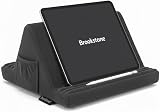
- 𝗔𝗹𝗹 𝗗𝗮𝘆 𝗖𝗼𝗺𝗳𝗼𝗿𝘁 - Soft memory foam design supports long reading or streaming sessions, this tablet holder also reduces wrist strain and improves posture with multiple viewing angles
- 𝗛𝗮𝗻𝗱𝘀 𝗙𝗿𝗲𝗲 𝗥𝗲𝗮𝗱𝗶𝗻𝗴 - The Brookstone tablet stand for bed with stable support works across multiple applications, such as the Kindle Paperwhite, iPad, iPad Pro, and Samsung Galaxy to give you hands free use while relaxing or doing other tasks
- 𝗘𝗿𝗴𝗼𝗻𝗼𝗺𝗶𝗰 𝗦𝘂𝗽𝗽𝗼𝗿𝘁 - The cushioned lap pillow design rests comfortably on your legs or desk while keeping screens at eye level and at the right angle
- 𝐄𝐑𝐆𝐎𝐍𝐎𝐌𝐈𝐂 COMFORT ANYWHERE – The ergonomic tablet holder for bed delivers superior support while lounging or working, reducing strain on your neck and wrists with a plush design that keeps your device stable on any surface.
- 𝐓𝐑𝐀𝐕𝐄𝐋-READY DESIGN – A must-have hands free tablet holder for travel, this stand offers secure, lightweight convenience for flights, road trips, or commutes—making it easy to stay productive or entertained on the go.
How to choose and check an accessory
- Identify the input or visual task. Work out what the student can use comfortably: a switch activation, keyboard key, stylus contact, magnified content, larger text, or spoken screen information. Do not infer the best method from a diagnosis alone.
- Confirm the device and software. Record the tablet model and operating-system version, then check the applicable platform documentation. Features and setup differ between Android and iPad.
- Check the connection and setup. For a switch or keyboard, verify whether the intended setup uses USB or Bluetooth and whether the tablet supports it. Check any device-specific steps before ordering.
- Ask about school requirements. Confirm device-management rules, procurement requirements, and classroom setup with the school or accessibility staff.
- Try built-in options where relevant. Explore the tablet’s accessibility settings before purchasing hardware, especially when the need is visual access.
Product prices and availability are accurate as of the date/time indicated and are subject to change. Any price and availability information displayed on Amazon at the time of purchase will apply.




