Do these 3 things before closing this tab:
1Scan for outdated or missing drivers - takes under a minute2Repair Windows errors before they cause bigger problems3Fix the driver behind crashes, sound loss and screen glitchesGorgias is the clearest documented fit among the Magento help desk integrations covered here: its Magento 2 connection adds matched customer profiles and order details to support tickets, and its setup guide says the integration is available on the Pro plan or higher. Zendesk has a documented Magento connector from Wagento, with important limits for multi-website and GraphQL stores. A Freshdesk connector manual describes useful ticket workflows, but does not establish that the connector is maintained or compatible with current Magento releases.
This is a comparison of three documented integration paths, not a performance-tested ranking or a census of every help desk that can be connected to Magento. The order below reflects how clearly current integration details and limitations are documented—not measured support outcomes.
As an Amazon Associate I earn from qualifying purchases.
Magento help desk options at a glance
| Option | Magento evidence | Notable fit or limitation | Help desk pricing in cited documentation |
|---|---|---|---|
| 1. Gorgias | Vendor setup guide covers Magento 2; Marketplace listing identifies an extension for Magento Open Source 2.4 and Adobe Commerce 2.4, cloud and on-premises. | Matched customer and order details in ticket sidebars. Setup guide says Pro or higher; store admin access is required. A separate Gorgias account is required. | Not stated in the cited setup guide or Marketplace listing. |
| 2. Zendesk via Wagento | Adobe Commerce Marketplace listing identifies the connector for Magento Open Source and Adobe Commerce 2.4. | Order display can include shipping date and tracking details. The connector FAQ says it does not support multi-website or GraphQL. | Not stated in the cited connector listing. |
| 3. Freshdesk connector | A Magento Marketplace reference manual documents API-based ticket workflows. | Manual describes ticket creation from contact forms or feedback widgets, order ID linking, and customer-facing ticket views. Current maintenance and compatibility are not established by the manual. | Not stated in the cited manual. |
Compatibility and feature details here come from vendor documentation and Marketplace materials, not independent tests. Before choosing a connector, match its stated version and architecture to the store you actually operate.
Free tools Windows power users keep installed
One-click scans. No signup required.
1. Gorgias: strongest documented order context for Magento 2
Gorgias connects Magento 2 store data to its support workspace. Its setup documentation, updated July 23, 2026, says agents can see matched customer profiles and order details in a ticket sidebar. That context can help an agent understand a customer’s purchase while handling a support conversation, rather than switching between the ticket and Magento for those details.
#1 Best Overall

- FIND INFORMATION FAST - Provides EASY access to information you need every day - 10 pockets display up to 20 letter-size sheets. Brightly colored pockets quickly direct you to frequently used information SAVING YOU TIME AND MONEY!
- NO TACKS, NO TAPE, NO MESS! - AdjustaView Desktop Organizer eliminates unsightly Post-Its and documents tacked or taped to your walls. Desktop organizer measures 19 1/4"w x 12 3/4"h x 5 1/2"d.
- EASY LOAD POCKETS & TABS - Crystal-clear protective, easy-load, corner-tuck pockets make inserting documents easy and free of creasing or tearing. Each pocket displays two single-sided sheets of 8 1/2" x 11" letter sized paper or one double-sided document. Adjustable index tabs and labels quickly direct you to the appropriate page.
- VERSATILE ORGANIZATION - Ideal for schedules, shipping charts, forms, menus, procedures, contacts, and calendars, phone directory, reference materials. Keeps your workspace clutter-free while ensuring critical information is always visible
- BUILT TO LAST AND EASY INSTALLATION - Constructed from heavy-duty, injection-molded polystyrene for years of use. This unit is designed to sit on a desk, please choose model B07L3RG23G or B08QYMLM89 if you need a wall-mounted model.
Integration and features
The setup guide describes installing the Gorgias Magento extension and authorizing the connection. It says a manual setup path is available if a firewall blocks the one-click flow. The extension’s Adobe Commerce Marketplace listing identifies version 1.2.7 as a stable build updated April 10, 2026, and lists compatibility with Magento Open Source 2.4 and Adobe Commerce 2.4, both cloud and on-premises. The listing also describes customer and order context, unified support conversations, help center, and automation functionality.
Gorgias’s Magento product materials describe live chat, multichannel ticket management, social channel connections, reusable macros, automatic responses, intent and sentiment detection, support and revenue reporting, and multi-store connection. Those are vendor-described capabilities; the Marketplace listing and setup guide do not establish that every capability is included in every plan or that every channel is part of the Magento extension itself.
Plan, requirements, and limits
The vendor setup guide says the Magento 2 integration is available on Pro or higher and requires Magento store admin access. It also says a separate Gorgias account is required. Help desk subscription prices are not stated in the cited setup guide or Marketplace listing. Gorgias’s Magento product page says rules and macros can automate “up to 40% of support tickets”; that is a Gorgias-published potential result, not an independent benchmark or a forecast for a particular store.
Read Gorgias’s Magento 2 setup guide and its Adobe Commerce Marketplace listing for the documented connection and compatibility details.
Rank #2

- DESKTOP DOCUMENT DISPLAY ORGANIZER - EXPANDS AT ANY TIME - Instant access to your most-used documents, procedures, schedules, and reference materials at any workstation. 20 pockets display up to 40 letter-size sheets. Easily expand with 10-Pocket add-on module.
- MULTI-ENVIRONMENT REFERENCE SYSTEM – Used daily in offices, warehouses, manufacturing workstations, classrooms, restaurant kitchens, retail counters, and healthcare settings. Corner-tuck pockets insert and remove documents without creasing – each holds two 8 ½” x 11” sheets or one double-sided document.
- COMPACT WEIGHTED BASE – MAXIMUM STABILITY – Compact weighted base provides superior stability on desks and shelf surfaces. Scratch-resistant bottom protects any surface. Pockets pivot to 5 adjustable viewing angles for comfortable use whether sitting or standing – your perfect angle, guaranteed. Product measures 22"w x 14"h x 12"d with pockets opened. Weighted base (left & right side combined) measures 16"w x 8 1/2"d.
- EXPANDABLE TO 60 POCKETS – Start with 20 pockets and grow. Simply add 10-Pocket Add-on Modules (sold separately, B079M748TD) to expand to 30, 40, 50, or 60 pockets without replacing the base. No other document display system in this category offers this level of scalability.
- BUILT TO LAST - Constructed from heavy-duty, injection-molded polystyrene for durability that will LAST FOR YEARS! The highest-rated desk reference organizer in its class.
Who it suits
Gorgias is the most substantiated starting point here for a Magento 2 store that wants agents to see customer and order information alongside support tickets, especially if it also wants vendor-described chat, social, automation, or multi-store functions. The cited sources do not provide independent evidence that it will outperform another help desk.
2. Zendesk via Wagento: a documented connector with architecture limits
Wagento’s Zendesk Connector is an extension path for bringing Magento store information into Zendesk. The Adobe Commerce Marketplace listing shows connector version 220.0.26, updated August 11, 2026, with compatibility listed for Magento Open Source and Adobe Commerce 2.4. Its release notes mention Magento 2.4.9 support and order display details including shipping date, tracking number, tracking URL, and Adobe Commerce RMA number.
Important compatibility constraints
The connector FAQ says it does not currently support multi-website or GraphQL. Those restrictions can disqualify the connector for stores built around either architecture, even when the store’s base Magento version is listed as compatible. The marketplace listing’s version and update date are not a guarantee that a particular deployment, customization, or future release will work without changes.
PC Slower Than It Used to Be?
A free scan shows the junk files, broken settings and background clutter dragging Windows down - then fixes them in one click.Free scan · Windows 10 & 11Outdated Drivers Are Slowing You Down
One free scan finds every outdated or missing driver and matches the right update for your exact hardware.Free scan · exact hardware matchCost and fit
The cited connector listing does not state Zendesk subscription prices, connector charges, or implementation costs. It is a candidate for stores already using Zendesk or considering it, provided the store’s website structure and technical stack fit the connector’s stated constraints. The available information does not establish how broad Zendesk’s channel, routing, or automation capabilities are for this particular connector.
Rank #3

- DESKTOP DOCUMENT DISPLAY ORGANIZER - Keep your most-referenced documents, procedures, price lists, and schedules instantly visible at your workstation. 10 pockets display up to 20 letter-size sheets – brightly colored or all-black pockets let you locate critical information in seconds.
- BUILT-IN SUPPLY STORAGE BASE - Round 12-inch weighted base keeps the organizer rock-solid on any desk or shelf surface with a scratch-resistant bottom. Side compartments store pens, paperclips, and small supplies. Recessed front compartment fits a Post-it pad.
- ADJUSTABLE VIEWING ANGLES - Pockets pivot to 5 angled positions for comfortable viewing whether sitting or standing. Provides EASY access to information you need every day.
- MULTI-ENRIRONMENT REFERENCE SYSTEM – Trusted in offices, warehouses, manufacturing floors, classrooms, restaurants, retail counters, and healthcare workstations. Corner-tuck pockets insert and remove documents without creasing or tearing – each pocket holds two single-sided 8 ½” x 11” sheets or one double-sided document.
- LIFETIME GUARANTEE + TRUSTED BY THOUSANDS – Constructed from heavy-duty injection-molded polystyrene engineered for daily use across professional environments. Backed by Ultimate Office’s Lifetime Guarantee. Join over 900 customers who rated this 4.6 stars.
See the Wagento Zendesk Connector Marketplace listing for the compatibility metadata, release details, and FAQ.
3. Freshdesk connector: useful documented workflow, current status unknown
A Magento Marketplace reference manual for a Freshdesk integration describes connecting to Freshdesk APIs, creating tickets from a contact form or feedback widget, linking an order ID, and showing customers ticket views. These workflows indicate how the documented connector was intended to tie store interactions and orders to support cases.
What the manual does not establish
The manual is not evidence that this connector is still listed, maintained, secure, or compatible with current Magento or Adobe Commerce releases. It also does not establish current Freshdesk plan requirements or prices. For those reasons, treat this as a connector lead to validate—not as an equally current recommendation alongside the two Marketplace listings above.
The available Freshdesk connector reference manual documents the workflows, but not the connector’s current lifecycle or release compatibility.
Rank #4

- 360° Stable Base with Non-Slip Grip: This desk reference organizer features a heavy, weighted base with 360° rotation and non-slip silicone pads. Perfect as a stable document holder for desk in any office desk organizer setup, it provides reliable performance for busy workspace organizers
- Flip, Find, & Update in Seconds: Quickly flip to find the right page and update content instantly by lifting the clear pocket. Perfect solution for dynamic office environments where information changes frequently
- 10 Double-Sided Pockets with Color Coding: Our file pockets are designed to fit both A4 and 8.5 x11" letter-size paper, securely holding 20 sheets total. With 5-color coding, this desk reference organizer is perfect for project charts, weekly schedules, and reference sheets, making it the ultimate desk reference solution
- Professional Build for Daily Office Use: Built to withstand heavy use, this durable desk organizer maintains its professional look through years of service. It's the reliable choice among desk accessories & workspace organizers for corporate environments
- Multi-Purpose Display for Business Needs: Ideal for restaurants displaying menus, shops showing product charts, or offices presenting project timelines. This versatile paper sorter handles everything from price lists to training materials, making it one of the most practical desk organization deals available
How to choose a Magento help desk
Start with the Magento integration, not a help desk’s general feature list. An integration that exposes order context but fails on the store’s architecture can create more work than it removes. Compare the following points against the store’s actual setup and support operation.
1. Confirm the Magento edition, version, and architecture
- Identify whether the store runs Magento Open Source or Adobe Commerce, the precise release, and whether it is cloud or on-premises.
- Check the connector’s stated compatibility against that exact edition and release. The Gorgias Marketplace listing specifies 2.4 for both editions and cloud/on-premises deployments; the Wagento listing specifies Magento Open Source and Adobe Commerce 2.4.
- Check architecture-specific requirements. Wagento’s FAQ excludes multi-website and GraphQL. Do not infer support for those configurations from a general “Magento 2.4” compatibility statement.
- Account for customizations and any store-specific deployment details; marketplace compatibility metadata alone cannot certify a customized installation.
2. Test the depth of order context required by agents
Write down the data an agent needs during common contacts: customer identity, order details, shipment date, tracking number or URL, and return or RMA information. Gorgias documents matched customer profiles and order details in its ticket sidebar. Wagento’s release notes name shipment and Adobe Commerce RMA fields. The Freshdesk manual describes linking an order ID, but does not establish a current connector. Do not assume that a connector displaying an order number also exposes every order or shipment field.
3. Map support channels and workflows separately
List the channels your team actually handles—such as email, website chat, phone, social messaging, or a customer portal—and establish which product plan and connector support each one. The Gorgias Magento product materials describe live chat, social connections, multichannel tickets, macros, automatic responses, and reporting; the Magento setup documentation is narrower and focuses on the store connection and ticket-side customer and order context. The Wagento connector sources focus on Magento data in Zendesk and do not specify a channel matrix. The Freshdesk manual covers contact forms, feedback widgets, and customer ticket views. These differences in documentation should not be mistaken for proof that an undocumented capability is absent from the help desk itself.
The Tool Desk
Outbyte Driver Updater FREEScan for outdated or missing drivers - takes under a minuteDriver Scan →Outbyte PC Repair FREEClear out junk files and repair common Windows errorsFree Scan →4. Establish setup ownership and ongoing maintenance
Determine who can install and authorize the extension, what Magento permissions are needed, and how the connection will be maintained after upgrades. Gorgias’s guide calls for Magento admin access and describes a manual setup option if a firewall blocks one-click authorization. For any option, clarify who responds when the extension or API connection stops working and whether updates track the store’s Magento release path.
Best Value
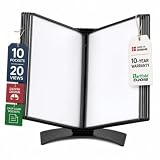
- EASY LOAD POCKETS: Double-sided openings allow quick document insertion and removal, while corner closures help keep pages secure during use.
- 20 SHEET CAPACITY: Includes 10 letter-size portrait pockets with double-sided viewing for 20 total sheets, helping organize important documents while reducing desk and workstation clutter.
- ORGANIZED DOCUMENT DISPLAY: Keep frequently used documents, instructions, procedures, price lists, schedules, and reference materials visible and easy to access at a desk, workstation, counter, or assembly area.
- SUPPORTS LEAN WORKFLOWS: Organizes SOPs, work instructions, safety notices, training materials, and other frequently referenced documents to support 5S, visual management, and standardized work practices.
- MADE IN DENMARK: Manufactured in Denmark with a sturdy metal base and durable polypropylene pockets, giving the system a professional, high-quality build designed for reliable long-term document display.
5. Compare total cost, not just the help desk seat price
Build a like-for-like cost view that includes the help desk subscription, any connector license, agent seats, ticket-volume charges, automation limits, implementation, and connector support. The cited integration materials do not state comparable current prices, so there is no substantiated basis here for a price ranking. Gorgias does specify a plan gate for the Magento connection—Pro or higher—but not a price in the cited setup guide.
6. Separate documentation from proven outcomes
Marketplace compatibility and vendor feature pages establish what a seller documents, not how well a connector performs for a particular store. The available material does not include an independent comparative benchmark for ticket resolution, agent productivity, or customer satisfaction across these options. Treat Gorgias’s “up to 40%” automation figure as the vendor’s claim about potential results from rules and macros, not as a general Magento help desk result.
Frequently Asked Questions
Is a Magento extension the same thing as a help desk?
No. The extension or connector links store data and workflows to a separate support platform. Gorgias’s Marketplace listing explicitly says a separate Gorgias account is required; the integration should not be confused with Magento’s own admin interface.
What’s actually slowing this PC down?
Pick the symptom - the matching free tool is one click away.
Does “Magento 2.4 compatible” guarantee support for every 2.4.x store?
No. The listings give broad compatibility metadata, while Wagento’s release notes separately mention support for Magento 2.4.9. Compatibility should be read alongside the connector’s specific version notes and architecture constraints, not as an assurance for every customization or deployment.
Can a store rely on the Freshdesk manual to confirm compatibility today?
No. The manual documents workflows, but does not confirm current maintenance, security status, Marketplace availability, or compatibility with present Magento releases.
Quick Recap
Product prices and availability are accurate as of the date/time indicated and are subject to change. Any price and availability information displayed on Amazon at the time of purchase will apply.




