Recommended Free Tools
For a PS5 Pro, the safest choice is to keep its vents unobstructed and use only replacement covers made for the Pro. Treat a separate dust cover as storage protection for a powered-off, cool console, and remove it before turning the console on. Sony warns against running the system in a closed cabinet or other place where heat can build up.
Which PS5 Pro cover should you choose?
“Cover” can mean two different things: a panel fitted directly to the console, or a removable fabric or other cover placed over the whole console for storage. They serve different purposes and should not be confused with a cabinet that surrounds a running system.
As an Amazon Associate I earn from qualifying purchases.
| Option | Fit and purpose | What the evidence supports |
|---|---|---|
| Sony PS5 Pro console covers | Replacement panels attached to the console; choose covers explicitly labeled for PS5 Pro. | Sony publishes a PS5 Pro cover manual. Its Australia compatibility guide lists older CFI-1000 and CFI-2000 cover sets as incompatible with PS5 Pro. Check the guide for your region and the exact model before buying: Sony’s PS5 compatibility guide and PS5 Pro console-cover manual. |
| BoxPlates PS5 Pro covers | A third-party replacement-cover option, described by Tom’s Guide as having larger circular vents. | A 2026 review reports the reviewer’s installation experience, but provides no independent temperature testing or proof of better dust protection. See Tom’s Guide’s BoxPlates coverage. |
| External dust cover | A separate cover for a console in storage, not a cover to leave on while playing. | The cited Sony guidance does not approve a particular external dust cover or establish dust-reduction performance, material safety, or fit for a specific product. Remove it before use. |
| Operating enclosure or cabinet | Furniture surrounding a console that is switched on. | Sony warns against closed cabinets or locations where heat may build up. Do not treat a vented-looking cabinet as safe without considering airflow and heat recirculation. |
Can you run a PS5 Pro in an enclosure?
Sony’s safety guidance says, “Do not use the console in a closed cabinet or other locations where heat may build up.” Sony warns that heat buildup may cause overheating and fire, injury, or malfunction. An enclosure with vents is not automatically safe: the relevant question is whether it lets the console draw in and exhaust air freely, without trapping warm exhaust around the system. Read Sony’s PS5 Pro safety guide.
Windows Errors? Fix Them Before They Spread
Repair common Windows errors and clear accumulated junk for a smoother, more stable PC - no reinstall needed.Free scan · no reinstallCrashes, No Sound, or Screen Glitches?
Random freezes, missing sound and display glitches usually trace back to one bad driver. Find and replace yours safely.Free scan · under a minuteSony describes the Pro’s airflow as intake and exhaust through the rear and bottom surfaces, with a larger exhaust-vent surface than other PS5 models. Its design also includes three slits that create airflow paths and a dust catcher on the top side for cleaning. As PS5 Pro Mechanical Design Lead Shinya Tsuchida puts it, “PS5 Pro is a high performing console, so it requires more air to cool it down.” Keep the rear, bottom, and other vent openings clear rather than relying on an enclosure to improve cooling. Sony’s PS5 Pro teardown.
#1 Best Overall
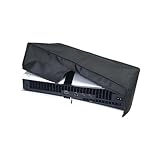
- ONLY For PS5 Pro: Specially Designed For Playstation 5 Pro Console, Compatible With Both Digital And Disk Version. (Not Fit For Any PS5, PS5 Slim, PS4 Or Earlier Model).
- Cutting Precision: Back Panel Cutaway, Allows For Protection Without Having To Remove Back Cables.
- Quality Material: Made Of Quality Oxford Fabric That Can Prevent Your Console From Dust, Pet Hairs, Kids Drawing Pens, Scratches And Liquid.
- Important Tips: Please Remove The Dust Cover When Console Is Powered On. Console Should Be Completely Powered Off And Cool Down Before Placing Any Dust Cover.
- Good Service: If You Have Any Problems During Use, Please Contact Us. We Will Give You a Satisfied Solution .
If you use furniture around the console
- Avoid a closed compartment or a narrow, cramped space.
- Look for a clear path for intake and exhaust; consider whether warm air can escape or will circulate back toward the console.
- Do not infer cooling performance from a cabinet’s vents or a replacement plate’s appearance. The sources cited here do not establish that any enclosure or aftermarket cover lowers PS5 Pro temperatures.
Sony’s general PS5 ventilation FAQ recommends 10 cm (4 in) of space from a wall and advises against narrow or cramped spaces and covering the console with cloth. That is general PS5 guidance published in 2020, not a PS5 Pro-specific clearance specification; use it as general ventilation advice, not a measured Pro requirement. Sony’s PS5 ventilation guidance.
Will PS5 Slim or older PS5 covers fit PS5 Pro?
Do not assume they will. Sony’s Australia compatibility guide lists cover sets for the CFI-1000 and CFI-2000 model groups as incompatible with PS5 Pro. Buy panels explicitly marked for PS5 Pro and check Sony’s compatibility information for your market before ordering; the cited compatibility page is regional.
Rank #2

- Advanced Dust Defense for Ports & Vents: Keep your PS5 Pro ports safe with precision-fit dust plugs and a breathable side screen that block pet hair, lint, and airborne debris. Prevent connection issues in HDMI/USB ports and optical drives while extending your console’s lifespan.
- Smart Cooling Design – No Overheating: Our mesh side screen stops dust without blocking airflow, so your PS5 Pro stays cool during marathon gaming sessions. Avoid performance drops and shutdowns caused by dust-clogged vents.
- Tool-Free Setup in Seconds: Snap on the side screen and plug ports without screws or tools. Designed for a perfect PS5 Pro fit, these guards install securely and remove cleanly—no sticky residue or scratches.
- Washable & Built to Last – Easy Maintenance: The reusable dust screen is vacuum-friendly and water-washable (air-dry only). Silicone dust plugs wipe clean with a damp cloth. Durable materials save you money vs. flimsy replacements.
- Sleek, Seamless Protection: Low-profile guards blend with your PS5 Pro’s design (Digital/Disc Edition compatible). Keep your gaming station looking sharp while ensuring dust-free performance—no bulk or rattling parts.
How to fit or remove replacement covers safely
- Turn the console off, unplug its cables, and let it cool. Sony specifies these steps before attaching or removing covers.
- Follow the PS5 Pro cover manual. Handle the panels as directed and make sure each cover is correctly installed before powering on.
- Do not run the console with covers incorrectly installed or removed. Sony warns incorrect cover installation may cause overheating.
- Clean removed covers gently. Sony advises using a soft, dry cloth and avoiding solvents and chemically treated wipes.
See the official PS5 Pro cover manual for the model-specific procedure.
Can you leave an external dust cover on while the PS5 Pro is on?
No: remove an external dust cover before powering on. Sony’s sources do not approve a specific whole-console storage cover for use during play. Its guidance says not to cover the console with cloth and warns against restricting ventilation, so the prudent use is to place an external cover only over a powered-off, cool console and take it off before use.
Rank #3

- Designed for ps5 Pro Console – Compatible with ps5 Pro Disc & Digital Edition, Vertical Position only, NOT for the horizontal placement of the pro console
- Nylon Material – Made from hand-washable and ironable nylon with a soft double-layer interior to prevent scratches from the device
- Precision Cut for Cable Access – Features precise cutouts at the back for easy cable connection without removing the dust cover
- Effective Dust & Dirt Protection – The dust protector helps to block dust, liquids, pet hair, and minor scratches, keeping your console clean
- Remove Before Use – Always remove the dust cover while the console is powered on to prevent overheating and ensure proper airflow
How to limit dust without blocking airflow
Keep the console’s vents open and use Sony’s built-in dust catcher as intended. Sony’s general PS5 ventilation guidance recommends removing dust from vents with a cleaning tool such as a vacuum cleaner. Follow the console’s instructions and avoid improvising around an operating system. The cited sources do not establish that a particular external cover, replacement plate, or cabinet reduces dust or improves cooling.
Quick Recap
Best Value
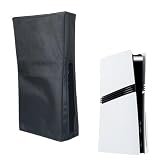
- ONLY For PS5 Pro : Specially Designed For Playstation 5 Console, Compatible With Both Digital And Disk Version. (Not Fit For Any PS4 Or Earlier Model).
- Cutting Precision: Back Panel Cutaway, Allows For Protection Without Having To Remove Back Cables.
- Quality Material: Made Of Quality Oxford Fabric That Can Prevent Your Console From Dust, Pet Hairs, Kids Drawing Pens, Scratches And Liquid.
- Important Tips: Please Remove The Dust Cover When Console Is Powered On. Console Should Be Completely Powered Off And Cool Down Before Placing Any Dust Cover.
- Good Service: If You Have Any Problems During Use, Please Contact Us. We Will Give You a Satisfied Solution .
Rank #4

- Only for PS5 Pro: Dust cover tailored specifically for SONY PlayStation 5 Pro Disc Edition & Digital Edition console The New Pro Design(Vertical position)
- Premium material: PlayStation 5 Pro Dust Sleeve is made of a large amount of pure cotton cloth, and the inside is soft, which protects your PS5 Pro from scratches, is comfortable, strong, has no odor, dust-proof and splash-proof
- Cutting Precision: Precision cut easy access cable port without having to remove back cables. Easy to place and remove.Also square design with enough space to keep the machine from overheating
- Attention: Please remove the dust cover when the PS5 Pro console power on to avoid overheating
- Warranty: If product is broken during shipping or normal use within 40 days, we can arrange a new one for free.
Product prices and availability are accurate as of the date/time indicated and are subject to change. Any price and availability information displayed on Amazon at the time of purchase will apply.




