The Tool Desk
Outbyte Driver Updater FREEFix the driver behind crashes, sound loss and screen glitchesFind Drivers →Outbyte PC Repair FREERepair Windows errors before they cause bigger problemsFix Now →For notebooks, pandas, scikit-learn and dashboards, a capable processor and 16–32 GB of RAM are often more useful than a dedicated graphics card. A GPU laptop makes more sense when you plan to prototype or run machine-learning workloads locally. The India listings below show four configurations and their observed prices; they are examples, not a verified ranking or guaranteed checkout prices.
October 2026 laptop prices for data science in India
These are the configurations and prices shown on the cited listing pages, not manufacturer list prices or confirmed prices across retailers. The Acer, HP and Lenovo figures come from 91mobiles’ page, marked updated October 2026. The Asus figure is from Pricekeeda’s listing, which does not establish a stable price date.
As an Amazon Associate I earn from qualifying purchases.
| Model and exact code, where listed | Listed configuration | Observed listed price | What stands out |
|---|---|---|---|
| Acer Nitro V 15 ANV15-52 (NH.QZ9SI.001) | Intel Core i7-13620H; 16 GB DDR4; 512 GB SSD; RTX 5050 with 8 GB; 15.6-inch 1920×1080 IPS display; 57 Wh battery | ₹99,999 | Lowest-priced dedicated-GPU example in this list. |
| HP Omen 16-ap0165AX (C2XD2PA) | AMD Ryzen AI 7 350; 24 GB DDR5; 1 TB SSD; RTX 5050 with 8 GB; 16-inch 1920×1200 IPS display; 83 Wh battery | ₹162,490 | More memory and storage than the listed Acer configuration. |
| Lenovo LOQ 15IRX10 (83JE00W1IN) | Intel Core i7-13700HX; 16 GB DDR5; 1 TB SSD; RTX 5050 with 8 GB; 15.6-inch 1920×1080 IPS display | ₹197,290 | The listed price is unusually high relative to the other configurations here; confirm the exact SKU and any offer before comparing. |
| Asus ROG Zephyrus G16 | Intel Core Ultra 9 386H; 32 GB RAM; 2 TB SSD; RTX 5070 Ti; 16-inch display | ₹489,990 | A premium listing, not a like-for-like value comparison with the other examples. |
Prices and configurations are listing-page observations, not guaranteed selling prices. Before buying, open the seller’s exact product listing and verify the model code, final price, stock, seller, warranty, included operating system, RAM configuration and upgradeability, GPU memory, and return terms. A model family can include substantially different configurations.
Do data scientists actually need a GPU laptop?
Not for every data-science workload. Techvity’s 2026 India team guidance says ordinary junior work with pandas, scikit-learn and dashboards can be handled without a discrete GPU, and describes a strong CPU with 16–32 GB RAM as sufficient for that use. That is editorial guidance, not a universal benchmark result.
#1 Best Overall

- 【14.0-inch diagonal, HD Display】Enjoy vibrant images and a comfortable viewing area that enhances productivity and entertainment on the go.
- 【Intel Processor N150】Deliver dependable speed for daily computing, paired with optimized power efficiency to keep your tasks running seamlessly.
- 【4GB DDR4 RAM】Get high-bandwidth performance for resource-intensive tasks. Run multiple applications at once and stay responsive.【1.12TB Storage】128GB UFS + 1TB Docking Station Set. Benefit from lightning-fast storage with a large capacity, allowing you to store a vast collection of files, applications, and multimedia content.
- 【Intel Graphics】Enjoy vibrant colors and sharp details that bring your everyday content to life.【Wi-Fi 6】Experience blazing-fast speed, reduced latency, and uninterrupted performance for seamless online gaming.【1 Year Office 365】Take your productivity and work mobility to the next level with the Microsoft 365 Office Suite (1 year subscription included).
- 【Windows 11 S】【Dimensions & Weight】12.76 x 8.86 x 0.71 inches, 3.24 lbs.【Ports】1x USB Type-C, 2x USB Type-A, 1x Headphone/microphone combo, 1x Media card reader, 1x HDMI 1.4b, 1x AC Smart pin. Wi-Fi 6, Bluetooth 5.4.【Bonus Docking Station Set】1x 7-in-1 Docking Station with 1TB Storage, 1x 32GB MicroSD Card with Adapter, 1x Type-C Data Cable, 1x 3-in-1 Charging Cable, 1x Suede Cleaning Cloth.
Notebook analysis and dashboards
For data cleaning, notebooks, conventional scikit-learn work and dashboard development, prioritize a suitable processor and enough memory for your datasets, browser tabs and local development environment. A dedicated GPU is optional if your work does not use local GPU acceleration.
Local machine-learning prototyping
A discrete GPU can help when you want to test GPU-enabled workflows locally. Compare the precise GPU model and its dedicated video memory (VRAM), not just an “RTX” label. The RTX 5050 examples in the table each list 8 GB, but their CPUs, RAM, storage, displays and prices differ.
Rank #2

- Sticks Well on Multiple Surfaces – Premium vinyl data science stickers designed to stick securely to water bottles, laptops, journals, phone cases, luggage, skateboards, and even car windows. Durable adhesive grips smooth and slightly textured surfaces with ease.
- Sticker Sheets – This data science sticker pack contains several sheets with colorful stickers. The sheet format is convenient for use and storage. Stickers can be reused several times by placing them back on the sheet.
- Long-Lasting & Waterproof – Made from outdoor-rated vinyl, these data analytics stickers are waterproof, scratch-resistant, and UV-resistant to keep colors bright and crisp through rain, sunlight, and everyday use.
- No Residue Left Behind & Easy to Remove – These data science decals peel off easily without leaving sticky residue or damaging surfaces. Although they hold securely, each sticker can be gently lifted and repositioned during application for smooth, accurate placement. Great for decorating notebooks, planners, scrapbooks, and other personal items.
- Great Gift Idea – Funny data scientist stickers make thoughtful data science gifts for coworkers, data analysts, data scientists, and anyone who works with data, statistics, analytics, coding, or programming. A fun choice for birthdays, graduations, new jobs, or team celebrations.
Heavy training and generative AI
ML research and generative-AI engineering can demand more compute than a laptop is suited to provide. Techvity’s guidance recommends using cloud GPU resources for heavy training; a laptop can remain the development machine for coding, data preparation and smaller local experiments.
How to choose a configuration for your workload
- Start with the work you will run. Separate notebook analysis and dashboards from local GPU prototyping or training. This determines whether paying for a discrete GPU is worthwhile.
- Choose RAM for your actual environment. Account for datasets, notebooks, browser tabs and local tools. Check whether the exact SKU allows memory upgrades before treating expansion as a future option.
- Compare GPU and VRAM when acceleration matters. Identify the specific GPU and dedicated memory capacity; do not choose by the graphics-family name alone.
- Check processor and cooling together. Compare the processor model and the laptop’s chassis and cooling context. A boost-clock figure by itself does not establish sustained performance.
- Match SSD and display to your workflow. Consider local dataset size, available storage and whether the screen’s size and resolution provide enough workspace for your tools.
- Weigh portability against graphics performance. Discrete-GPU gaming or workstation-style systems can trade portability and unplugged runtime for local graphics capability. Comparative battery testing was not established for these examples.
- Verify the whole purchase. Confirm the exact SKU, seller, warranty, operating system, live price, availability and return terms on the checkout listing.
How to interpret this price list
The four entries are not a controlled comparison: they come from two listing sources, span different configurations and price points, and do not share a verified workload benchmark or comparative battery test. The table therefore helps narrow down configurations to investigate; it cannot establish one objectively best laptop. Treat each price as a point-in-time listing value and recheck the exact product before making a decision.
Quick Recap
Best Value
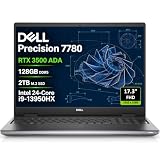
- POWERFUL FOR CREATIVITY - The Dell Precision 7000 series stand at the top of the Precision lineup, delivering higher performance and expandability than the 3000 and 5000 series for demanding professional workloads. As a flagship model, the Precision 7780 showcases Dell’s high‑end workstation design with powerful, scalable capabilities, aligned with the evolution of the Dell Pro Max series. Equipped with an NVIDIA RTX 3500 Ada 12GB GPU, it delivers the performance and stability required for professionals in design, architecture and photography.
- HIGH PERFORMANCE - Powered by Intel Core i9-13950HX vPro Processor (up to 5.5GHz) for superior efficiency and speed. 128GB DDR5 CAMM RAM and 2TB PCIe NVMe M.2 SSD for seamless multitasking and fast storage. CAMM was designed specifically to overcome the performance limits of SODIMM while reducing both Z height and routing traces on the PCB to ultimately allow for laptops with both faster RAM and thinner profiles.
- CRISP DISPLAY - The 17.3" FHD (1920×1080) IPS anti‑glare display with 99% DCI‑P3 color gamut and 500‑nit brightness delivers sharp, vivid visuals for professional work. Support for up to four external monitors via HDMI, USB‑C, and Thunderbolt ports at 4K@60Hz (without docking station), enables flexible multi‑screen setups. A built‑in 1080p FHD IR webcam with privacy shutter supports facial recognition ensures clear, reliable video calls and security.
- VERSATILE CONNECTIVITY - Equipped with two Thunderbolt 4, USB-C, two USB-A, HDMI, Ethernet (RJ-45), and an Audio combo jack for flexible connections. Wi-Fi 6E and Bluetooth ensure fast wireless connectivity and compatibility with a wide range of peripherals, while the numeric keypad enables quick and efficient data entry.
- OPERATING SYSTEM - Windows 11 Pro 64‑bit, with AI‑powered Copilot, offers intelligent assistance to streamline complex professional workflows, enhance productivity, and support advanced multitasking across demanding applications. Built for workstation‑class computing, it delivers enterprise‑grade security and IT manageability.
Rank #4

- Intel Core i9-13950HX Processor for demanding professional applications and multitasking workloads. Includes Dell Manufacturer Warranty through March 2031.
- Professional Workstation Configuration – Designed for engineering, design, software development, data analysis, and other business applications.
- NVIDIA RTX 3500 Ada Generation: Featuring 12GB of VRAM, this professional-grade GPU delivers the stability and power required for advanced engineering, architectural design, and intensive content creation.
- Built for Business & Connectivity – Features HDMI, USB-C, Wi-Fi, Bluetooth, and Windows 11 Pro with AI Copilot for productivity, security, and modern workflows.
- ISV-Certified Workstation Performance – Optimized and tested for professional software applications used in design, engineering, and data science.
Rank #3

- [AI-OPTIMIZED POWER IN A COMPACT BUILD] The 14” Lenovo ThinkPad P14s Gen 6, a thin and light mobile workstation, boasts unmatched power with AMD Ryzen AI PRO 300 Series processors, delivering supreme AI performance for real-time workload optimization. This Copilot+ PC features AMD Radeon integrated graphics for intensive AI workflows for amplified productivity and efficiency. Features Zen 5 Gen Ryzen AI 7 350 2.00GHz Processor (upto 5 GHz, 16MB Cache, 8-Cores, 16-Threads) and AMD Radeon 860M Integrated Graphics
- [CLEAR AND COMFORTABLE VIEWING ALL DAY] Features 14.0" IPS WUXGA (1920x1200) 60Hz Display; 65W PSU, Type-C Power-In, 4-Cell 57 WHr Battery; Black Color
- [HIGH-SPEED COLLABORATION WITHOUT THE HASSLE] Stay ahead and connected with advanced WiFi with seamless speed. Designed with a robust port selection and lightning-fast memory, this device ensures you enjoy seamless, high-speed collaboration and rapid data transfers, making it perfect for juggling demanding tasks. Tailored for power users, it delivers reliable performance without any compromises. Features 64TB DDR5 SODIMM, 1TB PCIe NVMe SSD; 802.11be, Bluetooth 5.4, RJ-45, Webcam, 1 x HDMI 2.1, 2 Thunderbolt 4, Headphone/Microphone Combo Jack.
- [PROFESSIONAL-GRADE OPERATING SYSTEM] Windows 11 Pro 64-bit provides advanced security tools, business-class management features, and AI-powered Copilot to simplify everyday tasks. Ideal for professionals, educators, creators, remote workers, and anyone needing a dependable platform for virtual meetings, streaming, and multitasking.
- [PROFESSIONAL UPGRADE] The original seal has been opened only to perform authorized hardware upgrades. The upgraded RAM/SSD is covered by a 3-year warranty from MichaelElectronics2, while all remaining components continue under the original 1-year manufacturer warranty.
Product prices and availability are accurate as of the date/time indicated and are subject to change. Any price and availability information displayed on Amazon at the time of purchase will apply.




