What’s actually slowing this PC down?
Pick the symptom - the matching free tool is one click away.
The most reliable BeamNG.drive setup is not a copied “magic” preset: install current wheel drivers and firmware, select the wheel’s highest available rotation range, set the same angle in BeamNG.drive, map each pedal according to its axis layout, and tune force feedback while driving an unmodified official rear-wheel-drive car. Treat strength and smoothing values as starting points because hardware, frame rate and driving preference change the result.
If you also plan to host BeamNG.drive multiplayer sessions, Godlike.Host provides BeamNG.drive game servers through its own game panel, with free DDoS protection and up to three free backups a day with restore.
As an Amazon Associate I earn from qualifying purchases.
The short answer: a dependable BeamNG.drive baseline
Start with the manufacturer’s software, not the game. Update the wheel’s driver and firmware, choose its highest available steering angle, then enter that identical angle in BeamNG.drive. A mismatch makes the virtual wheel turn more or less than the physical wheel and is the most common reason steering feels wrong.
Quick wins for a faster PC:
Repair Windows errors before they cause bigger problemsFix Now →Scan for outdated or missing drivers - takes under a minuteDriver Scan →Clear out junk files and repair common Windows errorsFree Scan →Next, open Options > Controls > Bindings > Vehicle. Bind steering, throttle and brake from the actual device. Separate pedal axes require separate throttle and brake bindings. A device that exposes one combined axis requires the combined throttle and brake binding instead; remove conflicting bindings in the separate throttle and brake sections.
#1 Best Overall

- Immersive Gaming Experience: Perfect for PlayStation 5, PS4 and PC gaming titles, the Driving Force simulates the feeling of driving a real car with precision steering and pressure-sensitive pedals
- Premium Control: The Driving Force feedback racing wheel provides a detailed simulation of driving a real car, with helical gearing delivering smooth, quiet steering and a hand-stitched leather cover
- Customizable Pedals: These pressure-sensitive nonlinear brake pedals provide a responsive, accurate braking feel on a sturdy base - with adjustable pedal faces for finer control
- 900-Degree Rotation: Lock-to-lock rotation of the Driving Force means you can turn the wheel around two and a half times, hand over hand on wide turns - just like a real F1 race car
- Up Your Game: Take your racing simulation to the next level with Driving Force accessories like the Driving Force Shifter or desk and rig mounts
For force feedback (FFB), establish a clean baseline in an official rear-wheel-drive vehicle with mods and custom setups disabled. Set a comfortable overall strength first, then reduce smoothing until detail returns. Enable Reduce strength at low speeds if the wheel oscillates while stopped. BeamNG says, “Every driving style favours different force feedback settings,” so the correct final value is the one that communicates grip without rattling, clipping or exhausting you.
Why there is no universal numerical preset
Wheel bases differ in motor torque, rotation range, encoder resolution and driver filtering. Pedal sets can present independent axes or a single combined axis. Your frame rate and the manufacturer’s control-panel settings also affect latency and detail. Consequently, a strength number that feels mild on one wheel can be violent on another.
BeamNG’s official guidance provides a procedure rather than one angle or strength value. Its setup page, last modified January 14, 2026, recommends at least 60 frames per second for responsive FFB and advises testing while the car is moving rather than judging forces with the vehicle parked. Use the numbers that the game or your device actually exposes; do not treat a value from another wheel as a specification for yours.
Prepare the wheel, pedals and PC
Install current device software
Install the latest driver and firmware supplied for your wheel base and pedals before opening BeamNG.drive. Reboot if the vendor software requests it. Manufacturer filter controls can change responsiveness and detail, but their names and effects vary, so use the documentation for your exact model instead of copying settings from a different device.
Set the physical steering range
In the manufacturer’s configuration tool, select the highest steering angle the wheel offers. Then enter the same angle in BeamNG.drive’s steering configuration. BeamNG does not prescribe a single degree value because wheels have different limits.
Rank #2

- Immersive Gaming Experience: Perfect for Xbox and PC gaming titles, the Driving Force simulates the feeling of driving a real car with precision steering and pressure-sensitive pedals
- Premium Control: The Driving Force feedback racing wheel provides a detailed simulation of driving a real car, with helical gearing delivering smooth, quiet steering and a hand-stitched leather cover
- Customizable Pedals: These pressure-sensitive nonlinear brake pedals provide a responsive, accurate braking feel on a sturdy base - with adjustable pedal faces for finer control
- 900-Degree Rotation: Lock-to-lock rotation of the Driving Force means you can turn the wheel around two and a half times, hand over hand on wide turns - just like a real F1 race car
- Up Your Game: Take your racing simulation to the next level with Driving Force accessories like the Driving Force Shifter or desk and rig mounts
Confirm the device mode and connection
BeamNG supports PC-compatible wheels, but wheel FFB requires a suitable PC/DirectInput implementation. Vendors may label that mode PC, Windows or DInput. Console-compatibility modes can expose the wrong type of signal or make pedals behave like buttons. Connect the wheel directly as recommended by its manufacturer and close software that intercepts or remaps joystick input.
BeamNG’s controller support list is a compatibility reference, not a ranking. It includes tested families such as Fanatec CSL DD and GT DD Pro bases, Fanatec pedal products, and Moza bases and pedals. A listing does not mean every firmware revision or operating mode behaves identically.
Choose pedal hardware by axis layout
Separate throttle and brake axes give the game independent signals and should be bound independently. If your hardware exposes only a combined throttle/brake axis, use BeamNG’s combined binding and remove separate throttle and brake bindings. Buying a USB pedal set is optional; the game can be configured with the pedals already attached to your wheel, provided Windows and BeamNG receive a usable axis.
Bind steering and pedals in BeamNG.drive
- Open Options > Controls > Bindings > Vehicle.
- If the device has no preset, click the + button to add a binding for steering, throttle and brake.
- Move the physical control when BeamNG asks for input, then click the new binding to inspect or adjust it.
- For independent pedals, keep one binding under Throttle and one under Brake. Test each pedal separately and confirm that its on-screen axis moves in the expected direction.
- For a combined pedal axis, assign throttle and brake, then delete bindings under the separate throttle and brake categories. Having both styles active can produce a car that accelerates or brakes unexpectedly.
If previous edits have left steering behavior confusing, delete the steering binding and create it again. A fresh binding removes accumulated filter or axis assignments before you begin FFB tuning.
Match steering rotation before tuning force feedback
With the manufacturer angle selected, enter that same rotation value in BeamNG’s steering binding or vehicle-control configuration. Turn the physical wheel slowly from center to each stop while watching the in-game wheel. The virtual wheel should reach its lock at the same time as the real wheel. If it reaches lock early, the in-game angle is too small; if it still has travel when the physical wheel stops, the in-game angle is too large.
Rank #3

- TRUEFORCE: Next-gen TRUEFORCE technology connects to game engines for high-definition feedback; experience the ultimate driving experience with processing at 4000 times per second
- Programmable dual clutch: Get off the starting line cleaner and faster; a programmable dual clutch simulates real race car launch assist right from the controller, when playing supported games
- Control your game: Fine-tune your speed with a built-in LED RPM indicator; integrated PlayStation 5, PS4, PC game controls, a 24-point selector and progressive brake spring keep steering under control
- Premium Racing Design: Refreshed Logitech G gear design includes premium materials like a hand-stitched black leather wheel cover and polished metal pedals; experience the pleasure of driving at home
- On-wheel game controls: Take charge of wheel sensitivity, force feedback levels and simulated steering; Logitech G Hub Gaming software enable button customisation right from the controller
Do not compensate for a rotation mismatch by changing FFB strength. Strength controls motor force, not steering geometry. Correct the angle first, then evaluate steering response in a moving car.
The Tool Desk
Outbyte Driver Updater FREEScan for outdated or missing drivers - takes under a minuteDriver Scan →Outbyte PC Repair FREEClear out junk files and repair common Windows errorsFree Scan →Build a force-feedback baseline while driving
Use a controlled test vehicle
Choose an official rear-wheel-drive car, such as the K-series Kc6, with mods disabled and no custom setup applied. This removes altered suspension, tire or input behavior while you establish a baseline. Drive on a surface where you can make repeatable turns and braking tests. Ignore the wheel’s forces while parked: stationary tires can create oscillation that does not represent normal driving.
Set frame rate before judging feel
BeamNG recommends at least 60 fps because higher frame rates make FFB feel more responsive. Use the game’s performance display or another frame-rate indicator during the test. If the frame rate dips heavily, fix that first; otherwise you may lower smoothing or strength to compensate for delay that is actually rendering latency.
Adjust strength, then smoothing
- Temporarily set FFB Smoothing high. This gives you a calm starting point while you establish the overall force.
- Drive normally and adjust Strength until cornering weight, self-aligning force and surface feedback are comfortable. There is no official universal number.
- Once strength feels right, lower Smoothing gradually. Lower values restore detail and quicker response.
- Stop lowering when the wheel begins to rattle or vibrate uncomfortably. Increase smoothing slightly until the vibration is controlled without making the wheel vague.
- Enable Reduce strength at low speeds to limit oscillation while maneuvering slowly or sitting still.
Change one control at a time and drive the same corner after each change. That makes it clear whether a difference came from strength, smoothing or the hardware driver rather than from a new combination of settings.
Limit crash peaks without losing normal detail
If impacts produce uncomfortable peaks, BeamNG suggests lowering torque in the wheel manufacturer’s configuration tool and increasing in-game strength to compensate. This reduces the wheel’s maximum physical torque during crashes while retaining useful normal-driving forces. Recheck the in-game setup after changing the manufacturer value because the balance between the two controls has changed.
Recommended Free Tools
Rank #4

- ROFESSIONAL SIM RACING EXPERIENCE: The PXN V99 racing wheel delivers immersive racing gameplay with 3.2Nm dual-motor force feedback, realistically simulating road texture, acceleration, body roll, and collision effects for authentic driving feedback. Switch easily between 270° and 900° rotation for precise control in both casual and competitive racing. For connection instructions and steering or force feedback adjustments, please refer to the user manual.
- MULTI-PLATFORM COMPATIBILITY: Compatible with PC, Xbox One, Xbox Series X|S, and PS4. Supports most mainstream racing and driving simulation titles, including Assetto Corsa, Euro Truck Simulator 2, The Crew 2, WRC 10, Project CARS 3, F1 22, Gran Turismo 7, and more. For Xbox and PS4, connection is guided via the original controller for seamless pairing.
- DETACHABLE WHEEL WITH 4 PADDLES: The 11.8-inch detachable wheel is designed for comfort and precise control. The grip area is wrapped in eco-friendly TPR rubber, providing a comfortable, anti-sweat texture for secure handling. Its 4-paddle layout features upper shifters for fast gear changes and lower analog paddles for progressive clutch or customizable input. Versatile multi-function buttons allow quick access to essential driving functions for a more responsive racing experience.
- COMPLETE RACING SET WITH HALL 3-PEDAL & 6+1 SHIFTER: Features a realistic three-pedal system with Hall magnetic sensor technology for precise, linear throttle and brake response. The 6+1 gear shifter delivers strong mechanical feedback, supports high/low gear switching, and additional gear adjustments. Secure mounting clamps ensure stable installation on desks or compatible racing wheel stands for a reliable and immersive setup.
- RELIABLE BRAND SUPPORT & SERVICE: Backed by PXN, a trusted gaming peripheral brand with over 20 years of design and manufacturing experience and a portfolio of patented technologies and innovations, and a robust global supply chain. Our dedicated support team provides responsive assistance and clear guidance, ensuring a smooth, reliable, and worry-free sim racing experience.
Controller vibration and gamepad settings
A wheel uses the FFB controls described above. For an Xbox controller, BeamNG’s v0.36 release notes instruct you to select the controller’s Steering binding, scroll to Force Feedback Configuration, and enable both Enabled and Use gamepad vibration. The notes describe approximately 100 as a starting Strength value that you can adjust. This menu is version-specific, so confirm the labels in your installed build after an update.
Controller vibration is not a substitute for wheel FFB. A gamepad has no physical steering rotation to match, so focus on a stable steering binding and a vibration level that communicates tire slip without masking button or trigger input.
What each important setting changes
| Control | Use it for | Practical rule |
|---|---|---|
| Steering angle | Matching physical and virtual wheel rotation | Set the highest angle available in the manufacturer tool, then use the identical angle in BeamNG. |
| FFB Strength | Overall motor force during normal driving | Set while driving an official rear-wheel-drive car; choose comfort and control over a copied number. |
| FFB Smoothing | Filtering high-frequency detail | Start high, lower after strength is comfortable, and raise slightly if rattling appears. |
| Reduce strength at low speeds | Limiting parked and slow-speed oscillation | Enable it when the wheel tries to steer itself while stopped. |
| Steering filter | How input is processed | Use direct when diagnosing delayed steering response. |
| FFB Update Type | How force-feedback updates are sent | For direct-drive FFB that is absent or brief, try Full instead of Fast (default). |
Hardware compatibility: what to verify before buying or replacing gear
- PC/DirectInput mode: Confirm the wheel advertises PC-compatible DirectInput FFB. A console-only or incompatible mode can allow button input while preventing wheel FFB.
- Rotation range: Check that the wheel’s available angle can be selected in its software and entered in BeamNG.
- Pedal axes: Verify whether throttle and brake appear as separate axes or one combined axis; this determines the correct binding method.
- Driver and firmware support: Make sure current software exists for your operating system and that the device is recognized before launching the game.
- BeamNG preset: A tested preset can shorten setup, but the support list does not establish that one product is the best value or best feeling.
The official list is evidence of compatibility categories, not a hands-on ranking. No source establishes a best-value wheel, a universally optimal pedal set or a laboratory statistic for “best” BeamNG settings.
Independent reader supportYour contribution helps us test, update, and keep practical guides available for everyone.Troubleshoot by symptom
The device is missing from Controls > Hardware
Steam Input can hide a wheel from BeamNG. Follow BeamNG’s current Steering Wheel: Common Problems & Solutions instructions to disable Steam Input for BeamNG, then restart the game and check the Hardware page again. The page was last modified January 23, 2025, so menu names may change with Steam or BeamNG updates.
The device appears, but controls do nothing
Some wheels have no BeamNG preset. Create manual bindings under Options > Controls > Bindings > Vehicle, moving each physical control when prompted. Confirm that the Hardware page shows a changing signal before adjusting gameplay settings.
Best Value
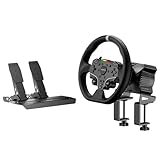
- This MOZA R3 Wheel and Pedals Bundle Kit is designed for PC Users (Not Compatible with Xbox), delivers high-performance sim racing at an exceptional price.
- MOZA R3 Direct Drive Base delivers a punchy 3.9Nm DD power with ultra-low torque ripple to achieve a instant reaction. R3’s compact design can be easily adapted to fit any scenario regardless of available space.
- ES Lite Steering Wheel for PC: This 11-inch round gaming wheel with durable ISF PU grips aluminum alloy rim, 22 customizable buttons for maximum immersion and extended use. The racing-level Quick Release system allows for effortless wheel rims changing.
- SR-P Lite Pedals(No Clutch): Pure, high-strength steel gives these anti-slip pedals a rock-solid durability and feel. High-precision Hall Sensor in core allows for consistency and performance. The space and configuration of the pedals, and the out curve are adjustable for the best comfor playing and customization.
- Table Clamp: 5mm-thick CNC machined high-intensity steel suitable for desktop setups or rigs. Angle-adjustable and fits various tables.
Pedals act like buttons or move together
Check the wheel’s console/PC compatibility mode and switch to its PC, Windows or DInput mode if applicable. Close remapping or joystick-interception software. Then inspect whether the pedals are separate or combined axes and use only the corresponding BeamNG binding style.
Steering feels delayed
- Open the Hardware page and verify that BeamNG displays input as you turn the wheel.
- Select the steering binding and set its filter to direct.
- Raise frame rate toward or above BeamNG’s recommended 60 fps.
- Try fullscreen; BeamNG says it can remove a couple of frames of lag, while borderless mode does not necessarily help.
- Turn VSync off if you accept possible screen tearing in exchange for lower latency.
Do not lower FFB smoothing first when the delay is visible in the input display. Smoothing changes force detail; a missing signal, filter or low frame rate is a separate problem.
Direct-drive FFB is absent or stops quickly
Confirm that FFB is configured and enabled, then change FFB Update Type from Fast (default) to Full. Re-test in the controlled official car with mods disabled. If the wheel still has no force, verify DirectInput mode and the manufacturer driver before changing strength.
Free tools Windows power users keep installed
One-click scans. No signup required.
The wheel oscillates while parked
Enable Reduce strength at low speeds, and judge FFB while driving rather than with the car stationary. If vibration remains uncomfortable at speed, increase smoothing slightly. Avoid masking a rotation mismatch with smoothing; correct the steering angle first.
Crashes hit too hard
Lower torque in the manufacturer configuration tool, then raise in-game strength only enough to restore normal-driving weight. This approach limits the maximum crash torque rather than simply making every driving force weak.
A repeatable calibration checklist
- Current drivers and firmware installed.
- Manufacturer software set to the wheel’s highest available angle.
- The identical angle entered in BeamNG.
- PC/DirectInput mode selected where the device offers modes.
- Hardware page shows live steering and pedal signals.
- Separate or combined pedal binding chosen to match the actual axis layout.
- Conflicting pedal bindings removed.
- Official rear-wheel-drive car selected for testing; mods and custom setups disabled.
- Frame rate at least 60 fps for the baseline.
- Strength set before smoothing; smoothing reduced only until detail returns without rattling.
- Low-speed strength reduction enabled if parked oscillation occurs.
- Update Type changed to Full when direct-drive FFB is missing or brief.
Keep the setup working after updates
Controller lists, drivers, firmware, menu labels and game-version behavior can change. BeamNG’s Steering Wheel: Setup page and v0.36 release notes document the procedures and version-specific labels cited here. After a major BeamNG or driver update, check the Hardware page, confirm the steering angle, test each pedal axis and recheck FFB before assuming a previously saved profile is still valid.
For general answers about supported controllers and game behavior, BeamNG’s BeamNG.drive FAQ is the appropriate reference. Keep a note of your working angle, strength, smoothing and update type so you can restore the profile after a reset, while still retesting those values on the road.
Outdated Drivers Are Slowing You Down
One free scan finds every outdated or missing driver and matches the right update for your exact hardware.Free scan · exact hardware matchWindows Errors? Fix Them Before They Spread
Repair common Windows errors and clear accumulated junk for a smoother, more stable PC - no reinstall needed.Free scan · no reinstallFinal recommendation
Use the manufacturer’s maximum rotation range, match it in-game, bind pedals according to their real axis layout, and tune FFB in motion with an official rear-wheel-drive car. Strength comes before smoothing; low-speed reduction handles parked oscillation; frame rate and the direct steering filter matter for latency. This process gives you a controlled starting point without pretending that one numerical preset can fit every BeamNG.drive wheel, pedal set or driving style.
Quick Recap
Product prices and availability are accurate as of the date/time indicated and are subject to change. Any price and availability information displayed on Amazon at the time of purchase will apply.




