Quick wins for a faster PC:
Fix the driver behind crashes, sound loss and screen glitchesFind Drivers →Repair Windows errors before they cause bigger problemsFix Now →Scan for outdated or missing drivers - takes under a minuteDriver Scan →For basic volume and ringtone changes, Android’s built-in Sound & vibration controls are the best place to start. For more specialized jobs, Samsung Galaxy owners can try Sound Assistant for per-app volume and finer steps, while Wavelet is geared toward headphone tuning and Poweramp Equalizer can work with supported players. There is no universal winner: compatibility depends on your phone, Android version, audio output, and the app playing sound.
Which Android sound-control option fits your needs?
| Option | Best suited to | Key limitation |
|---|---|---|
| Android Sound & vibration settings | Adjusting media, call, ring, notification, and alarm levels; choosing ringtones and notification sounds | Menu names and available steps vary by Android version. |
| Samsung Sound Assistant | Galaxy owners seeking finer volume steps, per-app media levels, or output switching | It is a Samsung/One UI option; feature availability can depend on the device and software version. |
| Wavelet | Headphone-focused equalization, including AutoEq profiles and manual tuning | Operation and feature availability vary by audio mode, device, and playback app. |
| Poweramp Equalizer | Equalization for supported music and streaming players | It is a separate app, and it does not work with every player or audio path. |
| Pixel Adaptive Sound | Adjusting sound from the phone speaker to suit the environment | Available only on selected Pixel models; it does not apply through external speakers or headphones. |
Start with Android’s built-in volume controls
Android already separates five common sound streams: media, calls, ring, notifications, and alarms. The Sound & vibration settings also let you manage mute and vibrate, select ringtones and notification sounds, and adjust some system sounds. Google’s instructions vary by Android version, and some steps apply only to Android 12 and later: Android Help: Change volume, sound, and vibrate settings.
As an Amazon Associate I earn from qualifying purchases.
Use these settings if you want to change ordinary volume levels or notification behavior. You may also be able to control notifications for individual apps through Android’s notification settings, but that is different from assigning each app its own media playback volume.
How do I control volume for individual apps on Android?
On a Samsung Galaxy: Sound Assistant
Samsung’s Sound Assistant listing describes per-app media volume, fine volume adjustment, and switching an app’s output between Bluetooth and the phone speaker. It also lists an equalizer, mono audio, left/right balance, and sound presets. Samsung advertises 150 fine volume steps; that is a vendor-listed feature, not an independent measurement. Some features require particular One UI releases, so check the Galaxy Store listing and your device’s compatibility before installing: Samsung Galaxy Store: Sound Assistant.
#1 Best Overall
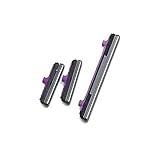
- 100% Brand New, OEM, High Quality
- This product are tested before shipping
- Compatible with Samsung Galaxy s10/ s10 plus
- Disassembly instruction isn't include, you may can search it via Internet.
This is a Galaxy-focused choice, not a general Android utility. A per-app control in Sound Assistant also does not guarantee that every app or output will behave identically across Galaxy models and software versions.
On other Android phones
The options covered here do not establish a universal per-app volume solution for non-Samsung phones. Android’s built-in controls offer separate system streams, but not necessarily an independent media slider for every app. Check your manufacturer’s sound settings and the utility’s compatibility details before relying on a third-party volume panel or mixer.
Rank #2

- 100% Brand New, OEM, High Quality
- This product are tested before shipping
- Compatible with Samsung Galaxy s10/ s10 plus
- Disassembly instruction isn't include, you may can search it via Internet.
What’s the best Android equalizer app for headphones?
Wavelet: headphone-oriented tuning
Wavelet’s Google Play listing describes a headphone-focused equalizer with AutoEq, imported custom optimizations, profiles that can load when headphones change, a graphic equalizer, channel balance, limiter, virtualizer, reverberation, and equal-loudness compensation. Its listing says it includes “5000+ AutoEq profiles”; this is Wavelet’s own figure, accessed in 2026, not an independently audited count. See Wavelet on Google Play.
What’s actually slowing this PC down?
Pick the symptom - the matching free tool is one click away.
Wavelet is the most directly headphone-oriented option in this group, but the listing does not establish that every profile or feature works with every phone, headset, playback app, or audio mode. Its update notes describe expanded enhanced-session detection and automatic AIDL detection, while warning that some features are unavailable in that mode. Treat those as compatibility details to check rather than a promise of identical behavior on all devices.
Rank #3
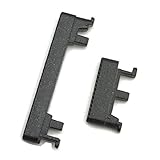
- Replacement power on/off button and volume side key button replacement set for Motorola Moto G Power 2020 XT2041 smartphone
- Brand new. Repair replacement parts. Color: Black color
- Phone needs to be disassembled in order to install this button, just simply insert it through the slot, will not keep the buttons stay secure. Professional technician is recommended for installation. Instruction is not included
- Compatible with: Motorola Moto G Power 2020 XT2041 only (NOT for Moto G Power 2021)
- Contents: power volume button set x 1
Poweramp Equalizer: for supported players
Poweramp Equalizer is a separate app from Poweramp, the developer’s local music player. The developer says the equalizer can apply its audio engine to streaming and other players that support Android audio effects, with per-app controls and presets. Support depends on the device, Android version, and player; it is not safe to assume every streaming app or audio path will be affected. The developer’s details are at Poweramp.
The Poweramp site also describes a 64-band parametric equalizer in Poweramp and a trial followed by a one-time unlock. Check the current terms on the developer’s site if you are considering a paid unlock, since commercial details can change.
Rank #4

- Contents: 1set Power On Off Volume Key
- Fix Problem: Replace your worn-out or damaged Power Volume Button Key /Power On Off /Volume Button /Side Buttons Key with this high-quality replacement set.
- Compatible Phone Models:for Moto Edge 40 Neo XT2307 XT2307-1, you can find you phone version through: Setting-About phone-Model.
Why isn’t my Android equalizer working in every app?
An equalizer app does not necessarily process all sound leaving the phone. Android’s AudioEffect documentation says an effect must be associated with an audio session to affect a particular AudioTrack or MediaPlayer. It also warns that attaching insert effects such as an equalizer to the global output mix using session 0 is deprecated: Android Developers: AudioEffect API reference.
The Tool Desk
Outbyte Driver Updater FREEFix the driver behind crashes, sound loss and screen glitchesFind Drivers →Outbyte PC Repair FREEClear out junk files and repair common Windows errorsFree Scan →In practical terms, whether an equalizer works can depend on how the player exposes its audio session, the Android implementation, the phone manufacturer, and whether the sound is routed to the phone speaker, wired headphones, Bluetooth, or another output. An app’s “system-wide” description is a stated capability, not a guarantee that it will affect every source. If processing is missing, check the equalizer’s status and compatibility guidance, try a supported player, and test the output route you actually use.
Best Value

- 100% Brand New, OEM, High Quality
- This product are tested before shipping
- Compatible with Samsung Galaxy s10/ s10 plus
- Disassembly instruction isn't include, you may can search it via Internet.
What sound features are built into Pixel phones?
On selected Pixel models through Pixel 10, Google offers Adaptive Sound, which adjusts phone-speaker output without changing the volume setting. Google says it requires current Android software and Android System Intelligence, and it does not work through external speakers or headphones. The feature is therefore not a headphone equalizer or a general Android app: Google Pixel Phone Help: Adjust sound on your Pixel phone.
Pixel Sound Amplifier and Conversation mode are separate listening and accessibility features. They should not be confused with a general-purpose volume mixer or equalizer.
Quick Recap
Choose based on the sound problem you want to solve
- Volume, ringtones, or notifications: begin with Android’s Sound & vibration and notification settings.
- Per-app media levels or finer volume steps on a Galaxy: check Samsung Sound Assistant and the requirements for your One UI version.
- Headphone-specific correction: try Wavelet’s AutoEq or manual controls, then confirm that your player and audio mode are supported.
- Equalization in a particular music or streaming app: check whether that player supports Android audio effects; Poweramp Equalizer is not guaranteed to work with every app.
- Changing phone-speaker output for listening conditions on a Pixel: check whether your model supports Adaptive Sound.
Product prices and availability are accurate as of the date/time indicated and are subject to change. Any price and availability information displayed on Amazon at the time of purchase will apply.
Do these 3 things before closing this tab:
1Scan for outdated or missing drivers - takes under a minute2Clear out junk files and repair common Windows errors3Fix the driver behind crashes, sound loss and screen glitches



