Best overall: Choose a Kobo eReader if you want native EPUB and PDF support alongside built-in borrowing from a participating library. PocketBook is another option with documented Libby access on newer models; an Android-based BOOX device suits readers who want to install several reading apps. For all three, check the exact model, your library’s workflow, and the sales listing for ad status before buying.
Which ad-free e-reader should you choose?
| Reader | Best fit | What to verify |
|---|---|---|
| Kobo eReader | Readers who want built-in library borrowing and personal EPUB/PDF support. | Your library and specific loan work with Kobo’s OverDrive/Libby path; protected files may require Adobe Digital Editions. Check the exact listing for ad status. |
| PocketBook eReader | Readers whose library supports its Libby connection, or who can use the device’s browser-based route. | OverDrive describes Libby collection access on newer PocketBook devices and a built-in-browser option on older models. Confirm your model, library, and ad status. |
| BOOX e-ink device | Readers who want to run multiple reading apps on an Android-based e-ink device. | App flexibility is not a guarantee that every library’s borrowing workflow will work smoothly. Confirm app compatibility and the listing’s ad status. |
No complete, authoritative model-by-model list establishes which current Kobo, PocketBook, or BOOX devices are ad-free. Even within a brand, do not assume every configuration is the same: inspect the exact model and regional listing, including whether it specifies lockscreen ads or an ad-free option.
![KINDLE PAPERWHITE 11TH GENERATION USER GUIDE: The Ultimate Step by Step Manual To Master The Hidden Features Including Tips And Tricks Of Kindle Paperwhite [11th Gen]](https://m.media-amazon.com/images/I/41fHJFVtyRL._SL160_.jpg)
As an Amazon Associate I earn from qualifying purchases.
Why Kobo is the strongest starting point for library books and EPUBs
Kobo’s format documentation lists EPUB, EPUB2, EPUB3, and PDF, among other formats, as supported. For personal, non-protected EPUB and PDF files, Kobo explains how to transfer them from a computer. These format and transfer details make Kobo a practical first choice for readers bringing their own books as well as borrowing from a library. Kobo’s supported formats and computer-transfer instructions distinguish ordinary files from protected ones.
Borrowing directly on a compatible Kobo
OverDrive says newer compatible Kobo models—including Libra Colour, Clara Colour, Clara BW, Elipsa 2E, and Sage—have OverDrive built in, allowing users to borrow and download ebooks from the Kobo catalog. The route depends on device, library, and title compatibility; the model list is not a promise that every library loan will appear or open. See OverDrive’s e-reader setup guidance and Kobo’s Libby help page before relying on this workflow.
#1 Best Overall

- Pages that pop - Now with enhanced display features and faster page turns. Includes a cover, a 6-month Amazon Kids+ subscription, and a 2-year warranty—up to a $187 value.
- Amazon Kids+ is a subscription designed for kids aged 3-12, providing unlimited access to thousands of age-appropriate books, including classic chapter books and graphic novel favorites. Included content is curated by age range, so it safely evolves with a child's interests and maturity. After 6 months, your subscription will automatically renew every month starting at just $7.99/month plus applicable tax. You may cancel at any time by visiting the Amazon Parent Dashboard or contacting Customer Service.
- Build healthy reading habits - Kids read, on average, more than an hour a day when they sit down with their Kindle. Kindle Kids is purpose-built for reading (not a toy)—no apps, videos, or games.
- Effortless reading in any light - With a 25% brighter front light at max setting—as bright as Kindle Paperwhite—light and dark mode, and 6″ glare-free display.
- Easy to use - The compact, lightweight design allows for one-handed reading. With 16 GB of storage, holds thousands of books. A single charge via USB-C lasts up to 6 weeks.
When a computer and Adobe Digital Editions are needed
Some library loans and other ebooks use Adobe DRM. Kobo says Adobe Digital Editions is needed to transfer Adobe DRM-protected books to a Kobo reader. OverDrive also documents downloading EPUB loans through Adobe Digital Editions and transferring them to a compatible reader; open PDFs can instead be opened in a PDF-compatible app. These are distinct paths, so support for EPUB or PDF alone does not mean every protected loan can be copied onto the device the same way. Read Kobo’s format and DRM notes, Kobo’s transfer guide, and OverDrive’s ebook reading options.
Check your library before choosing a device
Library compatibility is about more than whether an e-reader lists EPUB as a supported format. The library’s service, the title’s available format, the reader model, and any copy protection all affect the route.
Rank #2

- 6-INCH E INK CARTA DISPLAY: Enjoy crisp, paper-like reading on a glare-free touchscreen that’s easy on the eyes—even in direct sunlight.
- BUILT-IN FRONTLIGHT FOR LOW-LIGHT READING: Read comfortably in any environment, day or night, thanks to the eye-friendly integrated frontlight.
- SUPPORTS 25+ FILE FORMATS: Compatible with over 25 eBook and graphic formats including EPUB, PDF, MOBI, Adobe DRM, and LCP DRM-protected files.
- WI-FI & CLOUD CONNECTIVITY: Easily download books, sync your library, and manage content with seamless Wi-Fi and cloud integration.
- WEEKS OF READING ON A SINGLE CHARGE: Enjoy uninterrupted reading with a long-lasting battery that can go up to 2 months between charges.
- Identify your library’s ebook service. Check the library’s digital-borrowing page for Libby or OverDrive instructions and the e-reader models it supports.
- Check the title’s format and device path. A Kobo loan using the described Libby route must also be sold in the Kobo store, according to Kobo. Library guidance also notes that not every Libby title is compatible with Kobo and highlights EPUB for its transfer workflow. Check the specific loan before borrowing; see Kobo’s Libby conditions and the KDL Kobo guide.
- Confirm the transfer steps. A direct download, a computer transfer through Adobe Digital Editions, and opening an unprotected file are different workflows. Follow the library’s directions for that loan rather than assuming a general format list settles compatibility.
- Ask about the exact model. OverDrive’s setup guidance distinguishes newer PocketBook readers that connect to a Libby collection from older devices that may use a built-in browser. Ask the library whether your chosen model and local service work together.
When PocketBook or BOOX makes more sense
PocketBook for a second library-capable ecosystem
OverDrive documents newer PocketBook readers connecting to a library’s Libby collection; older models may rely on their built-in browser to download library ebooks. That makes PocketBook worth considering if your library confirms support for the specific model. The existence of a documented route does not establish that every library or title is supported.
BOOX for app choice
BOOX devices are Android-based e-ink tablets, which can be useful if you want several reading apps or services on one device. That flexibility is a different advantage from a dedicated reader’s built-in borrowing path: the material available here does not establish that BOOX is a better choice for every library workflow or PDF. Treat it as an app-flexible alternative, and verify the apps and library service you plan to use. For context, see TechRadar’s BOOX-versus-Kobo comparison.
Rank #3

- Pages that pop - Now with enhanced display features and faster page turns. Includes a cover, a 6-month Amazon Kids+ subscription, and a 2-year warranty—up to a $187 value.
- Amazon Kids+ is a subscription designed for kids aged 3-12, providing unlimited access to thousands of age-appropriate books, including classic chapter books and graphic novel favorites. Included content is curated by age range, so it safely evolves with a child's interests and maturity. After 6 months, your subscription will automatically renew every month starting at just $7.99/month plus applicable tax. You may cancel at any time by visiting the Amazon Parent Dashboard or contacting Customer Service.
- Build healthy reading habits - Kids read, on average, more than an hour a day when they sit down with their Kindle. Kindle Kids is purpose-built for reading (not a toy)—no apps, videos, or games.
- Effortless reading in any light - With a 25% brighter front light at max setting—as bright as Kindle Paperwhite—light and dark mode, and 6″ glare-free display.
- Easy to use - The compact, lightweight design allows for one-handed reading. With 16 GB of storage, holds thousands of books. A single charge via USB-C lasts up to 6 weeks.
Choose for your PDFs, not just the file extension
Kobo lists PDF support, and OverDrive describes options for opening PDFs, but those facts do not establish how comfortable a particular device will be with a complex document. A novel-length text that can reflow and a fixed-layout PDF with small type, columns, charts, or diagrams place different demands on a screen. Decide how often you read PDFs and inspect the exact device’s screen dimensions and document controls before choosing a PDF-first reader. The sources cited here do not provide comparative testing that would justify naming a universal PDF winner.
Independent reader supportYour contribution helps us test, update, and keep practical guides available for everyone.How to verify an ad-free configuration
“Ad-free” should describe the exact device configuration you are buying, not a whole brand. A buying guide has shown a Kindle model offered in ad-supported and ad-free configurations, illustrating why the listing matters; that example does not establish a comprehensive current policy for Kindle or any other brand. Check the regional product page or retailer listing for terms such as lockscreen ads, special offers, or an ad-free option, and confirm the choice applies to the precise model before checkout. See Creative Bloq’s e-reader guide for the configuration example.
Quick Recap
Best Value
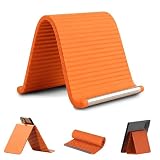
- 360° Flexible & Adjustable Design: Designed with a bendable aluminum core and soft silicone exterior, this flexible silicone phone holder can be flexibly adjusted to create comfortable viewing positions -vertical, horizontal, or tilted-for watching videos, reading, video calls, browsing, or hands-free use in daily life
- Stable Support & Anti-Slip Protection: The sturdy internal structure provides reliable support for smartphones and small tablets, silicone phone stand supporting devices of various sizes without deforming, while the non-slip silicone surface helps keep devices securely in place. The soft exterior also helps reduce scratches during use
- Hands-Free Convenience: Free your hands while watching videos, making video calls, reading, studying, or following recipes. This flexible silicone phone holder helps create a more comfortable viewing setup for work, entertainment, and everyday activities
- Portable & Foldable for Travel: Lightweight and easy to carry, this foldable tablet stand fits conveniently into backpacks, handbags, luggage, or desk drawers. A practical accessory for travel, commuting, office work, study sessions, and everyday use
- Wide Compatibility & Versatile Use: The phone holder for desk compatible with most smartphones, mini tablets, e-readers, and other small devices. Suitable for use on desks, bedside tables, kitchen counters, office workstations, airplane tray tables, and many other everyday environments
Quick decision guide
- Pick Kobo if built-in borrowing on a compatible model and native EPUB/PDF support are your priorities, and your library confirms the title path.
- Pick PocketBook if your library confirms Libby access or a workable browser-based route for the model you want.
- Consider BOOX if installing multiple reading apps matters more than having one established built-in library workflow.
- For frequent PDFs, compare the actual screen and document controls against your files; format support by itself is not a comfort guarantee.
- For any brand, verify ad status on the exact listing in your market.
Product prices and availability are accurate as of the date/time indicated and are subject to change. Any price and availability information displayed on Amazon at the time of purchase will apply.
Do these 3 things before closing this tab:
1Scan for outdated or missing drivers - takes under a minute2Clear out junk files and repair common Windows errors3Fix the driver behind crashes, sound loss and screen glitches



