Best fit depends on whether you want to manage a computer: StreamNeo is the first cloud option to try if you want an animated video to loop on YouTube while your computer is off. OBS Studio is a free local option if you can keep a computer and internet connection running. No independent uptime comparison establishes one cloud provider as universally best, so check each service’s current limits and terms before subscribing.
Best options for a 24/7 animated YouTube loop
| Option | Best for | What keeps the stream running | Important trade-off |
|---|---|---|---|
| StreamNeo | Creators who want an unattended cloud loop, with one flat price per slot for any uploaded quality up to 4K 60fps and a free first day. | StreamNeo loops uploaded video from its cloud and automatically recovers if YouTube drops the stream. | It streams to YouTube only. Provider reliability claims are not independently measured here. |
| OBS Studio | Creators who prefer a free, local encoder and can keep their setup available. | Your computer encodes and sends the video directly to YouTube. | The computer, encoder and network connection must stay available; connection issues can cause dropped frames. |
| Looping Stream | Creators comparing managed cloud looping and playlist features. | The service says broadcasts run on managed servers and playlists can repeat continuously. | Verify current formats, limits, pricing and recovery terms with the provider. |
| Streamloop | Creators looking for continuous playlist streams and scheduling. | The service says it supports continuous streams from playlists. | Confirm current pricing, file support and plan limits before choosing. |
| Loopcast | Creators looking for a cloud loop with a stated reconnect feature. | The service says it can restart a dropped connection. | Its displayed price and trial may change; check current terms. |
Service capabilities above are providers’ own descriptions, not results of independent uptime tests. Compare whether a service supports a single loop or playlists, accepted media formats and quality, automatic recovery, storage, billing, stream-key handling and documented support. Provider pages: StreamNeo, Looping Stream, Streamloop and Loopcast.
As an Amazon Associate I earn from qualifying purchases.
What you need before going live
- A YouTube channel eligible for live streaming and verified as required by YouTube. Check live availability in YouTube Studio before preparing a long broadcast; YouTube’s setup and limits are described in its live-streaming guide.
- An animated video file you have the right to broadcast, including rights to its soundtrack. YouTube says live content must follow its Community Guidelines and Terms of Service, and its livestream terms put responsibility for necessary rights on the creator.
- A plan for the stream’s visual and audio experience. A loop that technically works may still feel repetitive to viewers; if monetization matters, YouTube’s channel-level policy on repetitive or mass-produced content is relevant.
- A backup plan if you need a replay. YouTube says streams under 12 hours can be archived automatically, but a stream longer than 12 hours may not be captured at all. Do not rely on a 24/7 broadcast as a complete archive; record locally or use shorter sessions if preserving a replay matters.
Read YouTube’s live-stream setup guidance, archive guidance, livestream terms and channel monetization policies before launch.
Run the animated loop locally with OBS Studio
OBS Studio is open source and free for any use, including commercial use, according to the OBS Help Portal. It does not provide streaming servers: your computer sends the stream directly to YouTube, so this approach is not unattended if the machine or connection goes offline.
#1 Best Overall

- 🏡【𝐔𝐩𝐠𝐫𝐚𝐝𝐞𝐝 𝟑-𝐢𝐧-𝟏 𝐆𝐚𝐥𝐚𝐱𝐲 𝐏𝐫𝐨𝐣𝐞𝐜𝐭𝐨𝐫】Watch the splendid aurora views without chasing around or hiking far away, turning your home into a mini planetarium room or cozy bedroom. Place yourself in a peaceful environment with natural white noises echoing in your ears, relaxing both your mind and body. Enjoy immersive sound while playing your favorite music through the built-in Bluetooth speaker and lamp-style ambient effect.
- 🌈【𝐑𝐨𝐦𝐚𝐧𝐭𝐢𝐜 𝐆𝐚𝐥𝐚𝐱𝐲 𝐀𝐮𝐫𝐨𝐫𝐚 𝐏𝐫𝐨𝐣𝐞𝐜𝐭𝐨𝐫】 Featuring four colors (red/green/blue/white), this dual-lens star projector creates 33 lighting atmospheres, 3 modes, and 16 northern light effects, bringing the starry ceiling back home. With 4-level flow speed and brightness adjustment, it performs beautifully in both bright and dark rooms, ideal for kids, adults, and mood decor lovers.
- 🌲【𝐒𝐨𝐨𝐭𝐡𝐢𝐧𝐠 𝐖𝐡𝐢𝐭𝐞 𝐍𝐨𝐢𝐬𝐞 𝐒𝐥𝐞𝐞𝐩 𝐀𝐢𝐝】Equipped with 8 natural white noises, from ocean waves, forest birds to rivulet and lullaby, it provides calming sound therapy for relaxation and sleep, making it perfect for night use in the bedroom, nursery, or relaxation corner. It also helps soothe crying kids and create peaceful bedtime routines.
- 🎶【𝐁𝐥𝐮𝐞𝐭𝐨𝐨𝐭𝐡 𝐒𝐩𝐞𝐚𝐤𝐞𝐫 & 𝐑𝐡𝐲𝐭𝐡𝐦 𝐌𝐨𝐝𝐞】 Serve as a Bluetooth speaker when paired with your Bluetooth-enabled devices to play music. Stars and aurora move with the beat, turning any place into an engaging, immersive party environment — great for birthdays, Christmas, and holiday celebrations.
- 🎁【𝐏𝐞𝐫𝐟𝐞𝐜𝐭 𝐆𝐢𝐟𝐭 & 𝐇𝐨𝐦𝐞 𝐃𝐞𝐜𝐨𝐫】Designed as an adorable elephant-shaped decor lamp, it fits perfectly as stylish room decor or cozy bedroom decor, suitable for gaming setups, home theaters, reading nooks, and relaxation corners. A thoughtful gift idea for girls, boys, babies, couples, and elders, blending relaxation, aesthetics, and warm lights. Certified by FCC, CE & RoHS, ensuring safety for all-age home use.
- Check channel eligibility. In YouTube Studio, confirm live streaming is available for your channel. Follow YouTube’s current verification and setup requirements.
- Create a stream in YouTube Studio. Open Live Control Room and choose the encoder workflow. Copy the stream URL and stream key shown for the broadcast. Treat the key like a password: do not share it or show it in a recording.
- Add your animation in OBS. In OBS, add the video as a Media Source. Enable looping in that source’s properties so playback restarts at the end. Preview the scene and check that the animation and any audio play as intended.
- Set output to suit the source and connection. Choose a resolution and frame rate that your video and upload connection can sustain. Set the encoder bitrate and keyframe interval in OBS’s output settings to values accepted by YouTube’s current encoder guidance; do not assume a higher bitrate improves a stream if the connection cannot sustain it. The supplied service and YouTube pages do not establish a single bitrate or keyframe value for every resolution, frame rate and encoder, so check YouTube’s current recommendations for your chosen output.
- Connect OBS to YouTube. In OBS, open Settings > Stream, select YouTube as the service, and enter the stream key or connect the account using the available workflow. Keep the key private.
- Start and verify the broadcast. Start streaming in OBS, then check Live Control Room for the incoming signal and use its go-live controls as the selected YouTube setup path requires. Confirm the picture, audio and stream status before leaving the machine unattended.
- Monitor the local setup. Keep OBS, the computer and the network connection running. OBS’s dropped-frame indicator can rise when the connection is unstable or cannot keep up with the selected bitrate; reduce the load or address the connection before relying on a continuous broadcast.
Or let it run in the cloud
With StreamNeo, upload your prepared animation, add your YouTube stream key once, and go live. The cloud loops the uploaded video, so nothing has to stay on at home. Every slot streams the upload as made, up to 4K 60fps, at one flat price per slot; there are no quality tiers. StreamNeo automatically recovers if YouTube drops the stream. The first day is free with no card required, one free day per account. Monthly billing is $9.99 per month. For India, UPI and cards are accepted; card checkout is available worldwide. See StreamNeo for details, then start your free first day.
Independent reader supportYour contribution helps us test, update, and keep practical guides available for everyone.Costs and choosing a setup
Local OBS
OBS itself is free, but a local 24/7 stream depends on a computer and connection being available continuously. Consider the practical cost of keeping that equipment on and the time needed to monitor or restart it; the total varies by your existing hardware, electricity rate and internet service.
Rank #2

- 3-IN-1 Ambient Lighting - Crafted with a premium crystal glass globe and a warm wood-grain base, this upgraded 3-in-1 projector transforms any space into a soothing sanctuary. With 216 dynamic combinations of sunset glow, ocean waves, and northern lights, it creates an immersive atmosphere to melt away daily stress. It's the perfect room decor for creating a calming vibe, making it an ideal self-care gift for women, a dreamy addition to a teen girl's bedroom, or a thoughtful Mother's Day Gift.
- RGB MULTI-COLOR Projector Lights for Bedroom - The Mood Lighting has 16 colors & 6 brightness and 3 dynamic modes,Super vivid colors with mesmerizing ocean water ripples light projector for relaxation or sleep.You can select red,green,blue,white,yellow or mix through the remote/USB control create different effects to suit yr mood/room decor.Crystal lamp light projector reflects relaxing RGB ambient lighting comfortable lights,show the gorgeous temperament and transform yr bedroom into a gorgeous wonderland.The crystal light projector Memory Function helps U quickly turn on the last brightness&color of the room lights for bedroom & birthday gifts for teen girls.
- EYES-CARING & 6 BRIGHTNESS ADJUSTABLE - Flicker-free to protect yr eyes.Small crystal lamp has 10 levels of brightness, which can be achieved through a USB cable or remote control. The room projector lights for bedroom shines flicker-free & non-glare birthday gifts for teen girls.Room projector lights for bedroom with different brightness settings is Really cozy and pretty improved yr&kids sleep,allowing you to indulge in a tranquil and comfortable night like never before.Just touch the DIMM button to change the brightness of crystal lamp galaxy light projector for kids room from bright to a soft glow,room lights for bedroom ambient lighting light projector suitable every scenes.
- Handy Remote Control and Auto Off Timer - Crystal light projector for kids room with USB CABLE & REMOTE control and comes timing function,all function settings can be achieved through remote&USB control,providing U with more convenient life.When u try to fall asleep,don't worry about the plug in night light projector being on all night.U can set it to turn off after 1H,so u don't worry about getting up in the middle of night to turn off galaxy lamp!Galaxy light projector for kids room very soothing environment and lulls KIDS to sleep.Just choose the mood lighting crystal light projector kids room lights for bedroom decor ambient lighting to have a sweet dream for whole night without worry!
- Real glass & wood, not all-plastic construction - Crafted from a textured real-glass globe and solid wood base, this compact crystal lamp (4.13in × 4.53in) fits beautifully on any nightstand, shelf, or desk even when unlit. The non-replaceable LED is built for lasting use; for any repair needs, simply contact our support team.
Cloud looping
Cloud services can avoid leaving a personal computer running, but compare the live plan terms rather than assuming all providers include the same recovery behavior, storage, playlist support or media limits. StreamNeo uses the same product on every plan; only the billing length changes: Daily $0.99 per day · Weekly $2.99 per week · Monthly $9.99 per month · 6 months $49.99 for 6 months · Yearly $89.99 a year. Billing can be a day, week, month, six months or year, and can be canceled any time. Each slot includes one always-on stream, 10 GB storage per slot pooled across active slots, looping and playlists, automatic recovery if YouTube drops, and StreamNeo team support. For five or more slots, contact support.
The Tool Desk
Outbyte Driver Updater FREEFix the driver behind crashes, sound loss and screen glitchesFind Drivers →Outbyte PC Repair FREEClear out junk files and repair common Windows errorsFree Scan →Quick Recap
Best Value

- Immersive 7-Zone Stardust with Dynamic Lighting: Experience a breathtaking cosmos at home with 7 star light zones, each customizable to create vivid, layered stardust effects. Ideal for children's rooms and game rooms.
- Full DIY Control via Smart Command: DIY each zone’s color, brightness, speed, and motion—create flowing or breathing effects. Works with Matter, Alexa, and Google Assistant for hands-free control. Enjoy a starry sky with blink and orbit motions for a truly dynamic projection.
- Large 540ft² Coverage with Field of View Lenses: This star light projector has large field of view lenses, increasing coverage to 540ft², easily covering the entire living room. Transform bedrooms into a dreamy cosmic space.
- 50+ Scene Modes & 18 Soothing White Noise Options: One tap to change the LED lights from 50+ scenes and pair with 18 white noise options to create a unique atmosphere for different moods.
- Sleep Timer with Quiet Operation: Set sleep mode light and automated shut-off. Ultra-quiet motor ensures uninterrupted rest. Special gifts for kids, light sleepers.
Rank #4

- 【Galaxy Projector】LED red, green, blue and stars, multiple color mix for your choice, project the star projector onto the wall or ceiling, comes with beautiful flow effect, create bedroom living room family atmosphere.
- 【Stars Projector 】It build in 7 types LED background colors,This Stars Projector Lamp make romantic feeling stays with you as long as you want.it can produce different lights from different angle, creating a brilliant atmosphere, enjoy the beauty of different colors. it can bring you unexpected visual experience.
- 【Remote Control 】It operate not only with the buttons of the aurora projector itself, but also with the remote control by long distance, changing colors, adjust brightness, lighting mode, light effects, aurora light move speed, turn on/off,When the light is under sound mode, the sound controls the light. If there is no sound, the light is off. (Press"Auto Mode"again to enter modes.)
- 【Timing Function & Sleep mode】Northern Lights projector built-in timing function (0.5H,1H, 2H,3H,4H),Also when you choose sleep mode,it can automatically shutdown with no operation in 1H, It's more energy-saving and environmentally friendly.The soothing aurora effects will create a warm .
- 【Create Ambiance】It really sets the right mood,when you get home from a long day,turn this galaxy projector on,It makes your whole room feel so relaxing and comfy,It is very suitable for decorating bedrooms, walls, ceilings, birthdays, weddings, parties, and Christmas decorations. The best choice for family and friends.
Rank #3
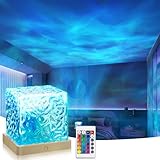
- Dynamic Ocean Wave Projector:This luminorthe cube lamp projects mesmerizing ocean wave patterns across your room, creating an immersive ambiance ideal for meditation, relaxation, and sleep
- 16-Color Mood Lighting:Select from 16 soothing hues and adjust brightness via included remote control to customize your perfect atmosphere
- Ambient Lighting: Enhance romantic dates, yoga sessions, or spa nights with 360° adjustable RGB lighting that transforms any space
- Amazing Room Decor:This simple cube light design make it suitable for any corner,an ideal personalized gifts for teens,teenage girls room decor or classroom decor
- Perfect Gift Choice: Northern lights projector is a perfect choice for birthdays,Christmas, anniversaries, or Valentine's Day, equally suited for homes, bedrooms, bathroom, loft and classroom
Troubleshooting a continuous loop
- YouTube does not show an incoming signal: Check that the channel is eligible for live streaming, the encoder is connected to the correct stream URL and key, and the key has not been replaced. Recopy it from Live Control Room if needed.
- OBS shows dropped frames: OBS identifies an unstable connection or a connection unable to sustain the selected bitrate as possible causes. Test the connection, reduce bitrate or output demands, and check that other network activity is not consuming upload capacity.
- The video stops instead of restarting: Check the Media Source’s loop setting and confirm the file plays through in OBS preview. If using a cloud service, verify that its current plan supports the file and loop or playlist configuration you selected.
- The broadcast ends after a disconnect: A local OBS setup depends on the local machine and connection being online again. For a cloud provider, check its documented reconnect behavior and current service status; vendor recovery descriptions are not independent uptime guarantees.
- The replay is missing or incomplete: YouTube warns that a stream longer than 12 hours may not be captured at all. Keep a local recording or plan shorter sessions if you need an archive.
- The stream is live but monetization is uncertain: Live technical acceptance does not establish monetization eligibility. YouTube evaluates monetization at channel level and may consider the channel’s theme, videos and metadata; make the loop meaningfully original rather than relying on repetition alone.
Product prices and availability are accurate as of the date/time indicated and are subject to change. Any price and availability information displayed on Amazon at the time of purchase will apply.




