Autonomous vehicle levels are the SAE’s six-part scale for describing what a driving feature does and who remains responsible for the task. The key distinction is not how advanced a car sounds: it is whether the system supports the driver or performs driving, under what conditions, and who must respond if it cannot continue.
What the SAE levels measure
SAE J3016 is a taxonomy for on-road motor-vehicle features that perform part or all of the dynamic driving task on a sustained basis. The level describes an engaged feature in a particular operating instance, not a permanent rating for an entire vehicle. One car may offer different features operating at different levels.

As an Amazon Associate I earn from qualifying purchases.
For detailed technical definitions, consult the current SAE J3016 catalog entry. SAE lists J3016_202609 as current, dated September 20, 2026, and cautions that its brief public level descriptions are not the complete definitions.
Quick wins for a faster PC:
Repair Windows errors before they cause bigger problemsFix Now →Scan for outdated or missing drivers - takes under a minuteDriver Scan →Clear out junk files and repair common Windows errorsFree Scan →SAE levels 0 through 5
| Level | Common descriptor | Who drives and what the feature does |
|---|---|---|
| 0 | No driving automation | The human drives. The vehicle may warn or intervene momentarily, but the feature does not provide sustained driving automation. |
| 1 | Driver assistance | The system supports either steering or speed control. The driver supervises, handles the rest of the driving task, and intervenes when needed. Adaptive cruise control is a familiar speed-support example. |
| 2 | Partial driving automation | The system can support steering and speed control together, but the driver must continually supervise and remain responsible for driving. NHTSA gives “highway pilot” as an example. |
| 3 | Conditional driving automation | The system drives under defined conditions. A human must be available to respond after a system request or relevant failure. |
| 4 | High driving automation | The system drives under defined conditions and can mitigate risk without a human within those conditions. |
| 5 | Full driving automation | The system is designed to drive under all conditions in which humans can drive; human driving is not needed. |
These are plain-language orientation points, not substitutes for the standard’s full definitions. SAE’s 2021 J3016 levels chart is also a useful visual reference.
#1 Best Overall
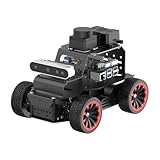
- For Raspberry Pi 5 & ROS2 Robot Car. MentorPi A1 smart AI robot car is powered by Raspberry Pi 5, compatible with ROS2, and programmed in Python, making it an ideal platform for AI robot development.
- High-Performance Hardware. Equipped with Ackerman chassis, closed-loop encoder motors, TOF lidar, depth camera, AI voice interaction box, and other advanced components to ensure optimal performance and efficiency.
- Advanced AI Capabilities. Supports SLAM mapping, path planning, multi-robot coordination, vision recognition, target tracking, and more, covering a wide range of AI applications.
- Autonomous Driving with Deep Learning. Utilizes YOLO model training to enable road sign and traffic light recognition, along with other autonomous driving features, helping users explore and develop autonomous driving technologies.
- Empowered by Large AI Model, Human-Robot Interaction Redefined. MentorPi AI robot car deploys multimodal models with ChatGPT at its core, integrating 3D vision and Al voice interaction box. This synergy enhances its perception, reasoning, and actuation capabilities, enabling advanced embodied AI applications and delivering natural, context-aware human-robot interaction.
The important dividing line: driver support or automated driving
Levels 0–2: the human remains responsible
At Levels 0, 1, and 2, a person remains responsible for driving and monitoring the environment. Level 1 supports either steering or speed; Level 2 can support both at once. That added capability does not make Level 2 hands-off or self-driving: the driver must continually supervise and be ready to intervene.
Levels 3–5: the system performs the driving task, with different fallback roles
At Levels 3, 4, and 5, the feature performs the driving task in its operating conditions. The critical difference is what happens when the feature cannot continue: at Level 3, a human must be available to respond to a request or relevant failure; at Level 4, the system can mitigate risk without a human within its defined conditions. Level 5 is intended to operate across all conditions in which people can drive.
Rank #2

- OpenMV Smart Robotic AGV Car Kit: Contains AGV car kit for OpenMV cameras
- Auto Tracking Color Balls: Includes color balls for automatic tracking
- Following Lines: Features pre-programmed lines for simple navigation
- Compatible with OpenMV Cam H7 Plus: Works with OpenMV Cam H7 Plus models
- Compatible with OpenMV Cam H7: Works with OpenMV Cam H7 models
Why Level 4 is not Level 5
Level 4 is limited to defined operating conditions. Those conditions may bound where or when the feature can drive; outside them, the feature is not operating at Level 4. Level 5 differs in intended scope: it covers all conditions in which a human can drive. The distinction is both the operating domain and the fallback role—not simply a ranking of how sophisticated the technology is.
Free tools Windows power users keep installed
One-click scans. No signup required.
Momentary safety features and Level 0
SAE’s taxonomy covers sustained performance of part or all of the dynamic driving task. It excludes warning systems and momentary active-safety interventions such as electronic stability control and automatic emergency braking, as well as certain lane-keeping assistance systems, because they do not perform the driving task on a sustained basis.
Rank #3
NHTSA’s consumer guidance uses a simplified presentation: it places automatic emergency braking, forward collision warning, and lane departure warning under Level 0 momentary assistance, and gives adaptive cruise control or lane-keeping assistance as Level 1 examples. That consumer framing is not the same as treating every feature name as a formal SAE classification. To understand a particular system, consider whether it provides sustained steering or speed support and check the vehicle’s operating instructions.
Independent reader supportYour contribution helps us test, update, and keep practical guides available for everyone.How to identify a feature’s level in practice
- Identify the specific feature. Do not assign one level to a whole vehicle just because it has a prominent automation feature.
- Check what it controls. Does it support steering, speed, or both—and does it perform the driving task on a sustained basis?
- Check who monitors. For Levels 0–2, the human remains responsible for driving and supervision. For automated-driving features, review the conditions under which the system performs the task.
- Find the fallback instructions. Determine whether the driver must respond to a request or failure, or whether the system can mitigate risk within its operating conditions.
- Read the owner’s manual and feature documentation. NHTSA advises consumers to review the manual for details about the actual technology; marketing names alone do not establish the level.
Are Level 3, 4, or 5 cars available to buy?
NHTSA’s consumer guidance, accessed October 4, 2026, says Levels 3–5 technologies are not available on vehicles for consumer purchase on its Driver Assistance Technologies page. Its separate Automated Vehicle Safety page says no fully automated vehicle is currently available for sale in the United States and that every vehicle currently for sale requires full driver attention for safe operation. These are U.S.-specific consumer-sale statements; they do not mean there is no testing, research, pilot activity, or limited deployment. Availability can change, so check current agency guidance and the specific vehicle’s documentation.
NHTSA also avoids using “self-driving” as a catch-all for higher automation because it can describe a state of operation without explaining capability or the driver’s required role. “Driving automation,” a specific SAE level, and explicit operating conditions are more informative terms.
The Tool Desk
Outbyte PC Repair FREEClear out junk files and repair common Windows errorsFree Scan →Outbyte Driver Updater FREEScan for outdated or missing drivers - takes under a minuteDriver Scan →Quick Recap
Product prices and availability are accurate as of the date/time indicated and are subject to change. Any price and availability information displayed on Amazon at the time of purchase will apply.




