Autonomous driving modes are commonly described using six SAE levels, from Level 0 (no driving automation) to Level 5 (full driving automation). The levels describe what an engaged feature does and whether a human must steer, supervise, or take over—not how advanced a car is overall. One vehicle can have features at different levels.
What the SAE levels describe
The SAE J3016 taxonomy applies to on-road motor vehicles and classifies sustained performance of some or all of the dynamic driving task. It focuses on the role of the active driving-automation feature and the human user. SAE cautions that short level labels are summaries, not the complete formal definitions. See SAE J3016.

| Level and name | What the feature does | Human role while it operates |
|---|---|---|
| 0 — No Driving Automation | No sustained driving-task automation; warnings and momentary safety interventions may still occur. | The human performs the driving task and remains responsible. |
| 1 — Driver Assistance | Provides sustained support for either steering or speed control, but not both together as one feature. | The human continuously supervises and performs the rest of the driving task. |
| 2 — Partial Driving Automation | Provides sustained support for steering and speed control together. | The human continuously monitors the driving environment and remains responsible for safe operation. |
| 3 — Conditional Driving Automation | Performs the complete driving task within defined conditions. | The human need not supervise while it operates, but must be available to respond to a takeover request or fallback need. |
| 4 — High Driving Automation | Performs the complete driving task within defined conditions and can manage fallback without human intervention. | No human fallback is needed within those conditions; outside them, the feature is unavailable. |
| 5 — Full Driving Automation | Performs the complete driving task under all conditions in which a human can drive. | Human driving is not needed. |
What changes from one level to the next?
Levels 0–2: the human remains in the driving loop
Level 1 supports one control dimension: lateral control (steering) or longitudinal control (speed). Level 2 supports both together, but does not hand responsibility for monitoring the road to the system. A Level 2 driver must keep watching the environment and be ready to act.
Level 3: the system drives, but the human is the fallback
Within its defined operating conditions, a Level 3 feature performs the full driving task and the user does not have to supervise continuously. The user must, however, be able to respond when asked to take over or when a fallback is needed. It is therefore different from a system that can safely handle fallback on its own.
Do these 3 things before closing this tab:
1Scan for outdated or missing drivers - takes under a minute2Repair Windows errors before they cause bigger problems3Fix the driver behind crashes, sound loss and screen glitchesLevel 4: no human fallback within the operating domain
A Level 4 feature can perform the task and manage fallback without a human taking over, but only inside the conditions for which it is designed. If those conditions are not met, the feature is unavailable; Level 4 does not mean it can operate everywhere.
Level 5: no defined operating-condition limit of the Level 4 kind
Level 5 covers all conditions in which a human can drive. That scope is broader than Level 4’s defined operating domain; it is not merely a claim that a feature handles more roads or weather than a particular Level 4 system.
Does a car have one automation level?
Not necessarily. The level applies to the particular feature when it is engaged, not automatically to the vehicle as a whole. A vehicle may have more than one feature with different levels, so a useful comparison names the specific feature and the conditions in which it operates.
Do warnings or automatic emergency braking count?
Not by themselves. The levels concern sustained performance of the driving task. A warning or brief safety intervention—such as automatic emergency braking—does not establish that a vehicle has a particular driving-automation level.
Quick wins for a faster PC:
Repair Windows errors before they cause bigger problemsFix Now →Fix the driver behind crashes, sound loss and screen glitchesFind Drivers →Rank #3
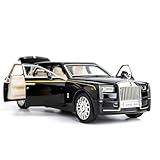
- Product size: 6.69*2.36*1.97 inches Weight: 0.7 pounds Outer packaging: exquisite color translucent packaging box
- Material: Die-cast car model, made of zinc alloy, with plastic parts, rubber tires, detailed interior and exterior decoration.
- Function: Press the two wheels of the front car to trigger the sound of the engine and the lights, with upright car logos,the angel logo is stored in the hood. The details of the body interior are realistic. Place the car on a flat ground, press the body and pull it back, the car will drive forward. (With pull back function)
- This Rolls-Royce Phantom 1/32 car model pull back car is very suitable for children to play with. The paint is exquisite and feels good, and it is heavy to hold. It is also very suitable for car model enthusiasts as a decoration.
- Accessories and collections: This product is very suitable for static accessories and can be used as an accessory next to a computer. For those who are passionate about collecting model car models, this is a great art collection.
What do “autonomous” and “self-driving” mean in practice?
Those terms can blur what a feature can do and what the person using it must do. NHTSA says it avoids “self-driving” for higher automation levels because the phrase can describe an operating state without explaining capability and may falsely suggest that users of current consumer technologies need not interact with the vehicle. When assessing a feature, look for its specific automation level, whether continuous supervision is required, whether a person must be ready to take over, and its operating conditions. See NHTSA’s automated-vehicle safety information.
Availability depends on geography, model, and year. IIHS reports that Level 5 systems are not currently on roads, that consumer-available technology is constrained to road and environmental conditions, and that a Level 3 consumer offering in the U.S. began with the 2024 model year. Those statements do not guarantee availability for every buyer or market; consult IIHS’s driver-assistance overview and the vehicle maker’s current feature documentation for the specific vehicle and location.
How to compare two driving-automation features
- Driving task: Does the feature support steering, speed control, or the complete driving task?
- Supervision: Must the human continuously monitor the driving environment?
- Takeover or fallback: Must the human be ready to respond, or can the feature manage fallback within its conditions?
- Operating domain: Where and under what conditions is the feature designed to work?
These questions clarify capability and responsibility more reliably than a marketing label such as “autonomous” or “self-driving.”
Quick Recap
Product prices and availability are accurate as of the date/time indicated and are subject to change. Any price and availability information displayed on Amazon at the time of purchase will apply.
Free tools Windows power users keep installed
One-click scans. No signup required.




