Freedom251 › Photo Animation Software

Zoetropic
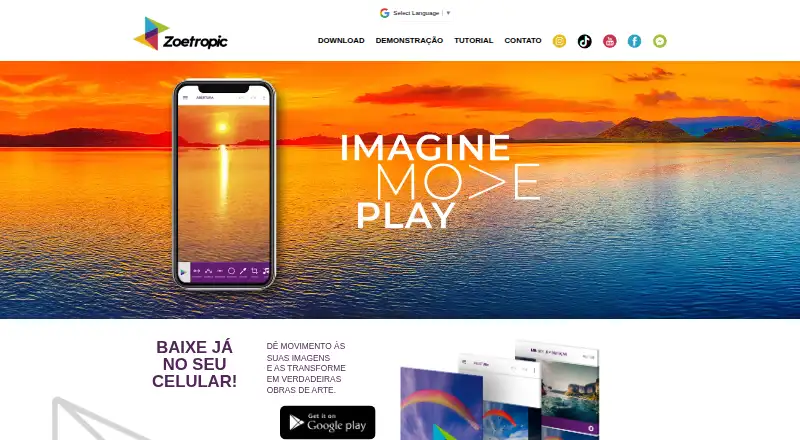
What Zoetropic is
Zoetropic turns still images into animations or videos by letting users specify how parts of a photo move. Movimento uses drawn arrows to set movement direction and intensity, while Sequência creates multiple movements with standardized arrows for patterns such as flowing water or curves. Stabilization points separate areas that can move in different directions, and Máscara marks regions that should remain still. Listed editing options include 3D and camera effects, sky changes, cropping, color adjustments, text, overlays, and audio tools with an audio library. The Android listing describes making cinemagraphs from a photo and exporting the result as video. Zoetropic is available on Android and iOS. Its free plan costs nothing and includes ads and limitations, with basic movement, sequence, stabilization, mask, audio, 3D effect, and camera tools. Paid plans list video without a watermark and no limits on animation speed or video repetitions. Standard is described as a one-time payment for lifetime removal of limitations; prices for Standard, Pro, and Club are not shown.
Who it suits
Zoetropic suits mobile users who want to animate parts of still photos and export video. Its tools may appeal to users creating flowing or curved movement, or keeping selected regions still.
What it does well
- Available on Android and iOS.
- Arrows set movement direction and intensity.
- Stabilization separates areas moving in different directions.
- Mask marks regions to keep still.
- Paid plans list video without a watermark.
What to know first
- Free plan includes ads and limitations.
- Standard, Pro, and Club prices are not shown.
- Free plan has limits on animation speed and repetitions.
Limits
The Free plan includes ads and limitations. Paid plans list video without a watermark and no limits on animation speed or video repetitions; Standard is a one-time payment for lifetime removal of limitations.
Plans
| Plan | Billed and limits | Price |
|---|---|---|
| Free | Anúncios e limitações; recursos básicos de movimento, sequência, estabilização, máscara, áudio, efeito 3D e câmera | Free |
| Standard | Pagamento único; limitações removidas vitaliciamente · Remoção vitalícia das limitações | On request |
| Pro | A página lista acesso a ferramentas e recursos sem limitações especificadas por plano; preço não exibido | On request |
| Club | A página lista acesso a ferramentas e recursos sem limitações especificadas por plano; preço não exibido | On request |
As zoetropic.com.br lists them, read 3 Oct 2026. The maker's own page has the final word.
Getting started
- Visit the Zoetropic website.
- Install the app on Android or iOS.
- Start with the Free plan, which includes basic movement and editing tools.
- Use Movimento to draw motion arrows, or Sequência to create multiple movements.
- Use stabilization points or Máscara to control which areas move.
- Export the result as a video.
Zoetropic turns still photos into animated videos, with motion controls for people who want to direct movement within an image. It is a strong fit for mobile cinemagraph-style edits; the free tier is a useful starting point, but paid plans are needed to remove key export limits.
Overview
Zoetropic is built around animating a photo rather than assembling video from scratch. Its arrows let you set the direction and intensity of movement, while stabilization points and masks help keep selected regions still or distinguish one area’s movement from another. That combination gives the app a focused role: shaping motion within a still image.
The app exports video and is available on Android and iOS. Its plan comparison also identifies depth animation and AI motion effects. Those add to the range of animation options, while the directional tools remain the clearest reason to choose Zoetropic over a more general editing app.
Key features
- Movement arrows: Draw arrows to control motion direction and intensity. This is useful when only part of a photo should appear to move, though it requires more deliberate shaping than applying a single whole-image effect.
- Sequence: Create multiple movements with standardized arrows, including flows such as water or curved motion. It suits scenes with a repeated or changing path better than relying on one directional cue.
- Stabilization and masks: Stabilization points isolate areas and separate movements in different directions; masks mark regions that should remain still. Together, they make it possible to preserve parts of a scene while animating others.
- Effects and sound: The plan comparison includes 3D and camera effects, sky changes, cropping, color changes, text, overlays, an audio tool, and an audio library. These broaden the finishing options, though access to particular tools depends on plan.
- Export controls: Paid plans include video without a watermark and remove limits on animation speed and video repetitions. Those are meaningful upgrades for anyone who needs more control over the finished clip.
Pricing
Zoetropic uses a freemium model. Free costs nothing and includes ads and limitations alongside basic movement, sequence, stabilization, mask, audio, 3D effect, and camera effect tools. It is the sensible way to try the core workflow, but the ads and caps make it a weaker choice for regular export use.
Standard is a one-time payment with limitations removed for life. Its price is custom pricing. It is the clearest step up for someone who wants lasting removal of restrictions without a recurring plan.
Pro and Club provide access to tools and resources without plan-specific limits stated in the comparison. Both use custom pricing, so their value is harder to assess against Standard. Choose between them only after confirming the price and the practical differences in access.
For paid plans, watermark-free video and unrestricted animation speed and repetitions are the concrete advantages over Free. The free plan’s listed tools cover the basics, but it retains ads and limitations.
Platforms
Zoetropic is available on Android and iOS. Android users can create cinemagraphs from a photo and save the result as video. Google Play says data is encrypted in transit, users can request data deletion, and device identifiers may be shared. The listed support email is [email protected]; the developer is ZOEMACH TECNOLOGIA LTDA, based in Aracaju, Brazil.
Who it's for
Zoetropic suits mobile users who want to animate a still photo while keeping control over which areas move and how. It is especially apt for cinemagraph-style clips and directional effects such as flowing water. It is less compelling if you need a broad video-production workflow or want unrestricted, watermark-free exports without paying.
Pros and cons
- Pros: Directional arrows, sequence, stabilization, and masks provide several ways to shape motion within a single image.
- Pros: The free plan includes core animation controls, so users can begin without buying a plan.
- Cons: Free includes ads and limitations, while watermark-free video and unrestricted speed and repetitions are paid-plan benefits.
- Cons: Standard, Pro, and Club prices are custom pricing, making it difficult to compare their cost before choosing.
Alternatives
Photo Animation Software is a useful category overview if you want to compare a wider set of options before settling on an app.
- Plotaverse is another freemium option for Android, iOS, macOS, and web users who want broader platform coverage.
- Deep Nostalgia fits users seeking several free animations and general animation tools on Android, iOS, or web.
- Dreamina is worth considering if you want a web-accessible, freemium option with a published Basic plan at $15 a month.
- Parallax Studio is the alternative to consider if you prefer free, open-source software for Linux, macOS, or Windows rather than a mobile app.
- Hedra suits users looking for an API or web option with monthly credit plans, including Basic at $20 a month and Pro at $50 a month.
- Motionleap is a close mobile alternative for Android and iOS; it has a free tier and an Unlimited access option at $35.99, paid once.
- Mug Life is another freemium Android and iOS option, with free photo effects and optional in-app purchases for advanced tools.
- PicAlive is an iOS alternative if you want to start with one free animation, though its free videos have usage limits, a watermark, and occasional ads.
Verdict
Choose Zoetropic if you want mobile tools for directing motion inside a still photo, especially for cinemagraph-style video. Its combination of arrows, stabilization, and masks is its main advantage, and the free plan lets you try the workflow. Look elsewhere if you need unrestricted exports on a free tier or want clear pricing before committing to a paid plan.
Verdict
Zoetropic provides photo animation tools on Android and iOS, with a free plan and paid options that remove listed limits. Compare plan details before choosing, since prices for Standard, Pro, and Club are not shown.
Questions
Is Zoetropic free?
Yes. The Free plan is listed as free and includes ads and limitations, with basic movement, sequence, stabilization, mask, audio, 3D effect and camera effect tools.
Which devices can run Zoetropic?
The listed platforms are Android and iOS.
What does Zoetropic export?
Video is the listed export format. The Android listing describes the result of creating a cinemagraph from a photo as a video.
What do the paid plans add?
The plan comparison lists video without a watermark and no limits on animation speed or video repetitions for paid plans.
How much do Standard, Pro and Club cost?
Their prices are not provided here. Standard is described as a one-time payment for lifetime removal of limitations.
Who develops Zoetropic?
The Google Play listing identifies the developer as ZOEMACH TECNOLOGIA LTDA and gives an address in Aracaju, Brazil.
Facts from Zoetropic's own pages
- Android
- A página do Google Play descreve o app como uma ferramenta para criar cinemagraphs a partir de uma foto e informa que o resultado é um vídeo. · play.google.com, 3 Oct 2026
- Desenvolvedor
- A listagem do Google Play identifica o desenvolvedor como ZOEMACH TECNOLOGIA LTDA e apresenta endereço em Aracaju, Brasil. · play.google.com, 3 Oct 2026
- Efeitos e edição
- A tabela de planos lista efeito 3D, efeito câmera, mudança de céu, corte de imagem, alteração de cor, texto e overlays. · zoetropic.com.br, 3 Oct 2026
- Estabilização
- Pontos de estabilização isolam áreas e separam movimentos em direções diferentes. · zoetropic.com.br, 3 Oct 2026
- Exportação e limites
- A comparação de planos identifica vídeo sem marca d’água, sem limite de velocidade de animação e sem limite de repetições do vídeo como recursos dos planos pagos. · zoetropic.com.br, 3 Oct 2026
- Função principal
- O Zoetropic dá movimento a imagens e transforma fotos em animações ou vídeos. · zoetropic.com.br, 3 Oct 2026
- Headquarters
- Aracaju, Sergipe, Brazil · zoetropic.com.br, 28 Sept 2026
- Movimento
- A ferramenta Movimento permite desenhar setas que determinam a direção e a intensidade do movimento na foto. · zoetropic.com.br, 3 Oct 2026
- Máscara
- A ferramenta Máscara marca regiões da imagem que devem permanecer imóveis. · zoetropic.com.br, 3 Oct 2026
- Segurança
- O Google Play informa que dados são criptografados em trânsito e que é possível solicitar a exclusão dos dados; também indica possível compartilhamento de identificadores do dispositivo. · play.google.com, 3 Oct 2026
- Sequência
- A ferramenta Sequência cria vários movimentos com setas padronizadas e pode ser usada para fluxos como água ou movimentos curvos. · zoetropic.com.br, 3 Oct 2026
- Suporte
- A listagem do Google Play informa o email de suporte [email protected]. · play.google.com, 3 Oct 2026
- Áudio
- A tabela de planos lista ferramenta de áudio e biblioteca de áudios. · zoetropic.com.br, 3 Oct 2026
Where Zoetropic stands on Freedom251
- Photo Animation Software#17 of 27