Freedom251 › Photo Animation Software

Deep Nostalgia
What Deep Nostalgia is
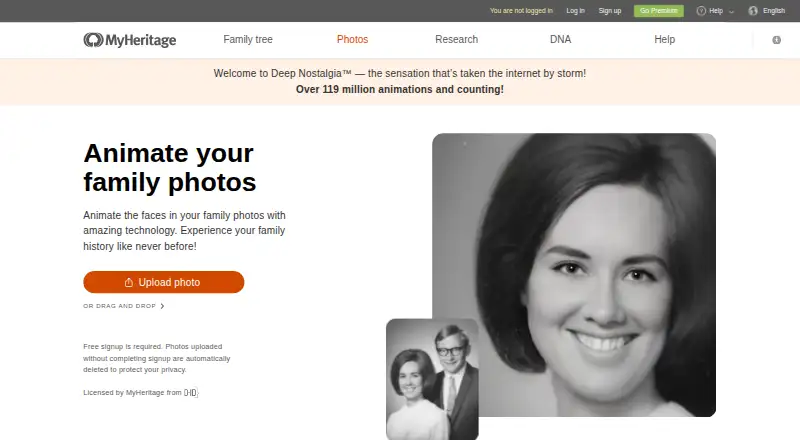
Deep Nostalgia animates detected faces in still photos to create short videos that simulate how a person might move on camera. The animations can show smiling, blinking and head-turning, and the feature works with black-and-white and color images. Photos not already enhanced on MyHeritage are enhanced automatically during the animation process. Users can start from the Deep Nostalgia page, the My Photos area of a MyHeritage family site or the MyHeritage mobile app, available for Android and iOS. Animations can be shared through Facebook or Twitter, sent as a link, or downloaded as MP4 files. Non-paying users can make several animations for free; a Complete subscription allows unlimited animations and special animations. Only faces detected by the algorithm can be animated, and multiple detected faces must be handled one at a time. MyHeritage characterizes the output as a simulation and marks animated photos with an icon. Free-user animations carry a MyHeritage logo watermark; paid-plan animations can be logo-free.
Who it suits
Deep Nostalgia may suit people who want to animate faces in still photos and share or download the resulting videos. It is available on the web and in MyHeritage's Android and iOS app.
What it does well
- Works with color and black-and-white photos.
- Animations can show blinking and head-turning.
- Videos can be downloaded as MP4.
- Several general animations are available for free.
What to know first
- Only algorithm-detected faces can be animated.
- Multiple detected faces must be animated individually.
- Free-user videos display a MyHeritage watermark.
Limits
Free access allows several general animations, and videos made without a paid MyHeritage plan display the MyHeritage logo watermark. A Complete subscription allows unlimited animations and special animations; paid-plan animations can be logo-free.
Plans
| Plan | Billed and limits | Price |
|---|---|---|
| Deep Nostalgia free access | Several animations for free · general animations · free MyHeritage sign-up | Free |
| Free Deep Nostalgia | Several animations · MyHeritage account required · Logo watermark | Free |
| Photo Subscription for Complete subscribers | annually · Same Photo plan features at a 25% discount | $37 a year |
| Photo Subscription | annually · Unlimited photo scanning and storage · AI enhancement, colorization, repair and animation · 20 LiveMemory videos annually | $49.90 a year |
As myheritage.com lists them, read 30 Sept 2026. The maker's own page has the final word.
Getting started
- Open the Deep Nostalgia page, a MyHeritage family site's My Photos section, or the MyHeritage mobile app.
- Sign up for free MyHeritage access to create several animations.
- Choose a photo with a face detected by the algorithm.
- Animate each detected face individually if the photo contains more than one.
- Share the result through Facebook or Twitter, copy a link, or download it as an MP4.
Deep Nostalgia is MyHeritage’s tool for giving faces in still photos a short, suggested movement. It is best suited to people who want to animate family portraits without moving into general-purpose video editing. The focused approach is appealing, but face detection and a free-plan watermark are meaningful constraints.
Overview
Animations can depict smiling, blinking, or a turn of the head, and work with color and black-and-white photographs. MyHeritage says the licensed technology from D-ID uses pre-recorded driver videos to guide facial motion. That makes each clip a simulation of possible movement, not a record of the subject in motion; an icon distinguishes animated photos from originals.
You can start with a photo from the Deep Nostalgia landing page, the My Photos area of a MyHeritage family site, or the MyHeritage mobile app. If the photo has not already been enhanced on MyHeritage, enhancement happens as part of the animation process, which may help with older pictures.
Key features
Face animation and sharing
The feature animates only faces its algorithm detects. Detected faces in a group photo have to be animated individually, adding steps, and a face that goes undetected cannot be animated. For portraits with one clearly detected subject, this is a narrower limitation. Clips can be shared on Facebook or Twitter, sent by copied link, or downloaded in MP4 format.
Mobile access
The free MyHeritage app is available on Android and iOS. That gives mobile users an alternative to starting from the website or a family site, though the same face-detection constraints apply.
Pricing
| Plan | Price | Includes |
|---|---|---|
| Deep Nostalgia free access | free | Several animations for free, general animations, and free MyHeritage sign-up |
| Complete subscription | Custom pricing | Unlimited animations and special animations |
Free access is suitable for occasional use, but the allowance is several animations rather than unlimited creation, and clips made without a paid MyHeritage plan carry the MyHeritage logo watermark. A Complete subscription removes the animation cap and provides special animations; paid-plan clips can also be logo-free. There is no free trial.
Platforms
Deep Nostalgia is available on web, Android, and iOS. The phone apps are free to download through Google Play and the App Store.
Who it's for
Choose Deep Nostalgia for occasional animated family portraits, especially when a single detected face and simple sharing or MP4 export meet the need. It is a poor fit for group images that need several faces animated together, or for anyone who wants motion to document what a person actually did: the output is explicitly a technological simulation.
Pros and cons
Pros
- Works with color and black-and-white photos. The same animation approach covers both kinds of portrait.
- Enhancement is built into the process when needed. Photos not already enhanced on MyHeritage are enhanced during animation.
- Several free animations and MP4 export. You can try the core workflow and download a video without first subscribing.
Cons
- Detection determines what can be animated. Missed faces are unavailable, and multiple detected people must be handled one at a time.
- Free clips carry a logo. The watermark makes free output less suitable when a clean video matters.
- Movement is simulated. The clip should not be treated as authentic footage of the person.
Alternatives
Photo Animation Software is a useful place to compare tools in this category. Consider Plotaverse if you want an option spanning Android, iOS, macOS, and web, with free download and in-app purchases. Motionleap may suit mobile users seeking a broader set of editing tools: some are free, while additional Pro tools require in-app purchase; its Unlimited access plan is $35.99, paid once. Mug Life offers free photo effects with optional in-app purchase for advanced tools.
Parallax Studio is the free, open-source option for Linux, macOS, and Windows, with no licence key or subscription. Zoetropic is a mobile alternative whose free tier includes basic movement and other effects with ads and limitations. For web or API access, Hedra offers paid monthly tiers with credit allowances and slower generations on Basic; Free.ai Text to Video instead provides daily free tokens and one video clip every two days on its free plan. Immersity AI is another web/API choice, with a free tier that allows unlimited watermarked conversions up to 720p for non-commercial use.
Verdict
Deep Nostalgia is a good choice for people who want a few shareable, animated family portraits through a focused web or mobile workflow. Its strongest case is the combination of photo enhancement, simple exports, and free access. Look elsewhere if you need multiple faces animated together, watermark-free output without a paid plan, or movement that represents real recorded behavior.
Verdict
Deep Nostalgia turns still photos into marked video simulations, with options to share or download them. Face detection limits which people can be animated, and free-user videos carry a logo watermark.
Questions
Is Deep Nostalgia free?
Yes. The free access plan costs nothing and includes several general animations after free MyHeritage sign-up.
Is there a free trial?
No. Deep Nostalgia has no free trial.
Which platforms support Deep Nostalgia?
It is available on the web and in the MyHeritage app for Android and iOS.
What can I do with an animation?
You can share it through Facebook or Twitter, copy a link, or download the video in MP4 format.
Can I animate every face in a photo?
Only faces detected by the algorithm can be animated. When several faces are detected, animate them one at a time.
Who makes Deep Nostalgia?
It is a MyHeritage feature. MyHeritage says the animation technology is licensed from D-ID.
Facts from Deep Nostalgia's own pages
- Account requirement
- Users must create or use a free MyHeritage account after uploading a photo. · myheritage.com, 15 Oct 2026
- Animation
- The animations can show a person smiling, blinking, and turning their head, and the feature works with black-and-white and color photos. · myheritage.com, 30 Sept 2026
- Animation drivers
- The service applies pre-recorded driver videos prepared by MyHeritage to control facial gestures. · myheritage-storage.com, 15 Oct 2026
- API status
- An independent API directory reports that MyHeritage’s former FamilyGraph public API has been retired and that its developer hosts now redirect or no longer resolve. · apis.io, 15 Oct 2026
- Authenticity
- MyHeritage describes the output as a technological simulation and marks animated photos with an icon to distinguish them from originals. · myheritage.com, 30 Sept 2026
- Authenticity labeling
- Animated outputs carry motion and enhancement icons so viewers can distinguish simulations from original photographs. · myheritage.com, 15 Oct 2026
- Company
- MyHeritage says it was founded by Gilad Japhet in 2003 and is headquartered in Israel. · myheritage.com, 30 Sept 2026
- Company founded
- LinkedIn lists MyHeritage as founded in 2003. · linkedin.com, 15 Oct 2026
- Company headquarters
- LinkedIn lists the headquarters in Or Yehuda, Israel. · linkedin.com, 15 Oct 2026
- Company size
- LinkedIn displays 528 employees on the company profile and classifies the company size as 201–500 employees. · linkedin.com, 15 Oct 2026
- Detection limitation
- Faces that the algorithm fails to detect cannot be animated. · myheritage.com, 15 Oct 2026
- Existing photos
- Photos already stored in a MyHeritage family site can be animated from the My Photos section. · myheritage.com, 15 Oct 2026
- Face detection
- Uploaded photographs are scanned for faces, and the user chooses which detected face to animate. · myheritage.com, 15 Oct 2026
- Face detection limit
- Only faces detected by the algorithm can be animated, and multiple detected faces must be animated one at a time. · myheritage.com, 30 Sept 2026
- Founded
- 2021 · myheritage.com, 28 Sept 2026
- Free use and subscription limit
- Non-paying users can create several animations for free, while a Complete subscription allows unlimited animations and special animations. · education.myheritage.com, 30 Sept 2026
- Headquarters
- Israel · myheritage.com, 28 Sept 2026
- Independent coverage
- Le Monde described Deep Nostalgia as an Israeli MyHeritage AI process that produces a short animation of a photographed face in under twenty seconds. · lemonde.fr, 15 Oct 2026
- Launch news
- MyHeritage announced Deep Nostalgia in February 2021 as a new feature for animating faces in family photographs. · blog.myheritage.com, 15 Oct 2026
- Legacy SDK
- MyHeritage’s public Family Graph Android SDK repository is Java code under the Apache License 2.0 and includes a sample app showing authorization and API calls. · github.com, 15 Oct 2026
- Limit: failed animations
- The same reviewer encountered photographs that could not be animated after waiting for processing. · tsgspaddlewheel.com, 15 Oct 2026
- Limit: subscription billing complaint
- An App Store reviewer reported being charged $99 plus tax after believing a free trial had been cancelled and warned users to cancel well before expiry. · apps.apple.com, 15 Oct 2026
- Limit: support response time
- A Trustpilot reviewer complained that responses to fault calls could take weeks. · trustpilot.com, 15 Oct 2026
- Limit: uncanny results
- MyHeritage acknowledges that some people find the animations uncanny or uncomfortable. · blog.myheritage.com, 15 Oct 2026
Where Deep Nostalgia stands on Freedom251
- Photo Animation Software#3 of 27