Freedom251 › Photo Animation Software
Parallax Studio
What Parallax Studio is
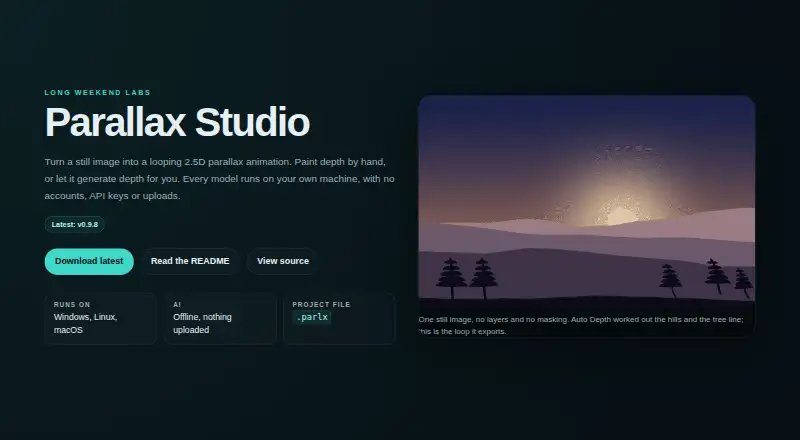
Parallax Studio turns a still image into a looping 2.5D parallax animation for artists seeking motion from still artwork without a 3D pipeline. Auto Depth separates a subject from its background and feathers depth around hard outlines; Body Relief detects people and poses to create depth across body parts. A depth brush provides adjustable size, hardness, strength, and value, with a colour-ramped overlay and undo and redo. Motion controls include focus, path, zoom, loop type, duration, and intensity, with previews at 24, 30, or 60 fps. Animations can be exported as MP4 or GIF at a chosen resolution and frame rate, with optional NVIDIA GPU rendering and NVENC encoding. The app imports PNG, JPG, JPEG, and WebP, and saves .parlx JSON projects that reference source images by path. It is free and open source at no cost, with downloads for Windows, Linux x86_64, and Apple Silicon Macs running macOS 12 or newer. The maker says downloaded models run locally and pictures are not uploaded to a cloud service. The optional 389 MB Depth Anything V2 Base model is licensed CC-BY-NC-4.0; its output should not be used commercially.
Who it suits
Parallax Studio suits artists who want to animate still images, including visual novel scenes and short loops, without a 3D pipeline.
What it does well
- Free and open source
- Exports MP4 or GIF
- Includes Auto Depth and Body Relief tools
- Maker says pictures are not uploaded to a cloud service
- Depth painting includes undo and redo
What to know first
- Optional Depth Anything V2 Base model is 389 MB
- That model’s output should not be used commercially
- macOS support requires Apple Silicon and macOS 12 or newer
- No mobile apps
Limits
The optional 389 MB Depth Anything V2 Base model is licensed CC-BY-NC-4.0; the README says not to use its output commercially.
Plans
| Plan | Billed and limits | Price |
|---|---|---|
| Free and open source | No licence key · no subscription | Free |
As longweekendlabs.github.io lists them, read 30 Sept 2026. The maker's own page has the final word.
Getting started
- Visit the Parallax Studio website.
- Download the version for Windows, Linux x86_64 or an Apple Silicon Mac running macOS 12 or newer.
- Open a PNG, JPG, JPEG or WebP image.
- Create depth with Auto Depth, Body Relief or the depth brush.
- Adjust motion and preview at 24, 30 or 60 fps.
- Export an MP4 or GIF, or save the project as a .parlx JSON file.
Parallax Studio turns still images into looping 2.5D animations, making it a focused option for artists who want motion without building a 3D scene. Its blend of automatic depth tools and manual control stands out, though a license restriction matters if you plan to use one of its depth models commercially.
Overview
This desktop app is designed for parallax animation rather than general-purpose photo editing. It supports depth animation but not face animation, and there are no mobile apps.
Projects are saved as .parlx JSON files that refer to source images by their file paths. Keep those images in place when moving or sharing a project. The maker says models run locally after download and pictures are not uploaded to a cloud service, a useful consideration for creators working with private images.
Key features
Depth creation and editing
Auto Depth uses Depth Anything V2 to separate a subject from its background and feather depth around hard outlines. Body Relief detects people and poses, then assigns depth across body parts to create more varied movement. These automatic tools offer a stronger starting point than a simple cutout, particularly for illustrated characters, while the depth brush lets users adjust size, hardness, strength and depth value. A colour-ramped overlay and undo and redo support more deliberate corrections.
Motion and export
Users can adjust focus, path, zoom, loop type, duration and intensity, then preview at 24, 30 or 60 fps. Export supports MP4 and GIF at a chosen resolution and frame rate, with optional NVIDIA GPU rendering and NVENC encoding. That makes the app practical for short loops and visual-novel scenes; the stated export formats keep it focused on animation output rather than a broader production pipeline.
Files, systems and support
Parallax Studio imports PNG, JPG, JPEG and WebP images. Downloads are available for Windows, Linux x86_64 and Apple Silicon Macs running macOS 12 or newer. The maker directs users to GitHub issues for bug reports and feature requests.
Pricing
Parallax Studio is free and open source: free, with no licence key and no subscription. There is no free trial because the app is free to use. The plan has no stated seat or export quota, so it is a straightforward fit for individual artists who want desktop parallax tools without recurring software costs.
The important qualification is the optional 389 MB Depth Anything V2 Base model, licensed under CC-BY-NC-4.0. Its output should not be used commercially. Artists creating work for commercial release should account for that restriction before choosing the model for their workflow.
Platforms
The app is available for Windows, Linux x86_64 and Apple Silicon Macs with macOS 12 or newer. It has no mobile app, so it is not suited to creators who need to animate or export directly from a phone or tablet.
Who it's for
Parallax Studio is best for artists making short loops or visual-novel scenes who want to give still artwork depth and motion without a 3D pipeline. Its pose-aware depth and manual painting are especially relevant when a subject needs more nuanced movement than a basic cutout can provide. It is less suitable for face animation, mobile-first workflows or commercial work that depends on output from the optional Depth Anything V2 Base model.
Pros and cons
- Pros: Automatic subject separation, pose-aware body depth and manual painting give artists several ways to shape parallax rather than accepting one generated result.
- Pros: MP4 and GIF export, with selectable resolution and frame rate, supports common short-loop deliverables.
- Pros: Free, open-source access and local model processing avoid subscription costs and cloud uploads, according to the maker.
- Cons: Output from the optional Depth Anything V2 Base model is restricted from commercial use, limiting its fit for monetized projects.
- Cons: No face animation or mobile apps; the app is narrowly aimed at desktop parallax work.
- Cons: .parlx projects reference source images by path, so project files alone do not keep their image assets together.
Alternatives
For a broader starting point, browse Photo Animation Software.
- Plotaverse is worth comparing if you want a freemium option available on Android, iOS, macOS and the web.
- Deep Nostalgia suits readers looking for general photo animations, with several animations available through free MyHeritage access.
- Dreamina is an alternative for readers who want a freemium app across Android, iOS and web, with a free tier and a paid Basic plan at $15 a month.
- Zoetropic is a mobile alternative for Android and iOS users seeking basic motion and 3D-camera effects in its free tier.
- Hedra is a web and API alternative with paid monthly plans that include credits and commercial use.
- Motionleap is a mobile option for Android and iOS, with some editing tools free and additional Pro tools requiring an in-app purchase.
- Mug Life offers free photo effects on Android and iOS, with advanced tools available through an optional in-app purchase.
- PicAlive is an iOS alternative that offers a first animation during onboarding, with limits, a watermark and occasional ads on free videos.
Verdict
Choose Parallax Studio if you make desktop-based illustrated loops or visual-novel scenes and want to shape depth with both automatic tools and a brush, without paying for a subscription. Its local processing and focused export options strengthen that case. Look elsewhere if you need face animation, mobile editing or commercial output from the optional Depth Anything V2 Base model.
Verdict
Parallax Studio offers depth creation, motion controls, and video or GIF export for still-image animation. Note the commercial-use restriction on output from its optional Depth Anything V2 Base model.
Questions
How much does Parallax Studio cost?
The Free and open source plan is free, with no licence key and no subscription.
Is there a free trial?
No. The facts list no free trial; the app is free and open source.
Which systems can run it?
Downloads are available for Windows, Linux x86_64 and Apple Silicon Macs running macOS 12 or newer.
Does Parallax Studio upload pictures to a cloud service?
The maker says models run locally after download and pictures are not uploaded to a cloud service.
Can the optional Depth Anything V2 Base model be used commercially?
The model is licensed CC-BY-NC-4.0, and the README says not to use its output commercially.
How can users report a bug or request a feature?
The maker directs users to open a GitHub issue.
Facts from Parallax Studio's own pages
- Auto Depth
- Auto Depth uses Depth Anything V2 to separate a subject from its background and feather the depth map around hard outlines. · github.com, 30 Sept 2026
- Body Relief
- Body Relief detects people and their poses, then creates separate depth across body parts for parallax motion. · github.com, 30 Sept 2026
- Depth painting
- The depth brush offers adjustable size, hardness, strength and depth value, with a colour-ramped overlay and undo and redo. · github.com, 30 Sept 2026
- Export formats
- The app exports MP4 or GIF at a chosen resolution and frame rate, with optional NVIDIA GPU rendering and NVENC encoding. · github.com, 30 Sept 2026
- Image and project formats
- It imports PNG, JPG, JPEG and WebP, and saves projects as .parlx JSON files that reference source images by path. · github.com, 30 Sept 2026
- Intended users
- The maker describes the product as built for artists who want motion from still art without a 3D pipeline, including visual novel scenes and short loops. · longweekendlabs.github.io, 30 Sept 2026
- Model licensing limit
- The optional 389 MB Depth Anything V2 Base model is CC-BY-NC-4.0, and the README says not to use its output commercially. · github.com, 30 Sept 2026
- Motion preview
- Motion controls include focus, path, zoom, loop type, duration and intensity, with preview options of 24, 30 or 60 fps. · github.com, 30 Sept 2026
- Privacy
- The maker says models run locally after download and that pictures are not uploaded to a cloud service. · longweekendlabs.github.io, 30 Sept 2026
- Purpose
- Parallax Studio turns a still image into a looping 2.5D parallax animation. · longweekendlabs.github.io, 30 Sept 2026
- Support
- The maker directs users to open a GitHub issue for bugs or feature requests. · github.com, 30 Sept 2026
- Supported systems
- Downloads are available for Windows, Linux x86_64 and Apple Silicon Macs running macOS 12 or newer. · github.com, 30 Sept 2026
Where Parallax Studio stands on Freedom251
- Photo Animation Software#10 of 27