Freedom251 › Photo Animation Software
Nero AI Face Animation
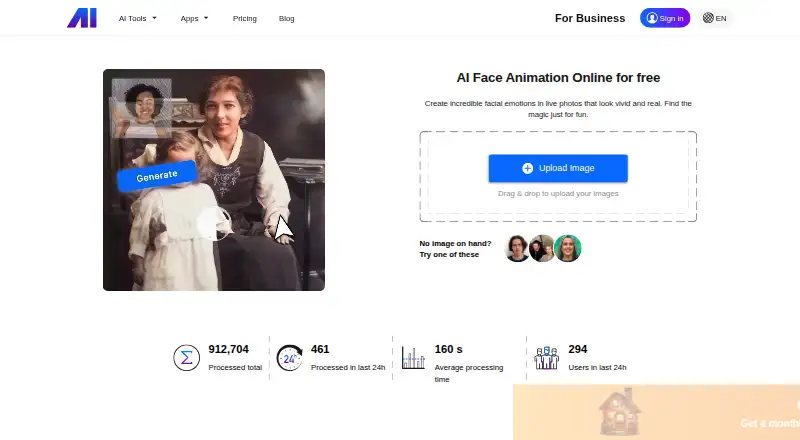
What Nero AI Face Animation is
Nero AI Face Animation turns a still picture containing a human face into an animated video using an emoticon template. Listed effects include smiles, nods, and winks. To make a video, upload a picture, choose a template, start processing, then preview and download the result. Supported uploads are JPG, JPEG, PNG, BMP, WebP, and AVIF; the listed photo limit is 30. Export formats include MP4, MOV, WMV, and AVI.
The service is available on the web and through an API that Nero says can be integrated into an application or code. Its Image To Video API is described as turning static pictures into animated facial expressions. The free trial plan includes 10 Nero Credits. Standard video generation uses 2 Credits, while Nero AI Plus uses 4 Credits per video. Nero AI Plus outputs 480P by default, with 720P available after upgrade. Nero warns that results may be blurry and recommends images with larger faces and clearer features. The Face Animation page also says its video generation model is being optimized and trained.
Who it suits
Nero presents Face Animation for photography enthusiasts, social media influencers, and people who want to animate portraits for fun or creative projects. Its API may also suit people integrating facial animation into an application or code.
What it does well
- Offers smiles, nods, and winks
- Accepts six listed image formats
- Exports MP4, MOV, WMV, and AVI
- API can be integrated into applications or code
What to know first
- Results may be blurry
- Standard generation uses 2 Nero Credits per video
- Nero AI Plus defaults to 480P output
- The model is still being optimized and trained
Limits
The free trial includes 10 Nero Credits, and each standard generation costs 2 Credits; Nero AI Plus costs 4 Credits per video. AI Plus outputs 480P by default, with 720P available after upgrade, and the listed photo limit is 30.
Plans
| Plan | Billed and limits | Price |
|---|---|---|
| Free trial credits | 10 free trial Nero Credits · 2 Credits per standard video generation · 4 Credits with Nero AI Plus | Free |
As ai.nero.com lists them, read 5 Oct 2026. The maker's own page has the final word.
Getting started
- Visit the Nero AI Face Animation website.
- Upload a portrait in JPG, JPEG, PNG, BMP, WebP, or AVIF format.
- Select an animation template and start processing.
- Preview and download the result.
- For application or code integration, use the API.
Verdict
Nero AI Face Animation provides a straightforward way to turn portraits into template-based clips, with web and API access. Keep the credit costs, default Nero AI Plus resolution, and stated image-quality limitation in mind.
Questions
Is Nero AI Face Animation free?
It has a free plan and a free trial. The free trial plan includes 10 Nero Credits.
How many credits does a video use?
A standard video generation costs 2 Nero Credits. A Nero AI Plus generation costs 4 Credits per video.
What platforms does it support?
It is available on the web and through an API.
What image formats can I upload?
JPG, JPEG, PNG, BMP, WebP, and AVIF are supported. The listed photo limit is 30.
What resolution does Nero AI Plus produce?
AI Plus outputs 480P video by default. 720P is available after upgrade.
Who makes Nero AI Face Animation?
Nero is based in Karlsruhe, Germany.
Facts from Nero AI Face Animation's own pages
- API
- Nero says Face Animation has an API that can be integrated into users’ applications or code. · ai.nero.com, 5 Oct 2026
- API use case
- Nero describes its Image To Video API as turning static pictures into animated facial expressions. · ai.nero.com, 5 Oct 2026
- Company background
- Nero’s AI API page says its journey began with Nero Burning ROM in 1995 and lists Karlsruhe, Germany as an office location. · ai.nero.com, 5 Oct 2026
- Expressions
- The site lists smiles, nods, and winks among its facial expression effects. · ai.nero.com, 5 Oct 2026
- Headquarters
- Karlsruhe, Germany · ai.nero.com, 28 Sept 2026
- Intended users
- Nero presents Face Animation for photography enthusiasts, social media influencers, and people who want to animate portraits for fun or creativity. · ai.nero.com, 5 Oct 2026
- Model status
- The Face Animation page says its video generation model is being optimized and trained. · ai.nero.com, 5 Oct 2026
- Output resolution
- The page says Nero AI Plus outputs 480P video by default, with 720P available after upgrade. · ai.nero.com, 5 Oct 2026
- Privacy
- Nero’s privacy statement says ai.nero.com is within its scope and that personal data is processed under applicable rules, particularly the GDPR. · nero.com, 5 Oct 2026
- Processing cost
- A standard Face Animation video generation costs 2 Nero Credits; the Nero AI Plus model costs 4 Credits per video. · ai.nero.com, 5 Oct 2026
- Quality limitation
- Nero says results may be blurry and suggests using an image with a larger face and clearer facial features. · ai.nero.com, 5 Oct 2026
- Support
- The Face Animation page lists [email protected] for contact and links to a feedback form. · ai.nero.com, 5 Oct 2026
- Upload formats
- It supports JPG, JPEG, PNG, BMP, WebP, and AVIF uploads. · ai.nero.com, 5 Oct 2026
- What it does
- It turns a static image with a human face into an animated video using a selected emoticon template. · ai.nero.com, 5 Oct 2026
- Workflow
- Users upload a picture, select an animation template, start processing, then preview and download the result. · ai.nero.com, 5 Oct 2026
Where Nero AI Face Animation stands on Freedom251
- Photo Animation Software#14 of 27