Freedom251 › Video Downloaders
yt-dlp online
What yt-dlp online is
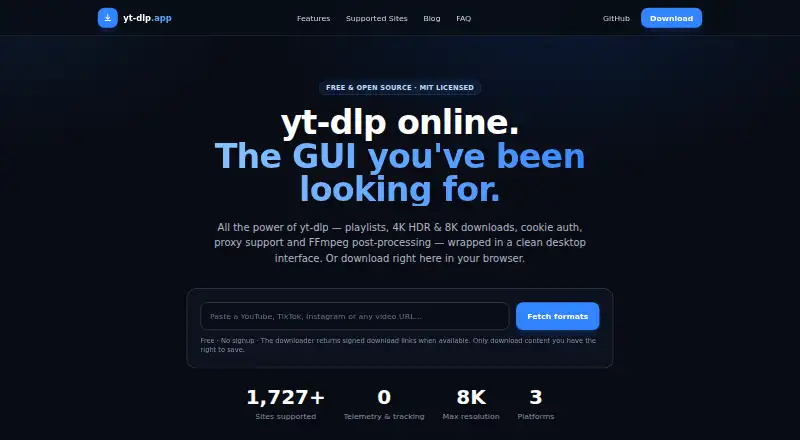
yt-dlp online is a free option for downloading video or audio from supported sources through a browser or desktop platform. Its source list includes YouTube, TikTok, Instagram, Facebook, X/Twitter, Vimeo, Twitch, SoundCloud, Reddit, Dailymotion, BiliBili, and Rumble, as well as 1,727+ other sites. Video quality is listed up to 8K, although available source video formats vary by site. Audio output choices include MP3, M4A, Opus, and FLAC. Playlist, subtitle, and batch downloads are supported. Listed platforms are web, Windows, macOS, and Linux. The Free plan costs nothing and is described as an open-source desktop application with no premium tier and no download limits. The exact video formats available for a particular download depend on the source site.
Who it suits
It suits people who want to save audio or video from supported sites using a browser or desktop platform. Playlist, subtitle, and batch downloads may be useful for people handling more than one item or needing subtitles.
What it does well
- Lists more than 1,727 supported sites.
- Video quality is listed up to 8K.
- Supports playlist, subtitle, and batch downloads.
- Offers MP3, M4A, Opus, and FLAC audio outputs.
- Free plan has no download limits.
What to know first
- Available video formats vary by source site.
- No paid tier is listed.
Limits
The Free plan is described as having no download limits and no premium tier. Video quality is listed up to 8K, and source video formats vary by site.
Plans
| Plan | Billed and limits | Price |
|---|---|---|
| Free | Open-source desktop application · No premium tier · No download limits | Free |
As dlp.yt lists them, read 20 Sept 2026. The maker's own page has the final word.
Getting started
- Visit the yt-dlp online website.
- Open it in a web browser or use the desktop option for Windows, macOS, or Linux.
- Choose a supported source and provide the item to download.
- Select an available video or audio format, or choose playlist, subtitle, or batch downloads as needed.
Overview
yt-dlp online is a downloader for saving media from a wide range of sites, with desktop and browser options. It suits people who need playlists, subtitles, or batches as well as individual downloads. Its strongest case is broad source coverage at no cost; video formats depend on the source.
Key features
Supported sources include YouTube, TikTok, Instagram, Facebook, X/Twitter, Vimeo, Twitch, SoundCloud, Reddit, Dailymotion, BiliBili, Rumble, and more than 1,727 other sites. That breadth is useful if your downloads span several platforms. It does not guarantee the same formats or quality across them: source video formats vary, and 8K is a maximum rather than a promise for every clip.
Audio output includes MP3, M4A, Opus, and FLAC. Playlist, subtitle, and batch downloads make the tool a better fit for collections or multi-item jobs than a downloader limited to single clips. Those features do not overcome the source-specific limits on video formats.
Pricing
The Free plan costs nothing. It is an open-source desktop application with no download limits and no premium tier, so regular users can avoid both quotas and upgrade decisions. There is no paid plan for users seeking a premium tier.
Platforms
yt-dlp online supports Windows, macOS, Linux, and web browsers. That mix suits people who want a desktop option or browser access, though the free plan is described as a desktop application.
Who it's for
Choose it if you download from multiple supported sites or regularly need playlists, subtitles, or batches without a download cap. Look elsewhere if you require consistent video formats across sources, or if a particular site's quality options are central to your choice.
Pros and cons
- Pros: Broad source support, including more than 1,727 additional sites, gives users one option for varied sources.
- Pros: Playlist, subtitle, and batch downloads cover jobs beyond saving a single clip.
- Pros: The free plan has no download limits and no premium tier to budget for.
- Cons: Video formats vary by source, so users cannot count on the same options everywhere.
Alternatives
yt-dlp app is another free, open-source desktop option for Windows, macOS, and Linux; choose it if no telemetry or tracking is a priority.
4K Video Downloader+ has a permanent free Starter plan, a free trial, and support for Android as well as desktop platforms; consider it if those platform or plan options suit you better.
OmniGet offers a free plan with no ads, no account, and no paid plan.
MeowLoad has basic desktop functions on its free plan and a premium plan with playlist, channel, and bulk downloads; consider it if those plan options meet your needs.
Catalyst is a free, open-source alternative with no account required and local processing.
Star Video Downloader caps its free plan at five downloads per day and 1080p, so it is a paid-plan alternative for users who can work within those free limits.
Turbo Downloader caps its free plan at 10 downloads per day and 1080p; its annual plan is $19 a year and supports up to 8K.
aTube Catcher has a free Community plan capped at 1080p for single-video downloads.
Browse the Video Downloaders list for more options.
Verdict
yt-dlp online is a strong fit for people who want broad source coverage, useful collection tools, and unlimited downloads at no cost. Its main drawback is variable video-format support across sites; choose another downloader if consistent format availability is more important than breadth.
Verdict
yt-dlp online offers broad listed source coverage, several audio formats, and playlist, subtitle, and batch downloads at no listed cost. Video format availability varies with the source site.
Questions
How much does yt-dlp online cost?
The Free plan costs nothing.
Which platforms are listed?
Web browsers, Windows, macOS, and Linux.
Which sites does it support?
Listed sources include YouTube, TikTok, Instagram, Facebook, X/Twitter, Vimeo, Twitch, SoundCloud, Reddit, Dailymotion, BiliBili, Rumble, and 1,727+ sites.
What audio formats are available?
The listed audio output formats are MP3, M4A, Opus, and FLAC.
Can I download playlists, subtitles, or batches?
Yes. Playlist, subtitle, and batch downloads are supported.
Does the Free plan have download limits?
The plan is described as having no download limits and no premium tier.
Facts from yt-dlp online's own pages
- Batch downloads
- Yes · dlp.yt, 20 Sept 2026
- Device platforms
- Windows,macOS,Linux,web browser · dlp.yt, 20 Sept 2026
- Free plan
- Yes · dlp.yt, 20 Sept 2026
- Maximum video quality
- 8k · dlp.yt, 20 Sept 2026
- Output formats
- MP3,M4A,Opus,FLAC; source video formats vary by site · dlp.yt, 20 Sept 2026
- Playlist downloads
- Yes · dlp.yt, 20 Sept 2026
- Subtitle downloads
- Yes · dlp.yt, 20 Sept 2026
- Supported sources
- YouTube,TikTok,Instagram,Facebook,X/Twitter,Vimeo,Twitch,SoundCloud,Reddit,Dailymotion,BiliBili,Rumble,and 1,727+ sites · dlp.yt, 20 Sept 2026
Where yt-dlp online stands on Freedom251
- Video Downloaders#10 of 135