Freedom251 › Video Downloaders

NeoDLP
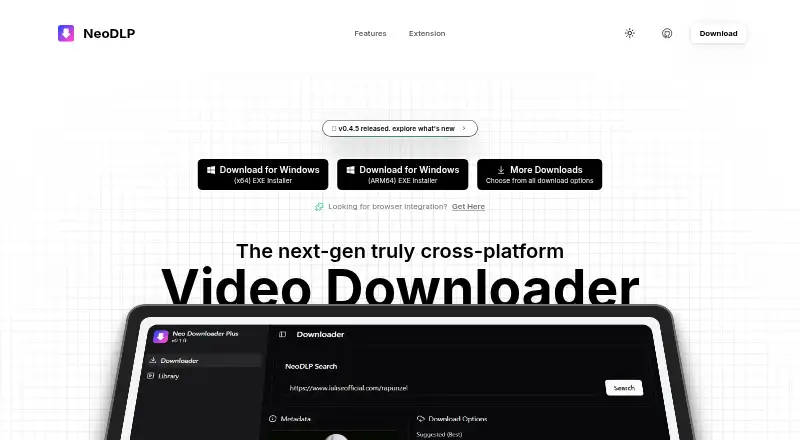
What NeoDLP is
NeoDLP is a free, open-source desktop downloader for video and audio from more than 2,500 websites, including YouTube, Facebook, Instagram, and X. It supports individual videos, playlists, and batch downloads, and can combine selected video and audio streams. Output options include MP4, WEBM, MKV, MP3, and other selectable formats; users can also embed subtitles, chapters, information, and thumbnails. The NeoDLP Library organizes downloads, while a separate extension provides Chrome and Firefox integration. Other listed capabilities include SponsorBlock, Aria2, proxy and rate controls, and customizable settings. Desktop support is listed for Windows 10/11, macOS 11 or later, and modern Linux distributions. Packages include Windows installers, macOS downloads, Linux packages, and options such as WinGet, Homebrew, Flathub, and AUR. Experimental macOS ARM64 browser downloads are unsigned and may not open; the project recommends Homebrew or its command-line installer for Apple Silicon. The project says users should download only content they own or are authorized to access, and remain responsible for following source-platform terms and laws.
Who it suits
NeoDLP suits people who want to download media from supported sites on Windows, macOS, or Linux. Its playlist, batch, subtitle, and format options may be useful for managing multiple downloads.
What it does well
- Supports more than 2,500 websites.
- Handles individual videos, playlists, and batches.
- Offers several output formats and metadata options.
- Chrome and Firefox extensions are listed.
What to know first
- Experimental macOS ARM64 browser downloads are unsigned.
- The project places responsibility for permissions and legal compliance on users.
Limits
NeoDLP is listed as free, with no paid plan described. Experimental macOS ARM64 browser downloads are unsigned and may not open when downloaded in a browser; Homebrew or the command-line installer is recommended for Apple Silicon.
Plans
| Plan | Billed and limits | Price |
|---|---|---|
| Free and open source | Fully free; open source under the MIT license | Free |
As neodlp.neosubhamoy.com lists them, read 11 Oct 2026. The maker's own page has the final word.
Getting started
- Visit the NeoDLP website.
- Choose a Windows, macOS, or Linux download or package option.
- On Windows, choose an x64 or ARM64 EXE or MSI installer.
- On macOS, choose an x64 DMG or app bundle; for Apple Silicon, use Homebrew or the command-line installer.
- On Linux, choose a DEB or RPM package, Flatpak, or native installer.
- Install the Chrome or Firefox extension from its browser store or use the listed ZIP download.
NeoDLP is a free, open-source downloader for video and audio on Windows, macOS, and Linux, with Chrome and Firefox integration. It suits people collecting media from many services who want playlists, batches, format choices, and a library rather than a single-save utility. Its broad coverage and zero price are compelling, although Apple Silicon installation requires extra care and the software depends on several supporting components.
Overview
NeoDLP is built around YT-DLP and presents it through a desktop application, download controls, and a browser extension. It supports more than 2,500 websites, including YouTube, Facebook, Instagram, and X, so it is a practical choice for users whose downloads come from multiple platforms. The NeoDLP Library provides a central place to manage and organize saved media, which is more useful for recurring collections than for occasional one-off downloads.
The project is fully free and open source under the MIT license. It is intended for content users own or are authorized to download, and users remain responsible for source-platform terms and applicable law. The website uses cookies and log files and may collect contact details when users contact or register; support is provided by email.
Key features
- Wide source coverage: Support for thousands of sites, with more than 2,500 cited, makes NeoDLP suitable for mixed-platform workflows instead of limiting you to one service.
- Multiple download modes: Individual videos, playlists, and batch downloads cover both quick saves and larger archives. NeoDLP can combine selected video and audio streams, helping when a source separates them.
- Format and metadata control: MP4, WEBM, MKV, MP3, and other selectable formats accommodate video and audio projects. Options to embed subtitles, chapters, information, and thumbnails give collectors more control over the resulting files.
- Library organization: The built-in library is valuable when downloads accumulate, because it gives saved items a dedicated management view rather than leaving everything in a generic downloads folder.
- Browser workflow: Chrome and Firefox integration, including a separate extension, lets users send downloads from the browser instead of copying links into a desktop tool.
- Advanced controls: SponsorBlock, Aria2 support, proxy and rate controls, and customizable settings appeal to users who need tuning beyond default downloads. The trade-off is a larger dependency stack: YT-DLP, FFmpeg and FFprobe, Aria2, Deno, and a Rust-based PO Token Provider are listed components.
Pricing
Free and open source — free. The plan is fully free, with source code under the MIT license and no paid tier or trial to evaluate. That makes it a straightforward choice for personal users, archivists, and developers who want unrestricted access without a subscription. It also means there is no paid support level or commercial plan to move to if your needs become more demanding; support is offered through the published email contact.
Platforms
NeoDLP supports Windows 10/11, macOS 11 or later, and modern Linux distributions. Windows users can choose x64 or ARM64 EXE and MSI installers. macOS offers x64 DMG and app-bundle downloads, while ARM64 binaries are experimental and unsigned; on Apple Silicon, the maker recommends Homebrew or the command-line installer because a browser-downloaded package may not open.
Linux users can install x64 or ARM64 DEB and RPM packages, with Flatpak and native installer options also provided. WinGet, Homebrew, Flathub, and AUR broaden installation choices. The companion extension is offered through the Chrome Web Store and Firefox Add-ons, with ZIP downloads for both browsers.
Who it's for
Choose NeoDLP if you regularly save from several websites, need playlists or batch jobs, or want output and metadata controls alongside a desktop library. Its browser integration makes it more approachable than using YT-DLP directly, while open-source licensing suits users who prefer inspectable software and no recurring cost.
Look elsewhere if you want a tightly self-contained application with minimal dependencies, a paid support route, or a macOS Apple Silicon package that opens directly from a browser download. NeoDLP is also inappropriate for downloading material without the rights or authorization to use it.
Pros and cons
Pros
- 2,500+ supported websites: Useful for collections spread across YouTube, Facebook, Instagram, X, and many other services.
- Playlists and batch downloads: Better suited to sizable queues than tools limited to single videos.
- Flexible output: Video, audio, subtitle, chapter, thumbnail, and metadata options support varied workflows.
- Free and MIT-licensed: No purchase or subscription is required, and the code is open source.
- Broad installation coverage: Desktop packages and browser extensions cover the three major desktop operating systems.
Cons
- Apple Silicon caveat: Experimental unsigned ARM64 macOS binaries may not open when downloaded in a browser.
- Several dependencies: The component stack may be less appealing to users seeking a self-contained downloader.
- No paid tier: There is no commercial support plan or alternative service level.
Alternatives
yt-dlp is the better pick for command-line users who want the underlying free tool on Linux, macOS, Windows, or a self-hosted setup, with no paid plans or stated usage limits.
4K Video Downloader+ suits readers who prefer a freemium product with permanent basic access and optional paid plans, including a plan limited to one device and three simultaneous downloads.
MeTube is worth choosing when a self-hosted web interface, mobile access, or broader platform coverage matters more than NeoDLP's desktop library.
Freemake Video Downloader is an option for Windows and macOS users seeking a free download intended for personal, private, non-commercial use.
Youwee provides another free, MIT-licensed open-source choice with Windows, macOS, Linux, and extension support.
yt-dlp app is preferable if you want a free open-source desktop app with no telemetry or tracking.
DownKingo is another free desktop alternative with source, releases, and a public roadmap available under the MIT license.
OmniGet fits users seeking a free GPL-3.0 option with no ads, no account, and no paid plan.
Verdict
NeoDLP is a strong choice for anyone who wants a free graphical downloader with unusually broad source coverage, playlist and batch handling, format control, browser capture, and library organization across Windows, macOS, and Linux. Choose it when those collection features matter more than a minimal dependency footprint. Look elsewhere mainly if you use Apple Silicon and want a frictionless browser-installed package, or if you require paid support and a more tightly bundled application.
Verdict
NeoDLP offers broad source coverage, multiple download modes, and desktop packages across three operating systems. Apple Silicon users should note the caveat for experimental browser downloads and the recommended installation alternatives.
Questions
How much does NeoDLP cost?
The listed plan is free and open source under the MIT license, priced at $0.
Which systems does it support?
The project lists Windows 10/11, macOS 11 or later, and modern Linux distributions. Packages are available for Windows, macOS, and Linux.
Which websites can it download from?
NeoDLP says it supports thousands of popular sites, including YouTube, Facebook, Instagram, and X; the listed coverage is more than 2,500 websites.
Can it download playlists and subtitles?
Yes. It supports playlists and batch downloads, and offers options to embed subtitles, chapters, information, and thumbnails.
Is NeoDLP open source?
Yes. The listed free plan is open source under the MIT license.
What should Apple Silicon users know?
Experimental macOS ARM64 browser downloads are unsigned and may not open when downloaded in a browser. The project recommends Homebrew or its command-line installer.
Facts from NeoDLP's own pages
- Additional features
- Listed features include SponsorBlock support, Aria2 support, proxy and rate controls, and customizable settings. · github.com, 11 Oct 2026
- Batch downloads
- Yes · neodlp.neosubhamoy.com, 22 Sept 2026
- Browser integration
- The site names Chrome and Firefox browser integration, with a separate NeoDLP Extension. · neodlp.neosubhamoy.com, 11 Oct 2026
- Dependencies
- The project lists YT-DLP, FFmpeg and FFprobe, Aria2, Deno, and a Rust-based PO Token Provider among its external dependencies. · github.com, 11 Oct 2026
- Desktop platforms
- The project lists Windows 10/11, macOS 11 or later, and modern Linux distributions as supported desktop platforms. · github.com, 11 Oct 2026
- Device platforms
- Windows,macOS,Linux · neodlp.neosubhamoy.com, 22 Sept 2026
- Downloads
- It supports individual videos, playlists, and batch downloads, and can combine selected video and audio streams. · github.com, 11 Oct 2026
- Download sources
- The site says NeoDLP supports downloading from thousands of sites, including YouTube, Facebook, Instagram and X. · neodlp.neosubhamoy.com, 11 Oct 2026
- Extension availability
- The extension page lists Chrome Web Store and Firefox Add-ons versions, as well as ZIP downloads for both browsers. · neodlp.neosubhamoy.com, 11 Oct 2026
- Formats and metadata
- It offers formats such as MP4, WEBM, MKV, and MP3, plus options to embed subtitles, chapters, information, and thumbnails. · github.com, 11 Oct 2026
- Free plan
- Yes · neodlp.neosubhamoy.com, 22 Sept 2026
- Installation
- Download and package options include Windows installers, macOS packages, Linux packages, WinGet, Homebrew, Flathub, and AUR. · neodlp.neosubhamoy.com, 11 Oct 2026
- Intended use
- The project says users should download only content they own or are authorized to download and are responsible for complying with source-platform terms and laws. · github.com, 11 Oct 2026
- Library
- NeoDLP Library helps users manage and organize downloads in one place. · neodlp.neosubhamoy.com, 11 Oct 2026
- Linux downloads
- The download page lists Linux x64 and ARM64 DEB and RPM packages, and gives Flatpak and native installer options. · neodlp.neosubhamoy.com, 11 Oct 2026
- macOS downloads
- The download page lists macOS x64 DMG and app bundle downloads, plus experimental ARM64 downloads. · neodlp.neosubhamoy.com, 11 Oct 2026
- macOS limitation
- The maker says experimental macOS ARM64 binaries are unsigned and may not open when downloaded in a browser; it recommends Homebrew or the command-line installer for Apple Silicon. · neodlp.neosubhamoy.com, 11 Oct 2026
- Maker
- The Terms of Use say the NeoDLP website is a copyrighted work belonging to Subhamoy Biswas. · neodlp.neosubhamoy.com, 11 Oct 2026
- Maker location
- The project describes itself as made in India. · github.com, 11 Oct 2026
- Open source
- The site describes NeoDLP as fully free and open source, built on free and open-source software components. · neodlp.neosubhamoy.com, 11 Oct 2026
- Output formats
- MP4,WEBM,MKV,MP3,and other selectable formats · neodlp.neosubhamoy.com, 22 Sept 2026
- Platform caveat
- The download page says macOS ARM64 browser downloads are experimental and unsigned, and recommends installing through Homebrew or its command-line installer. · neodlp.neosubhamoy.com, 11 Oct 2026
- Playlist downloads
- Yes · neodlp.neosubhamoy.com, 22 Sept 2026
- Privacy
- The website privacy policy says it uses cookies and log files, and may collect contact details when users contact or register with the website. · neodlp.neosubhamoy.com, 11 Oct 2026
Where NeoDLP stands on Freedom251
- Video Downloaders#8 of 135