Freedom251 › Video Downloaders
OmniGet
What OmniGet is
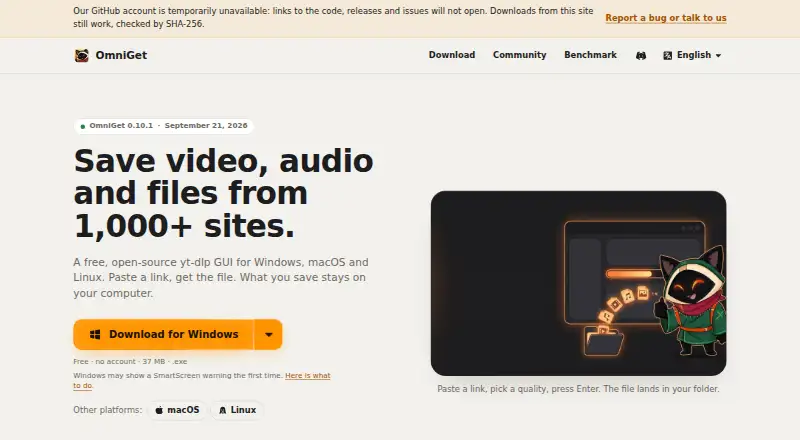
OmniGet is a free, open-source desktop app for saving video, audio and files from websites, as well as torrents, magnet links and direct files. It runs on Windows, macOS and Linux, with optional browser extensions. Its supported sources include YouTube, Instagram, TikTok, Reddit, Twitch, Vimeo and more than 1,800 other sites. Video downloads can reach 4K; audio-only formats include MP3, M4A, Opus, FLAC and WAV, and subtitle formats include SRT and VTT. Playlist, batch and subtitle downloads are supported. The queue can resume interrupted downloads, retry with backoff and follow channels. OmniGet uses yt-dlp and installs and updates it and FFmpeg automatically. Downloads remain on the user's computer, and the app reports no telemetry about downloaded material. It only downloads content accessible in the user's own session; it does not bypass DRM or paywalls. The GPL-3.0 app has no ads, account requirement or paid plan.
Who it suits
OmniGet suits people who want a desktop tool for downloading media and files from supported websites or direct sources. It may also suit users who prefer downloads to remain on their own computer and want browser-extension or beta MCP options.
What it does well
- Free, open-source app with no ads or account requirement.
- Supports video downloads up to 4K.
- Queue resumes interrupted downloads and retries.
- Downloads stay on the user's computer.
- Supports playlists, batch downloads and subtitles.
What to know first
- Does not bypass DRM or paywalls.
- Windows installers are not signed.
- macOS builds are not notarized.
- Linux packages lack a distribution signing key.
Limits
OmniGet only downloads content that the user's own session can already open, and does not break DRM or paywalls. Its Windows installers are unsigned, macOS builds are not notarized, and Linux packages lack a distribution signing key.
Plans
| Plan | Billed and limits | Price |
|---|---|---|
| Free | no ads · no account · no paid plan · GPL-3.0 | Free |
As omniget.dev lists them, read 30 Sept 2026. The maker's own page has the final word.
Getting started
- Visit https://omniget.dev/.
- Choose the release for Windows, macOS or Linux.
- Check the published SHA-256 hash for the release file if you want to verify it.
- Optionally add the browser extension for Chrome, Edge or Brave.
- Optionally use the beta MCP server with Claude Code, Cursor, VS Code or Codex.
OmniGet is a free, open-source desktop app for downloading video, audio and files from a broad range of sites. It is best for people who want one local tool for varied sources, playlists and queued downloads. Its reach is substantial, but it cannot open content your session cannot access.
Overview
OmniGet uses yt-dlp and automatically installs and updates yt-dlp and FFmpeg, so users do not need to maintain those components separately. Alongside supported websites, it handles torrents, magnet links and direct files. Its queue can resume interrupted downloads, retry failures with backoff and follow channels, making it more suited to ongoing download tasks than a basic link saver.
Downloads stay on the user's computer, and the app reports no telemetry about downloaded content. There are no ads, account requirement or paid tier, and the GPL-3.0 license will appeal to users who value open-source software. Access remains limited to content the user's own session can open: OmniGet does not bypass DRM or paywalls.
Key features
OmniGet supports more than 1,800 sites, including YouTube, Instagram, TikTok, X/Twitter, Reddit, Twitch, Vimeo, Bluesky, Pinterest, SoundCloud, Bilibili, Telegram, Udemy, Hotmart, Pixiv, DeviantArt, ArtStation and Douyin. That breadth is useful if your downloads span several services, rather than one platform. Playlist, batch and subtitle downloads add practical value for larger collections.
Video downloads reach 4K. Audio-only output includes MP3, M4A, Opus, FLAC and WAV, while subtitles can be saved as SRT or VTT. The directory's format listing also includes MP4, M4A, XML, ASS and JSON. This combination gives users options for media and related data, though format support does not change the access limits.
An optional browser extension for Chrome, Edge and Brave sends the current page to OmniGet and forwards browser cookies. That can help when a supported page depends on the browser session already being signed in. A beta MCP server can let Claude Code, Cursor, VS Code and Codex check links, queue downloads, wait for completion and report failures. Each connection has its own token and permissions, and the server listens only on the local computer; its beta status makes it a better fit for users comfortable with evolving integrations than for those seeking a settled workflow.
The official download page publishes SHA-256 hashes and verification commands, which gives technically minded users a way to check release files. However, Windows installers are unsigned, macOS builds are not notarized and Linux packages lack a distribution signing key. Users who prioritize platform-verified installers should weigh that trade-off before installing.
Pricing
The Free plan costs nothing and includes the app without ads or an account. OmniGet has no paid plan, so there is no feature tier to upgrade to; that makes it a straightforward option for users who want a no-cost downloader without a time-limited trial. Its free price does not remove the content-access boundary or the installer-signing caveat.
Platforms
OmniGet is available for Windows, macOS and Linux, with optional Chrome and Firefox browser extensions. The browser extension's page-and-cookie forwarding is described for Chrome, Edge and Brave. This desktop-and-browser setup suits users who want downloads managed locally across major desktop systems, but not those looking for a mobile app.
Who it's for
Choose OmniGet if you need a free, local downloader for many sites and file types, want queue recovery or channel-following, or value an open-source tool with no telemetry reporting. It is also a plausible fit for developers who want to automate download tasks through the beta MCP server. Look elsewhere if your goal is to access paywalled or DRM-protected material, or if signed and notarized installers are a requirement.
Pros and cons
- Pros: More than 1,800 supported sites, plus torrents, magnet links and direct files, cover a broad range of sources.
- Pros: Playlist, batch and subtitle downloads, together with a resumable retrying queue, help with larger or recurring tasks.
- Pros: Free, open-source use without ads, accounts or telemetry reporting keeps the cost and data footprint low.
- Cons: It only downloads content your session can already access, so it cannot serve as a workaround for DRM or paywalls.
- Cons: Unsigned Windows and Linux packages and a non-notarized macOS build may put off users who require platform signing checks.
- Cons: The MCP integration is beta, so users who depend on a mature agent workflow may prefer not to rely on it.
Alternatives
Browse the Video Downloaders list to compare more tools. 4K Video Downloader+ is worth considering if you prefer a freemium product with a permanent free Starter plan and a free trial, across desktop and Android platforms. yt-dlp app is another free, open-source desktop choice with no telemetry or tracking, if you want those traits without OmniGet's broader source and queue details. yt-dlp online offers a free, open-source option with no premium tier or download limits and adds web access, making it a possible fit if you want that platform choice.
MeowLoad has a free basic desktop tier and a premium option that includes playlist, channel and bulk downloads; consider it if you want a freemium alternative with those capabilities in its paid tier. Catalyst is a free, open-source desktop option with local processing and no account requirement if those are your priorities. Star Video Downloader may suit users who can work within a free cap of five downloads per day, 1080p and one simultaneous download, or want its paid plan at $5 a month. Turbo Downloader has a free tier capped at 10 downloads per day and 1080p, while its annual option costs $19 a year; it may fit someone willing to trade OmniGet's free, uncapped positioning for those terms. aTube Catcher offers a free Community plan limited to 1080p for single-video downloads, with a Pro option at $19.95 a month, for readers comparing a capped free tier with a paid alternative.
Verdict
OmniGet is a strong choice for users who want a free, open-source desktop downloader with wide source coverage, flexible outputs and a queue that can recover from interruptions. Choose it for that breadth and local, no-telemetry approach; look elsewhere if you need access-control bypasses or require installers signed or notarized by the platform.
Verdict
OmniGet offers broad source support and flexible download formats at no charge. Keep in mind that it works only with content your session can already access, and its listed installers are not signed or notarized.
Questions
Does OmniGet have a price?
The Free plan costs nothing. There are no ads, account requirement or paid plan.
Which operating systems does OmniGet support?
The desktop app runs on Windows, macOS and Linux. Browser extensions are listed for Chrome and Firefox; the optional extension is also described for Chrome, Edge and Brave.
What can it download?
It saves video, audio and files from supported sites, as well as torrents, magnet links and direct files. It supports more than 1,800 sites.
What formats and quality are supported?
Video downloads can reach 4K. Audio-only formats include MP3, M4A, Opus, FLAC and WAV; subtitles include SRT and VTT.
Is OmniGet open source?
Yes. It is licensed under GPL-3.0.
Does OmniGet bypass paywalls or DRM?
No. It only downloads content the user's own session can already open and does not break DRM or paywalls.
Facts from OmniGet's own pages
- Access limits
- OmniGet only downloads content the user's own session can already open and does not break DRM or paywalls. · getomniget.com, 30 Sept 2026
- Agent integration
- Its beta MCP server lets Claude Code, Cursor, VS Code and Codex check links, queue downloads, wait for completion and report failures. · getomniget.com, 30 Sept 2026
- Batch downloads
- Yes · omniget.dev, 22 Sept 2026
- Browser extension
- An optional extension for Chrome, Edge and Brave sends the current page and forwards browser cookies to OmniGet. · getomniget.com, 30 Sept 2026
- Code signing
- Windows installers are not signed, macOS builds are not notarized and Linux packages are not signed with a distribution key. · getomniget.com, 30 Sept 2026
- Device platforms
- Windows,macOS,Linux,Chrome and Firefox browser extension · omniget.dev, 22 Sept 2026
- Download engine
- It uses yt-dlp and installs and updates yt-dlp and FFmpeg automatically. · getomniget.com, 30 Sept 2026
- Formats
- It supports up to 4K video, audio-only downloads in MP3, M4A, Opus, FLAC or WAV, and subtitles as SRT or VTT. · getomniget.com, 30 Sept 2026
- Free plan
- Yes · omniget.dev, 22 Sept 2026
- Integrity checks
- The official download page publishes SHA-256 hashes for every release file and describes verification commands. · getomniget.com, 30 Sept 2026
- License
- OmniGet is licensed under GPL-3.0 and has no ads, account requirement or paid plan. · getomniget.com, 30 Sept 2026
- Maximum video quality
- 4k · omniget.dev, 22 Sept 2026
- MCP security
- Each MCP connection has its own token and permissions, and the server listens only on the local computer. · getomniget.com, 30 Sept 2026
- Output formats
- MP4,M4A,XML,ASS,JSON · omniget.dev, 22 Sept 2026
- Playlist downloads
- Yes · omniget.dev, 22 Sept 2026
- Privacy
- Downloads stay on the user's computer and the app reports no telemetry about what is downloaded. · getomniget.com, 30 Sept 2026
- Purpose
- OmniGet is a free, open-source desktop app for saving video, audio and files from more than 1,000 sites. · getomniget.com, 30 Sept 2026
- Queue
- Its queue resumes interrupted downloads, retries with backoff and can follow channels. · getomniget.com, 30 Sept 2026
- Sources
- It supports torrents, magnet links and direct files in addition to sites supported through yt-dlp. · getomniget.com, 30 Sept 2026
- Subtitle downloads
- Yes · omniget.dev, 22 Sept 2026
- Support
- Security vulnerabilities should be reported privately to [email protected]. · getomniget.com, 30 Sept 2026
- Supported sources
- YouTube,Instagram,TikTok,X/Twitter,Reddit,Twitch,Vimeo,Bluesky,Pinterest,SoundCloud,Bilibili,Telegram,Udemy,Hotmart,Pixiv,DeviantArt,ArtStation,Douyin and 1,800+ sites · omniget.dev, 22 Sept 2026
Where OmniGet stands on Freedom251
- Video Downloaders#9 of 135