Freedom251 › File Manager Software
xplr
What xplr is
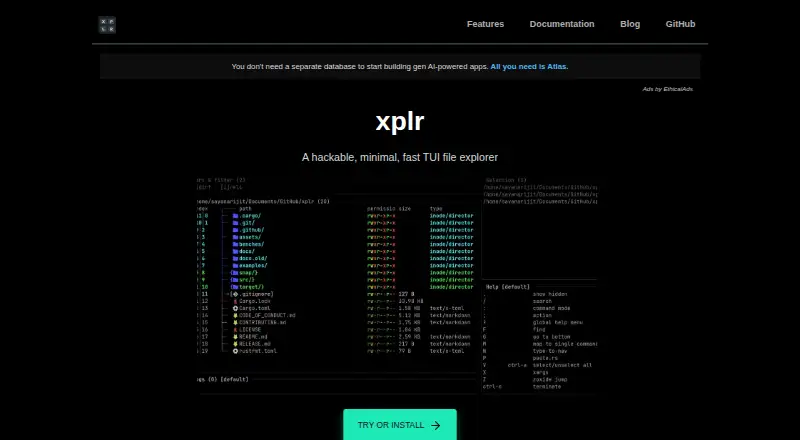
xplr is a free terminal user interface file explorer for Linux and macOS. It is designed to complement shell commands and graphical file managers, while delegating file-management operations to external commands. The modal interface accepts keyboard input, shell commands, Lua functions, and hooks. Users can change its behavior and appearance through Lua, an init.lua configuration file, plugins, and integrations; embedded LuaJIT supports this extensibility. Custom layouts may include panels for selections, key bindings, input, logs, filters, and sorters. Documented features include a preview pane, dual-pane navigation, file properties, a selection list, and virtual root. Listed integrations include Neovim, Vim, GitHub CLI repository browsing, and Powerlevel10k. Plugins add fuzzy search, clipboard actions, previews, compression, and device management. Standalone downloads cover GNU/Linux and macOS, with crates.io and source-build options. The repository identifies an MIT license.
Who it suits
xplr suits Linux and macOS users who prefer terminal-based file navigation and want Lua customization. It is intended to work alongside, not replace, shell commands and graphical file managers.
What it does well
- Free on Linux and macOS
- Customizable through Lua, plugins, and integrations
- Offers preview and dual-pane navigation
- Supports Neovim, Vim, and GitHub CLI
- Provides configurable layouts and modal controls
What to know first
- Manual upgrades may be required for listed installation routes
- File operations are delegated to external commands
- Project announcement described maintenance mode after v1.0.0
Verdict
xplr combines terminal file browsing with extensive Lua-based customization, previews, and dual-pane options. Users should note its external-command approach and the documented maintenance-mode announcement.
Facts from xplr's own pages
- Approach
- It is designed as a flexible, interactive orchestrator for command-line utilities that work with the file system. · xplr.dev, 5 Oct 2026
- Customisation
- Users can configure xplr with Lua, plugins and integrations to change its operations and appearance. · xplr.dev, 5 Oct 2026
- Customization
- Users can configure xplr with Lua through an init.lua file in a user or system configuration directory. · xplr.dev, 5 Oct 2026
- Downloads
- Direct standalone downloads are listed for GNU/Linux and macOS; the install guide also documents building from source and installing through crates.io. · xplr.dev, 5 Oct 2026
- Dual-pane layout
- Yes · xplr.dev, 21 Sept 2026
- Embedded runtime
- The listed features include embedded LuaJIT for portability and extensibility. · xplr.dev, 5 Oct 2026
- Extensibility
- xplr supports pluggable Lua modules to extend its interface and functionality. · xplr.dev, 5 Oct 2026
- External commands
- The maker says xplr outsources file management operations to external commands. · xplr.dev, 5 Oct 2026
- File operations
- xplr describes itself as an explorer that delegates file management operations to external commands. · xplr.dev, 5 Oct 2026
- Free plan
- Yes · xplr.dev, 21 Sept 2026
- Integration
- The documentation demonstrates integrating fzf through a custom key binding that searches for and focuses a file or enters a directory. · xplr.dev, 5 Oct 2026
- Integrations
- The integrations list includes editor integrations for Neovim and Vim, GitHub CLI repository browsing, and a Powerlevel10k shell prompt. · xplr.dev, 5 Oct 2026
- Intended use
- xplr aims to complement standard shell commands and GUI file managers rather than replace them. · xplr.dev, 5 Oct 2026
- Interface
- Its modal interface can be controlled with keyboard input, shell commands, Lua functions and hooks. · xplr.dev, 5 Oct 2026
- Key features
- Documented features include embedded LuaJIT, message-driven controls, customizable layouts, file properties, a selection list, and virtual root. · xplr.dev, 5 Oct 2026
- Layouts
- Customizable layouts can include panels for selections, key bindings, input and logs, and active filters and sorters. · xplr.dev, 5 Oct 2026
- License
- The project repository identifies xplr as MIT licensed. · github.com, 5 Oct 2026
- Linux support
- Yes · xplr.dev, 21 Sept 2026
- macOS support
- Yes · xplr.dev, 21 Sept 2026
- Maintenance status
- The v1.0.0 release announcement says the project would enter cleanup and maintenance mode, with no plan for xplr v2 at that time. · github.com, 5 Oct 2026
- Notable limitation
- Direct downloads are listed for GNU/Linux and macOS, and the documentation notes that direct downloads, crates.io installation and source builds require users to watch for releases and upgrade manually. · xplr.dev, 5 Oct 2026
- Plugin development
- The documentation says anyone who can write Lua can write xplr plugins. · xplr.dev, 5 Oct 2026
- Plugins
- Listed plugins add capabilities such as dual-pane navigation, fuzzy search, clipboard actions, file previews, compression and device management. · xplr.dev, 5 Oct 2026
- Preview pane
- Yes · xplr.dev, 21 Sept 2026
Where xplr stands on Freedom251
- File Manager Software#69 of 100
- File managers#24 of 29
- Terminal File Managers#29 of 29