XPipe
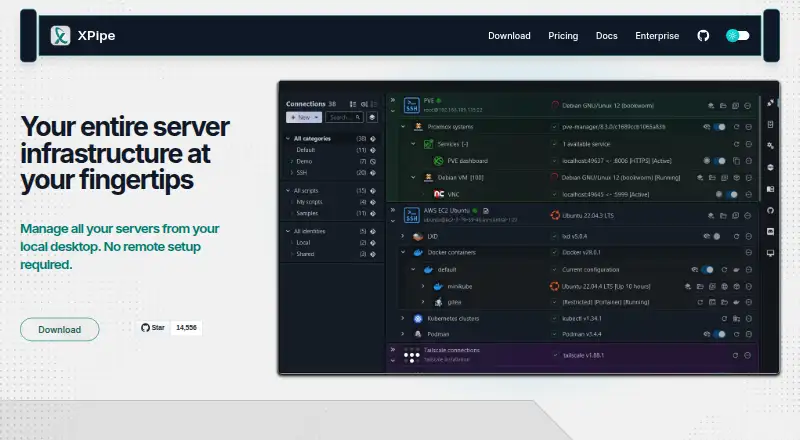
What XPipe is
XPipe is a connection hub for managing remote systems and opening shell sessions in a preferred terminal. It supports SSH and SFTP, reads SSH configuration files, and works with SSH agents, jump servers, tunnels, smart cards, and PKCS#11 libraries. Its remote file browser can transfer files between a desktop and remote systems, and open remote files in locally installed programs. XPipe connects with tools such as Docker, Podman, Kubernetes, LXD, Incus, Proxmox, Hyper-V, KVM, VMware, WSL, Cygwin, and MSYS2. It includes a VNC viewer, can launch RDP sessions, and can tunnel VNC and RDP over SSH. Shell scripts, templates, shell environments, and automatic port tunneling support automation. Connection details can sync across systems and team members through remote Git repositories, including self-hosted ones. XPipe says connection data remains on local machines and connected systems; stored sensitive data can be encrypted with a vault key or passphrase. It runs on Windows, macOS, and Linux. Community is free; Homelab is $5 a month and Professional is $10 a month.
Who it suits
XPipe suits engineers managing remote infrastructure, containers, and virtual machines. Its team synchronization and SSH features may also suit groups that share connection data across systems.
What it does well
- Free Community plan includes unlimited connections.
- Supports SSH, SFTP, and remote file management.
- Connects with container and virtualization tools.
- Synchronizes connection data through remote Git repositories.
- Includes a VNC viewer and RDP session support.
What to know first
- Homelab costs $5 a month.
- Professional costs $10 a month.
- Some paid features are not open source.
Limits
Community is free and includes unlimited connections, file management, shell scripting, and vault Git sync. Homelab costs $5/month or $40/year; Professional costs $10/month or $80/year. The listed plans have limits of one for certain items, including concurrent active tunnels, Tailscale tailnets, Netbird profiles, Docker contexts, Proxmox community nodes, and workspaces.
Plans
| Plan | Billed and limits | Price |
|---|---|---|
| Community | Free · Unlimited connections · File management · Shell scripting · Vault git sync | Free |
| Professional | $10/month or $80/year · All Homelab features · Enterprise OS support · Enterprise tool support | $10 a month |
| Homelab | $5/month or $40/year · All Community features · Unlimited hypervisors · Advanced SSH features | $40 a year |
| Homelab | $5/month or $40/year · All Community features · Unlimited hypervisors · Advanced SSH features | $5 a month |
| Professional | $10/month or $80/year · All Homelab features · Enterprise OS support · Enterprise tool support | $80 a year |
| Enterprise | Let's talk · All Professional features · Bulk licensing · Customized plans · Priority support | On request |
As xpipe.io lists them, read 30 Sept 2026. The maker's own page has the final word.
Getting started
- Visit https://xpipe.io/.
- Choose the Community, Homelab, or Professional plan.
- Install XPipe for Windows, macOS, or Linux.
- Connect using SSH or SFTP and use the supported connection options.
XPipe is a desktop connection hub for people managing remote systems through SSH, shells, files, and infrastructure tools. It is most compelling for engineers working across containers and virtual machines, but the strongest SSH and tool-support features require a paid plan.
Overview
Rather than stopping at a terminal launcher, XPipe combines remote connections with file handling, remote desktop access, and integrations spanning container and virtualization platforms. Shell sessions open in a terminal of the user's choice, which lets it coordinate access without replacing that preferred environment. The trade-off is that users who only need a straightforward SSH or file-transfer client may be paying for breadth they will not use.
XPipe says connection data stays on the local machine and connected systems, with no external component handling it. Sensitive stored data can be encrypted using a generated vault key file or a custom passphrase; its documented cipher is AES-128 GCM, and keys are generated with Argon2. The core is open source under Apache License 2.0, while some paid features are not, so the open-source status does not extend to the entire product.
Key features
SSH support covers configuration files and existing agents, alongside jump servers, tunnels, smart cards, and PKCS#11 libraries. That makes XPipe a stronger fit for established or more involved SSH setups than a basic connection list, although advanced SSH features are reserved for Homelab and higher plans. It also supports SFTP and port forwarding.
The remote file browser transfers files between a remote system and the desktop, and can open or edit remote files with locally installed programs. This is useful when routine work spans commands and file changes, rather than requiring a separate transfer client for every edit. XPipe also includes a VNC viewer, can launch RDP sessions, and can tunnel VNC and RDP over SSH.
Integrations include Docker, Podman, Kubernetes, LXD, Incus, Proxmox, Hyper-V, KVM, VMware, WSL, Cygwin, and MSYS2. Custom shell scripts, templates, shell environments, and automatic port tunneling for remote services extend it beyond connection organization into repeatable workflows. The breadth is valuable for mixed infrastructure, but the Professional plan is needed for enterprise OS and tool support.
Connection data can be synchronized across systems and team members through a remote Git repository, including self-hosted repositories. Team session sharing is supported, making XPipe relevant to collaborative work as well as individual administration.
Pricing
| Plan | Price | What it includes |
|---|---|---|
| Community | free | Unlimited connections, file management, shell scripting, and vault Git sync. |
| Homelab | $5 a month; $5/month or $40/year | All Community features, unlimited hypervisors, and advanced SSH features. |
| Professional | $10 a month; $10/month or $80/year | All Homelab features, enterprise OS support, and enterprise tool support. |
| Enterprise | Custom pricing | All Professional features, bulk licensing, customized plans, and priority support. |
Community is a capable starting point for core connection work, with unlimited connections and no charge. Homelab is the practical step up for users who need advanced SSH or manage multiple hypervisors; the annual option is lower than paying its monthly rate for a full year. Professional adds enterprise operating-system and tool support, so its higher price is most defensible for environments that need those capabilities. Enterprise suits organizations seeking bulk licensing, tailored plans, and priority support.
The feature matrix also sets limits of one for concurrent active tunnels, Tailscale tailnets, Netbird profiles, Docker contexts, Proxmox community nodes, and workspaces in specified plans. Those caps matter to users whose workflow depends on running multiple instances of one of these resources; check the applicable plan before relying on parallel use.
Platforms
XPipe supports Windows, macOS, and Linux. Its coverage across all three desktop platforms makes it a plausible shared hub for teams using different operating systems, while its infrastructure integrations serve varied server and virtualization environments.
Who it's for
XPipe is aimed at engineers managing modern server infrastructure, including containers and virtual machines. It fits especially well when SSH access, remote file edits, tunneling, and infrastructure tools need to sit in one workflow. For occasional transfers or users who only need a basic SSH utility, a narrower tool may be simpler and more economical.
Pros and cons
- Pros: Community includes unlimited connections, file management, shell scripting, and vault Git sync at no cost, covering substantial everyday work.
- Pros: SSH features, remote file handling, VNC/RDP support, and broad container and hypervisor integrations reduce the need to switch between separate tools.
- Pros: Git-based synchronization can work with self-hosted repositories, and XPipe says no external component handles connection data.
- Cons: Advanced SSH features require at least Homelab, while enterprise OS and tool support require Professional.
- Cons: One-item caps for several resources in specified plans can constrain workflows that need concurrent tunnels or multiple contexts, profiles, nodes, or workspaces.
- Cons: Some paid features are not open source, despite the Apache-licensed application core.
Alternatives
For a broader directory of connection tools, see SSH Clients.
- WinSCP is the better fit for Windows users focused on file transfer and wanting a free, open-source client with SFTP, FTP, FTPS, SCP, WebDAV, and S3 support.
- electerm is a free MIT-licensed terminal and file manager for readers who want a wider range of protocols, including SSH, SFTP, FTP, Telnet, Serial, RDP, VNC, and Spice.
- Termius is an option for readers who want a terminal client across mobile and desktop platforms; its free Starter plan includes a local vault, SSH and SFTP, AI-powered autocomplete, and port forwarding.
- Royal TS may suit readers who want a free Lite tier capped at 10 connections, 10 credentials, and one document, with a paid single-user license also offered.
- agedu is a free, MIT-licensed Unix utility for readers seeking a narrower Linux and web option.
- Bast is another free SSH host manager for readers considering a separate host-management option.
- OpenSSH is the straightforward choice for readers seeking a free SSH protocol suite with a BSD-style license that permits commercial use.
- SecurSSH may suit readers who want a focused host manager: its free plan covers one user, up to 30 hosts, and three groups, while Pro adds unlimited hosts and groups for €9 a month.
Verdict
Choose XPipe if you manage varied infrastructure and want SSH, file work, remote desktop sessions, and container or virtualization access coordinated in one desktop hub. Its free Community plan is unusually useful for core tasks, and Homelab unlocks the advanced SSH support that makes it more than a basic organizer. Look elsewhere if you need only a lightweight transfer or SSH client, or if the specified one-item resource caps would obstruct your workflow.
Verdict
XPipe brings remote connections, file handling, shell sessions, and infrastructure integrations into one hub. The free Community plan covers core connection tasks, while advanced SSH and enterprise support features are part of paid plans.
Questions
Is XPipe free?
Yes. The Community plan is free and includes unlimited connections, file management, shell scripting, and vault Git sync.
What do the paid plans cost?
Homelab costs $5/month or $40/year. Professional costs $10/month or $80/year. Enterprise pricing is listed as “Let’s talk.”
Which operating systems does XPipe support?
XPipe is available for Windows, macOS, and Linux.
Does XPipe support SSH and SFTP?
Yes. It supports both protocols and can load SSH configuration files and use existing SSH agents.
Is XPipe open source?
XPipe describes itself as open-core. Its application core is available on GitHub under Apache License 2.0, and some paid features are not open source.
Who makes XPipe, and where is it based?
XPipe UG (haftungsbeschränkt) lists its location as Ludwigsburg, Germany.
Facts from XPipe's own pages
- Automation
- XPipe supports custom shell scripts, templates, shell environments, and automatic tunneling of ports for remote services. · xpipe.io, 30 Sept 2026
- Company location
- XPipe UG (haftungsbeschränkt) lists its location as Ludwigsburg, Germany. · xpipe.io, 30 Sept 2026
- File management
- Its remote file browser supports using locally installed programs to open and edit remote files and transferring files to and from the desktop. · xpipe.io, 30 Sept 2026
- Headquarters
- Ludwigsburg, Germany · xpipe.io, 28 Sept 2026
- Integrations
- It integrates with Docker, Podman, Kubernetes, LXD, Incus, Proxmox, Hyper-V, KVM, VMware, WSL, Cygwin, and MSYS2. · xpipe.io, 30 Sept 2026
- Intended users
- XPipe says its mission is to improve productivity and collaboration for engineers managing modern server infrastructure, including containers and virtual machines. · xpipe.io, 30 Sept 2026
- Limits
- The pricing feature matrix lists a connection limit and limits of one for concurrent active tunnels, Tailscale tailnets, Netbird profiles, Docker contexts, Proxmox community nodes, and workspaces in specified plans. · xpipe.io, 30 Sept 2026
- Open source
- XPipe describes itself as open-core, with its application core available on GitHub under Apache License 2.0 and some paid features not open source. · docs.xpipe.io, 30 Sept 2026
- Product
- XPipe is a connection hub for managing remote connections and launching shell sessions in a user's preferred terminal. · xpipe.io, 30 Sept 2026
- Remote desktops
- XPipe includes a VNC viewer and supports launching RDP sessions and tunneling VNC and RDP over SSH. · xpipe.io, 30 Sept 2026
- Security
- XPipe states that connection data is stored and used on the local machine and connected systems, with no external component handling that data. · docs.xpipe.io, 30 Sept 2026
- SSH
- XPipe loads SSH configuration files and supports existing SSH agents, jump servers, tunnels, smart cards, and PKCS#11 libraries. · xpipe.io, 30 Sept 2026
- Support
- The Enterprise plan includes priority support, and XPipe lists [email protected] as a contact address. · xpipe.io, 30 Sept 2026
- Synchronization
- Connection data can be synchronized across systems and team members through a remote Git repository, including self-hosted repositories. · docs.xpipe.io, 30 Sept 2026
- Vault encryption
- Stored sensitive data can be encrypted using a generated vault key file or custom passphrase; the documented cipher is AES-128 GCM and keys are generated with Argon2. · docs.xpipe.io, 30 Sept 2026
Where XPipe stands on Freedom251
- SSH Clients#20 of 33