SmarTTY
What SmarTTY is
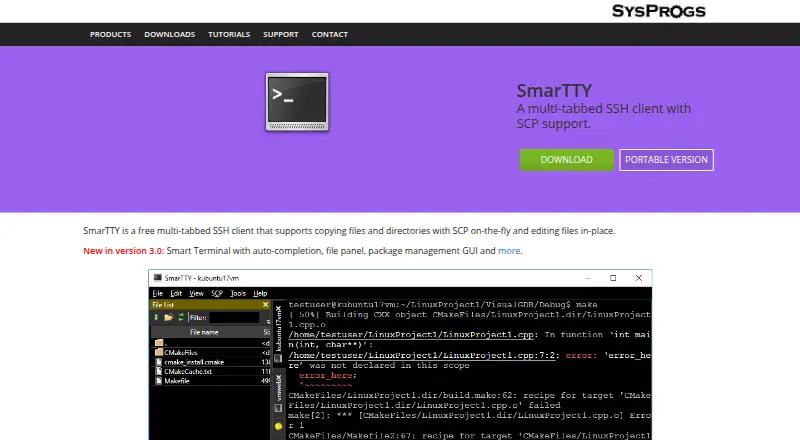
SmarTTY is a free SSH client for Windows that combines tabbed remote sessions, SCP file transfer, and remote file editing. It can open multiple tabs within one SSH connection when the server supports sub-sessions. Smart Terminal mode provides completion for files, folders, and recent commands, plus a navigation panel, clickable file-and-line links, and APT and YUM package-manager interfaces.
File transfers support individual files, recursive directories, and directories sent using on-the-fly TAR. Remote files can be opened in editor tabs; SmarTTY converts CRLF to LF and can invoke sudo when saving protected files. Its hex terminal communicates over COM ports or TCP, displays ASCII, HEX, or both, and can save logs. Public-key authentication can be configured for selected computers; the private key is kept in a Windows key container and the Unix password is not stored. It also includes XMing and VcXsrv X servers for graphical applications. A portable ZIP version is available.
Who it suits
SmarTTY suits Windows users connecting to SSH servers, transferring files, or editing remote files. Its hex terminal also serves users working with embedded-device serial or TCP communication.
What it does well
- Free SSH and SCP client
- Multiple tabs within supported SSH connections
- Supports recursive and TAR-based directory transfers
- Remote editing can use sudo for protected files
- Hex terminal works over COM ports or TCP
What to know first
- Windows platform only
- Multiple tabs in one connection require server sub-sessions
- Portable version lists Windows 7 through 10 and 2008
Limits
The free plan is the listed SmarTTY plan at no cost. The client is listed for Windows platforms.
Plans
| Plan | Billed and limits | Price |
|---|---|---|
| SmarTTY | Free multi-tabbed SSH client | Free |
As sysprogs.com lists them, read 10 Oct 2026. The maker's own page has the final word.
Getting started
- Visit the SmarTTY website
- Choose the portable ZIP version if desired
- Unpack the ZIP archive and run the EXE
- Configure an SSH connection to a remote computer
- Set public-key authentication for selected computers when needed
- Open tabs, transfer files, or edit remote files
Verdict
SmarTTY combines SSH sessions with file transfer, remote editing, and a hex terminal at no cost. Its platform is Windows, and its multi-tab connection behavior depends on server support.
Questions
What does SmarTTY cost?
The SmarTTY plan costs nothing, and a free plan is available.
Which platforms does SmarTTY support?
Supported platforms are Windows 11, 10, 8.1, 8, 7, and 2008.
Which protocols does it support?
SmarTTY supports SSH and SCP.
Can SmarTTY transfer directories?
Yes. It supports recursive directory transfers and directory transfers using on-the-fly TAR, as well as single-file SCP transfers.
Does it include a portable version?
Yes. A portable ZIP archive can be unpacked and run as an EXE.
Can it connect to serial devices?
Its built-in hex terminal communicates over COM ports or TCP and can display ASCII, HEX, or both while saving logs.
Facts from SmarTTY's own pages
- Authentication
- It can configure public-key authentication for selected remote computers; the private key is stored in a Windows key container and the Unix password is not stored. · sysprogs.com, 10 Oct 2026
- File transfer
- It supports single-file SCP transfers, recursive directory transfers, and directory transfers using on-the-fly TAR. · sysprogs.com, 10 Oct 2026
- Headquarters
- Vancouver, British Columbia, Canada · sysprogs.com, 28 Sept 2026
- Intended users
- The maker describes SmarTTY as a client for connecting to SSH servers and exchanging files, with features for remote Linux work and embedded-device serial or TCP communication. · sysprogs.com, 10 Oct 2026
- License terms
- The download page permits redistribution and use in binary form under stated conditions and provides an as-is warranty disclaimer. · sysprogs.com, 10 Oct 2026
- Platforms
- The download page lists Microsoft Windows 11, 10, 8.1, 8, 7, and 2008 as system requirements. · sysprogs.com, 10 Oct 2026
- Portable version
- A portable version is available as a ZIP archive that users unpack and run as an EXE; its listed requirements are Windows 10, 8.1, 8, 7, and 2008. · sysprogs.com, 10 Oct 2026
- Purpose
- SmarTTY is a free multi-tabbed SSH client with SCP file transfer and in-place remote file editing. · sysprogs.com, 10 Oct 2026
- Remote editing
- It can open remote files in an editor tab, convert CRLF to LF automatically, and invoke sudo when saving protected files. · sysprogs.com, 10 Oct 2026
- Serial and TCP
- Its built-in hex terminal can communicate over COM ports or TCP and display ASCII, HEX, or both while saving logs. · sysprogs.com, 10 Oct 2026
- Smart terminal
- Smart Terminal mode provides completion for files, folders and recent commands, a file navigation panel, clickable file-and-line links, and APT and YUM package manager GUIs. · sysprogs.com, 10 Oct 2026
- SSH sessions
- It lets users open multiple tabs within one SSH connection, using server-supported sub-sessions. · sysprogs.com, 10 Oct 2026
- X11
- It includes XMing and VcXsrv X servers that can be configured and started when a graphical application is launched in the terminal. · sysprogs.com, 10 Oct 2026
Where SmarTTY stands on Freedom251
- SSH Clients#19 of 33