
Bast
What Bast is
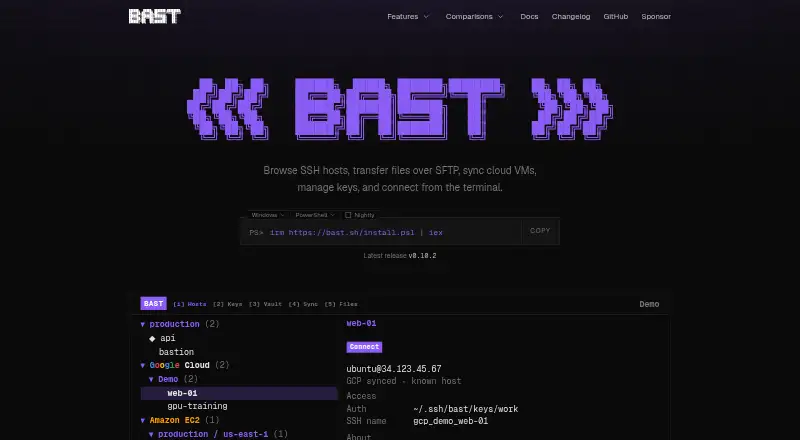
Bast is a free command-line tool and terminal interface for organizing SSH hosts and connecting to servers. It relies on the system OpenSSH client and uses the existing SSH configuration as its source of truth. Host tools let you search, sort, group, tag, color, favorite, and hide entries; SSH connections and port forwarding are supported. A dual-pane Files tab browses local and remote files and transfers them through OpenSSH SFTP. Bast can generate, import, export, and install SSH keys, and it documents host synchronization for GCP, AWS, Azure, box.ascii.dev, Upstash Box, Vercel Sandbox, and Hetzner Cloud. Vault encrypts managed hosts and keys on the client using a passphrase-derived key and XChaCha20-Poly1305, while the server stores ciphertext. Users can self-host the web app and direct Vault data to their own infrastructure. Bast supports macOS, Linux, and Windows 11. Windows requires the OpenSSH Client commands ssh, ssh-keygen, and ssh-add on PATH. Vercel Sandbox sessions are limited to five hours, even though Vercel Pro and Enterprise sandboxes can run up to 24 hours. The privacy policy says telemetry excludes hostnames, keys, emails, project IDs, and SSH configuration contents.
Who it suits
Bast suits people who manage SSH hosts and want host organization, file transfer, or key management in a terminal interface. It is available for macOS, Linux, and Windows 11, with an additional OpenSSH requirement on Windows.
What it does well
- Uses existing OpenSSH configuration
- Includes SSH SFTP file transfer
- Can generate and install SSH keys
- Vault encrypts managed hosts and keys client-side
- Free plan includes cloud host sync
What to know first
- Windows requires OpenSSH Client commands on PATH
- Vercel Sandbox sessions are capped at five hours
Plans
| Plan | Billed and limits | Price |
|---|---|---|
| Free | SSH host manager · Cloud host sync · SSH SFTP · SSH key manager · encrypted Vault sync | Free |
As bast.sh lists them, read 8 Oct 2026. The maker's own page has the final word.
Getting started
- Visit https://bast.sh/ to get started.
- Install Bast on macOS, Linux, or Windows 11.
- On Windows, ensure ssh, ssh-keygen, and ssh-add are on PATH.
- Use the existing SSH configuration to manage hosts with the system OpenSSH client.
- Connect to servers over SSH or transfer files over SFTP.
Bast is a terminal-first SSH manager for administrators and developers who have outgrown an unstructured host list. It keeps your existing OpenSSH setup at the center while adding host organization, SFTP file work, key administration, cloud synchronization, and encrypted storage. It is most compelling for people who want those tasks in one cross-platform interface without paying for the software.
Overview
Bast reads the system OpenSSH configuration as its authoritative connection data and uses the installed OpenSSH client to connect. That makes it a sensible layer over an established workflow rather than a replacement for it. Search, sorting, groups, tags, colors, favorites, and hidden hosts turn a large inventory into something you can navigate quickly; those controls matter most when you maintain separate development, staging, and production systems.
The Files tab presents local and remote directories in two panes and moves data through OpenSSH SFTP. SSH, SFTP, and port forwarding cover core operations work, although users who need protocols outside that set will need another tool.
Key features
Hosts, keys, and files
Bast can generate, import, export, and install SSH keys, keeping routine credential work beside connection management. Its dual-pane browser makes occasional uploads and downloads more direct than switching to a separate SFTP client, while still relying on OpenSSH underneath.
Cloud connections and Vault
Documented host synchronization covers GCP, AWS, Azure, box.ascii.dev, Upstash Box, Vercel Sandbox, and Hetzner Cloud. Vault encrypts managed hosts and keys on the client with a passphrase-derived key and XChaCha20-Poly1305; the service stores ciphertext. You can self-host the Bast web app and point the client at your own infrastructure, a useful control for teams that cannot place encrypted records on a vendor-hosted service.
The privacy policy states that telemetry excludes hostnames, keys, email addresses, project IDs, and SSH configuration contents. That reduces the sensitivity of usage reporting, though Vault still depends on protecting your passphrase and chosen storage endpoint.
Pricing
Bast has one published plan: Free at free. It includes the SSH host manager, cloud host sync, SSH SFTP, SSH key manager, and encrypted Vault sync. There are no paid tiers or seat charges presented, so it fits individual users and teams that can adopt the included feature set without procurement for a subscription.
Platforms
Bast supports macOS, Linux, and Windows 11, with SSH and SFTP support across those platforms. Windows users must have the OpenSSH Client commands ssh, ssh-keygen, and ssh-add on their PATH; anyone deploying it on Windows should treat that prerequisite as part of setup. Vercel Sandbox connections have a five-hour session-timeout cap, even though Vercel Pro and Enterprise sandboxes may run for up to 24 hours.
Who it's for
Choose Bast if you administer many OpenSSH hosts and want visual organization, key operations, SFTP, forwarding, and cloud-host synchronization together. It is also a strong fit for privacy-conscious users who want encrypted Vault data with a self-hosting option. It is less suitable if you need FTP, FTPS, WebDAV, S3, Telnet, serial, or graphical remote-desktop protocols, or if Windows machines cannot provide the required OpenSSH commands.
Pros and cons
- Pro: Existing OpenSSH configuration remains the source of truth, preserving established host definitions.
- Pro: Groups, tags, colors, favorites, search, and hiding provide practical control over crowded host inventories.
- Pro: SFTP file transfer, key management, and port forwarding sit alongside SSH connections.
- Pro: Client-side encrypted Vault storage and self-hosting give organizations more control over synchronized credentials.
- Con: Windows requires three OpenSSH Client commands on PATH before the workflow is usable.
- Con: Vercel Sandbox sessions are limited to five hours, below the maximum duration of higher Vercel plans.
- Con: The protocol scope is SSH/SFTP; broader transfer or remote-access needs require another application.
Alternatives
See the SSH Clients roundup when you want to compare a wider field.
- WinSCP is the better choice for a Windows-focused file-transfer client with SFTP, FTP, FTPS, SCP, WebDAV, and S3, and it is open source.
- electerm suits users who need a free MIT-licensed terminal and file manager spanning SSH, SFTP, FTP, Telnet, Serial, RDP, VNC, and Spice across many platforms.
- Termius is worth choosing for a broader multi-device client with a free local vault and paid Pro features such as synchronized data.
- Royal TS fits connection managers who want a free Lite allowance of up to 10 connections, 10 credentials, and one document, with paid licenses beyond that.
- XPipe is an alternative for users who prefer an open-core application with its core under Apache License 2.0.
- agedu is a focused MIT-licensed Unix utility rather than a general SSH workspace.
- OpenSSH is the right pick when you only need the free BSD-style SSH protocol suite itself.
- SecurSSH suits small inventories needing a free tier capped at one user, 30 hosts, and three groups, or a paid tier with unlimited hosts and groups.
Verdict
Bast is a strong free choice for OpenSSH users who want disciplined host organization plus SFTP, key tools, synchronization, and encrypted Vault storage in one interface. Pick it for that integrated, privacy-aware workflow; look elsewhere when broader protocols, longer Vercel sessions, or a different connection-management model matter more.
Verdict
Bast combines SSH host organization with SFTP, key tools, cloud host sync, and an encrypted Vault. Windows users need the specified OpenSSH commands, and Vercel Sandbox sessions have a five-hour cap.
Questions
How much does Bast cost?
Bast is free. The Free plan is listed as free.
Which operating systems does Bast support?
Bast supports macOS, Linux, and Windows 11.
Does Bast support file transfers?
Yes. Its Files tab browses local and remote files and transfers them over OpenSSH SFTP.
Can I self-host Bast?
Yes. Users can self-host the Bast web app and configure the client to store Vault data on their own infrastructure.
Which protocols does Bast support?
Bast supports SSH and SFTP, as well as port forwarding.
Who makes Bast?
Bast.sh is a product and hosted service of ELLIPSE SOFTWARE GROUP LIMITED, trading as ellipse Software.
Facts from Bast's own pages
- Cloud integrations
- Bast documents host sync for GCP, AWS, Azure, box.ascii.dev, Upstash Box, Vercel Sandbox, and Hetzner Cloud. · bast.sh, 8 Oct 2026
- File transfer
- Its dual-pane Files tab browses local and remote files and transfers them over OpenSSH SFTP. · bast.sh, 8 Oct 2026
- Host management
- It can search, sort, organize, favorite, and hide SSH hosts, with groups, tags, and colors. · bast.sh, 8 Oct 2026
- Key management
- Bast can generate, import, export, and install SSH keys. · bast.sh, 8 Oct 2026
- Maker
- Bast.sh is a product and hosted service of ELLIPSE SOFTWARE GROUP LIMITED, trading as ellipse Software. · bast.sh, 8 Oct 2026
- OpenSSH
- Bast uses the system OpenSSH client and treats the existing SSH configuration as its source of truth. · bast.sh, 8 Oct 2026
- Purpose
- Bast is a command-line tool and terminal interface for managing SSH hosts and connecting to servers. · bast.sh, 8 Oct 2026
- Self-hosting
- Users can self-host the Bast web app and configure the client to store Vault data on their own infrastructure. · bast.sh, 8 Oct 2026
- Supported operating systems
- Bast installs on macOS, Linux, and Windows 11. · bast.sh, 8 Oct 2026
- Telemetry privacy
- The privacy policy says telemetry does not collect hostnames, keys, emails, project IDs, or SSH config contents. · bast.sh, 8 Oct 2026
- Vault encryption
- Vault encrypts managed hosts and keys on the client using a passphrase-derived key and XChaCha20-Poly1305; the server stores ciphertext. · bast.sh, 8 Oct 2026
- Vercel connection limit
- Bast caps Vercel Sandbox session timeouts at five hours, although Vercel Pro and Enterprise sandboxes can run up to 24 hours. · bast.sh, 8 Oct 2026
- Windows requirement
- On Windows, Bast requires the OpenSSH Client commands ssh, ssh-keygen, and ssh-add on PATH. · bast.sh, 8 Oct 2026
Where Bast stands on Freedom251
- SSH Clients#3 of 33