
Core Shell
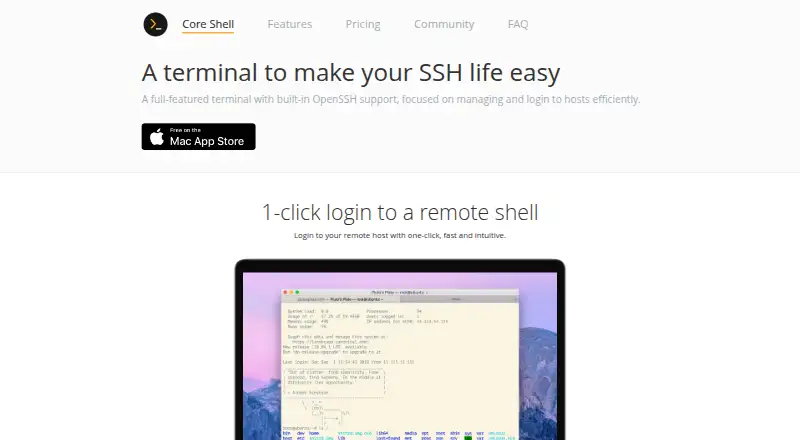
What Core Shell is
Core Shell is a terminal app for managing hosts and opening remote shell sessions on Apple devices. Its built-in OpenSSH support includes remote shells, certificates, and proxy jump, and the maker says users can log in to a remote host with one click. Tags help organize large host lists, and per-host advanced SSH options come with contextual help. The app can try to restore connections after network failures or waking from sleep. It also supports SFTP and serial connections; serial connections support USB, Bluetooth, and built-in interfaces, with common UART, RS-232, RS-422, and RS-485 adapters. The terminal supports ANSI 16-color, 256-color, and 24-bit true color modes, and is compatible with Terminal.app, iTerm2, and xterm. Sessions use tabs. Core Shell integrates with macOS Keychain to store passphrases. Its free Basic plan allows unlimited hosts. Premium costs $29.99 a year, with the plan described as a “4-Year License,” and adds unlimited SSH and serial connections, profile import and export, syncing across Macs, Shortcuts automation, and priority support. Core Shell is listed in the App Store for Mac, iPhone, and iPad; the download page specifies macOS 15.0 or later. The maker is Codinn Technologies Co., Ltd.
Who it suits
Core Shell suits Apple device users who manage remote hosts through SSH/OpenSSH and want SFTP or serial connections in the same terminal app. Its tagging, per-host SSH options, and profile syncing can suit people managing large host lists or multiple Macs.
What it does well
- Free Basic plan allows unlimited hosts.
- Supports OpenSSH certificates and proxy jump.
- Tags help organize large host lists.
- Supports SFTP and serial connections.
- Can try to restore connections after interruptions.
- Premium adds profile syncing and Shortcuts automation.
What to know first
- The App Store version omits local terminal access and authentication agent access.
- It omits X11 forwarding and certain SSH directives.
- Port forwarding is listed as “no.”
- Premium costs $29.99 a year, and the plan is described as a “4-Year License.”
Limits
The free Basic plan allows unlimited hosts. Premium is listed at $29.99 a year, with the plan described as a “4-Year License”; the App Store version omits local terminal access, authentication agent access, reuse of system SSH configuration and known-host files, X11 forwarding, and certain SSH directives.
Plans
Core Shell's published prices are being re-checked against the maker's own page.
| Plan | Billed and limits | Price |
|---|---|---|
| Basic | Unlimited hosts | Price being re-checked |
| Premium | 4-Year License · Unlimited SSH and serial connections · Import and export profiles · Sync profiles and tags across all your Macs · Shortcuts automation · Priority customer support | Price being re-checked |
As coreshell.app lists them, read 7 Oct 2026. The maker's own page has the final word.
Getting started
- Visit the Core Shell website.
- Core Shell is listed in the App Store for Mac, iPhone, and iPad.
- Start with the free Basic plan, which allows unlimited hosts.
- Add hosts and organize them with tags.
- Choose Premium for profile syncing, automation, and its other listed features.
Verdict
Choose Core Shell if you need an Apple device terminal with OpenSSH, SFTP, and serial support, especially when host organization matters. Look elsewhere if port forwarding or features omitted from the App Store version are needed. Premium is relevant for users who want profile syncing across Macs or Shortcuts automation.
Questions
Is Core Shell free?
Yes. Its Basic plan is free and allows unlimited hosts.
What does Premium cost?
Premium costs $29.99 a year, and the plan is described as a “4-Year License.”
Which platforms support Core Shell?
It is listed for Mac, iPhone, and iPad. The download page specifies macOS 15.0 or later.
Does it support SFTP and serial connections?
Yes. It supports SFTP and serial connections; serial connections include USB, Bluetooth, and built-in serial interfaces.
Does Core Shell support port forwarding?
The supplied protocol information lists port forwarding as “no.”
Who makes Core Shell?
The maker identifies Codinn Technologies Co., Ltd. in its copyright notice.
Facts from Core Shell's own pages
- Company
- The maker identifies Codinn Technologies Co., Ltd. in its copyright notice. · coreshell.app, 7 Oct 2026
- Host management
- Users can organize hundreds or thousands of hosts with tags and edit per-host advanced SSH options with contextual help. · coreshell.app, 7 Oct 2026
- Integrations
- Premium features include profile syncing across Macs and workflow automation with the Shortcuts app. · apps.apple.com, 7 Oct 2026
- Keychain
- Core Shell integrates with macOS Keychain to store passphrases. · coreshell.app, 7 Oct 2026
- Login
- The maker says users can log in to a remote host with one click. · coreshell.app, 7 Oct 2026
- OpenSSH
- It supports OpenSSH features including remote shell sessions, certificates, and proxy jump. · coreshell.app, 7 Oct 2026
- Platform availability
- The App Store lists Core Shell for Mac, iPad, and iPhone; the Codinn download page specifies macOS 15.0 or later. · apps.apple.com, 7 Oct 2026
- Privacy
- The maker says app data is stored locally and in iCloud Drive when sync is enabled, and saved passwords and passphrases are stored locally in macOS Keychain rather than sent remotely. · community.codinn.com, 7 Oct 2026
- Privacy collection
- The App Store listing reports that the developer indicated the app does not collect data. · apps.apple.com, 7 Oct 2026
- Purpose
- Core Shell is a terminal with built-in OpenSSH support for managing hosts and logging in to remote shells. · coreshell.app, 7 Oct 2026
- Reconnect
- The app tries to restore connections after network failure or waking from sleep. · coreshell.app, 7 Oct 2026
- Serial connections
- The App Store listing says Core Shell supports USB, Bluetooth, and built-in serial interfaces and common UART, RS-232, RS-422, and RS-485 adapters. · apps.apple.com, 7 Oct 2026
- Support
- The maker directs users to its community to request support, report bugs, discuss ideas, and provide feedback. · apps.apple.com, 7 Oct 2026
- Terminal compatibility
- The App Store listing says the terminal is compatible with Terminal.app, iTerm2, and xterm and supports ANSI 16-color, 256-color, and 24-bit true color modes. · apps.apple.com, 7 Oct 2026
- Version limits
- The maker says the App Store version omits local terminal access, authentication agent access, reuse of system SSH configuration and known-host files, X11 forwarding, and certain SSH directives. · community.codinn.com, 7 Oct 2026
Where Core Shell stands on Freedom251
- SSH Clients#7 of 33