Freedom251 › AI Video Repurposing Tools

Wisecut
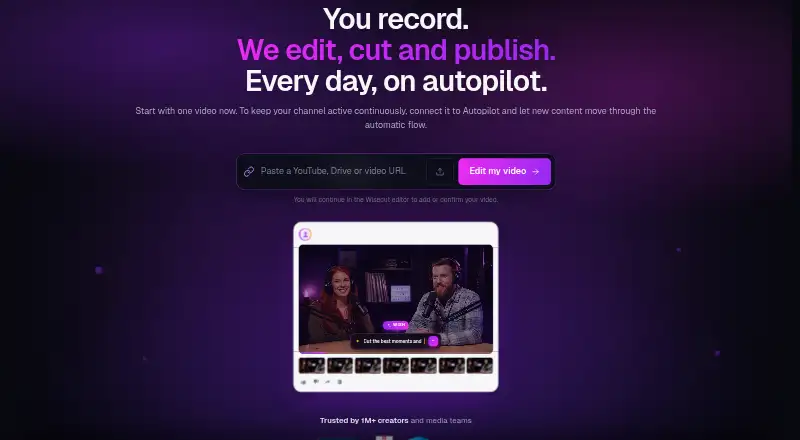
What Wisecut is
Wisecut is a web-based video editing and publishing service that can turn longer footage into short clips. Its editing tools can remove silence, add captions, reframe footage, identify highlights, create punch-in and punch-out edits, and lower background music when speech is detected. With Wish, users describe the edit they want and review proposed cuts, reframing, captions, and music. Autopilot can monitor a connected channel and create, schedule, and publish clips from new videos. Social Hub supports scheduling and distribution to YouTube Shorts, Instagram Reels, TikTok, and Facebook Reels. Wisecut MCP lets users request video actions from ChatGPT, Claude, and coding agents. Business workflows include live and on-demand clipping for broadcasters and streaming services, including real-time RTMP ingest. The free plan allows 30 minutes per month, 480p resolution, and exports up to three minutes; Autopilot and Social Hub are not included. Starter+ is $23.25/mo (annual), while Professional+ is $83.25/mo (annual). Wisecut is available on the web and through an API.
Who it suits
Wisecut suits creators who want to turn footage into shorter clips and prepare videos for social channels. Its Business workflows also target TV networks, streaming platforms, and live clipping operations.
What it does well
- Can automatically remove silence and add captions.
- Wish plans edits from a user-described request.
- Autopilot can schedule and publish clips.
- Social Hub supports four named social platforms.
- Professional+ offers exports up to 4K.
What to know first
- Free plan is limited to 30 minutes monthly.
- Free exports are limited to three minutes.
- Free plan is limited to 480p.
- Autopilot and Social Hub are excluded from Free.
Limits
The Free plan allows 30 minutes per month, 480p resolution, exports up to three minutes, and a maximum file size of 4 GB. Autopilot and Social Hub are not included. Starter+ is limited to 1080p and 60-minute exports; Professional+ supports 4K and exports up to 90 minutes.
Plans
| Plan | Billed and limits | Price |
|---|---|---|
| Free | Always free · 30 min/month · 480p · exports up to 3 min · 4 GB max file · no watermark · Autopilot and Social Hub not included | Free |
| Starter+ | Billed annually at US$ 279 · Save US$ 60/year · 300 credits/month · 1080p · up to 60 min/export · 4 GB max file · no watermark · email support | $279 a year |
| Professional+ | Billed annually at US$ 999 · Save US$ 420/year · 1,200 credits/month · 4K · up to 90 min/export · 5 GB max file · up to 3 accounts per social network · priority support | $999 a year |
| Enterprise | Contact sales · Custom volume · limits, resolution, API access, and support set with Wisecut | On request |
As wisecut.ai lists them, read 3 Oct 2026. The maker's own page has the final word.
Getting started
- Visit wisecut.ai and use the web service.
- Start with the Free plan or choose Starter+ or Professional+.
- Connect a channel to use Autopilot for new-video clips.
- Use Wish to describe an edit and review its proposed changes.
- Use Social Hub to schedule or distribute clips to supported social platforms.
Verdict
Wisecut combines automated editing with tools for scheduling and publishing clips. Compare the free plan's time, resolution, and export limits with the paid tiers before choosing.
Questions
Is there a free plan?
Yes. The Free plan costs nothing and includes 30 minutes per month, 480p resolution, and exports up to three minutes.
How much do the paid plans cost?
Starter+ is $23.25/mo (annual), billed annually at US$279. Professional+ is $83.25/mo (annual), billed annually at US$999. Enterprise pricing is available by contacting sales.
Which platforms does Wisecut support?
Wisecut is listed for web and API. Its supported social destinations are YouTube Shorts, Instagram Reels, TikTok, and Facebook Reels.
Can I use it for live video clipping?
Its Business workflows describe live and video-on-demand clipping, including real-time RTMP ingest, for TV networks, streaming platforms, and broadcasters.
What support comes with the paid plans?
Starter+ includes email support. Professional+ includes priority support.
Facts from Wisecut's own pages
- AI editing
- Features include automatic silence removal, captions, reframing, highlights, punch-in/out, and background music that lowers when speech is detected. · wisecut.ai, 3 Oct 2026
- AI integrations
- Wisecut MCP can be used from ChatGPT, Claude, and coding agents to turn requests into video actions. · wisecut.ai, 3 Oct 2026
- Audience
- The Business page identifies TV networks, streaming platforms, and live clipping operations as intended customers. · wisecut.ai, 3 Oct 2026
- Autopilot
- Autopilot monitors a connected channel and can automatically create, schedule, and publish clips from new videos. · wisecut.ai, 3 Oct 2026
- Founded
- 2019 · wisecut.ai, 28 Sept 2026
- Headquarters
- Miami, United States · wisecut.ai, 28 Sept 2026
- Notable limits
- The free plan limits usage to 30 minutes per month, 480p resolution, and exports up to 3 minutes. · wisecut.ai, 3 Oct 2026
- Privacy
- Wisecut says it does not sell customers’ personal information and describes reasonable administrative, technical, and physical security measures. · wisecut.ai, 3 Oct 2026
- Privacy notice date
- The privacy notice says it was revised on February 23, 2024. · wisecut.ai, 3 Oct 2026
- Product
- Wisecut edits, cuts, and helps publish video, including turning long footage into short clips. · wisecut.ai, 3 Oct 2026
- Publishing integrations
- Social Hub supports scheduling and distribution to YouTube Shorts, Instagram Reels, TikTok, and Facebook Reels. · wisecut.ai, 3 Oct 2026
- Support
- Starter+ includes email support, while Professional+ includes priority support. · wisecut.ai, 3 Oct 2026
- Supported workflows
- The Business page describes live and video-on-demand clipping for TV networks, streaming platforms, and broadcasters, including real-time RTMP ingest. · wisecut.ai, 3 Oct 2026
- Wish
- Wish lets users describe a desired edit and plans cuts, reframes, captions, and music for review. · wisecut.ai, 3 Oct 2026
Where Wisecut stands on Freedom251
- AI Video Repurposing Tools#26 of 50
- Video Editing Software#109 of 153
- AI Video Editors#57 of 80
- AI Video Editing Software#23 of 32