Freedom251 › 3D modeling software

Wings 3D
by Wings 3D
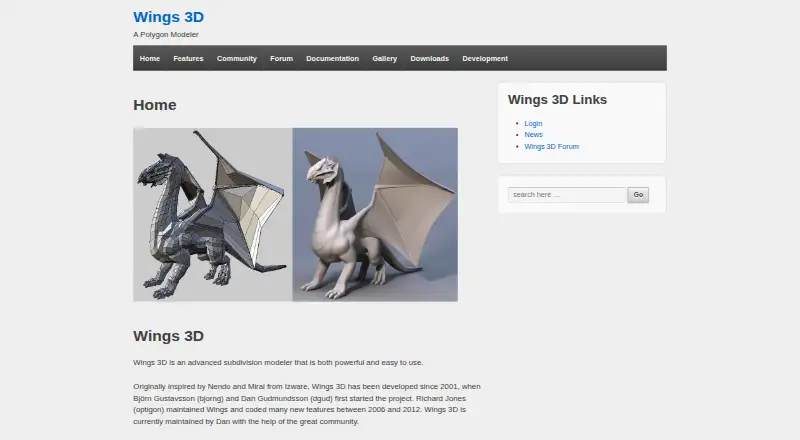
What Wings 3D is
Wings 3D is a free desktop application for subdivision modeling, with sculpting tools and a broad set of ways to shape geometry. Its modeling operations include moving, scaling, rotating, extruding, beveling, bridging, cutting, welding, sweeping, bending, shearing, and creating insets. AutoUV can cut and unfold a model’s surface image for export to painting and texturing workflows. The application also supports vertex colors, materials, and lights, and can export common 3D formats such as .obj, as well as files for 3D printing.
The interface can be configured, including its hotkeys, and uses context-sensitive menus opened with the right mouse button. Wings 3D runs on Windows, macOS, and Linux. Its rendering depends on an external engine, and it does not include animation tools. The maker, Wings 3D, was founded in 2001. The listed stable release is version 2.4.1, released in January 2025. Snapshot editions offer experimental features and are aimed at experienced users interested in trying them. The development forum welcomes usage questions, modeling discussions, and bug reports; the documentation project is still in progress and does not cover every aspect of the application.
Who it suits
Wings 3D suits people who want free desktop tools for shaping 3D models, sculpting, or preparing models for 3D printing. It can also fit workflows that use an external renderer and separate animation software.
What it does well
- Free for personal and commercial projects
- Available for Windows, macOS, and Linux
- Includes sculpting tools and 3D print export
- AutoUV unfolds surfaces for painting and texturing
- Configurable interface with customizable hotkeys
What to know first
- Animation tools are not supported
- Rendering requires an external engine
- Documentation does not cover every aspect of the software
Plans
| Plan | Billed and limits | Price |
|---|---|---|
| Wings 3D | Completely free for personal and commercial projects | Free |
As wings3d.com lists them, read 8 Oct 2026. The maker's own page has the final word.
Getting started
- Visit the Wings 3D website.
- Choose the download for Windows, macOS, or Linux.
- Check the requirements for your operating system before installing.
- Use the stable release, or choose a snapshot edition if you are an experienced user interested in experimental features.
- Consult the documentation or development forum for usage questions.
Wings 3D is a free desktop subdivision modeler for creating and refining polygon meshes. It suits artists, hobbyists, and developers who need focused modeling, sculpting, UV preparation, and export rather than an all-in-one production suite. Its configurable interface and broad mesh-editing toolkit are strong reasons to choose it, while the lack of animation and an in-app renderer narrows its role.
Overview
Wings 3D has been developed since 2001 and centers on advanced subdivision modeling. Its workflow covers the core operations needed to shape a mesh, including Move, Scale, Rotate, Extrude, Bevel, Bridge, Cut, Weld, Sweep, Plane Cut, Bend, Shear, and Inset. That concentration makes it a sensible choice when the model itself is the priority.
The application also includes sculpting tools, vertex colors, materials, and lights. AutoUV cuts and unfolds a model surface so the result can be exported for painting and texturing. Common 3D formats, including .obj, are supported for export, and 3D-print export is available. Rendering is handled by an external engine, so Wings 3D is better viewed as a modeling stage than a complete scene-production environment.
Key features
Subdivision and mesh editing
The extensive operation set supports controlled edits from broad shape changes to local topology work. Subdivision modeling is the central strength, making the software a good fit for users who want direct polygon and surface control without animation features competing for attention.
UV and surface preparation
AutoUV provides an unfolding workflow for preparing textures, while vertex colors and materials add basic surface data. This is useful for assets that will move to another texturing or rendering tool, but the external-render requirement means final image production happens elsewhere.
Configurable workflow
The interface can be configured, hotkeys can be customized, and context-sensitive right-click menus expose relevant commands. Those controls can help experienced modelers tailor repetitive work, although documentation remains a work in progress and does not cover every aspect of the application. Usage questions, modeling discussion, and bug reports can be handled through the official development forum.
Releases and experimentation
The listed stable release is 2.4.1, released in January 2025. Snapshot editions add experimental features and are aimed at experienced Wings users who want to evaluate new work; they are not the obvious starting point for someone seeking the most predictable setup.
Pricing
| Plan | Price | What you get |
|---|---|---|
| Wings 3D | free | Completely free for personal and commercial projects |
There is one free plan, with no trial period because the software is already free. It covers both personal and commercial projects, so independent creators, students, and commercial teams can use the same edition without a paid tier or seat-based upgrade described for this product.
Platforms
Wings 3D is a desktop application for Linux, macOS, and Windows. Windows requires Windows 10 or later and OpenGL 2.1. The Mac download lists Sequoia macOS 15 and provides an Apple-chip arm64 package. The listed Ubuntu 24.04 package requires OpenGL 2.1 or Mesa; other Unix systems require OpenGL 2.1 and building from source. Check those requirements before choosing it for an older workstation or an unsupported Unix distribution.
Who it's for
Choose Wings 3D for free subdivision modeling, sculpting, UV preparation, and 3D-print export on a desktop computer. It is particularly appropriate for users who already have a separate rendering workflow or who need to deliver assets in formats such as .obj. It is a poor fit for projects that depend on animation inside the same application, since animation is not supported, or for anyone wanting an integrated render engine.
Pros and cons
Pros
- Completely free for personal and commercial projects: there is no paid plan to unlock the core application.
- Focused subdivision toolkit: modeling commands cover everyday topology and shape-editing tasks in one desktop app.
- Useful asset handoff: AutoUV, common-format export, and 3D-print export prepare work for texturing, fabrication, or another renderer.
- Adaptable controls: configurable interface, custom hotkeys, and context-sensitive menus let users tailor the workflow.
Cons
- No animation: animated projects need another application.
- No internal render engine: final rendering requires an external tool.
- Documentation is incomplete: newcomers may need to rely on the development forum for uncovered workflows.
- Hardware and OS constraints matter: OpenGL 2.1 and specific current platform requirements can exclude some systems.
Alternatives
Blender is the stronger choice when you want a free, open-source 3D creation suite that also runs on Linux, macOS, and Windows.
Blockbench suits projects that need a free tool across desktop, mobile, and web platforms.
Houdini is the alternative to consider for a freemium workflow with commercial workstation licensing.
Bforartists is another free, open-source 3D creation suite for Linux, macOS, and Windows.
Meshy is a freemium web, Android, iOS, and API option with credit-based plans, including a free tier with 100 credits and ten monthly downloads for Meshy 6 Lite models.
Gravity Sketch is a freemium web, Windows, and macOS option with cloud storage and room-based collaboration on its free plan.
MakeHuman provides a free, no-paywall, no-email-download alternative for Linux, macOS, and Windows.
Tripo AI is a freemium web and API service with monthly credits, concurrent-task limits, and export caps on its free plan.
For broader comparisons, see Game 3D Modeling Software and 3D modeling software.
Verdict
Wings 3D is an excellent fit for anyone who wants a cost-free, desktop-focused subdivision modeler with sculpting, UV preparation, and export for print or downstream tools. Choose it for concentrated mesh work and flexible controls; look elsewhere if animation or integrated rendering is central to your workflow.
Verdict
Choose Wings 3D for free subdivision modeling, sculpting, and 3D print export on desktop systems. Look elsewhere if you need animation tools or rendering within the application.
Questions
How much does Wings 3D cost?
The Wings 3D plan is free. It is completely free for personal and commercial projects.
Does Wings 3D have a free trial?
No. Wings 3D has a free plan and no free trial.
Which operating systems does Wings 3D support?
It is available for Windows, macOS, and Linux. Windows requires Windows 10 or later and OpenGL 2.1; the listed macOS download requires Sequoia macOS 15 and includes an Apple chip arm64 package.
Can Wings 3D animate or render models?
It does not support animation. Rendering uses an external engine.
Can Wings 3D export models for 3D printing?
Yes. It supports 3D print export and exports common 3D formats such as .obj.
Who makes Wings 3D, and where can I get help?
Wings 3D is made by Wings 3D, a maker founded in 2001. Its development forum is available for usage questions, modeling discussions, and bug reports.
Facts from Wings 3D's own pages
- Animation limit
- Wings 3D does not support animation. · wings3d.com, 8 Oct 2026
- Animation tools
- No · wings3d.com, 21 Sept 2026
- Documentation
- The documentation project says it is a work in progress and does not cover all aspects of Wings 3D. · wings3d.com, 8 Oct 2026
- Experimental builds
- Snapshot editions include experimental features and are recommended for experienced Wings users interested in testing new features. · wings3d.com, 8 Oct 2026
- File formats
- Wings 3D exports to common 3D file formats such as .obj. · wings3d.com, 8 Oct 2026
- Founded
- 2001 · wings3d.com, 28 Sept 2026
- Free plan
- Yes · wings3d.com, 21 Sept 2026
- Interface
- The interface is configurable, supports customizable hotkeys, and uses context-sensitive right-click menus. · wings3d.com, 8 Oct 2026
- Linux requirements
- The listed Ubuntu 24.04 package requires OpenGL 2.1 or Mesa; other Unix requires OpenGL 2.1 and building from source. · wings3d.com, 8 Oct 2026
- Mac requirements
- The download page lists Sequoia MacOS 15 as required and provides an Apple chip arm64 package. · wings3d.com, 8 Oct 2026
- Materials and lights
- Wings 3D supports vertex colors, materials, and lights. · wings3d.com, 8 Oct 2026
- Modeling tools
- Its tools include Move, Scale, Rotate, Extrude, Bevel, Bridge, Cut, Weld, Sweep, Plane Cut, Bend, Shear, and Inset. · wings3d.com, 8 Oct 2026
- Platform access
- desktop · wings3d.com, 21 Sept 2026
- 3D print export
- Yes · wings3d.com, 21 Sept 2026
- Product
- Wings 3D is an advanced subdivision modeler. · wings3d.com, 8 Oct 2026
- Release
- The download page lists stable release 2.4.1, released January 2025. · wings3d.com, 8 Oct 2026
- Render engine
- external · wings3d.com, 21 Sept 2026
- Sculpting tools
- Yes · wings3d.com, 21 Sept 2026
- Support
- The official development forum is a place to ask usage questions, discuss modeling, and post bug reports. · wings3d.com, 8 Oct 2026
- UV mapping
- AutoUV cuts and unfolds a model surface image that can be exported for painting and texturing. · wings3d.com, 8 Oct 2026
- Windows requirements
- Windows 10 or later and OpenGL 2.1 are required. · wings3d.com, 8 Oct 2026
Where Wings 3D stands on Freedom251
- 3D modeling software#20 of 147
- Game 3D Modeling Software#14 of 26
- 3D Design Software#16 of 26