Freedom251 › Executable Packers
Windows PE Packer
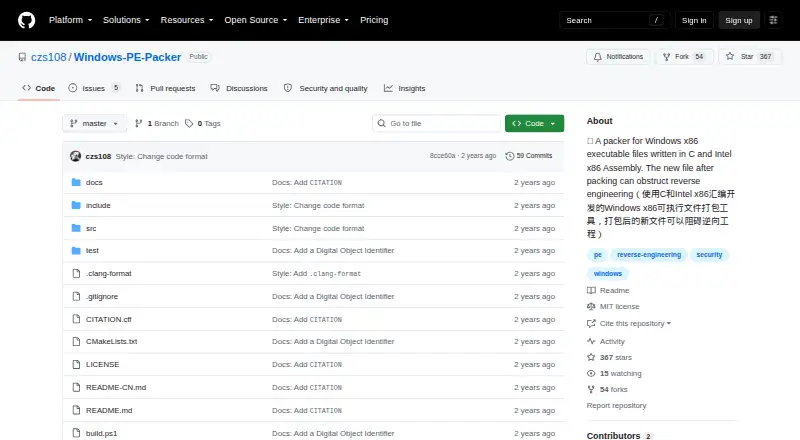
What Windows PE Packer is
Windows PE Packer is a free, open-source command-line tool for packing Windows PE files to obstruct reverse engineering. It transforms the import table, encrypts sections, removes section names, and adds a shell-entry. When a packed file runs, that entry decrypts the sections, initializes the original import table, and performs relocation. The project says these changes can make disassembly, constant-string searches, and import-table analysis more difficult. Its command takes an input filename and an output filename: `PE-Packer <input-file> <output-file>`. The tool currently handles only 32-bit `.exe` programs and must be configured for 32-bit Windows. Building it requires MASM32, MinGW-w64 with the i686 architecture, and CMake. The maker describes the project as a beginner demo for studying the Windows PE format and assembly, and says compatibility problems and bugs make it unsuitable for practical use. It is written in C and Intel x86 Assembly, distributed under the MIT License, and has no listed releases.
Who it suits
It may suit learners studying the Windows PE format and assembly on 32-bit Windows. The maker says it is unsuitable for practical use.
What it does well
- Free and distributed under the MIT License
- Packs PE files with section encryption
- Command-line input and output filenames
- Written in C and Intel x86 Assembly
What to know first
- Processes only 32-bit .exe programs
- Requires MASM32, MinGW-w64 i686, and CMake
- Maker warns of compatibility problems and bugs
- No releases are listed
Limits
The project can currently process only 32-bit .exe programs. The maker describes compatibility problems and bugs that make it unsuitable for practical use.
Plans
| Plan | Billed and limits | Price |
|---|---|---|
| Windows PE Packer | MIT licensed · processes 32-bit .exe programs | Free |
As github.com lists them, read 10 Oct 2026. The maker's own page has the final word.
Getting started
- Visit https://github.com/czs108/Windows-PE-Packer.
- Configure the project on or for 32-bit Windows.
- Install or provide MASM32, MinGW-w64 with the i686 architecture, and CMake.
- Build the project.
- Run PE-Packer <input-file> <output-file> with the input and output filenames.
Windows PE Packer is a free, open-source command-line packer for 32-bit Windows executables. It is best for learners exploring PE structure and x86 assembly; its maker’s warning about bugs and compatibility makes it a poor choice for software that must work reliably in practice.
Overview
The project combines C and Intel x86 Assembly to alter Portable Executable files. Its MIT License permits use, modification, distribution and sale subject to the license conditions, but provides the software without warranty. The maker frames it as a beginner demonstration, not dependable protection for shipped software.
Key features
Packing transforms the import table, encrypts sections, clears section names and adds a shell-entry. At runtime, that entry decrypts the sections, initializes the original import table and performs relocation. The intended benefit is added friction for disassembly, constant-string searches and import-table analysis—not a security guarantee or compliance certification.
Use the command PE-Packer <input-file> <output-file> to provide the input and output filenames. The workflow is narrow: it processes only 32-bit .exe programs. Building requires a 32-bit Windows configuration, MASM32, MinGW-w64 with the i686 architecture and CMake. Those requirements suit someone willing to configure a learning project, not someone seeking a ready-to-run utility.
The repository has no releases, so users should expect to build the project rather than download a published binary. Its stated compatibility problems and bugs further limit its usefulness outside experimentation.
Pricing
Windows PE Packer is free under the MIT License. There is no paid tier or free trial; the trade-off is a narrow 32-bit .exe scope and a project the maker says is unsuitable for practical use. The license allows copying, modifying, distributing, sublicensing and selling copies under its conditions, while disclaiming warranty.
Platforms
The supported platform is Windows 32-bit, and the supported binary formats are PE and .exe. The project’s build requirements also specify MASM32, MinGW-w64 for i686 and CMake. It is not a choice for users who need support for 64-bit executables or a build workflow on another platform.
Who it's for
Choose it to study how PE packing, section encryption, import-table handling and x86 assembly fit together. Avoid it for production protection, broad architecture coverage or a packaged tool: the project is explicitly described as a beginner demo with bugs and compatibility problems, and has no releases.
Pros and cons
Pros
- Free and open source: the MIT License permits modification and redistribution under its conditions.
- Concrete learning scope: its packing and runtime steps expose several PE and assembly concepts in one small command-line project.
- Focused anti-analysis intent: it aims to obstruct disassembly, string searches and import-table analysis.
Cons
- 32-bit .exe only: it cannot serve readers packing other executable architectures or formats.
- Build setup required: users need 32-bit Windows, MASM32, i686 MinGW-w64 and CMake, with no release binary to download.
- Not suitable for practical use: the maker warns of bugs and compatibility issues, and the MIT license provides no warranty.
Alternatives
For a broader starting point, browse Executable Packers. Consider Obsidian instead if you want a freemium option with a free plan across Windows and several other platforms. StarForce Reader is another free option spanning Windows, macOS, Linux, iOS and Android.
UPX is free and covers Linux, macOS and Windows, making it a candidate when those platforms matter. Choose Crinkler if your goal is a compressing linker for small 32-bit Windows executables. MPRESS supports PE32, PE32+, .NET and Mac-Darwin executable formats, so it is a broader-format alternative.
papaw is a free MIT-licensed option for Linux and self-hosted use. AlushPacker is another free Windows alternative. Enigma Virtual Box is freeware for Windows application virtualization, a different stated focus from PE packing.
Verdict
Windows PE Packer makes sense for learners who want a free, source-level exercise in 32-bit PE packing and x86 assembly. Its narrow support and the maker’s warning about reliability are decisive reasons to look elsewhere for software you intend to deploy.
Verdict
Windows PE Packer is a narrowly scoped learning project, limited to 32-bit `.exe` files. Its maker warns that bugs and compatibility issues make it unsuitable for practical use.
Questions
Does Windows PE Packer cost anything?
It is free and distributed under the MIT License.
Which file types and architecture does it support?
It currently processes 32-bit .exe programs.
What is required to build it?
It must be configured on or for 32-bit Windows and requires MASM32, MinGW-w64 with the i686 architecture, and CMake.
How do I run it?
The command takes an input filename and an output filename: PE-Packer <input-file> <output-file>.
What does the packer do?
It transforms the import table, encrypts sections, clears section names, and installs a shell-entry that decrypts sections, initializes the original import table, and performs relocation when the packed file runs.
Is it intended for practical use?
No. The maker describes it as a beginner demo for studying the Windows PE format and assembly, with compatibility problems and bugs that make it unsuitable for practical use.
Facts from Windows PE Packer's own pages
- Analysis resistance
- The project says packing obstructs disassembly, searching constant strings, and analyzing the import table. · github.com, 10 Oct 2026
- Architecture limit
- It can currently process only 32-bit .exe programs. · github.com, 10 Oct 2026
- Build platform
- The project must be configured on or for 32-bit Windows and requires MASM32, MinGW-w64 with i686 architecture, and CMake. · github.com, 9 Oct 2026
- Build requirements
- The project must be configured for Windows 32-bit and requires MASM32, MinGW-w64 with i686 architecture, and CMake. · github.com, 10 Oct 2026
- Command-line use
- The documented command takes an input filename and an output filename: PE-Packer <input-file> <output-file>. · github.com, 9 Oct 2026
- Downloads
- The repository's Releases page says there are no releases. · github.com, 9 Oct 2026
- Implementation
- It is written in C and Intel x86 Assembly. · github.com, 10 Oct 2026
- License
- The software is distributed under the MIT License, which permits use, copying, modification, distribution, sublicensing, and sale subject to its conditions. · github.com, 10 Oct 2026
- License terms
- The MIT license grants permission to use, copy, modify, merge, publish, distribute, sublicense, and sell copies, subject to its stated conditions. · github.com, 9 Oct 2026
- Maker
- The GitHub profile identifies the maker as Chenzs108 and lists Suzhou, Jiangsu, China. · github.com, 10 Oct 2026
- Packing features
- Packing transforms the original import table, encrypts sections, clears section names, and installs a shell-entry. · github.com, 10 Oct 2026
- Project status
- The maker describes it as a beginner demo for studying Windows PE Format and Assembly Language and says it has compatibility problems and bugs that make it unsuitable for practical use. · github.com, 10 Oct 2026
- Purpose
- Windows PE Packer packs Windows PE files to obstruct reverse engineering. · github.com, 10 Oct 2026
- Runtime behavior
- When a packed file runs, its shell-entry decrypts sections, initializes the original import table, and performs relocation. · github.com, 10 Oct 2026
- Security documentation
- The repository README describes anti-reverse-engineering behavior but does not state security or compliance certifications. · github.com, 9 Oct 2026
- Supported files
- The project can currently process only 32-bit .exe programs. · github.com, 9 Oct 2026
- Usage
- The command-line usage takes an input filename and an output filename: PE-Packer <input-file> <output-file>. · github.com, 10 Oct 2026
- Warranty
- The MIT license provides the software “AS IS” without warranty. · github.com, 10 Oct 2026
Where Windows PE Packer stands on Freedom251
- Executable Packers#11 of 28