StarForce Reader
What StarForce Reader is
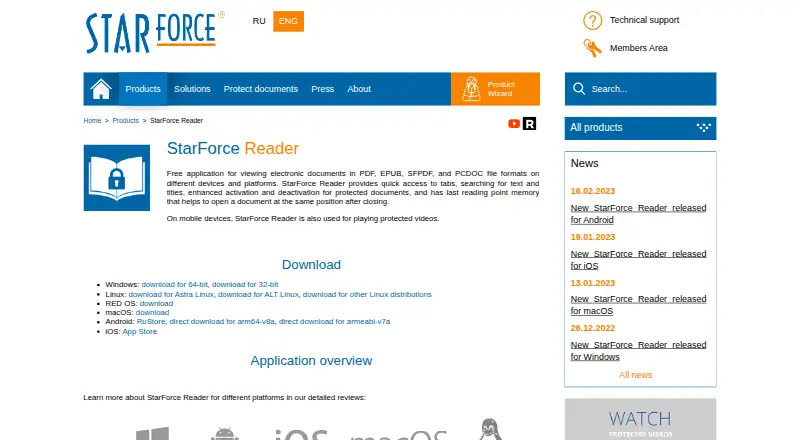
StarForce Reader is a free application for viewing PDF, EPUB, SFPDF, and PCDOC files. On mobile devices, it can also play protected videos. Reading tools include tabs, text and title searches, a saved last reading position, and controls for activating or deactivating protected documents. Downloads are listed for Windows, Linux, RED OS, macOS, Android, and iOS. Protected files have usage rules: on Windows, the first opening activates a document and ties it to that computer's software and hardware configuration. Printing is available only when the publisher permits it, and transferring an activation to another computer may be disabled. On Android, uninstalling the app also removes the protected-document license, so another activation is needed after reinstalling to view that document. The maker describes installation as clean and says the app does not promote third-party programs or utilities. Technical support is available through a feedback form, and the maker recommends SF Helper to diagnose problems with protected applications.
Who it suits
StarForce Reader suits people who need a free viewer for PDF, EPUB, SFPDF, or PCDOC files, including protected documents. Mobile users can also use it to play protected videos.
What it does well
- Free viewer for PDF, EPUB, SFPDF, and PCDOC.
- Mobile app can play protected videos.
- Available for Windows, Linux, RED OS, macOS, Android, and iOS.
- Tabs, searches, and saved reading position.
What to know first
- Protected-document printing depends on publisher permission.
- Activation transfer may be disabled.
- Android uninstall removes the protected-document license.
Limits
StarForce Reader is free. On Windows, protected-document printing is limited to cases where the publisher permits it, and deactivation for transfer may be disabled. On Android, uninstalling removes the protected-document license, requiring another activation after reinstalling to view that document.
Plans
| Plan | Billed and limits | Price |
|---|---|---|
| StarForce Reader | Free document viewer · no price listed | Free |
As star-force.com lists them, read 29 Sept 2026. The maker's own page has the final word.
Getting started
- Visit the StarForce Reader product page.
- Choose a listed download for Windows, Linux, RED OS, macOS, Android, or iOS.
- Install the application.
- Open a PDF, EPUB, SFPDF, or PCDOC file to begin reading.
- On Windows, open a protected document for its initial activation.
Overview
StarForce Reader is a no-cost app for reading documents and, on mobile, playing protected video. It is best suited to people who receive StarForce-protected publications and need a compatible reader. Its broad format support is useful, but the restrictions on protected files make it less dependable for readers who regularly move, print or reinstall documents.
Key features
Reader handles ordinary PDF and EPUB files alongside protected SFPDF and PCDOC documents. Tabs, searches by text or title, and a saved last reading position provide practical navigation basics. Mobile versions can also play protected video, although that function is limited to protected content.
Protected documents bring device and publisher controls that affect everyday use. On Windows, opening a protected document for the first time binds its activation to that computer’s software and hardware configuration. Printing works only when the publisher permits it in the serial number settings, and transferring activation by deactivating the document may be disabled. On Android, uninstalling Reader removes the document’s license, so reinstalling requires another activation. These constraints matter if you switch computers, need hard copies or expect to reinstall often.
The maker describes the app as small and quick to open, and says its installer does not promote third-party programs or utilities. Those qualities make it sound like a focused reader, but they do not change the publisher-imposed limits on protected content. Technical support is available through a feedback form; StarForce recommends its SF Helper utility for diagnosing problems with protected applications.
Pricing
StarForce Reader costs nothing. The free plan is a document viewer, making it a straightforward option for occasional readers and people who need to open protected files without adding a subscription cost. It remains subject to the activation, printing and transfer restrictions that apply to protected documents.
Platforms
Downloads are available for Windows, Linux, RED OS, macOS, Android and iOS. That range gives readers options across desktop and mobile, with protected video playback specifically supported on mobile devices. Protected-document behavior is not identical across platforms: the Windows guide describes computer-bound activation, while the Android overview warns that uninstalling removes a document’s license.
Who it's for
Reader makes most sense for people whose publishers distribute material as SFPDF or PCDOC, or protected video on mobile. It also covers everyday PDF and EPUB viewing at no cost. It is a weaker fit for readers who need predictable printing, frequent device changes or a reinstall that preserves protected-document access.
Pros and cons
- Pros: Supports ordinary PDF and EPUB as well as protected SFPDF and PCDOC, so one free app can cover both common reading and StarForce-protected material.
- Pros: Tabs, text and title search, and saved reading position help with document navigation and resuming a session.
- Pros: Mobile protected-video playback and downloads across desktop and mobile platforms extend its usefulness beyond PDF reading.
- Cons: First opening on Windows binds a protected document to that computer’s configuration; transfers may be blocked if deactivation is disabled.
- Cons: Printing depends on publisher permission, and Android reinstallation requires another activation after uninstalling removes the license.
Alternatives
For general PDF and EPUB reading or StarForce-protected content, Reader is the relevant choice among these options. The alternatives below are executable packers or related software, not like-for-like document readers.
- Executable Packers is a category directory for readers comparing executable-packing tools.
- Game DRM Software is a category directory for readers looking at game-protection software.
- PDF Readers is a category directory for comparing PDF-reading apps.
- UPX is a free option for readers seeking executable-packing software; it supports Linux, macOS and Windows.
- MPRESS is free and supports macOS and Windows for readers seeking executable-packing software.
- TinyLoad is a free Windows alternative.
- Enigma Virtual Box is free Windows application-virtualization software.
- AlushPacker is a free Windows option for readers seeking executable-packing software.
- Dhaedalida is a freemium Windows alternative.
- Fatpack is a free Windows alternative.
- Obsidian is a freemium executable-packing alternative with a free plan and platforms spanning Android, iOS, Linux, macOS and Windows.
Verdict
Choose StarForce Reader if you need a free way to open StarForce-protected documents, alongside ordinary PDFs and EPUBs, or play protected video on mobile. Its format and platform coverage are the case for it; device-bound activation, publisher-controlled printing and the Android reinstall penalty are reasons to look elsewhere if you need flexible handling of protected files.
Verdict
StarForce Reader covers ordinary and protected document formats across a range of platforms. Protected-document activation, printing, and transfer depend on the stated restrictions.
Questions
How much does StarForce Reader cost?
The listed plan is free, and the pricing model is free.
Which formats can it open?
It can view PDF and EPUB files, along with protected SFPDF and PCDOC files.
Which platforms have downloads?
Downloads are listed for Windows, Linux, RED OS, macOS, Android, and iOS.
Does it play video?
It can play protected videos on mobile devices.
Who makes StarForce Reader?
The maker identifies itself as Protection Technology, LLC and says it has developed software solutions since 2000.
What happens to protected documents after uninstalling on Android?
Uninstalling removes the protected-document license. Another activation is required after reinstalling to view that document.
Facts from StarForce Reader's own pages
- App size and launch
- The maker describes the app as small and says it opens quickly to allow users to start reading. · star-force.com, 29 Sept 2026
- Deactivation limit
- The Windows guide says deactivation to transfer a document's activation to another computer may be disabled. · star-force.com, 29 Sept 2026
- Founded
- 2000 · star-force.com, 28 Sept 2026
- Free plan
- Yes · star-force.com, 24 Sept 2026
- Headquarters
- The contacts page lists StarForce Moscow Headquarters at 125239, Moscow, P.O.B. 12. · star-force.com, 29 Sept 2026
- Installation
- The maker describes the installation as clean and says it does not promote third-party programs or utilities. · star-force.com, 29 Sept 2026
- Maker
- The maker identifies itself as Protection Technology, LLC and says it has developed software solutions since 2000. · star-force.com, 29 Sept 2026
- Mobile reinstall limit
- The Android overview says uninstalling the app also removes the protected document license, so reinstalling requires another activation to view that document. · star-force.com, 29 Sept 2026
- Platform availability
- Downloads are listed for Windows, Linux, RED OS, macOS, Android, and iOS. · star-force.com, 29 Sept 2026
- Printing limit
- The Windows guide says printing is available only if the publisher permits it in the serial number settings. · star-force.com, 29 Sept 2026
- Protected document activation
- The Windows guide says opening a protected document for the first time activates it and binds it to the computer's software and hardware configuration. · star-force.com, 29 Sept 2026
- Protected video
- On mobile devices, StarForce Reader can also play protected videos. · star-force.com, 29 Sept 2026
- Purpose
- StarForce Reader is a free application for viewing PDF, EPUB, SFPDF, and PCDOC files. · star-force.com, 29 Sept 2026
- Reading tools
- The product page lists tabs, text and title search, protected document activation and deactivation, and memory of the last reading position. · star-force.com, 29 Sept 2026
- Support
- StarForce provides a technical support page with a feedback form and recommends its SF Helper utility for diagnosing problems with protected applications. · star-force.com, 29 Sept 2026
- Supported formats
- The product page says it can view ordinary PDF and EPUB files plus protected SFPDF and PCDOC files. · star-force.com, 29 Sept 2026
Where StarForce Reader stands on Freedom251
- PDF Readers#15 of 24