Freedom251 › File transfer services
WeTransfer
by WeTransfer
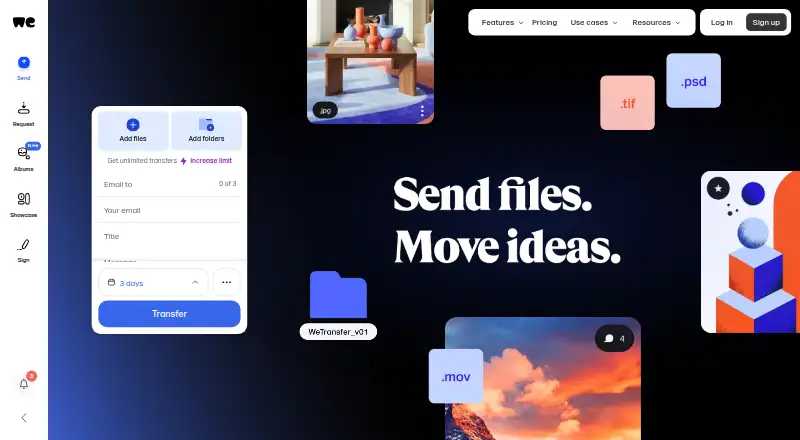
What WeTransfer is
WeTransfer is a file-transfer service for sending files to recipients by email or shareable link. Recipients can download a transfer without creating an account. A free account supports up to 10 transfers or 3 GB in a rolling 30-day period and includes file requests, password-protected transfers, paid transfers, and access to the mobile apps. File requests let people collect files from others through an email or link. With Paid Transfers, a sender can set a price and accept payment through Stripe, the only payment provider WeTransfer identifies as supported.
Plans range from Free and Starter to Ultimate, Teams, and Enterprise. Free and Starter transfers can remain online for up to 3 days. Ultimate supports unlimited transfers up to 1 TB each, custom expiration, password protection, branded pages, and access control. Teams adds shared workspaces, team brand controls, and admin tools; its storage can reach 5 TB, with extensions to 30 TB available on request. Enterprise plans are negotiated through sales and include SSO, SCIM provisioning, custom storage, and advanced compliance features. WeTransfer offers web, iOS, Android, and Mac access. Its Mac app can send from the menu bar or Finder. The company is based in Amsterdam and was founded in 2009.
Who it suits
WeTransfer suits people who need to send files by email or link, including recipients who do not have accounts. Its file requests, mobile apps, and paid transfers also serve users who need to collect files or charge for them. Teams and organizations can consider the higher plans for shared workspaces, administration, or enterprise identity features.
What it does well
- Recipients can download transfers without an account.
- Free accounts include file requests and password-protected transfers.
- Mobile apps are available for iOS and Android.
- Ultimate supports custom transfer expiration and access control.
- Teams includes shared workspaces and admin tools.
- Files are encrypted in transit and at rest, according to WeTransfer.
What to know first
- Free transfers can remain online for only up to 3 days.
- The free plan allows up to 10 transfers or 3 GB per 30 days.
- The Public API is retired.
- Phone support is not offered.
Limits
The free plan allows up to 10 transfers or 3 GB in a rolling 30-day window, and transfers can stay online for up to 3 days. Starter allows up to 10 transfers or 300 GB per 30 days, with the same 3-day expiry.
Plans
| Plan | Billed and limits | Price |
|---|---|---|
| Free | Up to 10 transfers or 3 GB in a rolling 30-day window · Free and Starter transfers can stay online up to 3 days | Free |
| Starter | Up to 10 transfers or 300 GB in a rolling 30-day window · Transfers can stay online up to 3 days | On request |
| Ultimate | Unlimited transfers up to 1 TB per transfer · Custom expiration · Password protection · Branded pages · Access Control | On request |
| Teams | Ultimate features · Shared workspaces · Team brand controls · Admin tools · Up to 5 TB storage, extendable to 30 TB on request | On request |
| Enterprise | Custom plan negotiated through Sales · SSO · SCIM provisioning · Custom storage · Advanced compliance features | On request |
As wetransfer.com lists them, read 11 Oct 2026. The maker's own page has the final word.
Getting started
- Visit https://wetransfer.com/.
- Choose the Free plan or review the Starter, Ultimate, Teams, and Enterprise plans.
- Create a free account to use its included file requests, protected transfers, paid transfers, and mobile app access.
- Use the web service or access WeTransfer through its iOS, Android, or Mac apps.
- On Mac, send from the menu bar or Finder.
Overview
WeTransfer is a file-transfer service from Amsterdam-based WeTransfer, founded in 2009, for sending files by email or shareable link. It suits people who need to deliver files or collect them without requiring recipients to create accounts. Its main trade-off is a tight free allowance and short expiry; plans with greater capacity and control have custom pricing.
Key features
Sending and collecting files
Senders can deliver transfers by email or link, and recipients can download without signing up. That makes WeTransfer a practical choice for client handoffs and other one-off exchanges with people outside your organization. File requests work in the other direction: invite someone to send files through an email or link. The free account includes this feature, making it useful beyond simple outbound delivery.
Mac users can start transfers from the menu bar or Finder, where a Finder Extension adds a “Create a transfer” action. iOS and Android apps support sending and receiving from a phone. These options extend the service beyond its web interface, though the free account's allowance remains the limiting factor for regular use.
Paid transfers
WeTransfer Paid Transfers lets users set a price for a transfer and accept payment through Stripe, its only supported payment provider. That suits creators who want to charge for a file delivery, but the single-provider restriction may not fit those who need another payment option.
Security and support
WeTransfer says it encrypts files in transit with TLS 1.2 or 1.3 and at rest with AES-256, maintains ISO/IEC 27001 certification, and conducts regular penetration testing. It also says uploaded content is not used to train AI models. Support starts in the account help drawer with AI assistant Jim, who passes issues needing a person to the support team. There is no phone support, so users who need to speak with support by phone should look elsewhere.
Pricing
WeTransfer uses a freemium model. The free account is useful for occasional exchanges, but its rolling quota and three-day expiry can make delivery inconvenient when recipients need more time or transfers are frequent. Paid-plan prices are custom pricing.
| Plan | Price | What it includes |
|---|---|---|
| Free | free | Up to 10 transfers or 3 GB in a rolling 30-day window; transfers can stay online up to 3 days. Includes file requests, paid transfers, password-protected transfers, and mobile app access. |
| Starter | Custom pricing | Up to 10 transfers or 300 GB in a rolling 30-day window; transfers can stay online up to 3 days. |
| Ultimate | Custom pricing | Unlimited transfers up to 1 TB per transfer, custom expiration, password protection, branded pages, and Access Control. |
| Teams | Custom pricing | Ultimate features, shared workspaces, team brand controls, admin tools, and up to 5 TB storage, extendable to 30 TB on request. |
| Enterprise | Custom pricing | Custom plan negotiated through sales, with SSO and SCIM provisioning, custom storage, and advanced compliance features. |
Starter raises the free account's capacity substantially but retains the three-day expiry and 10-transfer ceiling, so it is not a solution for frequent small transfers or longer-lived links. Ultimate removes that expiry constraint and supports transfers up to 1 TB each, making it a better fit when delivery needs custom retention or access controls. Teams adds shared workspaces and administration for organizations; Enterprise is aimed at buyers who need identity provisioning and tailored storage or compliance. No plan prices are stated beyond Free, so compare quotes before deciding whether the added controls justify moving up.
The pricing note also mentions a 7-day trial. The default account storage allowance is up to 2 TB; Teams storage is up to 5 TB and can be extended to 30 TB on request.
Platforms
WeTransfer is available on the web, Android, iOS, and macOS, with an extension and desktop app. The mobile apps handle sending and receiving, while the Mac app adds menu-bar and Finder workflows. Although API appears among its platform options, WeTransfer's Help Center lists its Public API as retired; do not choose it if you need a live Public API.
Who it's for
Choose WeTransfer for straightforward file delivery to recipients who should not need accounts, or for collecting files with simple email or link requests. The free plan can cover occasional transfers within 3 GB or 10 transfers per rolling 30 days, but its three-day availability is a poor fit for files that must remain downloadable longer. Teams needing shared workspaces and controls, or businesses requiring SSO and custom compliance features, should consider the higher tiers and request pricing.
Pros and cons
- Account-free downloads: recipients can retrieve transfers without signing up, reducing friction for external handoffs.
- Useful free account extras: file requests, paid transfers, password-protected transfers, and mobile access are included alongside the transfer allowance.
- Short free and Starter expiry: transfers stay online for up to 3 days, which can leave recipients too little time.
- Limited free capacity: the account allows up to 10 transfers or 3 GB in a rolling 30-day window.
- No live Public API or phone support: these omissions rule it out for workflows that depend on an API or phone-based help.
Alternatives
For a broader comparison, see File transfer services and File Sharing Software.
- AWS Transfer Family is a paid service with a free plan and a protocol-enabled SFTP, FTPS, or FTP endpoint; choose it when that endpoint model is a better fit than WeTransfer's email and link delivery.
- SendSafely has a free plan, trial, and a 50 MB-per-month Personal plan; consider it if that allowance and its broader platform support suit your needs.
- rclone is a free, open-source project with no trial; choose it if a free project is preferable to WeTransfer's freemium service.
- ExaVault offers a self-hosted appliance, including a free plan for up to 50 users; consider it if self-hosting and user-based plans better match your setup.
- pCloud has a free plan with 10 GB of storage and a trial; choose it if you want storage rather than WeTransfer's transfer-focused service.
- Wing FTP Server has a free edition with one domain, 10 user accounts per domain, and FTP/HTTP file transfer; consider it if those server-oriented limits fit your needs.
- Transloadit offers a Community plan with 5 GB per month, 200 priority slots per region, two collaborators, and a 0.5 GB file-size limit; choose it if those limits and collaborator allowance suit your workflow.
- Send Anywhere has a free plan with share-link transfers up to 10 GB, six-digit key transfers up to 50 GB, and 48-hour share-link expiry; consider it if those transfer limits and expiry better match your needs.
Verdict
WeTransfer is a strong fit for individuals and teams that need simple email or link delivery, account-free downloads, and basic file requests. Its free extras and desktop and mobile access help with occasional exchanges, but the small rolling allowance and three-day expiry limit the free tier. Look elsewhere if you need a live Public API or phone support; consider Ultimate or above when longer or custom expiry, larger transfers, or team controls matter.
Verdict
Choose WeTransfer for sending files by email or link, especially when recipients should not need accounts. The free account also includes file requests and mobile access. Look elsewhere if you need a live Public API or phone support; consider a paid plan if you need longer or custom expiry.
Questions
Is WeTransfer free?
Yes. The Free plan costs nothing and allows up to 10 transfers or 3 GB in a rolling 30-day window.
How long do free transfers remain online?
Free transfers can remain online for up to 3 days.
Which platforms does WeTransfer support?
The listed platforms are Android, API, extension, iOS, macOS, and web. The Public API is retired.
Can recipients download a transfer without an account?
Yes. Recipients do not need an account to download a transfer.
Who makes WeTransfer, and where is the company based?
WeTransfer makes the service. The company was founded in 2009 and is headquartered in Amsterdam, Netherlands.
What payment provider supports Paid Transfers?
WeTransfer identifies Stripe as its only supported payment provider for Paid Transfers.
Facts from WeTransfer's own pages
- API access
- Yes · wetransfer.com, 21 Sept 2026
- Desktop app
- Yes · wetransfer.com, 21 Sept 2026
- Download tracking
- Yes · wetransfer.com, 21 Sept 2026
- Encryption
- WeTransfer says files are encrypted in transit using TLS 1.2 or 1.3 and at rest using AES-256. · wetransfer.com, 11 Oct 2026
- File requests
- Users can request files from others through a simple email or link. · help.wetransfer.com, 11 Oct 2026
- File transfers
- WeTransfer lets senders share files with recipients through email transfers or links, and recipients do not need an account to download a transfer. · wetransfer.com, 11 Oct 2026
- Founded
- 2009 · wetransfer.com, 28 Sept 2026
- Free account
- A free account supports up to 10 transfers or 3 GB every 30 days and includes file requests, paid transfers, password-protected transfers, and mobile app access. · help.wetransfer.com, 11 Oct 2026
- Free plan
- Yes · wetransfer.com, 21 Sept 2026
- Free trial
- A free trial may be offered when subscribing, and its duration is the number of days shown on the payment checkout page. · wetransfer.com, 11 Oct 2026
- Headquarters
- Amsterdam, Netherlands · wetransfer.com, 28 Sept 2026
- Link expiry
- 3 · wetransfer.com, 21 Sept 2026
- Mac app
- The Mac app supports sending files from the menu bar or Finder, and its Finder Extension adds a Create a transfer action to Finder. · wetransfer.com, 11 Oct 2026
- Mobile apps
- WeTransfer provides iOS and Android apps for sending and receiving transfers from a phone. · help.wetransfer.com, 11 Oct 2026
- Paid transfers integration
- WeTransfer Paid Transfers lets users set a price for a transfer and accept payment through Stripe, which WeTransfer identifies as its only supported payment provider. · wetransfer.com, 11 Oct 2026
- Privacy
- WeTransfer states that uploaded content is not used to train AI models. · wetransfer.com, 11 Oct 2026
- Public API
- WeTransfer's Help Center lists its Public API as retired. · help.wetransfer.com, 11 Oct 2026
- Security certification
- WeTransfer says it maintains ISO/IEC 27001 certification and conducts regular penetration testing. · wetransfer.com, 11 Oct 2026
- Storage
- The default account storage allowance is up to 2 TB; Teams storage is up to 5 TB and can be extended to 30 TB on request. · wetransfer.com, 11 Oct 2026
- Support
- Support starts through the account help drawer with AI assistant Jim, who hands issues needing human follow-up to the support team; WeTransfer says it does not offer phone support. · wetransfer.com, 11 Oct 2026
- Transfer expiry
- Free and Starter transfers can remain online for up to 3 days, while Ultimate users can keep transfers active for as long as they want. · wetransfer.com, 11 Oct 2026
Where WeTransfer stands on Freedom251
- File transfer services#7 of 105
- File Sharing Software#34 of 47