Freedom251 › Kubernetes Deployment Tools
werf
What werf is
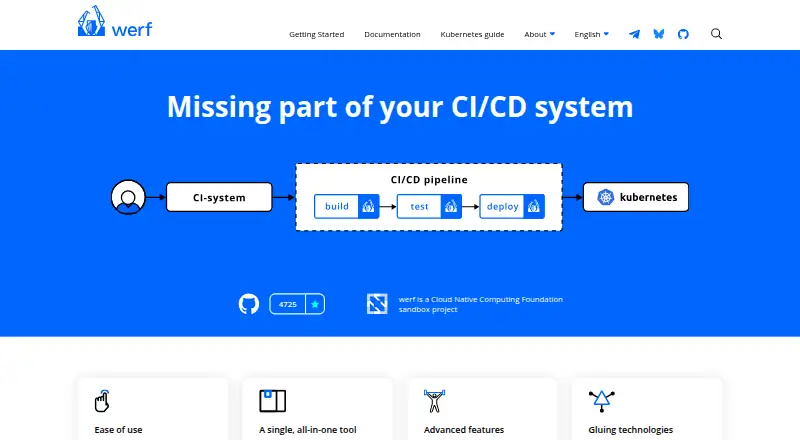
werf is a free, open-source tool for delivering applications to Kubernetes. It brings image building, testing, release artifact distribution, and deployment into one workflow, using Giterminism to keep delivery configuration in Git as the source of truth. Image builds can use Dockerfiles or Stapel, and incremental builds reuse registry layers while rebuilding changed components. Content-based tagging and immutable images support consistent builds for the same commit.
The converge command builds images and deploys an application, while deployment tracking waits for resources to become ready by default. Ready-made integrations cover GitLab CI/CD and GitHub Actions, and documented registries include ECR, ACR, Docker Hub, GCR, GitHub, GitLab, Harbor, and Quay. werf supports Docker and an embedded Buildah backend for daemonless rootless builds. Buildah is available on Linux and Windows with WSL2; macOS users are advised to use a virtual machine. werf can encrypt Helm secret parameter files stored in Git, which require a secret key for decryption. It supports Linux, macOS, and Windows workflows.
Who it suits
werf suits developers and delivery teams deploying applications to Kubernetes who want builds, tests, artifacts, and deployment in one tool. Its documented workflows cover Linux, macOS, and Windows, with a specific Buildah limitation for macOS.
What it does well
- Free and open source
- Supports Dockerfiles and Stapel builds
- Includes GitLab CI/CD and GitHub Actions integrations
- Deployment tracking waits for resources to be ready
- Supports encrypted Helm secret parameter files
What to know first
- Buildah on macOS requires a virtual machine
- Windows setup lists PowerShell, Git, GPG, and Docker Engine requirements
- Linux setup requires a Kubernetes cluster and public container registry
- Anonymous usage telemetry is collected by default
Limits
Buildah is available on Linux and Windows with WSL2; macOS users are advised to use a virtual machine for it. Windows and Docker setup requires PowerShell, Git 2.18.0 or above, GPG and Docker Engine.
Getting started
- Visit werf.io and choose the workflow for Linux, macOS or Windows
- For Linux with Docker, prepare Bash, Git 2.18 or newer, Docker Engine, a Kubernetes cluster and a public container registry
- For the Windows and Docker workflow, prepare PowerShell, Git 2.18.0 or above, GPG and Docker Engine
- Use Dockerfiles or Stapel to define image builds
- Connect a documented registry and a GitLab CI/CD or GitHub Actions workflow if needed
- Use the converge command to build images and deploy the application
Verdict
werf brings several Kubernetes delivery stages into one tool and supports multiple CI systems and registries. Teams should account for the Buildah platform constraints and the listed setup requirements for their operating system.
Questions
Is werf free?
Yes. werf is open source and has a free plan.
Which operating systems does werf support?
Getting Started workflows are available for Linux, macOS and Windows.
Which CI systems have ready-made integrations?
werf provides ready-made integrations for GitLab CI/CD and GitHub Actions.
Can werf encrypt secrets stored in Git?
It can encrypt Helm secret parameter files for Git storage. Decryption requires the secret key.
Does werf support Helm and GitOps?
Yes. werf supports Helm and GitOps.
Who created werf?
The project was originally created by Flant.
Facts from werf's own pages
- All-in-one workflow
- werf builds images, runs tests, distributes release artifacts, and deploys applications to Kubernetes in one tool. · werf.io, 30 Sept 2026
- Buildah platform limit
- Buildah is available on Linux and Windows with WSL2, while macOS users are advised to use a virtual machine. · werf.io, 30 Sept 2026
- Build backends
- werf supports Docker and the embedded Buildah backend, which supports secure daemonless rootless builds. · werf.io, 30 Sept 2026
- Build reproducibility
- werf uses content-based tagging, shared registry caching, and immutable images that are not rebuilt for the same commit. · werf.io, 30 Sept 2026
- Builds
- werf supports Dockerfiles and Stapel, an alternative assembly syntax, for defining image builds. · werf.io, 30 Sept 2026
- Caching
- werf supports incremental builds that rebuild modified components and reuse existing layers from a container registry. · werf.io, 30 Sept 2026
- CI integrations
- werf provides ready-made integrations for GitLab CI/CD and GitHub Actions. · werf.io, 30 Sept 2026
- Community
- The homepage says developers are in contact with the community and lists Telegram, Bluesky, and GitHub Discussions. · werf.io, 30 Sept 2026
- Community and governance
- werf developers engage through Telegram, Bluesky, GitHub Discussions, and the project is a CNCF sandbox project. · werf.io, 30 Sept 2026
- Container registries
- Documented registry implementations include ECR, ACR, Docker Hub, GCR, GitHub, GitLab, Harbor, and Quay. · werf.io, 30 Sept 2026
- Deployment
- The werf converge command builds images and deploys an application, and deployment tracking waits for resources to become ready by default. · werf.io, 30 Sept 2026
- Encrypted secrets
- werf supports encrypted secret parameter files stored in a Git repository and decrypted during use. · werf.io, 30 Sept 2026
- Giterminism
- werf uses Giterminism to encourage keeping delivery configuration in Git as the source of truth. · werf.io, 30 Sept 2026
- Local requirements
- The Linux-and-Docker setup requires Bash, Git 2.18 or newer, Docker Engine, a Kubernetes cluster, and a public container registry. · werf.io, 30 Sept 2026
- Operating systems
- The Getting Started guide includes Linux, macOS, and Windows workflows. · werf.io, 30 Sept 2026
- Product
- werf is an open-source tool for building images, running tests, distributing release artifacts, and deploying applications to Kubernetes. · werf.io, 30 Sept 2026
- Project origin
- The homepage says werf was originally created by Flant and identifies werf as a CNCF sandbox project. · werf.io, 30 Sept 2026
- Project start
- The maker's publication says werf's first commit was on January 22, 2016. · werf.io, 30 Sept 2026
- Purpose
- werf is a solution for efficient and consistent software delivery to Kubernetes covering the CI/CD lifecycle and related artifacts. · cncf.io, 30 Sept 2026
- Secret handling
- werf can encrypt Helm secret parameter files for storage in Git; decrypting them requires the secret key. · werf.io, 30 Sept 2026
- Signed downloads
- werf publishes Linux, macOS, and Windows binaries with PGP signatures that can be verified. · github.com, 30 Sept 2026
- Technology integrations
- werf relies on Git, Buildah, Helm, Kubernetes, and the user’s CI system. · werf.io, 30 Sept 2026
- Telemetry
- werf collects anonymous usage data, and telemetry can be disabled by setting WERF_TELEMETRY=0. · werf.io, 30 Sept 2026
- Windows constraint
- The Windows and Docker guide lists PowerShell, Git 2.18.0 or above, GPG, and Docker Engine as requirements. · werf.io, 30 Sept 2026
Where werf stands on Freedom251
- Kubernetes Deployment Tools#20 of 28
- Container Build Tools#29 of 34