Freedom251 › Daily Planner Apps
WeekPlanApp
What WeekPlanApp is
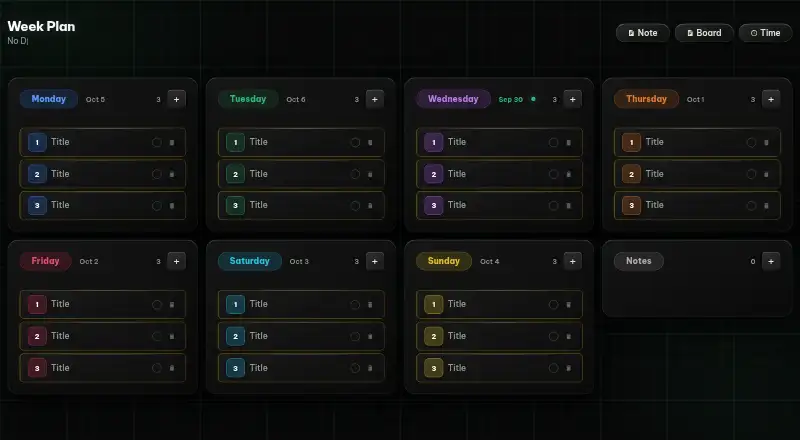
WeekPlanApp is a free weekly planner for arranging tasks and setting goals. Its board places Monday through Sunday in separate columns, with a Notes column for related information. A kanban-style layout lets you drag tasks from one day to another as plans change. Tasks can carry deadlines, with badges identifying overdue or due-soon items. Cards support attached images, videos, and files. Focus mode provides a distraction-free writing view, while overview mode displays all task titles together. The planner is available on Android, iOS, and the web, and is described for desktop, tablet, and mobile use. It can work offline as a Progressive Web App installed on a home screen. WeekPlanApp requires no sign-up or account and has no ads. Its interface is described as minimalist and dark. The service is intended for students, remote workers, freelancers, and professionals. The Free plan is listed as free, with no subscription.
Who it suits
It suits students, remote workers, freelancers, and professionals who want a weekly task board. It also fits people wanting offline access without an account or ads.
What it does well
- Monday-to-Sunday board with Notes column
- Drag-and-drop kanban task movement
- Deadline badges for overdue and due-soon tasks
- Attachments for images, videos, and files
- Works offline as an installable Progressive Web App
What to know first
- No focus sessions
- No account recovery through sign-up
- Dark minimalist interface may not suit everyone
Plans
| Plan | Billed and limits | Price |
|---|---|---|
| Free | No account · No ads · No subscription | Free |
As weekplanapp.com lists them, read 12 Oct 2026. The maker's own page has the final word.
Verdict
WeekPlanApp combines day-based planning with kanban movement, deadlines, attachments, and overview tools. Its no-account, ad-free, offline-capable setup keeps the planner simple across mobile and web devices.
Facts from WeekPlanApp's own pages
- Access
- The planner is described as accessible on any device and usable on desktop, tablet, and mobile. · weekplanapp.com, 12 Oct 2026
- Account and ads
- The site says no sign-up or account is required and that the planner has no ads. · weekplanapp.com, 12 Oct 2026
- Attachments
- Task cards can have images, videos, and files attached. · weekplanapp.com, 12 Oct 2026
- Deadlines
- Tasks can have deadlines with overdue and due-soon status badges. · weekplanapp.com, 12 Oct 2026
- Focus mode
- The app includes a focus mode for distraction-free task writing. · weekplanapp.com, 12 Oct 2026
- Focus sessions
- No · weekplanapp.com, 22 Sept 2026
- Free plan
- Yes · weekplanapp.com, 22 Sept 2026
- Intended users
- The site describes it for students, remote workers, freelancers, and professionals. · weekplanapp.com, 12 Oct 2026
- Interface
- The site describes the interface as minimalist and dark. · weekplanapp.com, 12 Oct 2026
- Kanban layout
- The site describes a kanban-style weekly planner with drag-and-drop task movement between days. · weekplanapp.com, 12 Oct 2026
- Offline use
- The site says it works offline as a Progressive Web App that can be installed to a home screen. · weekplanapp.com, 12 Oct 2026
- Overview mode
- An overview mode shows all task titles at a glance. · weekplanapp.com, 12 Oct 2026
- Product
- WeekPlanApp is a free online weekly planner for organizing tasks and planning goals. · weekplanapp.com, 12 Oct 2026
- Weekly board
- The planner has Monday through Sunday columns and a dedicated Notes column. · weekplanapp.com, 12 Oct 2026
Where WeekPlanApp stands on Freedom251
- Daily Planner Apps#85 of 137