Freedom251 › Help Authoring Tools
WebWorks ePublisher
What WebWorks ePublisher is
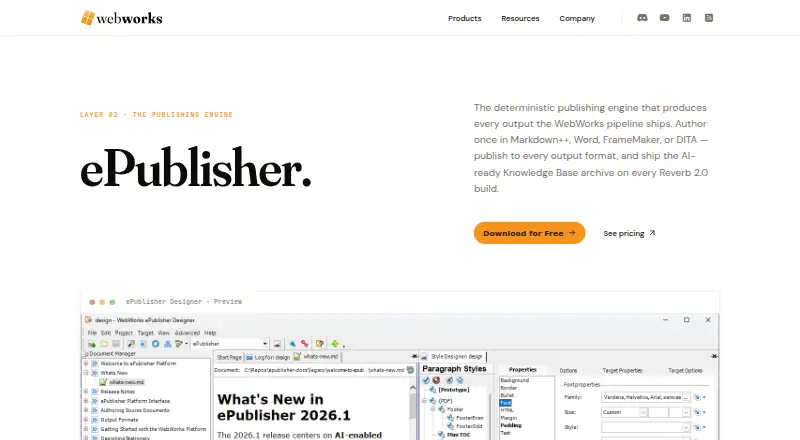
WebWorks ePublisher is Windows desktop software that turns documentation from one project into multiple publication formats. It accepts Markdown++, Microsoft Word, Adobe FrameMaker, and DITA XML, including mixed source types. Outputs include responsive HTML, PDF, ePUB, Eclipse Help, and other legacy help formats. Reverb 2.0 builds create an HTML5 helpset and a matching Markdown Knowledge Base archive with stable landmark IDs for WebWorks Platform uploads. Project Stationery manages style mappings, output targets, page templates, conditions, and variables across outputs. Reverb 2.0 also provides full-text search, ARIA accessibility, synonyms, relevance ranking, interactive filters, and Google Analytics GA4 events. AutoMap offers command-line scheduled publishing, CI/CD publishing, and AI-agent workflows. ePublisher requires a valid Contract ID and has a 14-day trial. Express costs $325 a year, Designer costs $875 a year, and AutoMap pricing requires contact. Windows 10 is the minimum listed system, with Java, Ghostscript, and .NET Framework dependencies.
Who it suits
It suits documentation teams publishing shared source content to web, PDF, ebook, and help-system outputs on Windows. Teams needing automated command-line publishing can consider AutoMap.
What it does well
- Supports mixed Markdown++, Word, FrameMaker, and DITA sources
- Publishes responsive HTML, PDF, ePUB, and help formats
- Shared styles, conditions, and variables across outputs
- Reverb 2.0 includes search and ARIA accessibility
- 14-day trial available
What to know first
- Windows desktop software only
- No free plan
- Valid Contract ID required
- Additional Java, Ghostscript, and .NET dependencies
Limits
ePublisher Express costs $325 a year and Designer costs $875 a year; AutoMap pricing requires contacting the maker. Use is limited by the applicable license, including user or physical-installation terms and internal-business-purpose conditions.
Plans
| Plan | Billed and limits | Price |
|---|---|---|
| ePublisher Express | $325.00 /year · Generate premier outputs · Manage Variables and Conditions · Content reports · Modify conditions, variables, and cross-references | $325 a year |
| ePublisher Designer | $875.00 /year · Generate premier outputs · Manage Variables and Conditions · Publishing reports · Modify conditions, variables, and cross-references · Design outputs · Preview content | $875 a year |
| ePublisher AutoMap | Contact for pricing · CLI for scheduled builds, CI/CD publishes, and AI agent workflows | On request |
As webworks.com lists them, read 8 Oct 2026. The maker's own page has the final word.
Getting started
- Open the WebWorks ePublisher product website
- Install on Windows 10 or Windows 11 with the listed dependencies
- Obtain a valid Contract ID
- Import Markdown++, Word, FrameMaker, or DITA XML sources
- Choose Express, Designer, or AutoMap licensing
- Use the 14-day trial if appropriate
Verdict
ePublisher is centered on single-sourced documentation and many publishing targets, with Reverb 2.0 and AutoMap extending search, analytics, and automation. Its Windows requirements, Contract ID condition, and paid licensing model are important constraints.
Questions
What platforms does ePublisher support?
The listed platform is Windows. Windows 10 is the minimum, and Windows 10 or 11 is recommended; AutoMap also supports Windows Server 2016–2025.
Is there a free plan or trial?
There is no free plan. The maker offers a free 14-day trial, and a valid Contract ID is required to use ePublisher.
What are the plan prices?
ePublisher Express costs $325 a year and Designer costs $875 a year. AutoMap pricing is available by contacting the maker.
Which source formats can it import?
It accepts Markdown++, Microsoft Word, Adobe FrameMaker, and DITA XML, including mixed source types in one project.
Which output formats are available?
Outputs include Reverb 2.0 HTML5, responsive or Dynamic HTML, PDF, ePUB, Eclipse Help, HTML Help, Oracle Help, Sun JavaHelp, and WebWorks Help.
Does it support automated publishing?
Yes. AutoMap provides a command-line interface for scheduled builds, CI/CD publishing, and AI-agent workflows.
Facts from WebWorks ePublisher's own pages
- Analytics
- Reverb 2.0 emits Google Analytics GA4 events out of the box. · webworks.com, 8 Oct 2026
- Automation
- ePublisher AutoMap supports scheduled publishing, CI/CD-driven publishing, and AI-agent workflows through a command-line interface. · webworks.com, 8 Oct 2026
- Customization
- Project Stationery configures style mappings, output targets, and page templates, with shared styling, conditions, and variables across outputs. · webworks.com, 8 Oct 2026
- Dependencies
- The listed additional software includes Java 11+, Ghostscript, and Microsoft .NET Framework 4.7.2; recommended requirements list Java 17 LTS. · webworks.com, 8 Oct 2026
- Founded
- 1992 · webworks.com, 28 Sept 2026
- Headquarters
- Austin, Texas, United States · webworks.com, 28 Sept 2026
- License limits
- The EULA says license fees scale based on users or physical installations and limits use to the licensee’s internal business purposes unless separately agreed. · webworks.com, 8 Oct 2026
- Output formats
- Outputs include responsive HTML, PDF, ePUB, Eclipse Help, and legacy formats. · webworks.com, 8 Oct 2026
- Purpose
- ePublisher converts source documentation into multiple published output formats from one project. · webworks.com, 8 Oct 2026
- Reverb 2.0
- Each Reverb 2.0 build produces an HTML5 helpset and a matching Markdown Knowledge Base archive with stable landmark IDs for upload to WebWorks Platform. · webworks.com, 8 Oct 2026
- Search and accessibility
- Reverb 2.0 offers full-text search, ARIA accessibility, synonyms, relevance ranking, and interactive filters. · webworks.com, 8 Oct 2026
- Security and privacy
- The maker’s privacy policy identifies Quadralay Corporation as the data controller under GDPR and is dated October 6, 2020. · webworks.com, 8 Oct 2026
- Support
- Support resources include product documentation, a Support Hub ticket channel, WebWorks Discord, and Study Hall sessions. · webworks.com, 8 Oct 2026
- Supported sources
- It accepts Markdown++, Microsoft Word, Adobe FrameMaker, and DITA XML, including mixed source types in one project. · webworks.com, 8 Oct 2026
- System requirements
- The download page lists Windows 10 as the minimum operating system and Windows 10 or 11 as recommended; AutoMap is also supported on Windows Server 2016–2025. · webworks.com, 8 Oct 2026
- Trial and license
- A valid Contract ID is required to use ePublisher, and the maker offers a free 14-day trial. · webworks.com, 8 Oct 2026
Where WebWorks ePublisher stands on Freedom251
- Help Authoring Tools#18 of 29