Freedom251 › Desktop Widget Software
Wdgts 2
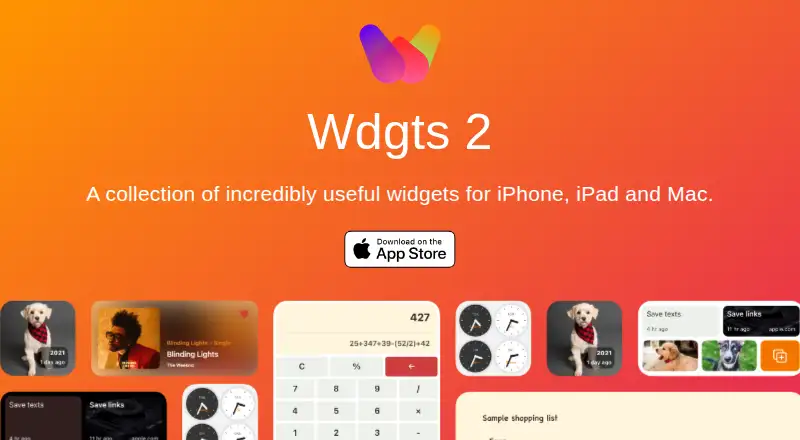
What Wdgts 2 is
Wdgts 2 is a collection of widgets for iPhone, iPad, and Mac, with native iOS and macOS apps built using SwiftUI. Its Calculator and Converter widgets are free forever. The converter covers major cryptocurrency and fiat currencies and refreshes every two hours. Clips saves links, text, or images for later access with search, while ScratchPad syncs across devices and keeps a history of deleted content. On This Day surfaces photos taken on the same date in earlier years, and Zones offers clocks for following friends in different time zones. On macOS, the Music widget shows the song playing in Music.app and provides playback controls on hover; the Mac app also supports desktop widgets, a three-column layout, windows, and menu bar apps. iOS supports Lock Screen widgets. Premium widgets require an active subscription. The App Store listing says the developer indicated the app does not collect data, while Apple says it has not verified that information.
Who it suits
Wdgts 2 may suit iPhone, iPad, and Mac users who want quick-access widgets for calculations, saved items, photos, time zones, or music. Premium widgets require a subscription.
What it does well
- Calculator and Converter widgets are free forever.
- Converter covers major cryptocurrency and fiat currencies.
- ScratchPad syncs across devices and keeps deleted-content history.
- iOS supports Lock Screen widgets.
What to know first
- Premium widgets require an active subscription.
- Music widget is macOS-only.
- Apple says the developer's no-data-collection information is unverified.
Limits
The free plan includes Calculator and Converter widgets. Premium widgets require an active subscription; listed paid options are Yearly at $6.99 a year and Lifetime at $9.99, paid once.
Plans
| Plan | Billed and limits | Price |
|---|---|---|
| Yearly | Yearly $6.99 · Premium widgets require an active subscription | $6.99 a year |
| Lifetime | Lifetime $9.99 · Premium widgets | $9.99, paid once |
As wdgts.co lists them, read 9 Oct 2026. The maker's own page has the final word.
Getting started
- Open the Wdgts 2 website
- Install the iOS or macOS app
- Use the free Calculator and Converter widgets
- Start the 3-day trial if desired
- Choose Yearly at $6.99 a year or Lifetime at $9.99, paid once for premium widgets
Verdict
Wdgts 2 combines free calculator and converter widgets with additional tools across iOS and macOS. Check which widgets are premium and which platform-specific features match your devices.
Questions
Which platforms does Wdgts 2 support?
It supports iOS and macOS, covering iPhone, iPad, and Mac.
Are any widgets free?
Calculator and Converter widgets are free forever.
What does the Converter support?
It supports major cryptocurrency and fiat currencies and updates every two hours.
What paid plans are available?
Yearly costs $6.99 a year, and Lifetime costs $9.99, paid once. Premium widgets require an active subscription.
Is there a trial?
A 3-day trial is listed.
Who develops Wdgts 2?
The product is listed under Tanmay Sonawane, described as an iOS developer and UX designer.
Facts from Wdgts 2's own pages
- Clips
- Clips saves links, text, or images for later access with full search. · wdgts.co, 9 Oct 2026
- Converter
- The converter supports major cryptocurrency and fiat currencies and updates every two hours. · apps.apple.com, 9 Oct 2026
- Desktop widgets
- The macOS app supports desktop widgets, a three-column layout, windows, and menu bar apps. · wdgts.co, 9 Oct 2026
- Developer
- The product is listed under developer Tanmay Sonawane, who describes himself as an iOS developer and UX designer. · tanmay.me, 9 Oct 2026
- Free widgets
- Calculator and converter widgets are free forever. · wdgts.co, 9 Oct 2026
- Lock Screen
- The app supports Lock Screen widgets on iOS. · apps.apple.com, 9 Oct 2026
- Music integration
- The macOS-only Music widget shows the currently playing song from Music.app and provides playback controls on hover. · wdgts.co, 9 Oct 2026
- Native apps
- The iOS and macOS apps are built with SwiftUI and described as fully native. · wdgts.co, 9 Oct 2026
- On This Day
- The On This Day widget shows photos taken on the same date in prior years. · wdgts.co, 9 Oct 2026
- Privacy
- The App Store listing says the developer indicated that the app does not collect data; Apple says this information has not been verified by Apple. · apps.apple.com, 9 Oct 2026
- ScratchPad
- ScratchPad syncs across devices and includes a history feature for accessing deleted content. · wdgts.co, 9 Oct 2026
- Support
- The App Store listing directs users to [email protected] for support and feature suggestions. · apps.apple.com, 9 Oct 2026
- Time zones
- Zones provides glanceable clocks for tracking friends in different time zones. · wdgts.co, 9 Oct 2026
- What it does
- Wdgts 2 is a collection of widgets for iPhone, iPad, and Mac. · wdgts.co, 9 Oct 2026
Where Wdgts 2 stands on Freedom251
- Desktop Widget Software#20 of 29