Freedom251 › Rich Text Editor Software
wangEditor
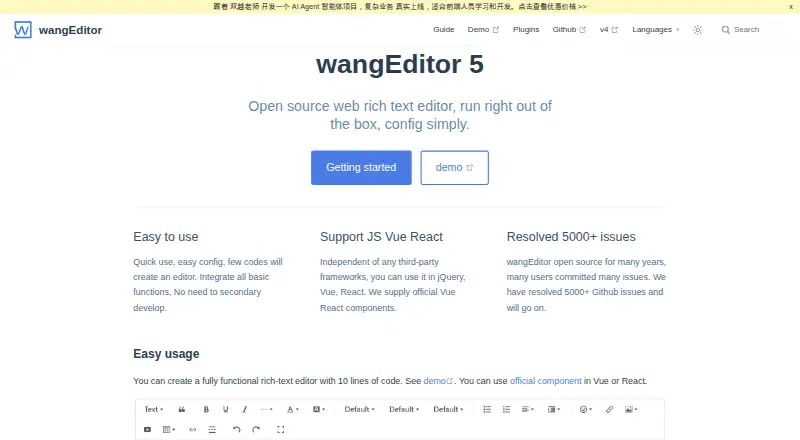
What wangEditor is
wangEditor 5 is an open-source web rich text editor that can be installed with yarn or npm or loaded from a CDN. The maker describes setup as simple and says a fully functional editor can be created with 10 lines of code. It works independently of third-party frameworks and can be used with jQuery, Vue, or React; official Vue and React components are available. Content can be returned as HTML, text, or JSON, with the documentation recommending HTML. Developers can reorder, group, or exclude toolbar menus and configure read-only mode, autofocus, scrolling, and a maximum content length. Image uploads require a server address, with settings for file size, file count, allowed types, headers, and credentials. Plugins cover mentions, formulas, Markdown, attachment uploads, link cards, and Ctrl+Enter line breaks. The editor supports tables and image and video insertion or embedding, with configurable server or custom uploads. Chinese and English are provided by default, and other languages can be added. It supports most PC browsers, including Chrome, Firefox, Safari, and Edge, but mobile editing is not supported; mobile viewing is. Internet Explorer is no longer supported. It is free and self-hosted.
Who it suits
wangEditor suits developers adding rich text editing to web projects using jQuery, Vue, or React. It is a fit for desktop-oriented editing workflows that can handle self-hosting and server-based image uploads.
What it does well
- Free, open-source web editor.
- Official Vue and React components are available.
- Content can be returned as HTML, text, or JSON.
- Toolbar and editor controls are configurable.
What to know first
- Mobile editing is not supported.
- Internet Explorer is no longer supported.
- Image uploads require a server address.
Plans
| Plan | Billed and limits | Price |
|---|---|---|
| Open source | Open source web rich text editor | Free |
As wangeditor.com lists them, read 8 Oct 2026. The maker's own page has the final word.
Getting started
- Visit https://www.wangeditor.com/en/.
- Install the editor with yarn or npm, or load it from a CDN.
- Add it to a web project; it can be used with jQuery, Vue, or React.
- Configure the toolbar, editor controls, and content format for the project.
- For image uploads, provide a server address and configure upload options.
Verdict
wangEditor offers configurable rich-text editing, framework options, and plugins for web projects. Its stated mobile limitation means it is not suitable when users need to edit on mobile devices.
Questions
How much does wangEditor cost?
The Open source plan is free. The listed pricing model is free.
Which platforms does it support?
wangEditor is for web projects. It supports most PC browsers, including Chrome, Firefox, Safari, and Edge.
Can it be used with Vue or React?
Yes. It is independent of third-party frameworks and can be used with Vue or React, with official components for both.
What content formats can it return?
It can return HTML, text, or JSON content. The documentation recommends HTML.
Does it support mobile editing?
No. Mobile viewing is supported, but mobile editing is not supported at the moment.
How are image uploads configured?
Uploads require a server address. Configuration includes options for file size, file count, allowed types, headers, and credentials.
Facts from wangEditor's own pages
- Browser support
- The maker lists support for most PC browsers, including Chrome, Firefox, Safari, and Edge. · wangeditor.com, 8 Oct 2026
- Content formats
- The editor can return HTML, text, or JSON content, and its documentation recommends HTML format. · wangeditor.com, 8 Oct 2026
- Customization
- Toolbar menus can be reordered, grouped, or excluded through toolbar configuration. · wangeditor.com, 8 Oct 2026
- Editor controls
- Configuration includes read-only mode, autofocus, scrolling, and a maximum content length setting. · wangeditor.com, 8 Oct 2026
- Framework support
- The editor is independent of third-party frameworks and can be used with jQuery, Vue, or React; official Vue and React components are provided. · wangeditor.com, 8 Oct 2026
- IE limitation
- The maker says Internet Explorer is no longer supported. · wangeditor.com, 8 Oct 2026
- Image uploads
- Image upload configuration requires a server address and supports settings such as file size, file count, allowed types, headers, and credentials. · wangeditor.com, 8 Oct 2026
- Installation
- The editor can be installed with yarn or npm, or loaded from a CDN. · wangeditor.com, 8 Oct 2026
- Languages
- Chinese and English are provided by default, and the documentation explains how to add other languages. · wangeditor.com, 8 Oct 2026
- Mobile limitation
- The maker says mobile editing is not supported at the moment, though mobile viewing is supported. · wangeditor.com, 8 Oct 2026
- Plugins
- The maker lists plugins for mentions, formulas, Markdown, attachment uploads, link cards, and Ctrl+Enter line breaks. · wangeditor.com, 8 Oct 2026
- Purpose
- wangEditor 5 is an open-source web rich text editor described as ready to run with simple configuration. · wangeditor.com, 8 Oct 2026
- Setup
- The maker says a fully functional editor can be created with 10 lines of code. · wangeditor.com, 8 Oct 2026
- Support channel
- The maker directs users to commit an issue for communication. · wangeditor.com, 8 Oct 2026
Where wangEditor stands on Freedom251
- Rich Text Editor Software#26 of 37