Freedom251 › Rich Text Editor Software

SunEditor
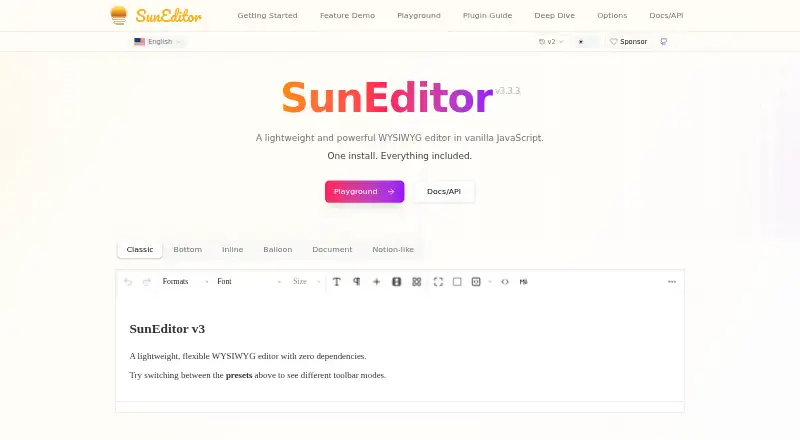
What SunEditor is
SunEditor is a free, open-source WYSIWYG editor written in vanilla JavaScript. It is intended for structured content such as articles, documentation, and emails, and validates and auto-corrects content. The editor can be self-hosted or used on the web. Its site lists integrations for HTML, JavaScript, React, Vue, Angular, Svelte, and Web Components, and the getting-started guide covers installation with npm or use through a CDN. The API reference documents editor methods, options, event callbacks, plugin interfaces, and modules.
Editing controls include text formatting, font and color settings, alignment, block styles, line height, and copy format. Its 24 built-in plugins cover media and editing functions, including image upload and editing, video, audio, hyperlinks, external embeds, drawing, math equations with KaTeX, tables, and media galleries. Developers can also create and register plugins. SunEditor comes with dark, midnight, cobalt, and cream themes, and CSS variables can be used for custom themes. The home page lists more than 25 languages and right-to-left support. To display rendered editor HTML, the getting-started guide requires SunEditor’s content CSS and the `sun-editor-editable` class. SunEditor v3 supports modern browsers but does not support Internet Explorer or legacy Edge. The project README identifies the MIT License.
Who it suits
SunEditor suits developers adding a rich text editor to structured-content workflows and who want a free, MIT-licensed project with framework integrations. Its plugin interfaces, documented API, and self-hosted deployment option also suit teams that want to customize the editor within their own applications.
What it does well
- Free and open source under the MIT License.
- Advertises zero dependencies and includes 24 built-in plugins.
- Integrations cover HTML, JavaScript, React, Vue, Angular, Svelte, and Web Components.
- Supports custom plugins and custom themes through CSS variables.
- Lists more than 25 languages and right-to-left support.
What to know first
- SunEditor v3 does not support Internet Explorer or legacy Edge.
- Rendered editor HTML requires SunEditor content CSS and a specific class.
- The GitHub security page lists two critical advisories published in 2026.
Getting started
- Visit suneditor.com.
- Install the package with npm or use the CDN.
- Choose an integration for your application, such as React, Vue, or Web Components.
- Configure the editor using its documented options, methods, and plugins.
- Include SunEditor content CSS and the `sun-editor-editable` class when rendering editor HTML.
Verdict
Choose SunEditor if you need a free, open-source editor with built-in media tools, framework integrations, and room for custom plugins. Look elsewhere if your users need Internet Explorer or legacy Edge support.
Questions
Is SunEditor free?
Yes. The maker describes it as free and open source under the MIT License.
Can I self-host SunEditor?
Yes. Self-hosted and web use are listed as platforms, and the deployment model is self-hosted.
Which frameworks and environments are supported?
The site lists HTML, JavaScript, React, Vue, Angular, Svelte, and Web Components integrations.
What does SunEditor include for media and plugins?
Its 24 built-in plugins include image upload and editing, video, audio, external embeds, drawing, and math equation editing. Developers can create and register custom plugins.
Which browsers does SunEditor v3 support?
The project README says it supports modern browsers and does not support Internet Explorer or legacy Edge.
What license does SunEditor use?
The project README identifies SunEditor as open source under the MIT License.
Facts from SunEditor's own pages
- API
- The API reference documents editor methods, options, event callbacks, plugin interfaces, and modules. · suneditor.com, 7 Oct 2026
- Browser support
- The project README says SunEditor supports modern browsers without dependencies or polyfills by default and does not support IE or Legacy Edge. · github.com, 7 Oct 2026
- Content focus
- The project README says SunEditor is optimized for structured content such as articles, documentation, and emails, and validates and auto-corrects content. · github.com, 7 Oct 2026
- Content rendering
- The getting-started guide says rendered editor HTML requires SunEditor content CSS and the sun-editor-editable class. · suneditor.com, 7 Oct 2026
- Customization
- SunEditor includes four themes and supports custom themes through CSS variables. · suneditor.com, 7 Oct 2026
- Custom plugins
- Developers can create and register their own plugins. · suneditor.com, 7 Oct 2026
- Dependencies
- The editor advertises zero dependencies. · suneditor.com, 7 Oct 2026
- Editing features
- The feature catalog lists text formatting, font controls, alignment, block styles, and line-height controls. · suneditor.com, 7 Oct 2026
- Editor features
- The feature catalog includes text formatting, font and color controls, alignment, block styles, line height, and copy format. · suneditor.com, 7 Oct 2026
- Framework integrations
- The official site lists HTML, JavaScript, React, Vue, Angular, Svelte, and Web Components integrations. · suneditor.com, 7 Oct 2026
- Framework support
- The site lists integrations for HTML, JavaScript, React, Vue, Angular, Svelte, and Web Components. · suneditor.com, 7 Oct 2026
- Installation
- The getting-started guide demonstrates installing with npm or using the CDN. · suneditor.com, 7 Oct 2026
- Language support
- The home page lists support for more than 25 languages and RTL. · suneditor.com, 7 Oct 2026
- License
- The project README identifies SunEditor as open source under the MIT License. · github.com, 7 Oct 2026
- Media
- Built-in plugins include image upload and editing, video, audio, external embeds, drawing, and math equation editing with KaTeX. · suneditor.com, 7 Oct 2026
- Media support
- Built-in plugins support image, video, audio, hyperlinks, external embeds, drawing, and math equations. · suneditor.com, 7 Oct 2026
- Open source
- The maker describes SunEditor as free and open source. · suneditor.com, 7 Oct 2026
- Plugins
- The plugin guide says SunEditor ships with 24 built-in plugins for media, formatting, and advanced features. · suneditor.com, 7 Oct 2026
- Pricing
- The official site describes SunEditor as free and open source. · suneditor.com, 7 Oct 2026
- Product
- SunEditor is a lightweight WYSIWYG editor written in vanilla JavaScript. · suneditor.com, 7 Oct 2026
- Purpose
- SunEditor is a lightweight WYSIWYG editor written in vanilla JavaScript. · suneditor.com, 7 Oct 2026
- Security
- The repository page links to a security policy; the product pages reviewed did not state a security certification or compliance standard. · github.com, 7 Oct 2026
- Security advisories
- The GitHub security page lists two critical advisories, published June 20 and July 15, 2026. · github.com, 7 Oct 2026
- Security reporting
- The project security policy accepts vulnerability reports by email and says an initial response can generally be expected within seven days. · github.com, 7 Oct 2026
Where SunEditor stands on Freedom251
- Rich Text Editor Software#28 of 37