Freedom251 › Text-to-speech tools

VoiceStudio
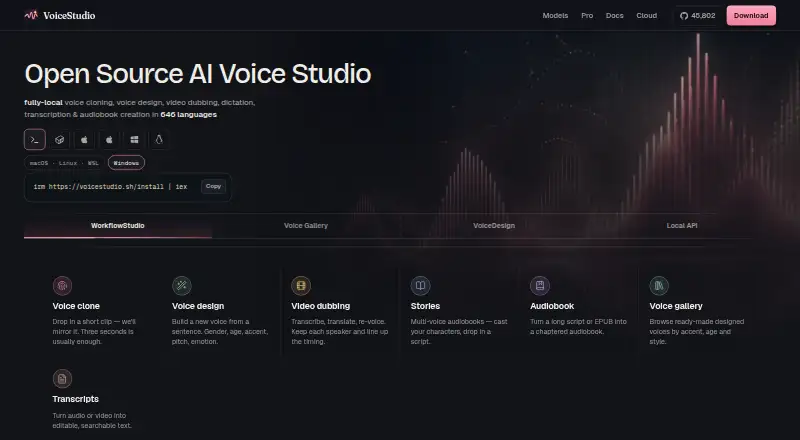
What VoiceStudio is
VoiceStudio is an open-source voice AI studio for voice cloning, voice design, video dubbing, dictation, transcription, and audiobook creation. For voice design, users can describe characteristics such as gender, age, accent, pitch, and emotion without reference audio. Its dubbing workflow transcribes and translates video, then re-voices it while keeping speakers separate and aligning timing with the original. Users can create multi-voice audio from scripts and chaptered audiobooks from long text or EPUB files. The desktop app exposes a local OpenAI-compatible API for speech, voices, transcription, and dubbing. The maker lists 26 adapters, including local speech and transcription engines and a configured-remote ASR adapter. The maker says recordings, generated audio, transcripts, and derived voice data remain on user-controlled storage, while the app may connect for updates, model downloads, or an explicitly network-backed adapter. The public build has no hosted dashboard or Cloud API. Open Source is free under AGPL-3.0; Pro is $99 per user per year and Lifetime is $299 per user once. Speech model licences are separate, and some models may be research-only.
Who it suits
VoiceStudio may suit people who want local voice creation, dubbing, transcription, or audiobook workflows, including developers who need a local API. Users should check individual speech model licences and the hardware guidance before choosing it.
What it does well
- Voice design does not require reference audio.
- Dubbing keeps speakers separate and aligns timing.
- Creates audiobooks from long text or EPUB files.
- Local API covers speech, voices, transcription, and dubbing.
- Free open-source plan under AGPL-3.0.
What to know first
- Public build has no hosted dashboard or Cloud API.
- Speech models have separate licences.
- Some speech models may be research-only.
- CPU use is slower; 16 GB or more RAM is recommended.
Limits
The free Open Source plan has no seat count or evaluation period. Pro and Lifetime each cover one user, three active devices, and three concurrent uses. Speech model licences are separate, and the public build does not include the hosted dashboard or Cloud API.
Plans
| Plan | Billed and limits | Price |
|---|---|---|
| Open Source | AGPL-3.0 · No seat count or evaluation period · Speech model licences are separate | Free |
| Lifetime | $299 per user · one-time · 1 user · 3 active devices · 3 concurrent uses | $299, paid once |
| Pro | $99 per user / year · 1 user · 3 active devices · 3 concurrent uses | $99 a year |
| Enterprise | Custom · Flexible terms for larger teams · Enquiry is not a purchase, quote, agreement, or licence grant | On request |
As voicestudio.sh lists them, read 30 Sept 2026. The maker's own page has the final word.
Getting started
- Visit https://voicestudio.sh/.
- Choose the Open Source, Pro, or Lifetime plan.
- Install the build for Linux, macOS, or Windows, or use the listed web, API, or self-hosted option.
- Allow about 8 GB RAM and around 10 GB disk for models; 16 GB or more RAM is recommended.
- Choose a voice workflow such as cloning, design, dubbing, transcription, dictation, or audiobook creation.
- Use the desktop app's local API at http://localhost:3900/v1 if you need its speech, voices, transcription, or dubbing endpoints.
VoiceStudio is a local voice-production app for creators and developers who need tools beyond speech generation. Its strongest case is the range of work it brings together; the trade-offs are local hardware demands and separate licences for speech models.
Overview
The open-source desktop app supports voice cloning, voice design, dubbing, dictation, transcription, and audiobook creation. Its local-first approach suits people who want voice data on storage they control, but it is not a substitute for the hosted cloud service: the public build has neither the hosted dashboard nor the Cloud API.
The maker says recordings, generated audio, transcripts, and derived voice data are not sent to its website or control plane. The app can still connect for updates and model downloads, or use a remote service when a network-backed adapter is explicitly configured. VoiceStudio was designed and built by Palash.dev; the maker identifies Palash Debnath, based in Agartala, India.
Key features
Voice creation and cloning
Voice design uses a written description rather than reference audio, letting users specify gender, age, accent, pitch, and emotion. Instant voice cloning and pronunciation controls add useful flexibility when creating speech for scripts or other production work. The important caveat is that VoiceStudio's AGPL-3.0 licence does not settle the licensing of the speech models: each has its own terms, and some may be research-only.
Dubbing, transcription, and audiobooks
The dubbing workflow transcribes and translates video, then re-voices it while keeping speakers separate and aligning timing to the original. That combination is useful for creators handling localized video, though the public build's local requirements may make it a poor fit for users seeking a hosted workflow. The app also supports dictation and transcription, multi-voice audio from scripts, and chaptered audiobooks from long text or EPUB files.
API and exports
The desktop app exposes an OpenAI-compatible local API at http://localhost:3900/v1, with speech, voices, transcription, and dubbing endpoints. The maker lists 26 engine adapters, including local text-to-speech and transcription engines and a configured-remote OpenAI-compatible ASR adapter. Exports include MP3, Opus, AAC, FLAC, WAV, and PCM. Developers can connect local workflows through the API, but it is not the Cloud API.
Pricing
The Open Source plan is free under AGPL-3.0, with no seat count or evaluation period; speech-model licences remain separate. This is the natural starting point for individual users comfortable managing local models and their terms. VoiceStudio says commercial use is permitted under AGPL-3.0, but that does not override a model's own licence.
Pro costs $99 a year, billed $99 per user / year, and includes 1 user, 3 active devices, and 3 concurrent uses. It fits one user who needs those usage allowances. Lifetime costs $299, paid once, billed $299 per user one-time, with the same 1-user, 3-device, and 3-concurrent-use limits. It may suit a buyer preferring a one-time payment, but does not add seats or concurrency over Pro.
Enterprise has custom pricing and flexible terms for larger teams. An enquiry is not a purchase, quote, agreement, or licence grant. There is no free trial. Cloud is in early access and invites users to request access for free usage credits, but that does not make the hosted dashboard or Cloud API part of the public build.
Platforms
VoiceStudio supports Linux, macOS, and Windows, as well as web, API, and self-hosted platforms. The download FAQ estimates about 8 GB of RAM and around 10 GB of disk for models, recommends 16 GB or more of RAM, and says a GPU is optional; CPU use is slower. That makes local use more appealing for users with suitable hardware than for those seeking a lightweight, hosted option.
Who it's for
VoiceStudio is best for creators who combine several voice tasks, and developers who want a local API alongside the desktop app. It is a strong fit when local control and broad workflows matter more than a managed cloud interface. Those who need the hosted dashboard, Cloud API, or a lower-hardware path should look elsewhere; commercial users should also check the licence of every model they use.
Pros and cons
Pros
- Broad voice workflow: cloning, dubbing, transcription, dictation, and audiobook creation share one app.
- Local control: the maker says recordings and derived voice data stay on user-controlled storage rather than going to its website or control plane.
- Useful integration options: the local OpenAI-compatible API and six export formats give developers and creators ways to connect or move audio.
Cons
- Hardware matters: the FAQ recommends 16 GB or more of RAM, and CPU use is slower.
- Model terms vary: some speech models may be research-only, despite the app's commercial-use permission.
- Cloud is not in the public build: users seeking a hosted dashboard or Cloud API will not get them there.
Alternatives
For a different balance of hosted plans and platform options, Fish Audio has a free tier with 8,000 monthly credits, up to 7 minutes of generation, up to 500 characters per generation, and 3 public voice slots.
Voicebox is another free-plan option, with Android and iOS support in addition to desktop, API, and self-hosted platforms.
Fish Speech is worth considering for its free tier of 8,000 monthly credits, up to 7 minutes per generation, and 3 public voice slots, with API, Linux, self-hosted, and web platforms.
Kits AI may fit users seeking a web or Windows option with a free plan that includes 15 conversion minutes, voice designer/blender, and Kits generative vocals, but no voice slots or download minutes.
Qwen3-TTS suits readers looking for free open-source models under Apache-2.0, with 0.6B and 1.7B models and 10 languages.
Chatterbox TTS offers free open-source models under MIT for research and development, on Linux, macOS, and self-hosted platforms.
CosyVoice is a free Apache-2.0-licensed repository with downloadable source code and models for users prepared to manage their own setup.
Sprag is a paid option for users considering per-hour speech-generation pricing.
For a broader shortlist, compare Voice Cloning Software, AI Voice Cloning Software, Text-to-Speech Software, and Voice Changer Software.
Verdict
Choose VoiceStudio if you want a local studio that spans cloning, dubbing, transcription, and long-form audio, with an API for connecting other software. Its main advantages are workflow breadth and local data control. Look elsewhere if you need the hosted cloud experience, lighter hardware requirements, or model licensing without separate checks.
Verdict
VoiceStudio covers voice work from cloning and dubbing to transcription and audiobooks, with local storage and API options. Its public build is not the hosted cloud service, and model licensing and hardware needs merit attention.
Questions
Is VoiceStudio free?
Yes. Its Open Source plan costs nothing under AGPL-3.0.
What do the paid plans cost?
Pro costs $99 a year, billed at $99 per user per year. Lifetime costs $299, paid once, billed at $299 per user one-time.
Which platforms does it support?
It is listed for API, Linux, macOS, self-hosted, web, and Windows.
Can VoiceStudio be used commercially?
The maker says VoiceStudio can be used at work or for money under AGPL-3.0. Speech models have separate licences, and some may be research-only.
Does it have a hosted cloud service?
Cloud is in early access and invites users to request access for free usage credits. The public build does not offer the hosted dashboard or Cloud API.
Who made VoiceStudio?
The site says it was designed and built by Palash.dev. Its about page names Palash Debnath and says he is based in Agartala, India.
Facts from VoiceStudio's own pages
- API access
- Yes · voicestudio.sh, 20 Sept 2026
- Audiobooks and stories
- Users can create multi-voice audio from scripts and chaptered audiobooks from long text or EPUB files. · voicestudio.sh, 30 Sept 2026
- Cloud status
- Cloud is in early access and invites users to request access for free usage credits; the public build does not offer the hosted dashboard or Cloud API. · voicestudio.sh, 30 Sept 2026
- Commercial use
- Yes · voicestudio.sh, 20 Sept 2026
- Commercial use and licensing
- The maker says VoiceStudio may be used at work or for money under AGPL-3.0, while speech models have separate licences and some may be research-only. · voicestudio.sh, 30 Sept 2026
- Engine catalog
- The maker lists 26 adapters, including local text-to-speech and transcription engines plus a configured-remote OpenAI-compatible ASR adapter. · voicestudio.sh, 30 Sept 2026
- Export formats
- mp3,opus,aac,flac,wav,pcm · voicestudio.sh, 20 Sept 2026
- Free plan
- Yes · voicestudio.sh, 20 Sept 2026
- Hardware
- The download FAQ says about 8 GB RAM and around 10 GB disk for models, recommends 16 GB or more RAM, and says GPU is optional but CPU use is slower. · voicestudio.sh, 30 Sept 2026
- Integrations
- The desktop app exposes an OpenAI-compatible local API at http://localhost:3900/v1 with speech, voices, transcription, and dubbing endpoints. · voicestudio.sh, 30 Sept 2026
- Maker
- The site says VoiceStudio was designed and built by Palash.dev, whose about page names Palash Debnath and describes him as based in Agartala, India; the opened pages give no founding year. · palash.dev, 30 Sept 2026
- Network behavior
- The app can access the network to check for updates, download models, or use an explicitly network-backed adapter. · voicestudio.sh, 30 Sept 2026
- Platforms
- The download page lists desktop builds for macOS, Windows, and Linux and a Docker web studio for servers, homelabs, or GPU boxes. · voicestudio.sh, 30 Sept 2026
- Privacy
- The maker says local recordings, generated audio, transcripts, and derived voice data are stored on user-controlled storage and are not received by its website or control plane. · voicestudio.sh, 30 Sept 2026
- Product
- VoiceStudio is an open-source, local voice AI studio for voice cloning, voice design, video dubbing, dictation, transcription, and audiobook creation. · voicestudio.sh, 30 Sept 2026
- Video dubbing
- The dubbing workflow transcribes, translates, and re-voices video while keeping speakers separate and aligning timing with the original. · voicestudio.sh, 30 Sept 2026
- Voice cloning
- The desktop app clones a voice from a short clean audio clip, with about three seconds usually enough. · voicestudio.sh, 30 Sept 2026
- Voice design
- Users can describe a voice by gender, age, accent, pitch, and emotion in a sentence without providing reference audio. · voicestudio.sh, 30 Sept 2026
Where VoiceStudio stands on Freedom251
- Text-to-speech tools#25 of 232
- Text-to-Speech Software#113 of 223
- Voice Changer Software#25 of 45
- Voice Cloning Software#16 of 25
- AI Voice Cloning Software#20 of 29