Freedom251 › Voice Cloning Software
CosyVoice
What CosyVoice is
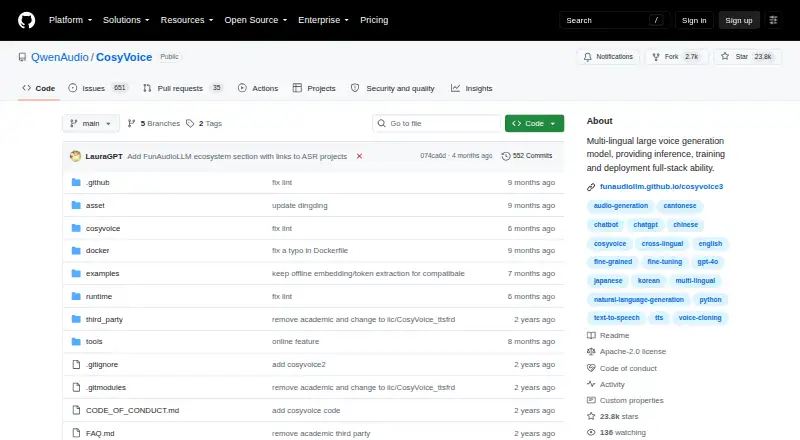
CosyVoice is a multilingual text-to-speech system for inference, training, and deployment, available as free, open-source software. Fun-CosyVoice 3.0 is designed for zero-shot multilingual speech synthesis across nine languages and more than 18 Chinese dialects or accents, with multilingual and cross-lingual zero-shot voice cloning. Users can guide language, dialect, emotion, speed, and volume, and adjust pronunciation with Chinese Pinyin or English CMU phonemes. It handles numbers, special symbols, and varied text formats without a traditional frontend module. Text-in, audio-out streaming has stated latency as low as 150 ms, and WAV is a listed export format. The repository documents installation with Conda and Python 3.10, model downloads through ModelScope or Hugging Face, and Docker deployment using gRPC or FastAPI. It also documents NVIDIA Triton and TensorRT-LLM acceleration. The repository is Apache License 2.0 licensed and describes its content as intended for academic purposes and demonstrating technical capabilities. Installation and deployment are self-managed, and no paid plans are listed.
Who it suits
CosyVoice suits developers or technical teams seeking a self-managed multilingual speech system with training and deployment options. Its stated academic purpose may also fit users exploring speech-system capabilities.
What it does well
- Free and Apache License 2.0 licensed.
- Supports voice cloning and nine languages.
- Provides text-in, audio-out streaming.
- Offers FastAPI and gRPC deployment interfaces.
- Supports WAV output.
What to know first
- Installation uses Python 3.10.
- Installation and deployment are self-managed.
- Content is described as intended for academic purposes and demonstrating capabilities.
Plans
| Plan | Billed and limits | Price |
|---|---|---|
| Open-source software | The repository provides downloadable source code and models; no paid plans are listed. · Apache-2.0 licensed repository · self-managed installation and deployment | Free |
As github.com lists them, read 3 Oct 2026. The maker's own page has the final word.
Getting started
- Open the CosyVoice GitHub repository.
- Install using the documented Conda setup and Python 3.10.
- Download pretrained models through ModelScope or Hugging Face.
- Choose a deployment route such as Docker with gRPC or FastAPI.
- Use the documented FastAPI or gRPC server and client interfaces.
Verdict
CosyVoice offers multilingual speech synthesis, voice cloning, and several documented deployment paths as free software. Its self-managed setup and stated intended use are worth considering before adopting it.
Questions
Does CosyVoice have a free plan?
Yes. The repository lists open-source software at no cost, with downloadable source code and models and no paid plans listed.
What license does CosyVoice use?
The repository is licensed under Apache License 2.0.
Which platforms are listed?
The listed platforms are API, Linux and self-hosted.
Can CosyVoice be used commercially?
Commercial use is listed as yes.
What installation setup is documented?
The repository documents Conda installation with Python 3.10. An optional ttsfrd normalization wheel is specified for Linux x86_64.
Where can users get support?
The maintainers direct users to GitHub Issues and an official Dingding chat group.
Facts from CosyVoice's own pages
- API access
- Yes · github.com, 20 Sept 2026
- API interfaces
- The deployment instructions include FastAPI and gRPC servers and clients. · github.com, 3 Oct 2026
- Commercial use
- Yes · github.com, 20 Sept 2026
- Deployment options
- The repository documents Docker deployment with gRPC or FastAPI, as well as NVIDIA Triton and TensorRT-LLM acceleration. · github.com, 3 Oct 2026
- Export formats
- WAV · github.com, 20 Sept 2026
- Free plan
- Yes · github.com, 20 Sept 2026
- Installation
- The repository documents installation with Conda and Python 3.10, and offers pretrained model downloads through ModelScope or Hugging Face. · github.com, 3 Oct 2026
- Intended use
- The repository says its content is for academic purposes and to demonstrate technical capabilities. · github.com, 3 Oct 2026
- Languages and dialects
- Version 3.0 covers nine languages and more than 18 Chinese dialects or accents, with multilingual and cross-lingual zero-shot voice cloning. · github.com, 3 Oct 2026
- License
- The repository is licensed under Apache License 2.0. · github.com, 3 Oct 2026
- Platforms
- linux,api,self_hosted · github.com, 20 Sept 2026
- Pronunciation control
- The system supports pronunciation inpainting with Chinese Pinyin and English CMU phonemes. · github.com, 3 Oct 2026
- Purpose
- CosyVoice is a multilingual text-to-speech system that provides inference, training, and deployment capabilities. · github.com, 3 Oct 2026
- Runtime requirements
- The documented installation uses Python 3.10; the optional ttsfrd normalization wheel is specified for Linux x86_64. · github.com, 3 Oct 2026
- Streaming
- It supports text-in and audio-out streaming, with latency stated as low as 150 ms. · github.com, 3 Oct 2026
- Support
- The maintainers direct users to GitHub Issues and an official Dingding chat group for discussion. · github.com, 3 Oct 2026
- Text normalization
- It supports reading numbers, special symbols, and varied text formats without a traditional frontend module. · github.com, 3 Oct 2026
- vLLM compatibility
- The repository says CosyVoice 2 and 3 support vLLM 0.11.x or newer and vLLM 0.9.0, while versions between those releases are untested. · github.com, 3 Oct 2026
- Voice cloning
- Yes · github.com, 20 Sept 2026
- Voice instructions
- Users can provide instructions for language, dialect, emotion, speed, and volume. · github.com, 3 Oct 2026
- Zero-shot synthesis
- Fun-CosyVoice 3.0 is designed for zero-shot multilingual speech synthesis. · github.com, 3 Oct 2026
Where CosyVoice stands on Freedom251
- Voice Cloning Software#3 of 25
- Text-to-Speech Software#30 of 223
- Text-to-speech tools#35 of 232