Freedom251 › AI Voice Isolators
VocalDrop
What VocalDrop is
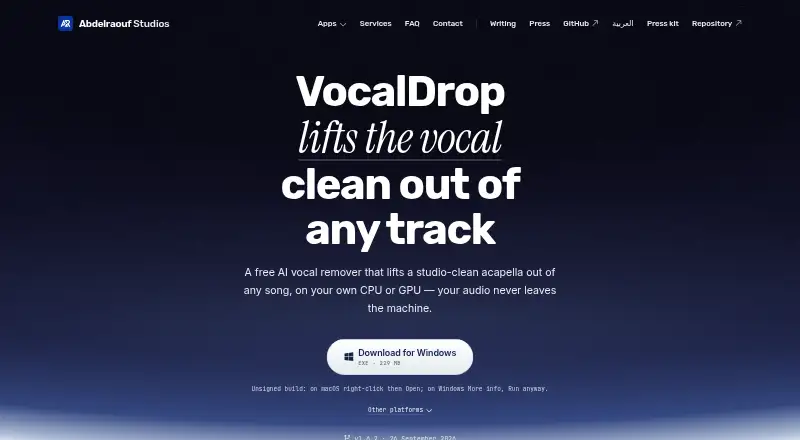
VocalDrop is a desktop app for separating vocals from songs on a computer. A separation can produce an isolated vocal and an instrumental stem, for uses such as sampling, remixing, editing, or karaoke. Users can choose Fast or Max modes, which use RoFormer-family models; model options vary for some hardware. The app can also extract audio from video, separate it, and place a selected stem back into a video with its timing preserved. Users may paste links from YouTube, SoundCloud, Vimeo, TikTok, and more than a thousand other sites for fetching. Optional audio tools include denoising, vocal restoration, silence removal, and format conversion. The maker says track audio is processed locally and not uploaded. After downloading the required models, separation can run offline; NVIDIA acceleration requires a one-time CUDA package download. A command-line interface with JSON output is included for pipelines. VocalDrop runs on Linux, macOS, and Windows and is free, with no track limits, watermark, account, or feature paywall. Current builds are not code-signed or notarized, and release assets have SHA-256 checksums.
Who it suits
VocalDrop suits people who want to extract vocals or instrumentals for editing, sampling, remixing, or karaoke. Its video tools, link fetching, and command-line interface may also suit users working with varied media or pipelines.
What it does well
- Produces both vocal and instrumental stems.
- Extracts and replaces audio in synced video.
- Optional denoising and vocal restoration.
- Includes a command-line interface with JSON output.
- Free, with no track limits or watermark.
What to know first
- Current builds are not code-signed or notarized.
- Model downloads are required before offline separation.
- NVIDIA acceleration requires a one-time CUDA download.
Plans
| Plan | Billed and limits | Price |
|---|---|---|
| Free | No track limits · no watermark · no account · no feature paywall | Free |
As abd3lraouf.dev lists them, read 2 Oct 2026. The maker's own page has the final word.
Getting started
- Open the VocalDrop project website.
- Choose the build for Linux, macOS or Windows.
- Download the required model before separating tracks.
- Optionally enable NVIDIA acceleration and download its one-time CUDA package.
- Use the app or its command-line interface to process audio or video.
Overview
VocalDrop is a desktop tool for splitting songs into vocal and instrumental stems, with video and link-based workflows alongside local audio files. It suits people making samples, remixes, edits or karaoke tracks who want a no-cost tool without per-track caps. Its range is useful, but the required model download and unsigned, unnotarized builds make installation a more considered choice.
Key features
Each separation can produce both an isolated vocal and an instrumental stem, so one run serves either vocal-focused editing or karaoke preparation. Fast and Max modes use RoFormer-family models, with some model choices depending on the computer's hardware. This flexibility is useful across supported setups, though it means choosing among processing modes rather than relying on a single fixed workflow.
For video, VocalDrop extracts the audio, separates it, then can put a selected stem back into synchronized video. It also fetches media from pasted links to YouTube, SoundCloud, Vimeo, TikTok and more than a thousand other sites. These options help when the source is not already a local file, but link fetching sends the URL for retrieval, unlike the app's local processing of track contents.
Optional denoising and AI vocal restoration can refine audio; silence removal and format conversion cover basic cleanup. The bundled command-line interface supports JSON output, making repeatable pipeline jobs possible without API access. That distinction matters to teams or developers seeking automation: the CLI is available, but VocalDrop does not provide an API.
The maker says track contents are processed locally and never uploaded. Separation can run offline after the initial model download; enabling NVIDIA acceleration also requires a one-time CUDA package download. Anonymous crash and usage diagnostics may be sent, as may URLs used for fetching and optional update checks. Current builds are not code-signed or notarized, although SHA-256 checksums are provided for release assets. Users who prefer signed installers should weigh that before installing.
Pricing
The Free plan costs nothing and includes unlimited tracks, no watermark, no account requirement and no feature paywall. There is no free trial because the plan is already free, and there are no published quotas to budget around. It is an unusually direct fit for individual creators who want to process songs without a subscription or account. The tradeoff is not a cheaper tier with reduced features: the plan is free, but the desktop installation requirements and unsigned builds still apply.
Platforms
VocalDrop supports Linux, macOS and Windows. Its processing is described as local rather than a browser-based upload workflow, and separation works offline once models are downloaded. Batch processing is supported, while API access is not.
Who it's for
VocalDrop is a strong fit for musicians, remixers and editors who want both vocal and instrumental stems from computer audio, or karaoke makers who need an instrumental version. Video editors can benefit from synchronized stem replacement, while technically minded users can put the CLI's JSON output into pipelines. It is less suitable for anyone who needs API integration, wants to avoid initial downloads, or requires signed and notarized builds.
Pros and cons
- Pro: Unlimited free separations with no watermark or account requirement remove common barriers for frequent personal use.
- Pro: Vocal and instrumental output, video remuxing and broad link fetching support several different source and editing workflows.
- Pro: Local processing and offline separation after model setup suit users who want to keep track contents on their own machine.
- Con: Initial model downloads are required, and NVIDIA acceleration adds a CUDA package download.
- Con: Unsigned, unnotarized builds may be a concern for users who prefer verified installers.
- Con: No API is offered, limiting integration options to the bundled command-line interface.
Alternatives
AI Voice Isolators is the broader category to browse if VocalDrop's desktop workflow is not the right fit.
AudioShake is worth considering for a wider range of platforms, including mobile, web and self-hosted options, or if its free offer of 200 credits, MP3 export and files up to 10 minutes meets your needs. LALAL.AI may suit a web-oriented workflow, but its Starter offer limits use to 10 minutes in the Relaxed Queue, caps uploads at 200 MB per file and does not provide full downloads.
Altered Real-Time Pro is more relevant when speech enhancement and voice skins are the goal: its free plan allows 20 minutes of processing per day and includes four Voice Skins daily. AIVoiceSeparator is a browser/API option for users who need API access; its free plan permits three songs per month when signed in and includes Studio-quality results with MP3, WAV and FLAC output.
Demixr is another web option, but its free plan is limited to 10 minutes of uploaded audio per month, 10 MB per upload and queued processing, with no WAV downloads. Denoise fits mobile users focused on denoising; its free tier allows importing and hearing the full before-and-after result, while saving or exporting requires Pro. Vocly is an Android alternative with a free, ad-supported offer that includes separation, a mixer, karaoke mode and a stem library.
clir Focus is another option to consider.
Verdict
Choose VocalDrop if you want unlimited, free vocal and instrumental separation on a desktop, especially when video handling or CLI pipelines matter. Look elsewhere if API access, signed and notarized builds, or an installation without model downloads is essential.
Verdict
VocalDrop combines vocal separation with video, link-fetching, and optional audio tools. Its free plan has no track limits, though users should note the unsigned builds and initial download requirements.
Questions
How much does VocalDrop cost?
The Free plan costs nothing. It has no track limits, watermark, account requirement or feature paywall.
Which platforms does VocalDrop support?
VocalDrop runs on Linux, macOS and Windows.
Can VocalDrop process videos?
Yes. It can extract a video's audio, separate it and mux a chosen stem back into a synced video.
Does VocalDrop work offline?
Separation can run offline after the required model download. NVIDIA acceleration downloads a one-time CUDA package when enabled.
Does VocalDrop upload track audio?
The maker says audio is processed locally and track contents are never uploaded. It says anonymous crash and usage diagnostics may be sent, along with first-use model downloads, user-pasted URLs for fetching and optional update checks.
Does VocalDrop have an API?
API access is not available. The app includes a command-line interface with JSON output for pipelines.
Facts from VocalDrop's own pages
- Audio tools
- Optional post-processing includes denoising and AI vocal restoration, and the app can remove silence and convert audio formats. · abd3lraouf.dev, 2 Oct 2026
- Automation
- A command-line interface ships with the app and supports JSON output for pipelines. · abd3lraouf.dev, 2 Oct 2026
- Download security
- The maker says current builds are not code-signed or notarized, and provides SHA-256 checksums for release assets. · github.com, 2 Oct 2026
- Headquarters
- United States · abd3lraouf.dev, 28 Sept 2026
- Intended users
- The maker describes the app as a tool for extracting vocals to sample, remix, or edit, with instrumental output also available for karaoke. · github.com, 2 Oct 2026
- Link sources
- Users can paste links from YouTube, SoundCloud, Vimeo, TikTok, and over a thousand other sites for the app to fetch. · abd3lraouf.dev, 2 Oct 2026
- Local processing
- The maker says audio is processed locally and track contents are never uploaded. · abd3lraouf.dev, 2 Oct 2026
- Models
- It offers Fast and Max modes using RoFormer-family models, with different models available for some hardware. · abd3lraouf.dev, 2 Oct 2026
- Network activity
- The maker says anonymous crash and usage diagnostics may be sent, along with first-use model downloads, user-pasted URLs for fetching, and optional update checks. · abd3lraouf.dev, 2 Oct 2026
- Offline use
- After the required model download, separation can run offline; the maker says NVIDIA acceleration also downloads a one-time CUDA package when enabled. · abd3lraouf.dev, 2 Oct 2026
- Output
- Each separation can produce both an isolated vocal and an instrumental stem. · abd3lraouf.dev, 2 Oct 2026
- Platforms
- The maker lists Apple Silicon Macs, Windows 10 or 11 on x64, and Linux on x64; Intel Mac builds are not provided. · abd3lraouf.dev, 2 Oct 2026
- Purpose
- VocalDrop uses AI to extract vocals from songs on the user's computer. · abd3lraouf.dev, 2 Oct 2026
- Support
- The maker offers review copies on request and links to a contact page from the studio site. · abd3lraouf.dev, 2 Oct 2026
- Video
- The app can extract audio from video, separate it, and mux a chosen stem back into a synced video. · abd3lraouf.dev, 2 Oct 2026
Where VocalDrop stands on Freedom251
- AI Voice Isolators#11 of 23