Freedom251 › AI Voice Isolators
AIVoiceSeparator
What AIVoiceSeparator is
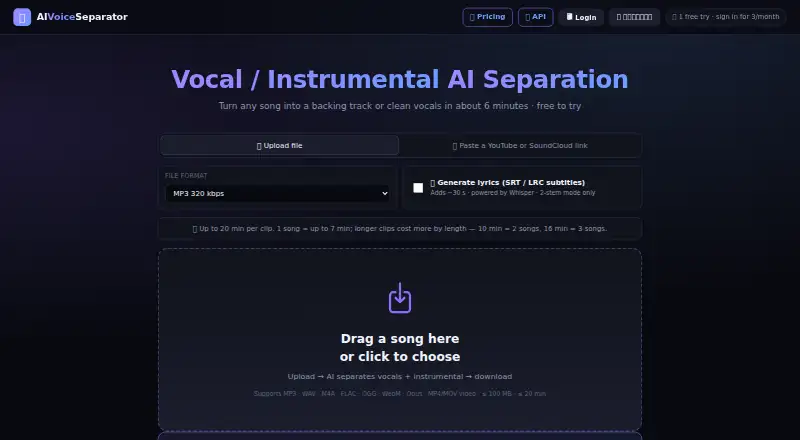
AIVoiceSeparator separates songs into vocal and instrumental stems for backing tracks or clean vocals. Its Studio pipeline combines BS-Roformer, Mel-Roformer, and MDX23C models, followed by EBU-R128 loudness normalization. The maker reports an SDR of 12.97 dB and says that is about 3 dB above the open Demucs baseline. The web app accepts audio and video files up to 100 MB and 20 minutes, including MP3, WAV, M4A, FLAC, OGG, WebM, Opus, and MP4/MOV. YouTube and SoundCloud links are accepted; TikTok clips must be saved and uploaded. Optional Whisper transcription produces SRT, LRC, and TXT files and adds about 30 seconds to processing. Its REST API accepts a URL or file and returns both stems. The free plan provides three songs per month for signed-in users. Credits cost $0.50 per purchase, while Pro is $30.00 per month. The maker says audio is processed on its own GPU in Thailand, deleted within 24 hours, and not used to train AI models.
Who it suits
It suits musicians and other users seeking vocal or instrumental stems, as well as developers using a REST API. Users with supported links or audio and video files can submit material through the web app.
What it does well
- Separates songs into vocals and instrumental stems.
- Accepts uploads up to 100 MB and 20 minutes.
- Optional transcription returns SRT, LRC, and TXT.
- Free plan includes three songs per month.
- Uploaded audio and results are deleted within 24 hours.
What to know first
- Free plan is limited to three songs monthly.
- TikTok clips must be saved and uploaded.
- Transcription adds about 30 seconds to processing.
- Pro costs $30.00 per month.
Limits
The Free plan allows three songs per month when signed in. The cheapest paid option is Credits at $0.50, paid once, billed pay as you go; it has no subscription, and credits never expire. API credits are also $0.50, paid once, with charges of 0.50 USD for up to 7 minutes, 1.00 USD for 7–14 minutes and 1.50 USD for 14–20 minutes.
Plans
| Plan | Billed and limits | Price |
|---|---|---|
| Free | 3 songs/month when signed in · full Studio quality · MP3 320/WAV/FLAC · lyrics, BPM and key detection | Free |
| Credits | pay as you go · no subscription · Top up $1–$20 (2–40 songs) · credits never expire · no daily limit · only pay for successful separations | $0.50, paid once |
| API credits | prepaid credits · no subscription or monthly minimum · Up to 7 min: $0.50 · 7–14 min: $1.00 · 14–20 min: $1.50 · failed jobs refunded | $0.50, paid once |
| Pro | billed via Patreon · cancel anytime · 6 songs/day · same Studio quality as Free · MP3 320/WAV/FLAC · lyrics, BPM and key detection | $30 a month |
As aivoiceseparator.com lists them, read 2 Oct 2026. The maker's own page has the final word.
Getting started
- Open the AIVoiceSeparator website or use its API.
- Sign in to use the Free plan, which includes three songs per month.
- Submit a supported audio or video file up to 100 MB and 20 minutes, or provide a supported URL.
- Choose optional Whisper transcription if you need SRT, LRC or TXT output.
- For more web processing, top up pay-as-you-go credits starting at $0.50, paid once, or choose Pro at $30 a month.
AIVoiceSeparator is a web service and REST API that splits songs into vocal and instrumental stems. It is best for creators and developers making occasional separations who want flexible inputs without a subscription. Full Studio quality on the free plan is a strong starting point, but its monthly quota and single-GPU queue make frequent batch work a less natural fit.
Overview
The service produces backing tracks or clean vocal parts from a song. Its Studio pipeline combines BS-Roformer, Mel-Roformer and MDX23C models and applies EBU-R128 loudness normalization. The maker reports an SDR of 12.97 dB, about 3 dB above the open Demucs baseline. Treat that as a useful quality claim, not a guarantee across different recordings.
Privacy terms are specific: audio and results are automatically deleted within 24 hours, and uploaded audio is not used to train AI models. The maker says processing runs on its own GPU in Thailand, not a third-party cloud. Traffic is encrypted through Cloudflare HTTPS, and temporary files are stored on a private machine accessible only through Cloudflare Tunnel. For signed-in accounts, the service collects Google email and uid; it also uses IP addresses for rate limits and quota counting and collects request metadata for debugging, but does not log audio content. Users are responsible for having rights to the material they process.
Key features
The web app handles MP3, WAV, M4A, FLAC, OGG, WebM, Opus and MP4 or MOV video, with a 100 MB and 20-minute ceiling. YouTube and SoundCloud links can be submitted directly; TikTok clips must first be saved and uploaded. That range is convenient for varied sources, though the duration cap rules out longer recordings.
Optional Whisper transcription exports SRT, LRC and TXT files and adds about 30 seconds to processing. Free and Pro plans also include BPM and key detection. The REST API accepts either a URL or an uploaded file, authenticates with an X-API-Key and returns vocal and instrumental stems. Its RapidAPI listing and support for YouTube, SoundCloud, TikTok, Bandcamp and Vimeo links make it useful for developers, although batch throughput beyond the single-GPU queue requires contacting the maker about dedicated capacity.
Pricing
The freemium structure gives occasional users a way to avoid a recurring bill, while offering paid routes for additional web use or API workloads.
- Free: free, with three songs a month when signed in. It includes full Studio quality, MP3 320, WAV and FLAC exports, lyrics, BPM and key detection. The main trade-off is the small monthly allowance.
- Credits: $0.50, paid once, pay as you go with no subscription. Top-ups run from $1–$20 for 2–40 songs; credits never expire, there is no daily limit, and only successful separations are charged. This suits occasional users who exceed the free quota and do not want a monthly commitment.
- API credits: $0.50, paid once in prepaid credits, with no subscription or monthly minimum. Jobs up to seven minutes cost $0.50, jobs from 7–14 minutes cost $1.00, and jobs from 14–20 minutes cost $1.50; failed jobs are refunded. This usage-based schedule suits developers with variable demand, but costs rise with file duration.
- Pro: $30 a month, billed via Patreon and cancellable anytime. It allows six songs a day at the same Studio quality and with the same listed exports, lyrics, BPM and key detection as Free. The higher allowance is aimed at regular users, but the daily cap still makes it a poor fit for large batches.
The service also offers a free trial, though no trial length is given. Credits are the more flexible paid choice for sporadic work; Pro makes more sense for steady daily use.
Platforms
AIVoiceSeparator runs on the web and offers API access. Its web workflow supports audio and video uploads, while the API accepts URLs or files. No desktop or mobile app is part of the platform offering.
Who it's for
Choose it for occasional vocal removal, backing-track creation or stem delivery through an API, especially if a 20-minute limit and three free monthly songs are enough to start. Users who need recurring volume can pay per separation or move to Pro. Teams that depend on high batch throughput should ask about dedicated capacity before building a workflow around the standard queue.
Pros and cons
- Pro: The free plan retains full Studio quality and includes several export formats, lyrics, BPM and key detection.
- Pro: Non-expiring credits avoid a subscription and charge only for successful separations.
- Pro: Broad upload formats, video support and direct links cover more input routes than a file-only workflow.
- Con: The free allowance is limited to three songs per month when signed in.
- Con: Uploads stop at 100 MB or 20 minutes, and TikTok clips require a save-and-upload step.
- Con: Batch users may need dedicated capacity because the standard queue runs on a single GPU.
Alternatives
For a broader comparison, browse AI Voice Isolators.
- AudioShake is worth comparing if you need a wider range of platforms, including mobile, desktop and self-hosted options; its free plan starts with 200 credits and supports files up to 10 minutes.
- LALAL.AI may suit users who prefer an always-free relaxed queue with a 10-minute allowance and 200 MB upload limit, though its free plan offers previews rather than full downloads.
- Altered Real-Time Pro is the more relevant alternative for desktop speech enhancement and voice skins, with a free daily processing allowance on macOS and Windows.
- VocalDrop is an option for desktop users seeking a free, no-account workflow with no track limits or watermark.
- Demixr may fit users who want a web-based alternative with a $4 a month Go plan, but its free tier limits monthly audio and upload size and does not provide WAV downloads.
- Denoise is a mobile option for denoising audio on Android or iOS; saving and exporting requires Pro.
- Vocly is an Android alternative with a free tier that includes ads and karaoke mode.
- clir Focus is an iOS option that starts with three free sessions.
Verdict
AIVoiceSeparator is a sensible choice for creators and developers who want full-quality occasional separation, multiple input routes and credits that do not expire. Its clearest advantage is avoiding a subscription for intermittent work; its clearest drawback is limited capacity for users who need frequent or high-volume batches. Start with Free, use credits for uneven demand, and look elsewhere if throughput is the priority.
Verdict
AIVoiceSeparator offers web and API separation, with several upload formats and optional transcription. Check the monthly free allowance, file limits, and listed paid options against your needs.
Questions
Is AIVoiceSeparator free?
Yes. The Free plan costs nothing and includes three songs per month when signed in, full Studio quality, MP3 320/WAV/FLAC, lyrics, BPM and key detection.
What do paid plans cost?
Credits cost $0.50, paid once, billed pay as you go, with no subscription; top-ups range from $1–$20 for 2–40 songs. Pro costs $30 a month and is billed via Patreon.
Which files and links can I use?
The web app accepts MP3, WAV, M4A, FLAC, OGG, WebM, Opus and MP4/MOV uploads up to 100 MB and 20 minutes. It accepts YouTube and SoundCloud links; TikTok clips must be saved and uploaded.
Does it have an API?
Yes. The REST API accepts a URL or uploaded file, uses X-API-Key authentication and returns vocal and instrumental stems. API credits are prepaid, with per-job prices based on duration.
Can it create lyrics or transcription files?
Optional Whisper transcription returns SRT, LRC and TXT files and adds about 30 seconds to processing.
How does it handle uploaded audio?
The maker says audio is processed on its own GPU in Thailand, uploads and results are deleted within 24 hours, and audio is never used to train AI models.
Facts from AIVoiceSeparator's own pages
- API
- The REST API accepts a URL or uploaded file, uses X-API-Key authentication and returns vocals and instrumental stems. · aivoiceseparator.com, 2 Oct 2026
- Audio engine
- The Studio pipeline uses a three-model ensemble of BS-Roformer, Mel-Roformer and MDX23C with EBU-R128 loudness normalization. · aivoiceseparator.com, 2 Oct 2026
- Data collection
- The privacy policy says it collects Google email and uid for signed-in accounts, IP addresses for rate limiting and quota counting, and request metadata for debugging, but does not log audio content. · aivoiceseparator.com, 2 Oct 2026
- Integrations
- The API page says it is listed on the RapidAPI marketplace and accepts links from YouTube, SoundCloud, TikTok, Bandcamp and Vimeo. · aivoiceseparator.com, 2 Oct 2026
- Lyrics
- Optional Whisper transcription returns SRT, LRC and TXT files and adds about 30 seconds to processing. · aivoiceseparator.com, 2 Oct 2026
- Maker identity
- The opened pages identify the product as AIVoiceSeparator but do not state a maker name, headquarters or founding date. · aivoiceseparator.com, 2 Oct 2026
- Processing location
- The maker says audio is processed on its own GPU in Thailand and is not sent to a third-party cloud. · aivoiceseparator.com, 2 Oct 2026
- Quality claim
- The maker reports SDR 12.97 dB and says this is roughly 3 dB better than the open Demucs baseline. · aivoiceseparator.com, 2 Oct 2026
- Retention and training
- The privacy policy says uploaded audio and results are automatically deleted within 24 hours and audio is never used to train AI models. · aivoiceseparator.com, 2 Oct 2026
- Security
- The privacy policy says traffic is encrypted via Cloudflare HTTPS and temporary files are stored on a private machine accessible only via Cloudflare Tunnel. · aivoiceseparator.com, 2 Oct 2026
- Support
- The API page directs users to contact the maker for dedicated capacity when batch throughput requires more than its single-GPU queue. · aivoiceseparator.com, 2 Oct 2026
- Uploads
- The web app supports MP3, WAV, M4A, FLAC, OGG, WebM, Opus and MP4/MOV video up to 100 MB and 20 minutes. · aivoiceseparator.com, 2 Oct 2026
- URL inputs
- Users can submit YouTube or SoundCloud links, while TikTok clips can be processed by saving and uploading the video. · aivoiceseparator.com, 2 Oct 2026
- Usage responsibility
- The terms say users are responsible for having rights to the content they upload or process. · aivoiceseparator.com, 2 Oct 2026
- What it does
- The service separates a song into vocals and instrumental stems for backing tracks or clean vocals. · aivoiceseparator.com, 2 Oct 2026
Where AIVoiceSeparator stands on Freedom251
- AI Voice Isolators#2 of 23