Freedom251 › AI Mind Map Tools
VisualNote AI
What VisualNote AI is
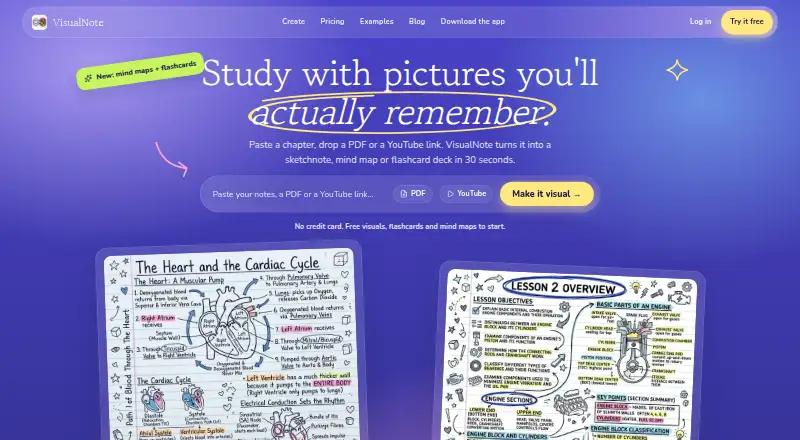
VisualNote AI turns documents, notes, and video links into visual notes, then uses those materials to create flashcards, mind maps, quizzes, and podcasts. It accepts PDF, Word (.doc and .docx), and text (.txt) uploads up to 10 MB, with full-document content extraction. Generated visuals download as high-resolution PNGs, with square, portrait, and landscape formats described. Flashcard decks can contain up to 30 cards and export as CSV for Anki or Sheets, PDF, plain text, or an offline page. Teachers can distribute visuals, run quizzes with a class, and make printable tests. The app is available on the web and iOS. Its free Notebook plan provides three visuals a month, one PDF, three links, and 15 minutes of YouTube; exports carry a watermark, creations are kept for seven days, and the plan uses free styles and square format. The one-time Intro Pack costs $4.99 for 10 credits that never expire, with clean downloads and final sale/no refunds. Monthly Plus costs $13.99 per month and includes 70 visuals and 20 PDFs monthly, four hours of YouTube, unlimited links, 40 styles and all ratios, watermark-free exports, and commercial use. Italy-based indie developer Salvatore Castellitti makes the product under Caste.dev.
Who it suits
VisualNote AI suits learners and readers who want to turn source material into visual notes and study aids such as flashcards or quizzes. Its class quiz and printable test tools also make it relevant to teachers.
What it does well
- Accepts PDF, Word, and text uploads up to 10 MB.
- Creates flashcards, mind maps, quizzes, and podcasts.
- Flashcards export to CSV, PDF, text, or an offline page.
- PNG visuals support square, portrait, and landscape formats.
- Plus includes watermark-free exports and commercial use.
What to know first
- The free plan limits users to three visuals per month.
- Notebook exports include a watermark.
- The $4.99 Intro Pack is final sale with no refunds.
Limits
Notebook allows three visuals per month, one PDF, three links, and 15 minutes of YouTube; it also limits users to free styles and square format, keeps creations for seven days, and adds a watermark to exports. Intro Pack provides 10 non-expiring credits but is final sale with no refunds.
Plans
| Plan | Billed and limits | Price |
|---|---|---|
| Notebook | 3 visuals/month · 1 PDF · 3 links · 15 min YouTube · free styles · square format · creations kept 7 days · watermark on exports | Free |
| Monthly Plus | Monthly · 70 visuals + 20 PDFs/month · 4 h YouTube · unlimited links · all 40 styles and ratios · no watermark · commercial use | $13.99 a month |
| Intro Pack | One time · 10 visual credits · credits never expire · clean downloads without watermark · final sale, no refunds | $4.99, paid once |
As visualnoteai.space lists them, read 10 Oct 2026. The maker's own page has the final word.
Getting started
- Open VisualNote AI on the web or use the iOS app.
- Choose the free Notebook plan, the one-time Intro Pack, or Monthly Plus.
- Upload a PDF, Word document, or text file, or provide notes or a video link.
- Generate a visual note or create flashcards, a mind map, quiz, or podcast.
- Download visuals as PNG or export flashcards in a supported format.
Verdict
Pick VisualNote AI if you want to convert documents or video links into visual learning materials on web or iOS. The free plan is limited, and buyers wanting more output, formats, and clean exports need a paid option.
Questions
Is VisualNote AI free?
Yes. The Notebook plan costs nothing and includes three visuals per month, one PDF, three links, and 15 minutes of YouTube.
What are the paid plans?
Intro Pack costs 4.99 USD once for 10 credits that never expire. Monthly Plus costs $13.99 a month.
Which platforms are supported?
VisualNote AI is available on the web and iOS.
What documents can it use?
The features page lists PDF, Word (.doc and .docx), and text (.txt) uploads up to 10 MB, with full-document content extraction.
Can flashcards be exported?
Yes. Decks can hold up to 30 cards and export as CSV for Anki or Sheets, PDF, plain text, or an offline page.
Who makes VisualNote AI?
Salvatore Castellitti, an indie developer based in Italy, builds it under the name Caste.dev.
Facts from VisualNote AI's own pages
- AI providers
- The privacy notice says Google Gemini and OpenAI models are used for image and text features, with the provider varying by feature and settings. · visualnoteai.space, 10 Oct 2026
- Data retention
- The privacy notice says generated images, uploaded documents, and style reference files are automatically deleted from cloud storage after seven days. · visualnoteai.space, 10 Oct 2026
- Document input
- The features page lists PDF, Word (.doc, .docx), and text (.txt) uploads up to 10 MB, with full-document content extraction. · visualnoteai.space, 10 Oct 2026
- Flashcards
- Flashcard decks contain up to 30 cards and can be downloaded as CSV for Anki and Sheets, PDF, plain text, or an offline page. · visualnoteai.space, 10 Oct 2026
- For teachers
- The homepage says teachers can hand out visuals, run quizzes with a class, and use a test maker for printable tests. · visualnoteai.space, 10 Oct 2026
- Headquarters
- Italy · visualnoteai.space, 28 Sept 2026
- Maker
- Salvatore Castellitti describes himself as an indie developer based in Italy who builds productivity tools under the name Caste.dev. · visualnoteai.space, 10 Oct 2026
- Output formats
- Generated visuals can be downloaded as high-resolution PNG images, with square, portrait, and landscape aspect ratios described on the features page. · visualnoteai.space, 10 Oct 2026
- Privacy controls
- The privacy notice says users can opt out of product analytics and AI personalization from the dashboard or by contacting the maker. · visualnoteai.space, 10 Oct 2026
- Purpose
- VisualNote AI turns PDFs, text, notes, and video links into visual notes, then can create flashcards, mind maps, quizzes, and podcasts from them. · visualnoteai.space, 10 Oct 2026
- Security
- The privacy notice lists encryption in transit and at rest, access controls, security assessments, and secure cloud storage among its safeguards. · visualnoteai.space, 10 Oct 2026
- Support
- The about page invites users to email Salvatore Castellitti directly at [email protected] with feedback, questions, or feature requests. · visualnoteai.space, 10 Oct 2026
- Visual styles
- The pricing page offers 40 styles on Plus, while the features page describes seven styles and names Classic, Blueprint, Comic, Kanban, Timeline, and Terminal. · visualnoteai.space, 10 Oct 2026
Where VisualNote AI stands on Freedom251
- AI Mind Map Tools#26 of 29