Freedom251 › AI Mind Map Tools
Mindmapi
What Mindmapi is
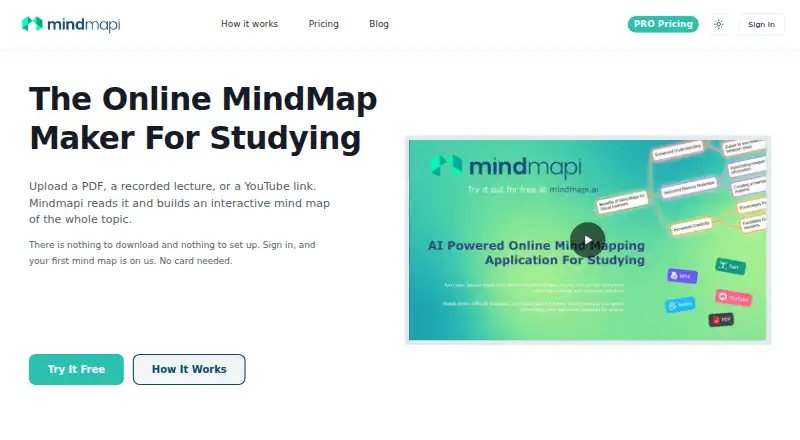
Mindmapi turns study materials into interactive mind maps for studying and revision. Start with typed notes, PDFs, Word documents, lecture recordings, or YouTube links, then arrange branches, edit nodes, add notes, change colours, draw arrows or brackets, and insert images. You can ask AI to explain a topic and place that explanation on the relevant map node. Live sessions let classmates or study groups edit a shared map in real time. Mindmapi runs in a browser on laptops, tablets, and phones, with no installation required, and maps can be exported to PDF or Word. Its pricing note lists a free plan and paid access from £14.99/mo. The free plan lists AI analysis of imported material, unlimited customisation, and three AI-powered suggested topic notes. Documents are limited to 1 MB each and audio files to 5 MB. The FAQ says users can permanently delete maps and data, which are then removed from the servers.
Who it suits
Mindmapi suits students who want to turn different study materials into editable revision maps. Teachers and study groups may also find its shared live editing useful.
What it does well
- Accepts notes, PDFs, Word documents, recordings, and YouTube links
- AI can add topic explanations to map nodes
- Live collaborative editing through a shared link
- Exports maps to PDF or Word
- Runs in a browser on laptops, tablets, and phones
What to know first
- Documents are limited to 1 MB each
- Audio files are limited to 5 MB
Limits
The free plan includes three AI-powered suggested topic notes, while Pro allows up to 30 AI-generated mind maps per month. Uploaded documents are limited to 1 MB each and audio files to 5 MB.
Plans
| Plan | Billed and limits | Price |
|---|---|---|
| Free | £0 per month · 3 AI-powered suggested topic notes · AI analysis of imported content · unlimited customisation · advanced export options | Free |
| Pro - Limited Time Discount | £5.99 per month (regular price shown: £14.99) · unlimited custom mind maps · unlimited AI-powered suggested topic notes · up to 30 AI-generated mind maps per month · sophisticated AI analysis · multi-format import · sharing and presentation | £5.99 a month |
As mindmapi.ai lists them, read 15 Oct 2026. The maker's own page has the final word.
Getting started
- Open Mindmapi in a browser on a laptop, tablet or phone
- Start with typed notes, a PDF, Word document, lecture recording or YouTube link
- Arrange branches and edit nodes, notes, colours, arrows or images
- Ask AI to explain a topic on its map node
- Invite classmates or study-group members with a shared link
- Export the finished map to PDF or Word
Verdict
Mindmapi combines varied study-material inputs with editable maps, AI explanations, and live group sessions. Check the upload limits if you plan to use larger documents or audio files.
Questions
Is Mindmapi free?
Yes. Mindmapi has a free plan, and paid plans start at £14.99 per month.
What devices can run it?
It runs in a web browser on a laptop, tablet or phone, with nothing to install.
What can I import?
You can use typed notes, PDFs, Word documents, lecture recordings and YouTube links as map sources.
What does the free plan include?
The free plan includes AI analysis of imported content, unlimited customisation and three AI-powered suggested topic notes.
Can groups edit together?
Yes. Live sessions let a class or study group edit one mind map together in real time through a shared link.
Can I delete my data?
Yes. Users can permanently delete their mind maps and data, which are then removed from the servers.
Facts from Mindmapi's own pages
- AI generation
- The service analyzes uploaded material and automatically builds map branches and subtopics. · mindmapi.ai, 15 Oct 2026
- AI notes
- Users can ask AI for explanations that are added to individual map nodes. · mindmapi.ai, 15 Oct 2026
- Alternative upload limits
- A separate alternative page states limits of 5 MB for documents and 25 MB for MP3 files, with one source of each type per subject. · mindmapi.ai, 15 Oct 2026
- API and SDKs
- The independent Stork listing gives conflicting API information, saying “No” in quick facts but “Yes, public API” in its specifications; no official API documentation was found. · stork.ai, 15 Oct 2026
- Audience
- The site says Mindmapi is built for students and is also useful for teachers. · mindmapi.ai, 8 Oct 2026
- Branch editing
- Maps support dragging nodes, recoloring branches, adding arrows and brackets, and inserting images. · mindmapi.ai, 15 Oct 2026
- Browser delivery
- The product runs in a browser with no software download or installation. · mindmapi.ai, 15 Oct 2026
- Collaboration
- Live sessions allow multiple people to edit one shared map in real time. · mindmapi.ai, 15 Oct 2026
- Company identity
- Mindmapi’s own site identifies the maker/location as “Social Entrepreneur, UK.” · mindmapi.ai, 15 Oct 2026
- Copyright date
- The site footer carries a 2024 copyright notice. · mindmapi.ai, 15 Oct 2026
- Deletion
- The FAQ says users can permanently delete their mind maps and data, which are then removed from the servers. · mindmapi.ai, 8 Oct 2026
- Developer attribution
- AlternativeTo lists Ability2code Ltd as the developer. · alternativeto.net, 15 Oct 2026
- Editing
- Users can drag branches, edit nodes, add notes, recolour branches, draw arrows and brackets, and paste images. · mindmapi.ai, 8 Oct 2026
- Exports
- Maps and notes can be exported to PDF or Word/DOCX. · mindmapi.ai, 15 Oct 2026
- Free allowance
- The FAQ says the free plan provides one AI-generated mind map that can then be edited manually. · mindmapi.ai, 15 Oct 2026
- Generation time
- The maker says long PDFs or full lecture recordings can take up to five minutes to process. · mindmapi.ai, 15 Oct 2026
- Independent export claim
- Stork reports PDF, Markdown, CSV and SVG export options. · stork.ai, 15 Oct 2026
- Independent feature coverage
- Stork describes support for PDF, Word, CSV, Markdown, audio, video, image and YouTube inputs. · stork.ai, 15 Oct 2026
- Independent language claim
- Stork reports an AI Expand feature supporting more than 80 languages. · stork.ai, 15 Oct 2026
- Independent update claim
- Stork says direct image copy-paste into map nodes was added in March 2026. · stork.ai, 15 Oct 2026
- Independent version claim
- Stork says Mindmapi.ai introduced an AI Copilot Thinking Mode in version 2 during December 2025. · stork.ai, 15 Oct 2026
- Inputs
- It accepts typed notes, PDFs, Word documents, lecture recordings, and YouTube links as map sources. · mindmapi.ai, 8 Oct 2026
- Integrations
- Stork lists ChatGPT and Claude integrations as upcoming rather than currently available. · stork.ai, 15 Oct 2026
- Licence
- AlternativeTo classifies Mindmapi.ai as proprietary, freemium software rather than open source. · alternativeto.net, 15 Oct 2026
Where Mindmapi stands on Freedom251
- AI Mind Map Tools#25 of 29